
المحفوظات
اختر الاسم الذي سيظهر في قائمة المحفوظات.
تم
| المطوّر: | Anatole Schaff (1) | ||
| السعر: | $3.99 | ||
| الدرجة: | 5,880 بلاتين | ||
| الترتيب: | 0 | ||
| تعليقات: | 0 انشر تعليقًا | ||
| قوائم: | 2 + 0 | ||
| النقاط: | 0 + 0 ¡ | ||
| +1 النقاط | |||
الوصف

Designed with input from professional presenters, content creators, teachers, and solution engineers, DemoPro puts simplicity and impact above all else. No gimmicky effects, just the essential tools every presenter needs, each one a single keystroke away.
DemoPro stays out of the way. There is no visible interface to distract your audience or clutter your screen. Switch from presenting to annotating with the press of a hotkey, then switch right back to interacting with your apps. There's a customizable hotkey for every tool, every color, the cursor highlight, and even the timer, so your audience never sees you fumbling through toolbars or menus.
ANNOTATE INSTANTLY
• No matter what's on your screen, just press a hotkey to activate the annotation tool of your choice (freehand, line, arrow, rectangle, ellipse, or text)
• Draw over PowerPoint, Google Slides, Keynote, web pages, or even live video, while you present
• Choose between two activation modes: hold the hotkey down to annotate, or press once to turn annotation mode on and again to turn it off
• Switch between drawing and interacting in an instant: release the hotkey to click, scroll, and type in your apps while your annotations stay on screen
• Clear annotations with a hotkey or let them vanish with Auto-Fade, like invisible ink
• Works with Zoom, Google Meet, Microsoft Teams, OBS Studio, and Loom
• 5 customizable color presets
• Choose your drawing indicator: a dot, a dot scaled to your line width, a crosshair, or the active tool's icon
• Supports multiple screens
• Can be controlled with a Stream Deck via hotkeys (see website to download the DemoPro icon pack)
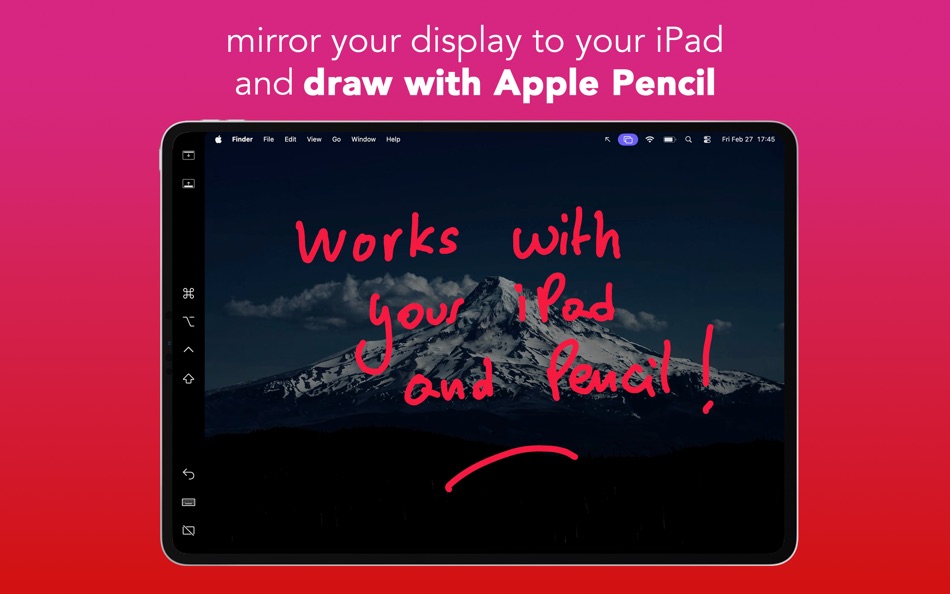
• Draw with your Apple Pencil and iPad (via Sidecar in mirror mode) or a drawing tablet
• Optional pressure sensitivity
• Double tap your Apple Pencil to switch to the eraser and back
HIGHLIGHT YOUR CURSOR
• Turn on a highlight that follows your pointer so your audience never loses track of it
• Choose from four styles: Ring, Disc, Laser Pointer, or Spotlight
• Adjust the size, color, and opacity of each style independently
• Optionally add a ripple animation on every click
• Clicks pass straight through to your apps, so the highlight never gets in your way
• Keep it always visible, hide it when idle, or show it only while you click
• Toggle it with a customizable hotkey, and it hides automatically while you annotate
BOARD MODE
• Instantly cover the screen with a whiteboard or blackboard to draw or illustrate concepts
• A floating toolbar keeps every tool within reach: set it to always stay visible, hide when idle, or stay hidden so nothing distracts
• Choose whether the board keeps its own canvas (saved automatically, so you can pick up where you left off) or continues the annotations already on your screen
• On multi-screen setups, the board appears only on the screen under your cursor, so you can still view your notes privately
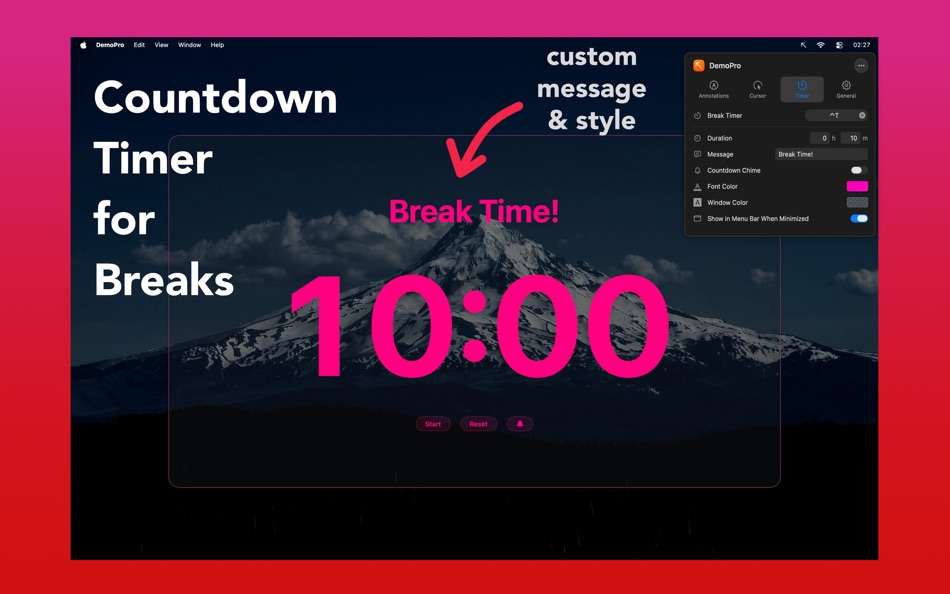
BREAK TIMER
• Display a countdown during breaks to stay on schedule
• Write your own break message, adjust the size and color, or use a transparent background
• Enable an optional chime when time is up
• Minimize the timer and keep an eye on the remaining time with a compact pill in the menu bar; click it to reopen the timer window
SECURE. FAST. RELIABLE
• DemoPro cannot see or capture what you do in other apps
• Built natively for macOS, DemoPro runs light and never slows down your machine
DemoPro does not include a screen-zoom feature, as one is built into macOS. The Cursor settings link straight to the macOS Zoom controls when you need them.
الإعلانات
لقطات الشاشة



سجل الأسعار
- السعر الحالي: $3.99
- الحد الأدنى: $0.99
- الحد الأقصى: $3.99
تتبّع الأسعار أضِف إلى قائمة لتلقّي تنبيهات الخصومات عبر البريد الإلكتروني أو الإشعارات الفورية
درجة AppAgg
5,880
درجة AppAgg التقديرية لـ
DemoPro - Screen Annotation
المطوّر: Anatole Schaff
5,880 بلاتين
تشير الدرجة الأعلى عادةً إلى أداء أفضل في مؤشرات AppAgg.
استنادًا إلى: الشعبية · تقييمات المستخدمين · الحداثة · العروض · بيانات المتاجر · نشاط المجتمع
يُعاد حسابها يوميًا بناءً على أحدث بيانات AppAgg.
شارة لموقعك الإلكتروني:  تم النسخ!
الميزات الجديدة
- الإصدار: 3.1.4
- آخر تحديث:
- This update fixes moving the break timer window and board toolbar on macOS 27 GoldenGate.
معلومات إضافية
- تاريخ الإصدار:
- الفئة:
تطبيقات لمنصة macOS›الإنتاجية - نظام التشغيل:
macOS,macOS 15.0 والأحدث - الحجم:
1 Mb - اللغات المدعومة:
English,French,German,Japanese,Portuguese,Spanish - تقييم المحتوى:
4+ - Mac App Store تقييم: ¡
0 - الموقع الإلكتروني:
 https://www.demoproapp.com
المطوّر
- Anatole Schaff
- المتابعون: 0
- المنصات: macOS تطبيقات (1)
- العروض: 0
- قوائم: 2 + 0
- النقاط: 0 + 0 ¡
- الترتيب: 0
- تعليقات: 0
- الفيديوهات: 0
- RSS: اشتراك
قوائم (2)
- DemoPro - Screen Annotation


النقاط (0)
0
الترتيب (0)
0
تعليقات (0)
كن أول من يعلق
ملخص
DemoPro - Screen Annotation عنوان URL مختصر: تم النسخ!- Mac App Store
يمكنك متابعة تطبيق «DemoPro - Screen Annotation» من Anatole Schaff على AppAgg. المنصة: macOS. الفئة: الإنتاجية. درجة AppAgg: 5,880 (بلاتين). نقاط AppAgg للتطبيق — المؤكدة: 0؛ غير المباشرة: 0. عدد القوائم العامة التي تضم التطبيق: 2. عدد المستخدمين الذين حفظوه في قوائم خاصة: 0. لم يقيّم مستخدمو AppAgg التطبيق بعد. تسجّل النقاط المؤكدة انتقال المستخدمين الذين سجّلوا الدخول إلى AppAgg إلى المتجر، بينما تستند النقاط غير المباشرة إلى بيانات المتاجر. يعرض العدّادان عدد القوائم العامة وعدد المستخدمين الذين حفظوا التطبيق أو اللعبة في قوائم خاصة. صدر التطبيق لأول مرة في . آخر تحديث للتطبيق: . سعر التطبيق الحالي هو $3.99. كان أدنى سعر مسجل للتطبيق $0.99 ()؛ وكان أعلى سعر $3.99 (). يدعم التطبيق اللغات التالية: English, French, German, Japanese, Portuguese, Spanish. اطّلع على سجل الأسعار، أو أضف التطبيق إلى قائمة، أو تابع المطوّر. تابع خصومات التطبيق وتحديثاته القادمة عبر موجز RSS. لا يستضيف AppAgg التطبيق ولا يوزعه. جميع العلامات التجارية والشعارات ولقطات الشاشة الخاصة بالتطبيق مملوكة لأصحابها.

