
Đã lưu
Chọn tên sẽ hiển thị trong menu Đã lưu của bạn.
Làm xong!
| Nhà phát triển: | Moment Inc. (3) | ||
| Giá bán: | $4.99 | ||
| Xếp hạng: | 0 | ||
| Bình luận: | 0 Đăng bình luận | ||
| Danh sách: | 10 + 13 | ||
| Điểm: | 10 + 9,212 (4.6) ¡ | ||
| +1 Điểm | |||
Mô tả

If you are looking for a powerful and easy-to-use camera app, Pro Camera is for you. We make it fast and intuitive to switch between modes, dial in your shot, and keep shooting. Plus, we give you all the manual controls you’ll need: shutter speed, ISO, white balance, focus, and more. Your favorite settings can be saved and recalled on demand.
For filmmakers – the features you need, not the ones you don’t. LUTs, color spaces, bitrates, dual-channel audio meters, real-time waveforms, fast access to frame rates, and more.
For photographers – easier than shooting on your DSLR. Shoot in RAW (even in bursts), capture brackets, and more. You can even create stunning timelapses and light trail effects (in-app purchase required).
For everyone else – inspired by the pros we made the interface simple, fast, and easy to use. We provide getting started tips, video tutorials, and full-time customer service to get you set up.
We love hearing from you. If you have any features, ideas, or feedback please email us at hello@shopmoment.com or DM us on Instagram @moment.
GENERAL FEATURES
+ Full manual: control shutter speed, iso, exposure, focus, and white balance with easy-to-use sliders
+ Focus peaking: manually dial in your focus using highlighted in-focus regions
+ Zebra stripes: quickly determine over- and under-exposed areas in the viewfinder
+ Split focus and exposure: take control of tricky lighting scenarios
+ Viewfinder grid: choose from thirds, square, and golden ratio
+ Gyroscope: ensure your shot is level with an on-screen gyroscope and haptic feedback
PHOTOGRAPHY FEATURES
+ RAW and TIFF: shoot photos in RAW/ProRAW format for better editing, or TIFF for high-quality printing
+ RAW+JPG option: simultaneously get the best of both worlds
+ Burst mode: capture burst shots in RAW format – capture action while maintaining the uncompressed quality pros want with RAW
+ Bracketing: capture multiple exposures to stack later in your favorite editing apps
FILMMAKER FEATURES
+ Import, organize, and use your favorite LUTs
+ Color spaces: choose between Rec.709, Rec.2020 HDR, Display P3, and Apple Log (on compatible devices)
+ Codecs: shoot in HEVC, H.264, or any of the 422 ProRes variants
+ Video bitrates: get precise control over video quality with standard, medium, and high bitrate options
+ RGB histogram: dial in your video color, balance, and exposure
+ Waveform monitor: evaluate video brightness and exposure across your shot in real time
+ Audio meters: get just the right sound levels with real-time, precise, dual-channel audio levels
+ HDMI clean feed output: preview on a bigger screen
+ Video stabilization: make your videos buttery smooth
+ Video formats: change your resolution and frame rate on screen, without digging into a settings menu
+ Anamorphic: use the Moment Anamorphic lens to shoot amazing, letterbox style photos and videos, with a de-squeeze option built in
PREMIUM FEATURES (In-App Purchases)
+ Timelapse mode: capture stunning time-lapse videos
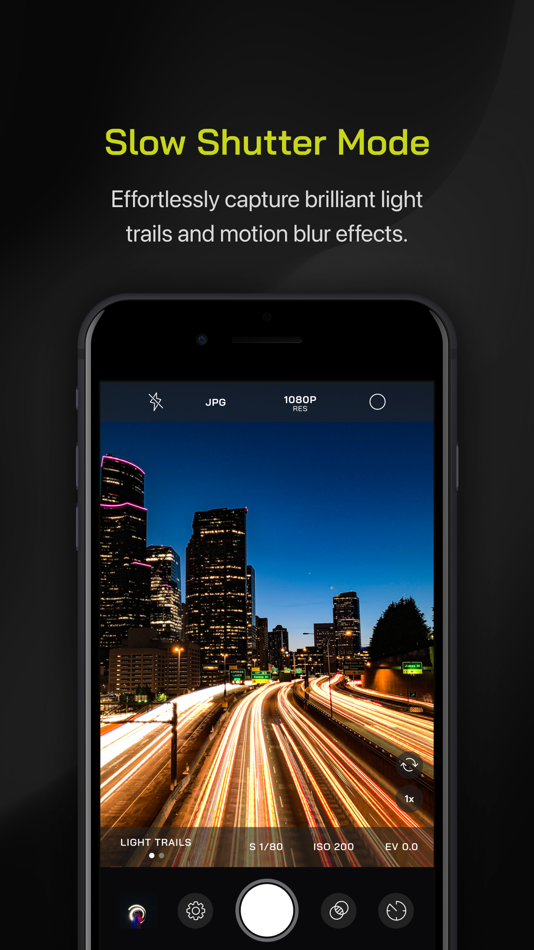
+ Slow Shutter mode: long exposure shots with motion blur or light trails
WORKS WITH
+ iPhone 16 Camera Control: get quick access to manual settings
+ Lens control: manually control which of the triple/dual lenses you want to shoot with so you can use Moment lenses over each one
+ Moment lenses: access options like anamorphic de-squeeze and distortion correction
+ Moment battery case: works with the DSLR-like shutter button on our photography cases for half-press and full-press capture. Take better photos, faster.
+ Apple Watch: use your watch as a remote to shoot photos or record videos
+ Siri Shortcuts: quick access to capture a photo or start a video
Ảnh chụp màn hình


Lịch sử giá
- Giá hiện tại: $4.99
- Tối thiểu: Miễn phí
- Tối đa: $9.99
Theo dõi giá
Ad
Thông tin bổ sung
- Ngày phát hành:
- Danh mục:
iOS Ứng dụng›Nhiếp ảnh - HĐH:
Apple Watch,iPad,iPhone,iOS 15.0 trở lên - Kích thước:
119 Mb - Ngôn ngữ được hỗ trợ:
English - Xếp hạng nội dung:
4+ - App Store Xêp hạng:
4.6(9,212) - Trang web:
 https://www.shopmoment.com/pages/apps
Nhà phát triển
- Moment Inc.
- Nền tảng: iOS Ứng dụng (3)
- Danh sách: 11 + 15
- Điểm: 16 + 9,501 ¡
- Xếp hạng: 0
- Bình luận: 0
- Giảm giá: 0
- Video: 0
- RSS: Đăng ký
Danh sách (10)
- Pro Camera by Moment


Điểm (10)
-

- 892 Chris
- +1
-
- 29,620 Lance Eliakim Sotto
- +1
-
- 430 lista de apps
- +1
-
- 375 shopman
- +1
-
- 85 spacedog
- +1
-
- 647 holy_braveheart
- +1




Xếp hạng (0)
0 ☹️
Bình luận (0)
Hãy là người đầu tiên nhận xét 🌟
«Pro Camera by Moment». Nền tảng: iOS. Thể loại: Nhiếp ảnh. Nhà phát triển: «Moment Inc.». Bản phát hành đầu tiên: . Cập nhật lần cuối: . Giá hiện tại: $4.99. Giá thấp nhất được ghi nhận: $0.00 (). Giá cao nhất được ghi nhận: $9.99 (). Tiêu đề này chưa nhận được xếp hạng hoặc đánh giá trên AppAgg. Danh sách: công khai 10, riêng tư 13. Điểm được theo dõi: xác nhận 10, gián tiếp 9,212. Cửa hàng: App Store. Đánh giá cửa hàng: 4.6. Phiếu bầu: 9,212. Ngôn ngữ có sẵn: English. AppAgg theo dõi lịch sử giá, xếp hạng và phản hồi của người dùng cho «Pro Camera by Moment». Theo dõi ưu đãi và cập nhật trong tương lai qua RSS. AppAgg không lưu trữ ứng dụng hoặc phân phối phần mềm. Tất cả các nhãn hiệu, logo và ảnh chụp màn hình đều thuộc về chủ sở hữu tương ứng.
Pro Camera by Moment URL ngắn: Đã sao chép!- 🌟 Chia sẻ
- App Store
Tương tự
-
- Camera M - Pro Manual Camera
- iOS Ứng dụng: Nhiếp ảnh Bởi: bxb
- $7.99
- Danh sách: 3 + 7 0 0
- Điểm: 5 + 1,358 (4.5) Phiên bản: 9.2.1 Camera M is a professional manual camera designed to do one thing exceptionally well help you capture beautiful photos at the highest possible quality with powerful, precise manual ... ⥯
-
- Leica LUX - Pro Manual Camera
- iOS Ứng dụng: Nhiếp ảnh Bởi: Leica Camera AG
- Miễn phí
- Danh sách: 2 + 1 0 0
- Điểm: 5 + 5,786 (4.8) Phiên bản: 1.12 Leica LUX is a professional camera app that brings the iconic Leica Look and its signature color, style, and feel to your iPhone. Developed in-house by Leica, it gives you the unique ... ⥯
-
- Camera+: Pro Camera & Editor
- iOS Ứng dụng: Nhiếp ảnh Bởi: Heavy Plumb Apps, SOCIEDAD LIMITADA
- Miễn phí
- Danh sách: 9 + 11 0 0
- Điểm: 22 + 11,727 (4.5) Phiên bản: 24.6.0 Camera+ is the most advanced and powerful photo capturing and editing app available. With intuitive camera presets, a variety of built-in filters, flexible editing tools, and ... ⥯
-
- Lens Buddy - Self Timer Camera
- iOS Ứng dụng: Nhiếp ảnh Bởi: Lens Buddy Selfie Timer Photo Video Filter Camera LLC
- Miễn phí
- Danh sách: 1 0 0
- Điểm: 1 + 32,311 (4.9) Phiên bản: 104 Your ultimate handsfree camera experience is here! You take your own photos. Lens Buddy is a simple yet powerful timer camera app that will take pictures of you and your loved ones ... ⥯
-
- Camera+ Legacy
- iOS Ứng dụng: Nhiếp ảnh Bởi: LateNite Apps
- $4.99
- Danh sách: 6 + 11 0 0
- Điểm: 4 + 2,338 (4.2) Phiên bản: 10.42 Hey you! Yeah you! Shouldn't you be looking for Photon instead? Our newest app has been rebuilt from the ground app to support the next 10 years (or 20, who knows?) of mobile ... ⥯
-
- Leo AR Camera
- iOS Ứng dụng: Nhiếp ảnh Bởi: Augmented Reality App & Augmented Reality Games & Apps & Camera LLC
- Miễn phí
- Danh sách: 1 0 0
- Điểm: 4 + 2,877 (4.5) Phiên bản: 2025.03.21 Transform your world with ease using Leo AR! Just point, tap and create amazing augmented reality videos in seconds! Perfect for family fun, Leo AR lets you and your kids unleash ... ⥯
-
- Dazz Cam - Vintage Camera
- iOS Ứng dụng: Nhiếp ảnh Bởi: DAZZ PTE. LTD.
- Miễn phí
- Danh sách: 10 0 5 (1)
- Điểm: 20 + 106,092 (4.8) Phiên bản: 2.17 Dazz Camera, Pro Photographer in your Pocket. We believe in keeping it simple, no need for post-editing. With just one tap, you can capture the most authentic vintage photos or videos, ⥯
-
- Canon Camera Connect
- iOS Ứng dụng: Nhiếp ảnh Bởi: Canon Inc.
- Miễn phí
- Danh sách: 0 + 1 0 0
- Điểm: 0 + 127,683 (4.8) Phiên bản: 3.5.11 Canon Camera Connect is an application to transfer images shot with compatible Canon cameras to smartphone/tablet. By connecting to a camera with Wi-Fi (direct connection or via ... ⥯
-
- Kino - Pro Video Camera
- iOS Ứng dụng: Nhiếp ảnh Bởi: Lux Optics Incorporated
- $9.99
- Danh sách: 1 + 5 0 0
- Điểm: 1 + 1,852 (4.7) Phiên bản: 1.4.2 Make great video easy! Kino lets you just press record and create cinematic video with color presets created by expert filmmakers no edit required. Plus, with AutoMotion, the app ... ⥯
-
- Lapse - Disposable Camera
- iOS Ứng dụng: Nhiếp ảnh Bởi: Lapse
- Miễn phí
- Danh sách: 0 0 0
- Điểm: 2 + 118,190 (4.8) Phiên bản: 4.1.1 - Turn your phone into a disposable camera - Shoot first, develop later - Capture life, free from the pressure of over-curation - Relive your memories as customisable recaps ⥯
-
- Z Camera - Photo Editor Pro
- iOS Ứng dụng: Nhiếp ảnh Bởi: Funnytech Corporation
- Miễn phí
- Danh sách: 0 0 0
- Điểm: 0 + 30,798 (4.2) Phiên bản: 3.0.9 Z Camera helps you create best photos. With Z Camera, you can have a high-speed camera with stylish filters. In Z Camera, all our high-quality collages, stickers & filters are ... ⥯
- -100%
- FILCA - Vintage Film Camera
- iOS Ứng dụng: Nhiếp ảnh Bởi: Cheol Kim
- ▼ * Miễn phí
$2.99-100% - Danh sách: 7 + 7 0 0
- Điểm: 48 + 2,459 (3.8) Phiên bản: 5.00 Moment becomes memory only with Filca. Filca is an SLR-style film camera app. 35 film filters and cinematic effects bring your photos to life. @veteranUser "Without Filca, you're just ... ⥯
-
- Timestamp Camera: Time stamp
- iOS Ứng dụng: Nhiếp ảnh Bởi: 燕倩 费
- Miễn phí
- Danh sách: 0 0 0
- Điểm: 1 + 2,107 (4.6) Phiên bản: 1.3.8 Timestamp Camera is not only a powerful camera app, but also your best memory recording assistant! Whether it is recording your sports diary, diet record, study notes or work log, ... ⥯