
Enregistrés
Choisissez le nom qui sera affiché dans votre menu Enregistrés.
Terminé!
| Concepteur: | 文达 田 (5) | ||
| Prix: | * $12.99 | ||
| Classements: | 0 | ||
| Commentaires: | 0 Publier un commentaire | ||
| Listes: | 3 + 1 | ||
| Points: | 3 + 0 ¡ | ||
| Mac App Store | |||
Description

QSpace has powerful Multi-Pane state Auto-save and Restore capabilities, which makes it not only a file manager, but also a secretary for your work status management. Make your work easier and more efficient.
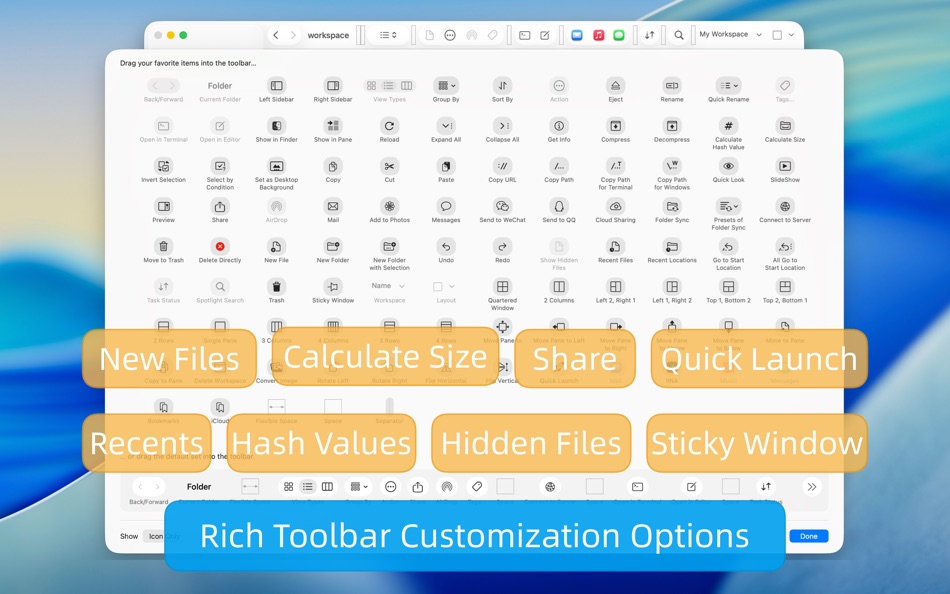
In addition, QSpace also supports a wealth of personalized settings: customize Context Menu, customize Toolbar, custom Touch Bar, customize Hotkeys, customize Quick Launcher. Here, you can follow your own way~ The interface is more concise and the operation is more efficient!
-------- Multi-Pane Workspace --------
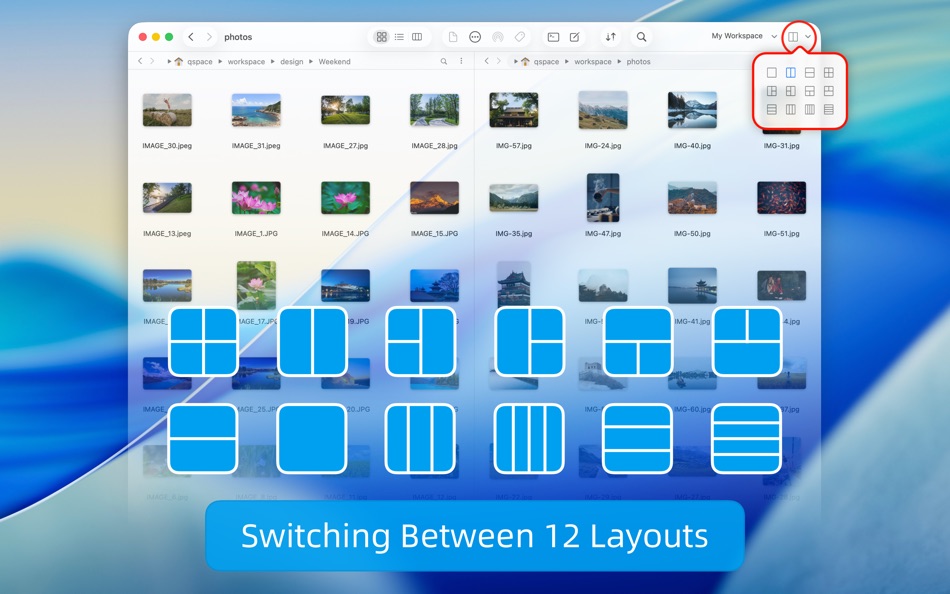
* Support 12 window layouts with one-click flexible switching.
* Support to create multiple workspaces, and you can set independent hotkey for each workspace.
* The status of the workspace supports automatic saving and can be restored by opening it again!
* Support window tabs, you can put multiple workspaces into one window.
-------- File Management Enhancement --------
* Segmented Interactive Address Bar: Quick access to every level of directories, support forward and backward operations.
* Editable Address Bar: Supports copying, editing, or directly entering the path.
* Quick Access: One-click access to the system's common directories and support for directory bookmarking.
* Customized Sidebar: Create custom bookmark group, support drag and drop sorting items, set different accent colors.
* Customized Context Menu: You can set any menu item display switch and its position.
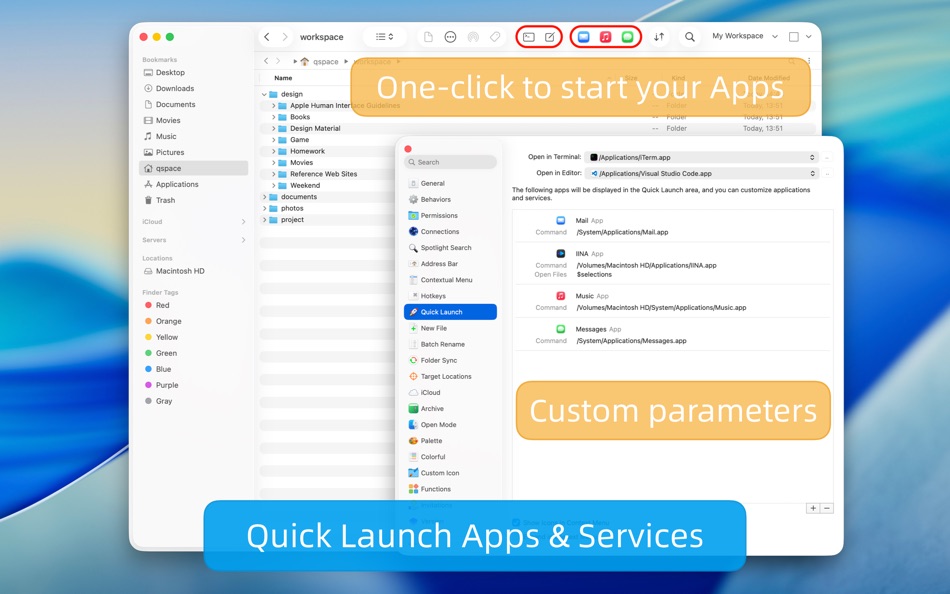
* Customized Quick Launcher: You can place commonly used applications or services in the Toolbar with one click to open.
* Quick Search: Supports global search or specified workspace search, and context menu actions on results.
* Terminal shortcut: Open selected directories in the specified terminal with one click (support Terminal, iTerm)
* Editor shortcut: Open selected files or directories in the specified editor with one click (supports VSCode, Atom, Sublime)
* File hash value calculation supports MD5/SHA256/SHA128/SHA224/SHA384/SHA512/CRC32.
* Support for creating new files and folders anywhere.
* Support for customize new file templates, customizable file names and its contents, and file name support date variables.
* Support cutting, copying, pasting, dragging, etc. between panes.
-------- Extensions --------
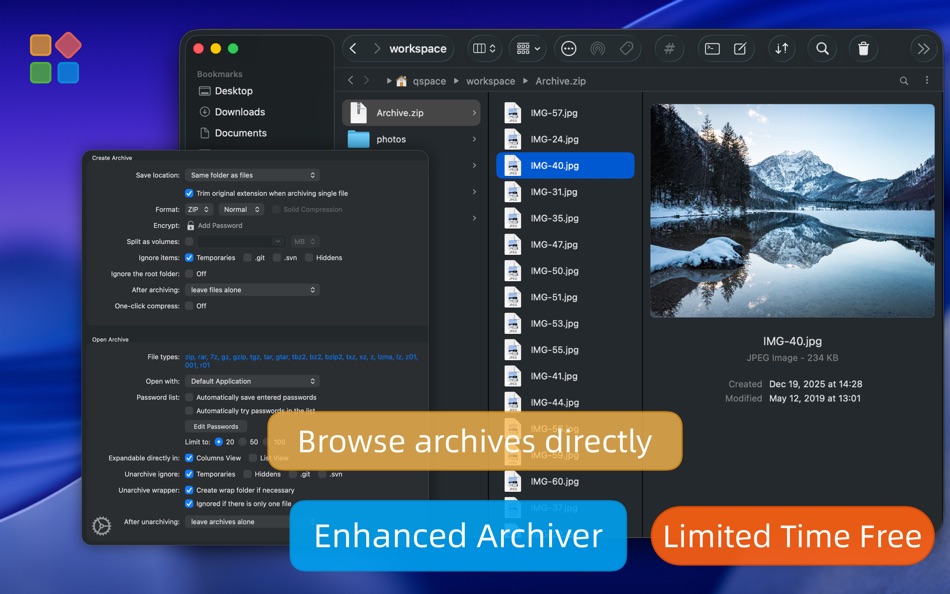
【Enhanced Archiver】
Browse the contents of an archive, just like browsing a folder! You can compress files into zip or 7z. Supports encryption and multiple volumes. Supports unarchiving more than 20 popular archive formats such as rar, zip, 7z, tar, gz, bz2, xz, lzma, lz4 etc.
【Stash Shelf】
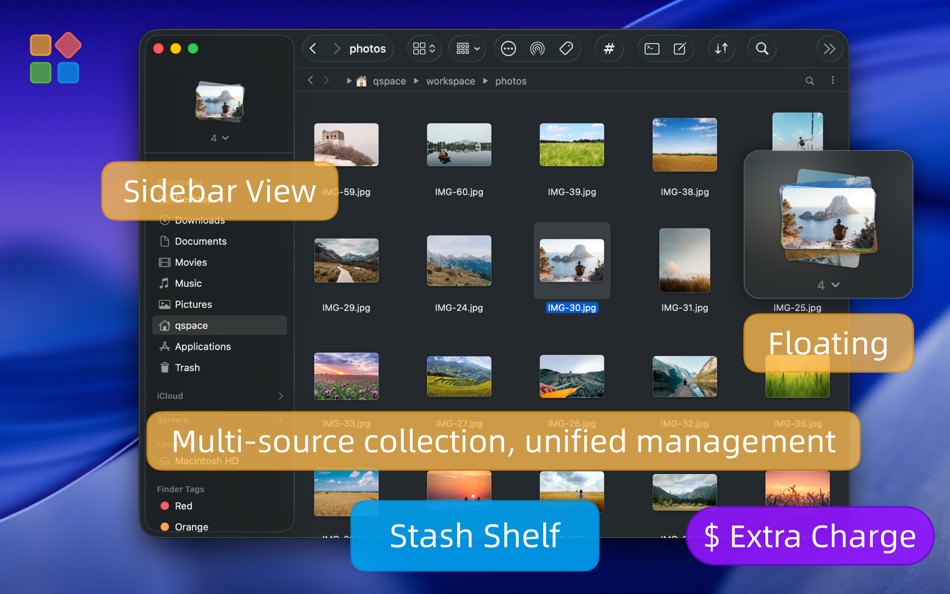
You can drag local items and web images to the “Stash Shelf”, and then perform unified processing: copy or move to somewhere, share via AirDrop, batch rename, calculate hash values, run services etc. Support Quick Launch variable “$stash_items”.
【Advanced Batch Rename】
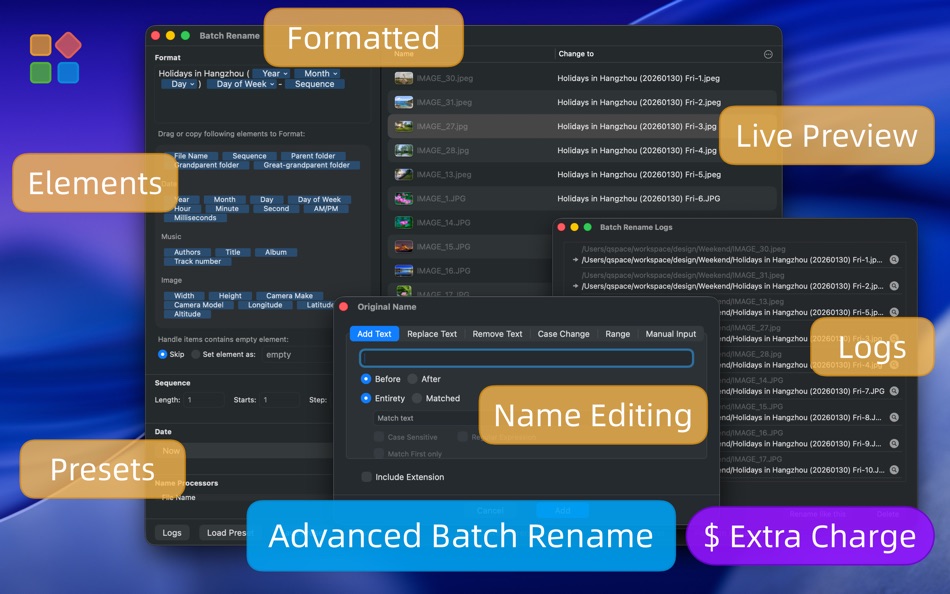
Supports real-time preview of modified results. Supports multiple text additions, replacements, and removals, and regular expression options. Supports saving and loading preset rules. Each batch operation will automatically record logs for reviewing previous names.
【Server Connections】
Connect to servers and currently support FTP, SFTP, WebDAV, Dropbox, OneDrive, Google Drive, Aliyun Drive, SMB, NFS, AFP, Amazon S3(and S3 compatible), Aliyun OSS. Similar to the operation experience of local files.
-------- Feedback --------
In case of problems, you can get help in the following ways:
Tutorials: https://qspace.awehunt.com/en-us/tutorial.html
Email: qspace@awehunt.com
Ad
Captures d'écran




Historique des prix
-
* Achats intégrés - Aujourd’hui: $12.99
- Minimum: $0.99
- Maximum: $12.99
Suivre l'évolution des prix
Nouveautés
- Version: 6.1.3
- Mis à jour:
- [Fixed] App may quit automatically after system wakes from sleep.
[Fixed] The pane preview width could not be adjusted.
[Fixed] Redundant error prompt when selecting a compressed file during copy operations in Columns view.
[Fixed] File size and modification date may not refresh after changes.
[Fixed] Original file display not refreshing after moving and replacing a file.
[Fixed] Extension may be removed during text replacement in simplified batch rename mode.
[Fixed] Drag & drop extraction from third-party apps may fail.
[Improved] Settings > Quick Launch > Open in Editor: now recognizes Antigravity, TRAE, Qoder, and Code Buddy.
Informations supplémentaires
- Date de sortie:
- Catégorie:
macOS Applications›Productivité - Systèmes d'exploitation:
macOS,macOS 10.15 ou version ultérieure - Taille:
35 Mb - Langues prises en charge:
Chinese,Dutch,English,French,German,Hungarian,Italian,Japanese,Korean,Polish,Russian,Spanish,Turkish - Classification du contenu:
4+ - Mac App Store Note:
0 - Site Web:
 https://qspace.awehunt.com
Concepteur
- 文达 田
- Plateformes: iOS Applications (2) macOS Applications (3)
- Listes: 3 + 2
- Points: 6 + 105 ¡
- Classements: 0
- Commentaires: 0
- Remises: 0
- Vidéos: 0
- RSS: S'abonner
Listes (3)
- QSpace




Classements (0)
0 ☹️
Commentaires (0)
Soyez le premier à commenter 🌟
«QSpace». Plateforme : macOS. Catégorie : Productivité. Développeur : «文达 田». Première version : . Dernière mise à jour : . Prix actuel : $12.99. Prix le plus bas enregistré : $0.99 (). Prix le plus élevé enregistré : $12.99 (). Ce titre n'a pas encore reçu de notes ou d'avis sur AppAgg. Listes : publiques 3, privées 1. Points suivis : confirmés 3, indirects 0. Langues disponibles : Chinese, Dutch, English, French, German, Hungarian, Italian, Japanese, Korean, Polish, Russian, Spanish, Turkish. AppAgg suit l'historique des prix, les notes et les commentaires des utilisateurs pour «QSpace». Suivez les futures réductions et mises à jour via RSS. AppAgg n'héberge pas d'applications et ne distribue pas de logiciels. Toutes les marques, logos et captures d'écran appartiennent à leurs propriétaires respectifs.
QSpace URL courte: Copié!- 🌟 Partager
- Mac App Store
Similaires
-
- VMTek
- macOS Applications: Productivité De: Cyaneous, Inc.
- * Gratuit
- Listes: 1 + 2 0 0
- Points: 23 + 0 Version: 3.1.0 VMTek is the Mac virtualization platform you've been waiting for. Run multiple instances and versions of macOS*, Linux and other operating systems side-by-side on your Mac with ease. ... ⥯
-
- NotchBox - Easier Drag & Drop
- macOS Applications: Productivité De: 裕涛 兰
- * Gratuit
- Listes: 2 + 1 0 0
- Points: 21 + 0 Version: 1.1.68 NotchBox Turn Your Mac s Notch into a Dynamic Hub NotchBox transforms your Mac s notch into a lively, interactive space just like the iPhone s Dynamic Island. From music playback to ... ⥯
-
- Mountain Duck
- macOS Applications: Productivité De: David Kocher
- * Gratuit
- Listes: 2 + 6 0 0
- Points: 19 + 0 Version: 5.2.1 Mountain Duck lets you mount server and cloud storage as a disk on your desktop. With Smart Synchronization, files are synchronized to the local disk when opened to allow offline usage ⥯
-
- Soonie - Meeting Reminder
- macOS Applications: Productivité De: Unit Numberfive oHG
- Gratuit
- Listes: 0 + 2 0 0
- Points: 17 + 0 Version: 3.1 You know how it goes: suddenly your meeting is here, and you were deep into something else. Soonie quietly lives in your Mac s menu bar and gently pops up to show you how much time you ⥯
-
- Awesome Copy Clipboard History
- macOS Applications: Productivité De: Evan Jones
- * Gratuit
- Listes: 0 + 1 0 0
- Points: 14 + 0 Version: 5.17 AwesomeCopy is a full-featured clipboard history manager built for Apple users who value speed, design, and privacy. It keeps track of everything you copy - text, images, links, files, ⥯
-
- Bridges Link Formatting
- macOS Applications: Productivité De: Jonathan Ruiz
- Gratuit
- Listes: 1 + 1 0 0
- Points: 14 + 0 Version: 2.1 Bridges is the best way to collect custom formatted links. Saving a link for your podcast, newsletter, or blog post has never been easier. If you ve ever had the task to collect links ... ⥯
-
- SoundPaste
- macOS Applications: Productivité De: Maxim Kuzmenko
- * Gratuit
- Listes: 0 + 3 0 0
- Points: 14 + 0 Version: 1.6.0 Introducing SoundPaste the simple, revolutionary app that lets you copy and paste sound. Tired of saving and dragging sound files around? With SoundPaste, just record and paste. It s ... ⥯
-
- Grila • calendar for typers
- macOS Applications: Productivité De: THE LOW-TECH GUYS SRL
- Gratuit
- Listes: 0 + 1 0 0
- Points: 13 + 0 Version: 2.0.4 Grila is a keyboard-driven instantly available calendar. The calendar can be shown instantly using ⌥ Right Option + \ (backslash), which is configurable to any other hotkey. Navigating ⥯
-
- Applight – Smart App Switcher
- macOS Applications: Productivité De: Seungwoo Choe
- * Gratuit
- Listes: 0 + 3 0 0
- Points: 13 + 0 Version: 1.1 A smarter, faster way to switch apps. Instead of endless Command-Tabs or Spotlight searches, Applight learns your workflow and predicts what you ll need next so you can jump to the ... ⥯
-
- Canary Mail App
- macOS Applications: Productivité De: Cartasec Pte. Ltd.
- * Gratuit
- Listes: 3 + 3 0 0
- Points: 13 + 0 Version: 5.19 The Best Email Client for Mac. Your AI Email Assistant. Canary can be as simple or as powerful as you want it to be: FOREVER FREE: Best for students & personal use Includes: **Unified ... ⥯
- -100%
- ClipBoardy: Copy & Paste Tool
- macOS Applications: Productivité De: Tristan Jarrett
- ▼ Gratuit
$0.99-100% - Listes: 0 + 1 0 0
- Points: 13 + 0 Version: 1.0.1 ClipBoardy is a lightweight, beautifully simple clipboard manager for macOS that keeps everything you copy exactly where you need it, ready instantly without breaking your focus. ... ⥯
-
- PerfectViewer
- macOS Applications: Productivité De: Abdusodiq Saidov
- * Gratuit
- Listes: 0 + 1 0 0
- Points: 13 + 0 Version: 1.0.1 Tool to Open and Convert WordPerfect Documents and Graphics. Simple, beautiful app for viewing WordPerfect .wpd, wpg files and .txt, rtf, rtfd documents. PerfectViewer features: . ... ⥯