
Đã lưu
Chọn tên sẽ hiển thị trong menu Đã lưu của bạn.
Làm xong!
| Nhà phát triển: | 渊 周 (10) | ||
| Giá bán: | $2.99 | ||
| Xếp hạng: | 0 | ||
| Bình luận: | 0 Đăng bình luận | ||
| Danh sách: | 1 + 1 | ||
| Điểm: | 1 + 0 ¡ | ||
| +1 Điểm | |||
Mô tả

Tab Space includes the following features:
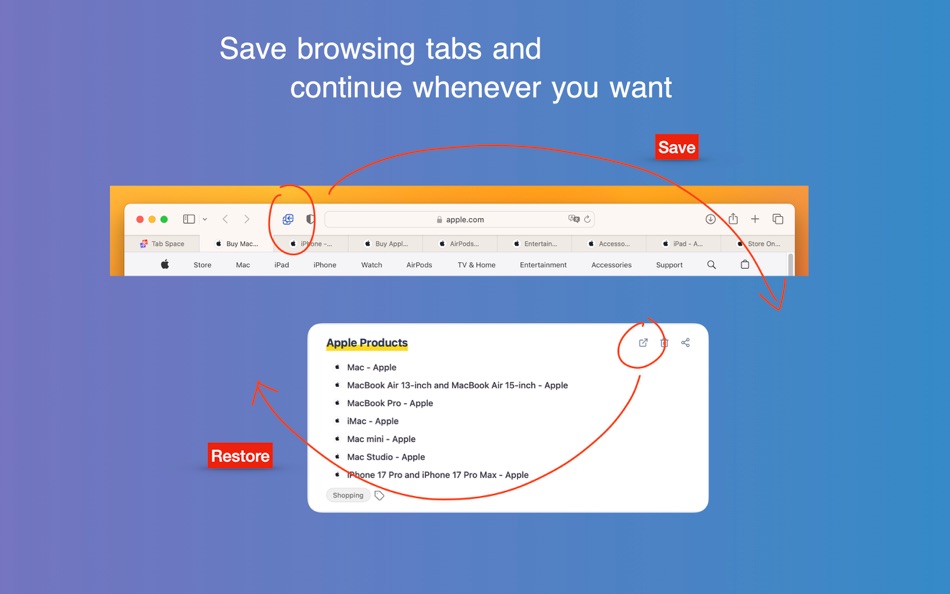
1. Save & Restore Tabs — Save your browsing tabs with just one click. Restore them whenever you need, individually or all at once.
2. iCloud Sync — Your saved sessions sync automatically across all your Mac devices via iCloud.
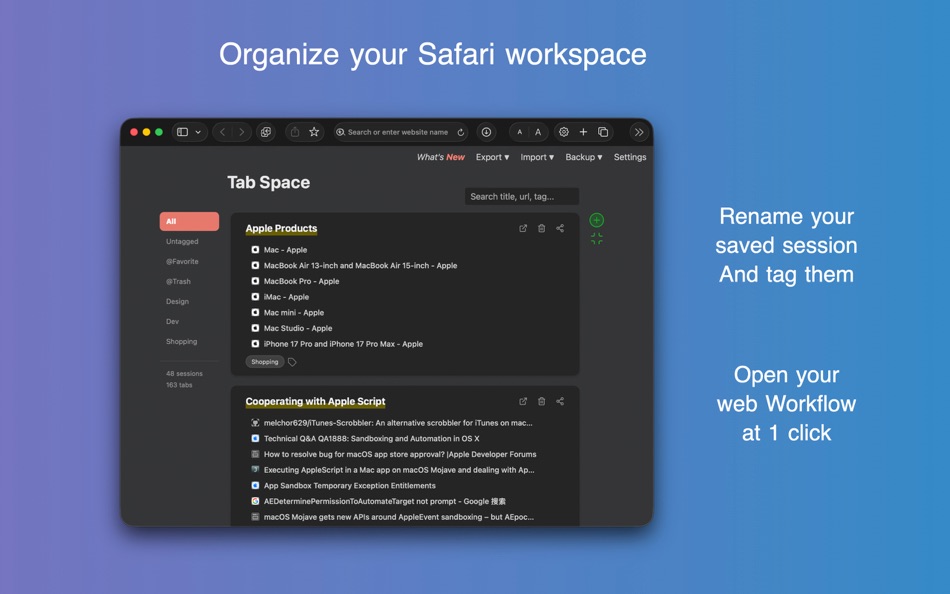
3. Tag System — Add custom tags to organize your saved sessions. Use Tab Space as a workflow launcher—create a "News" workflow to open all your favorite news websites with a single click. Star your favorite sessions for quick access.
4. Search — Quickly find any saved session by searching titles, URLs, or tags.
5. Drag & Drop — Reorganize your sessions and individual tabs by dragging them. Move tabs between sessions or reorder your session list.
6. Merge Sessions — Combine multiple sessions into one for better organization.
7. Export & Import:
- Export sessions as Text, Markdown, HTML, or JSON backup files
- Import from Tab Space backup files (.tabspace)
- Import from OneTab
8. Automatic Backups — Tab Space automatically creates backups when you save sessions. Smart retention keeps 7 hourly, 7 daily, 4 weekly, and 12 monthly backups. Easily restore from any backup.
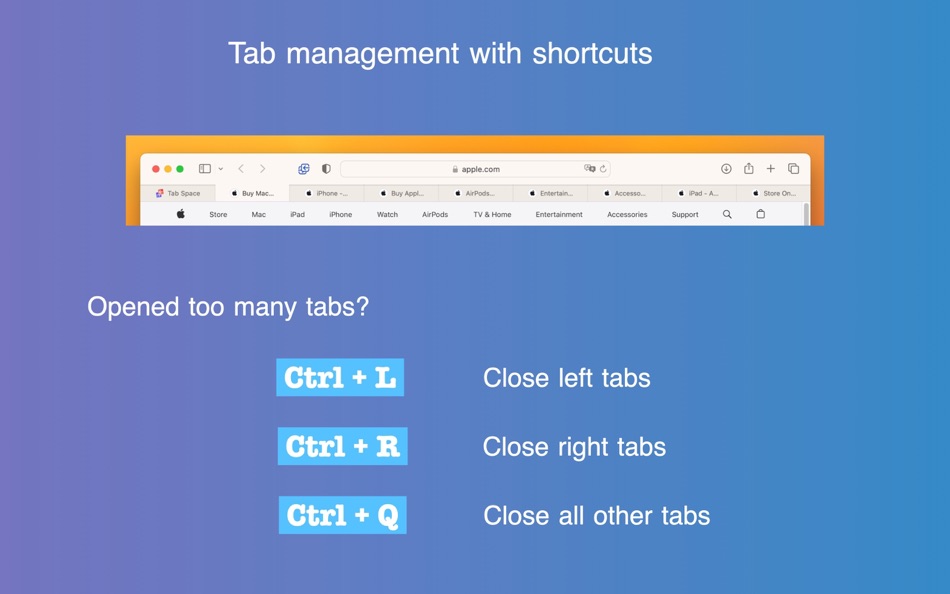
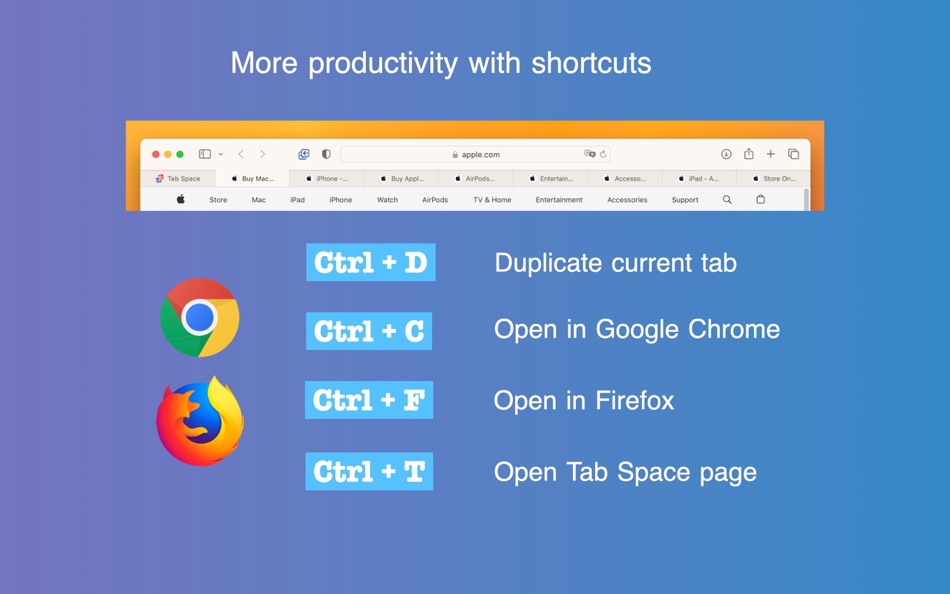
9. Keyboard Shortcuts — Powerful shortcuts for Safari that offer commonly used functions:
- Ctrl + D — Duplicate current tab
- Ctrl + L — Close left tabs
- Ctrl + R — Close right tabs
- Ctrl + K — Close same domain tabs
- Ctrl + Q — Close all other tabs
- Ctrl + ; — Save all tabs and close them
- Ctrl + S — Save current tab to Tab Space
- Ctrl + T — Open Tab Space
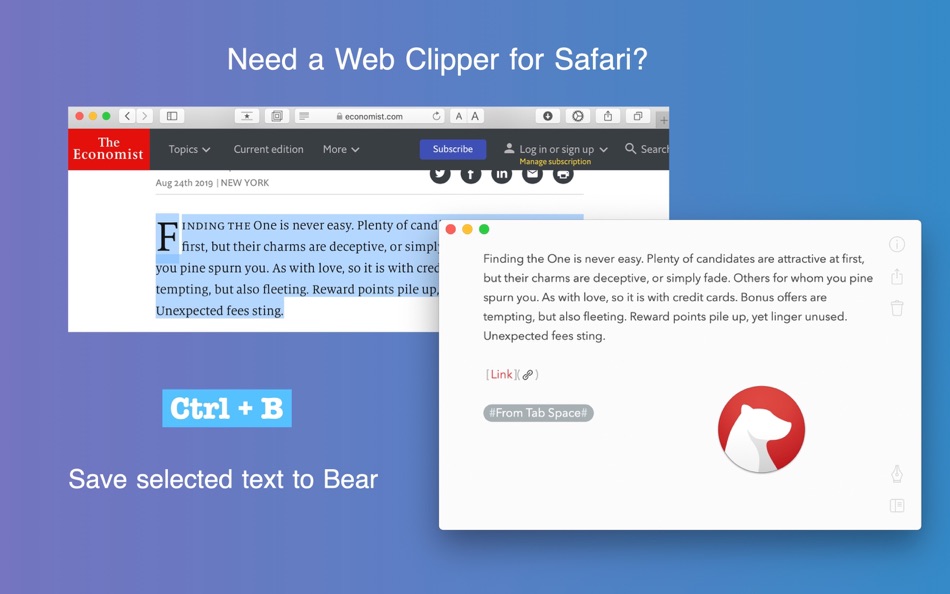
- Ctrl + B — Save selected text to Bear
- Ctrl + M — Copy URL as Markdown link
- Ctrl + C / Ctrl + F — Open in external browsers (configurable: Chrome, Edge, Firefox, Arc, Brave)
10. Customizable Settings:
- Ignore pinned tabs when saving
- Ignore duplicate tabs
- Save tabs from all windows
- Remove site from session after clicking
- Trigger shortcuts with Ctrl + Shift instead of Ctrl
- Disable shortcuts or context menus if needed
11. Dark Mode — Beautiful interface with full dark mode support.
12. Multi-language — Available in 16 languages including English, Chinese, Spanish, German, French, Japanese, Korean, and more.
If you encounter any problems after upgrading Tab Space, please try restarting Safari or macOS.
Ảnh chụp màn hình
Lịch sử giá
- Giá hiện tại: $2.99
- Tối thiểu: $0.99
- Tối đa: $2.99
Theo dõi giá
Điểm AppAgg
Điểm ước tính cho ứng dụng này
$7,470
Điểm cao hơn thường cho thấy tín hiệu mạnh hơn trên AppAgg.
Dựa trên: 🔥 độ phổ biến · ⭐ đánh giá của người dùng · 🕒 độ mới · 🏷️ ưu đãi · 🏬 dữ liệu cửa hàng · 👥 hoạt động cộng đồng
Điểm này chỉ nhằm mục đích cung cấp thông tin. Đây không phải là giá thật, lời đề nghị bán hay định giá thị trường.
URL ngắn: Đã sao chép!
Ad
Tính năng mới
- Phiên bản: 3.14
- Cập nhật lần cuối:
- What's New in This Version:
- Save to a specific session: Save open tabs directly into an existing session from the toolbar menu.
- Delete sessions from the menu: Remove sessions directly from the extension's session menu.
- Fixed a loading issue where the admin page could get stuck on "Connecting to Tab Space App…".
- Rebuilt the main menu for better stability on recent macOS versions.
- Refreshed app icon for a crisper look on recent macOS versions.
- More reliable bookmark fetching with improved retry behavior.
Thông tin bổ sung
- Ngày phát hành:
- Danh mục:
macOS Ứng dụng›Năng suất - HĐH:
macOS,macOS 11.5 trở lên - Kích thước:
2 Mb - Ngôn ngữ được hỗ trợ:
Chinese,Danish,Dutch,English,French,German,Italian,Japanese,Korean,Polish,Russian,Spanish,Swedish,Turkish,Ukrainian - Xếp hạng nội dung:
4+ - Mac App Store Xêp hạng:
0 - Trang web:
 https://mytab.space
Nhà phát triển
- Yuan Zhou
- Nền tảng: Android Ứng dụng (1) iOS Ứng dụng (6) macOS Ứng dụng (3)
- Danh sách: 2 + 1
- Điểm: 4 + 22,086 ¡
- Xếp hạng: 0
- Bình luận: 0
- Giảm giá: 0
- Video: 0
- RSS: Đăng ký

Điểm (1)
-

- 775 Erin
- +1

Xếp hạng (0)
0 ☹️
Bình luận (0)
Hãy là người đầu tiên nhận xét 🌟
«Tab Space». Nền tảng: macOS. Thể loại: Năng suất. Nhà phát triển: «渊 周». Bản phát hành đầu tiên: . Cập nhật lần cuối: . Giá hiện tại: $2.99. Giá thấp nhất được ghi nhận: $0.99 (). Giá cao nhất được ghi nhận: $2.99 (). Tiêu đề này chưa nhận được xếp hạng hoặc đánh giá trên AppAgg. Danh sách: công khai 1, riêng tư 1. Điểm được theo dõi: xác nhận 1, gián tiếp 0. Ngôn ngữ có sẵn: Chinese, Danish, Dutch, English, French, German, Italian, Japanese, Korean, Polish, Russian, Spanish, Swedish, Turkish, Ukrainian. AppAgg theo dõi lịch sử giá, xếp hạng và phản hồi của người dùng cho «Tab Space». Theo dõi ưu đãi và cập nhật trong tương lai qua RSS. AppAgg không lưu trữ ứng dụng hoặc phân phối phần mềm. Tất cả các nhãn hiệu, logo và ảnh chụp màn hình đều thuộc về chủ sở hữu tương ứng.
Tab Space URL ngắn: Đã sao chép!- 🌟 Chia sẻ
- Mac App Store
Tương tự
-
- Tab Browser - MenuTab for Web Browsing for Mac OS X
- macOS Ứng dụng: Năng suất Bởi: Bastian Roessler
- $1.99
- Danh sách: 1 0 0
- Điểm: 0 + 0 Phiên bản: 2.0.0 Tab Browser is the quick and easy way to always have an eye on the website that matters to you the most! Sitting in your Mac's menu bar, your favorite website is never more than one ... ⥯
-
- Tab Notes
- macOS Ứng dụng: Năng suất Bởi: Catalystwo Limited
- * $24.99
- Danh sách: 0 0 0
- Điểm: 1 + 0 Phiên bản: 2.4.3 Tab Notes is a Menu Bar application which keeps your notes tidy and easy to access and your screen uncluttered. Click on your screen edge, then a note pops up! Watch the demonstration ... ⥯
-
- Tab Search
- macOS Ứng dụng: Năng suất Bởi: Tuan Nguyen
- $1.99
- Danh sách: 0 0 0
- Điểm: 0 + 0 Phiên bản: 1.0 Tab Search is a practical web extension designed to simplify tab management in your browser. This Safari extension introduces a fuzzy search function that helps you find tabs quickly, ... ⥯
-
- Tab Finder Lite for Safari
- macOS Ứng dụng: Năng suất Bởi: Oleh Kopyl
- Miễn phí
- Danh sách: 1 0 0
- Điểm: 0 + 0 Phiên bản: 1.4.4 Search, navigate, and organize your browsing history faster than ever. This lightweight Safari extension enhances productivity with quick tab switching and search. Navigate in the ... ⥯
-
- Tab Notes Theme Editor
- macOS Ứng dụng: Năng suất Bởi: Catalystwo
- Miễn phí
- Danh sách: 0 0 0
- Điểm: 2 + 0 Phiên bản: 1.0.4 You can create your own themes for Tab Notes. * Please note: The header sizing bar in the preview popover is for preview purpose only. If you need to adjust size, please use Tab Notes ... ⥯
-
- Tab Application Switcher
- macOS Ứng dụng: Năng suất Bởi: BRONSON EDWARD MCKINLEY
- Miễn phí
- Danh sách: 0 0 0
- Điểm: 1 + 0 Phiên bản: 1.2.3 Switch between browser tabs using Alt+Tab, just like switching between apps on your computer. Features: Most Recently Used (MRU) tab ordering - your last tab is always one keystroke ... ⥯
-
- Tab for Trello
- macOS Ứng dụng: Năng suất Bởi: Joacim Ståhl
- * $0.99
- Danh sách: 0 0 0
- Điểm: 0 + 0 Phiên bản: 1.1 Tab for Trello that gives you fast and instant access to Trello directly from your toolbar. Manage your work via boards and tasks faster than ever. Just click the Tab for Trello icon ... ⥯
-
- Tab Control Center
- macOS Ứng dụng: Năng suất Bởi: Robin Lieb
- Miễn phí
- Danh sách: 0 0 0
- Điểm: 2 + 0 Phiên bản: 1.0.0 Tab Control Center is a browser extension that adds the functionality to Safari to set a limit of allowed open tabs. When the limit is reached the extension closes automatically the ... ⥯
-
- Tab Snooze
- macOS Ứng dụng: Năng suất Bởi: Pawan Dixit
- $0.99
- Danh sách: 0 0 0
- Điểm: 1 + 0 Phiên bản: 1.0.1 Tab Snooze lets your schedule your browser tabs to come back at a later point in time. It works just like the snooze function in your email. When you snooze an email for tomorrow your ... ⥯
-
- Tab Control
- macOS Ứng dụng: Năng suất Bởi: Clever Armadillo LLC
- $1.99
- Danh sách: 0 0 0
- Điểm: 0 + 0 Phiên bản: 2024.1.0 Tab Control allows you to switch between the two most recently used tabs in Safari. The default keyboard shortcut for switching between tabs is CMD+SHIFT+H. You can also copy the ... ⥯
-
- Tab for a Cause
- macOS Ứng dụng: Năng suất Bởi: Gladly
- Miễn phí
- Danh sách: 0 0 0
- Điểm: 0 + 0 Phiên bản: 1.0 Raise money for charity with every tab you open in Safari! Just by surfing the web, you can build libraries, plant trees, help shelter cats, send emergency aid, give clean water, and ... ⥯
-
- Tab Launcher
- macOS Ứng dụng: Năng suất Bởi: Oktoid
- $3.99
- Danh sách: 2 0 0
- Điểm: 1 + 0 Phiên bản: 2.9.6 TabLauncher will help you find and launch your favorite programs, web pages, folders, or any type of files in a fast and easy way. Taking up fewer resources as possible, and allowing ... ⥯
-
- Space Drop - Drag, Store, Drop
- macOS Ứng dụng: Năng suất Bởi: FIPLAB Ltd
- $7.99
- Danh sách: 1 + 1 0 0
- Điểm: 0 + 0 Phiên bản: 2.8 Park files mid-drag. Space Drop adds a frosted glass shelf to the side of your screen that appears the moment you start dragging. Drop files onto it, switch apps, browse folders, then ... ⥯
-
- Tab Limit for Safari – TabCap
- macOS Ứng dụng: Năng suất Bởi: Thales Brederodes
- $3.99
- Danh sách: 0 0 0
- Điểm: 0 + 0 Phiên bản: 1.2 Limit Safari Tabs. Regain Focus. TabCap lets you set a maximum number of tabs in Safari on macOS. Once the limit is reached, Safari won t open new tabs helping you stay focused, ... ⥯
Bạn cũng có thể thích
Đã xem gần đây
Cập nhật lần cuối:
Toán tử tìm kiếm bạn có thể sử dụng với AppAgg