
Αποθηκευμένα
Επιλέξτε το όνομα που θα εμφανίζεται στο μενού «Αποθηκευμένα».
Έγινε!
| Προγραμματιστής: | 刚刚 孔 (21) | ||
| Τιμή: | ▼ $0.99 | ||
| Βαθμολογία: | 1,780 Χρυσό | ||
| Κατατάξεις: | 0 | ||
| Σχόλια: | 0 Δημοσίευση σχολίου | ||
| Λίστες: | 1 + 1 | ||
| Πόντοι: | 1 + 0 ¡ | ||
| +1 Πόντοι | |||
Περιγραφή
[ How to use it: ]
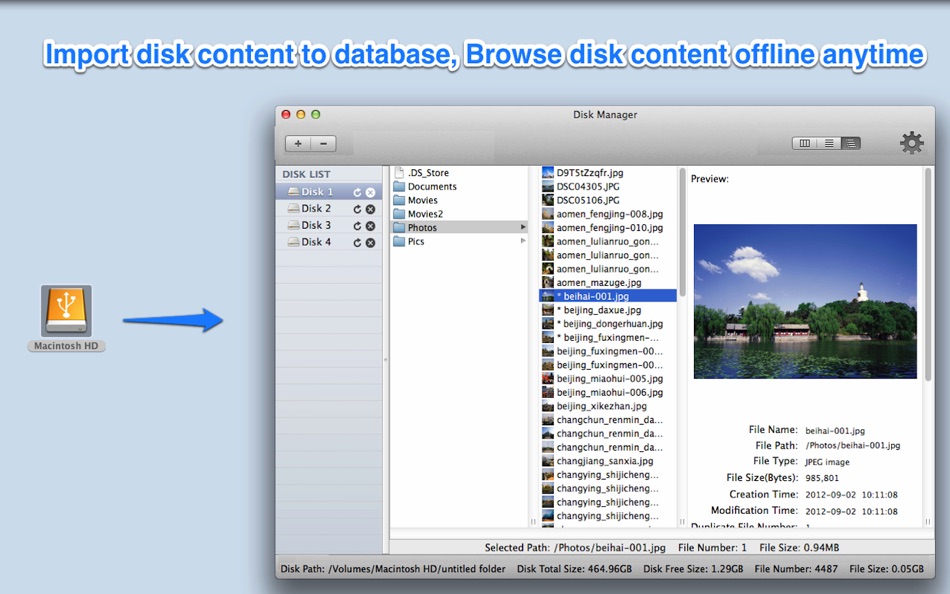
1. Add or drag disks/folders to the left disk list pane of App
2. After import the disk content, you can then browse&find disk content offline.
[ Key features: ]
1. Backup disk file information to database precisely. Easily browse disk content offline anytime anywhere. Support to customise database store path and switch database.
2. Provides rich query condition to easily search disk content offline.
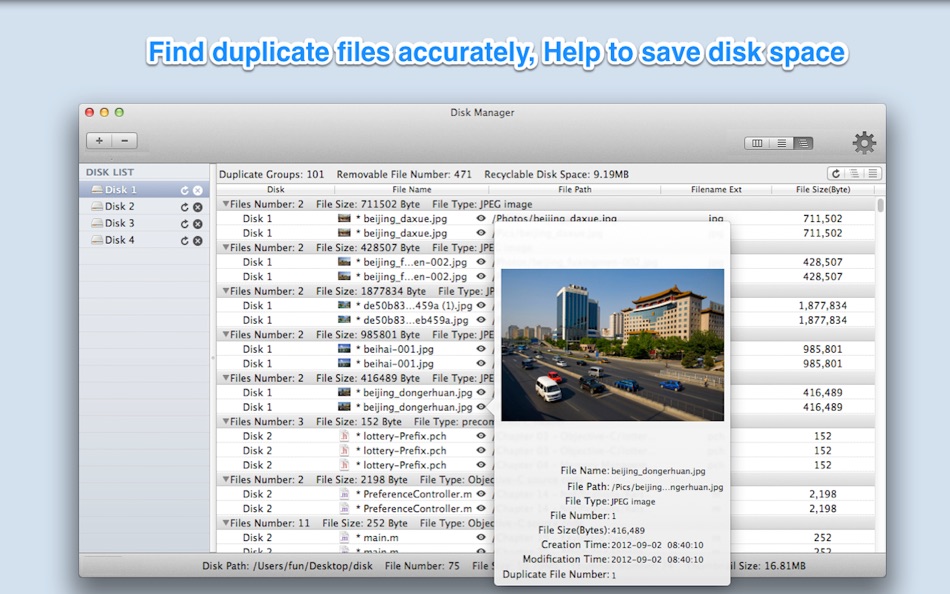
3. Find out all duplicate files on disks accurately, help to save disk space.
4. Create thumbnail for images, videos, PDF files and all other Preview supported files, more convenient to browse.
5. Support protect login by password.
[ Contact: ]
Email: dummyapps@163.com
******Users FAQ******
Q0: How to import disks and how to view duplicate files?
A:Please follow the steps below:
1. From the preferences panel of "Disk Manager" , please turn on "Duplicate file detection" option.
2. Drag or click "+" button to import disks to "Disk Manager", and wait the import finished, then you can browse the content of the disks now.
3. For duplicate files, there is a segment button on the top right of toolbar,please click the third one, then click the "refresh" button, if there are duplicate files, they will show in the table.
Q1: Why import disk is slow sometimes?
A: There are two reasons:
1) The detection of duplicate files will slow down the disk import speed, you can disable it from preference.
2) Take thumbnail of some file types is slow, you can disable it from preference.
3) Because some package file and bundle file contain many sub-files, the calculation of these package files will take a lot of time.
Q2. Why it takes a lot of disk space after import huge number of files?
A: Because large number of high quality of thumbnail take a lot of disk space, you can choose to disable it or take low quality thumbnail instead from preference.
Q3: How do I know the disk import progress?
A: If you click other disk , then back to click the importing disk, do it for several times, you will find that the status information of the importing disk at the bottom bar changes continuously, then you will know that how many files have imported so far.
Q4: How do I delete imported disk?
A: Click the disk you want to remove in the left disk list, then click "-" button.
Q5: How to detect duplicate files?
A:
1. Check the option "Duplicate Detection" in preference panel.
2. Import disks
3. Click "Refresh" button in duplicate file list view.
Q6:How to search files in disks?
A:
1. If you want to search files in all imported disks, please click "all disk" from the left pane.
2. if you want to search files in the certain disk, please click the disk you want to search in the left pane.
3. Change to the search view by clicking the middle button of the segment button in the toolbar , and you can choose the search condition and click "search" button
Q7. How to backup&restore disk database?
A:
1. Click the "Open disk store folder" menu
2. Backup the "FileRecorder" folder
3. To restore disk database, close the app first, and then replace the "FileRecorder" folder with your backup, then re-launch the app
Q8: How to rename imported disk?
A: Click the disk name, when it editable, rename it.
Q9: Why import some of disks need so much time?
A: 1. Disable duplicate files detection from preferences.
2. Disable create file thumbnail from preferences.
3. Only import your interesting folder in your disks.
Q10: how to only search file or folder?
A: please add a "child file number" query condition in search query, when child file number is 0, only search file, otherwise search folder
********
please note: when switch database or delete database, App will save database and quit automatically to make the change take effect.
Διαφήμιση
Στιγμιότυπα οθόνης


Ιστορικό τιμών
- Τρέχουσα τιμή: $0.99
$4.99-80% - Ελάχιστο: ▼ $0.99
- Μέγιστο: $4.99
Παρακολούθηση τιμών Προσθέστε σε μια λίστα για να λαμβάνετε ειδοποιήσεις εκπτώσεων μέσω email ή push
Βαθμολογία AppAgg
1,780
Εκτιμώμενη βαθμολογία AppAgg για
Disk Manager-manage all disks
Προγραμματιστής: 刚刚 孔
1,780 Χρυσό
Η υψηλότερη βαθμολογία συνήθως αντανακλά ισχυρότερους δείκτες στο AppAgg.
Βασισμένο σε: δημοτικότητα · αξιολογήσεις χρηστών · επικαιρότητα · προσφορές · δεδομένα καταστημάτων · δραστηριότητα κοινότητας
Υπολογίζεται εκ νέου καθημερινά με βάση τα πιο πρόσφατα δεδομένα του AppAgg.
Σήμα για τον ιστότοπό σας:  Αντιγράφηκε!
Τι νέο υπάρχει
- Έκδοση: 5.8
- Τελευταία ενημέρωση:
- * Fix minor bugs to improve user experience
Πρόσθετες πληροφορίες
- Ημερομηνία κυκλοφορίας:
- Κατηγορία:
Εφαρμογές για macOS›Βοηθητικά προγράμματα - Λειτουργικό σύστημα:
macOS,macOS 10.14.6 και νεότερες εκδόσεις - Μέγεθος:
55 Mb - Υποστηριζόμενη γλώσσα:
Chinese,English - Αξιολόγηση περιεχομένου:
4+ - Mac App Store Βαθμολογία: ¡
0 - Ιστοσελίδα:
 https://www.jianshu.com/p/697693efb7c9
Προγραμματιστής
- 刚刚 孔
- Ακόλουθοι: 0
- Πλατφόρμες: iOS Εφαρμογές (1) macOS Εφαρμογές (20)
- Προσφορές: 17
- Λίστες: 3 + 4
- Πόντοι: 38 + 8 ¡
- Κατατάξεις: 0
- Σχόλια: 0
- Βίντεο: 0
- RSS: Εγγραφή
Λίστες (1)
- Disk Manager-manage all disks

Πόντοι (1)
-

- 2,821 바람처어럼
- +1

Κατατάξεις (0)
0
Σχόλια (0)
Γράψτε το πρώτο σχόλιο
Σύνοψη
Disk Manager-manage all disks Σύντομο URL: Αντιγράφηκε!- Mac App Store
Στο AppAgg μπορείτε να παρακολουθείτε την εφαρμογή «Disk Manager-manage all disks» από 刚刚 孔 για macOS, στην κατηγορία Βοηθητικά προγράμματα. Βαθμολογία AppAgg: 1,780 (Χρυσό). Πόντοι AppAgg της εφαρμογής — επιβεβαιωμένοι: 1· έμμεσοι: 0. Δημόσιες λίστες που περιέχουν την εφαρμογή: 1. Χρήστες που την έχουν αποθηκεύσει σε ιδιωτικές λίστες: 1. Οι χρήστες του AppAgg δεν έχουν αξιολογήσει ακόμη την εφαρμογή. Οι επιβεβαιωμένοι πόντοι καταγράφουν τις επισκέψεις συνδεδεμένων χρηστών του AppAgg στο κατάστημα. Οι έμμεσοι πόντοι βασίζονται σε στοιχεία των καταστημάτων. Οι δύο μετρητές δείχνουν το πλήθος των δημόσιων λιστών και των χρηστών που έχουν αποθηκεύσει την εφαρμογή ή το παιχνίδι σε ιδιωτικές λίστες. Η εφαρμογή κυκλοφόρησε για πρώτη φορά στις . Τελευταία ενημέρωση της εφαρμογής: . Η προηγούμενη τιμή της εφαρμογής ήταν $4.99· τώρα κοστίζει $0.99 (έκπτωση 80%). Η χαμηλότερη καταγεγραμμένη τιμή της εφαρμογής ήταν $0.99 ()· η υψηλότερη ήταν $4.99 (). Γλώσσες που υποστηρίζει η εφαρμογή: Chinese, English. Δείτε το ιστορικό τιμών, προσθέστε την εφαρμογή σε λίστα ή ακολουθήστε τον δημιουργό της. Παρακολουθήστε τις μελλοντικές προσφορές και ενημερώσεις της εφαρμογής μέσα από τη Ροή RSS. Το AppAgg δεν φιλοξενεί αυτή την εφαρμογή στους διακομιστές του και δεν τη διανέμει. Όλα τα εμπορικά σήματα, τα λογότυπα και τα στιγμιότυπα οθόνης που σχετίζονται με την εφαρμογή ανήκουν στους αντίστοιχους κατόχους τους.

