
| Pengembang: | Hypercritical LLC (3) | ||
| Harga: | $7.99 | ||
| Peringkat: | 0 | ||
| Ulasan: | 0 Menulis review | ||
| Komentar: | 0 Kirimkan komentar | ||
| Daftar: | 3 + 1 | ||
| Poin: | 5 + 0 ¡ | ||
| Mac App Store | |||
Deskripsi

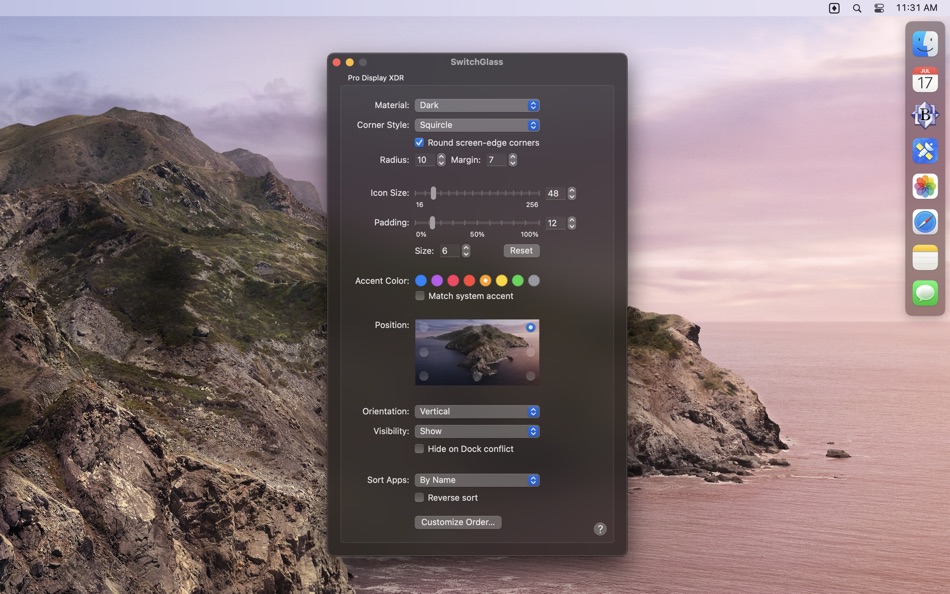
The following app switcher attributes can be customized individually for each attached display:
• Visibility - Permanently hide, show, or auto-hide the app switcher. Auto-hide keeps the app switcher hidden until the mouse cursor touches the region of the screen edge where the app switcher is positioned.
• Position - Move the app switcher to one of eight different positions on each screen.
• Orientation - Make the app switcher horizontal or vertical in a given position.
• Material - Change the appearance of the app switcher background to one of several possible choices (see screenshot above) including a mode where it automatically matches the system appearance (e.g, dark when dark mode is active, light otherwise).
• Corner Style and Radius - Choose from three corner styles: square, circle, or “squircle” (a “continuous” rounded corner style). The corner radius can also be adjusted.
• Icon Size - Adjust the size of app icons in the switcher from 16 to 256 points.
• Icon Padding - Adjust the padding between icons from 0% to 100% of the configured icon size.
• Margin - Adjust the amount of space around the app switcher.
• Hide on Dock conflict - Hide the app switcher when the macOS Dock occupies the same screen edge.
• App Sort Order - Sort apps by name or launch order, descending or ascending.
App order can also be customized for individual apps by setting fixed positions starting from either end of the app switcher.
Additionally, the following global settings may be customized:
• App Filtering - Show all apps or just those with windows on the current display.
• Menu Bar Icon - Choose from three possible menu bar icons.
• App Exclusions - Select apps that should never appear in the app switcher.
• Animation - Show animations during app state transitions.
• Tooltips - Show the app name when the pointer hovers over an app icon.
Here’s how the app switcher works in its default configuration:
• Click an app icon to bring all windows from that app to the front.
• Hold down the Shift key while clicking an app icon to bring just one window from that app to the front.
• Hold down the Option key while clicking an app icon to hide the current app before bringing the clicked app to the front. (Option-clicking the currently active app will hide it.)
• Hold down the Option and Shift keys while clicking an app icon to hide the current app before bringing just one window from the clicked app to the front. (Option-Shift-clicking the currently active app will hide it.)
• Right-click (or Control-click) an app icon to activate a context menu from which you can perform any of the supported actions (described below).
• Drag one or more files or folders onto an app icon to open those items with the app.
• Hold down the Command key while clicking on an app icon to reveal the app in the Finder.
The click and Shift-click actions are configurable. Each may be set to any one of these actions:
• Show All Windows - Activate an app and bring all its window to the front.
• Activate - Activate an app and bring a single window to the front.
• Reopen - Activate an app in a way that triggers its “reopen” handler. Apps can choose to do whatever they want in response to a “reopen” action, but most bring a single window to the front, opening a new window (or un-minimizing a window from the Dock) if none are open.
• Reopen and Show All - This is the same as “Reopen” except that SwitchGlass will also bring all the app’s windows to the front after sending the “reopen” action.
• Hide - Hide all windows belonging to an app.
For more information, click the SwitchGlass menu bar icon and choose “Help”, or visit https://hypercritical.co/switchglass/#help
Ad
Jepretan layar


Sejarah Harga
- Hari ini: $7.99
- Minimal: $4.99
- Maksimum: $7.99
Pantau harga
Yang Baru
- Versi: 2.4.16
- Diperbarui:
- • Improved the wiggle animation when reordering apps.
• Minor stability improvements.
Komentar (0)
Jadilah yang pertama berkomentar 🌟
Pengembang
- Hypercritical LLC
- Platform: macOS Aplikasi (3)
- Daftar: 3 + 4
- Poin: 7 + 0 ¡
- Peringkat: 0
- Ulasan: 0
- Komentar: 0
- Diskon: 0
- Video: 0
- RSS: Berlangganan
Poin (5)
-

- 543 MichaelTheGeek
- +1
-
- 3,660 Dragon
- +1
-
- 74 Alessandro
- +1
-
- 65 Kai Lee
- +1
-
- 35 aguano
- +1




Peringkat (0)
0 ☹️
Daftar (3)
- SwitchGlass


Ulasan (0)
Jadilah yang pertama mengulas 🌟
Info tambahan
- Versi: 2.4.16
- Kategori:
macOS Aplikasi›Produktivitas - OS:
macOS,macOS 12.0 dan yang lebih tinggi - Ukuran:
3 Mb - Bahasa yang didukung:
English - Rating Konten:
4+ - Mac App Store Peringkat:
0 - Diperbarui:
- Tanggal rilis:
«SwitchGlass». Platform: macOS. Kategori: Produktivitas. Pengembang: «Hypercritical LLC». Rilis pertama: . Pembaruan terakhir: . Harga saat ini: $7.99. Harga terendah yang tercatat: $4.99 (). Harga tertinggi yang tercatat: $7.99 (). Judul ini belum mendapat rating atau ulasan di AppAgg. Daftar: publik 3, pribadi 1. Poin yang dilacak: dikonfirmasi 5, tidak langsung 0. Bahasa yang tersedia: English. AppAgg melacak riwayat harga, peringkat, dan umpan balik pengguna «SwitchGlass». Ikuti diskon dan pembaruan di masa mendatang melalui RSS. AppAgg tidak menghosting aplikasi atau mendistribusikan perangkat lunak. Semua merek dagang, logo, dan tangkapan layar adalah milik pemiliknya masing-masing.
SwitchGlass URL singkat: Disalin!- 🌟 Bagikan
- Mac App Store
Ad
Serupa
-
- Switch Browser: No copy-paste
- macOS Aplikasi: Produktivitas Oleh: Vladimir Kucherenko
- $0.99
- Daftar: 0 + 0 Peringkat: 0 Ulasan: 0
- Poin: 0 + 0 0 Versi: 1.2.4 A Share Menu extension that opens any installed browser with the page you're currently looking at. No need to copy-paste urls anymore. ⥯
-
- Fast Switch - App Switcher
- macOS Aplikasi: Produktivitas Oleh: 波 宁
- $2.99
- Daftar: 0 + 0 Peringkat: 0 Ulasan: 0
- Poin: 0 + 0 0 Versi: 1.1 "Fast Switch" helps you switch between apps Super Quick. Press the right Command key and the designated shortcut, and you can instantly switch to your target app, or even launch it. ... ⥯
-
- Locale Switcher
- macOS Aplikasi: Produktivitas Oleh: 渊 周
- Gratis
- Daftar: 1 + 0 Peringkat: 0 Ulasan: 0
- Poin: 2 + 0 0 Versi: 1.1.3 # 1 Click to Switch between Different Version of Web Pages # * https://support.apple.com/en-US/HT201150 https://support.apple.com/zh-CN/HT201150 * ... ⥯
-
- LaunchPalette – App Switcher
- macOS Aplikasi: Produktivitas Oleh: Seungwoo Choe
- * Gratis
- Daftar: 0 + 3 Peringkat: 0 Ulasan: 0
- Poin: 13 + 0 0 Versi: 1.13 Switch between apps and projects in milliseconds, without breaking your flow. LaunchPalette brings keyboard-first navigation to macOS, letting you instantly jump to any app, project, ... ⥯
-
- DisplayProg
- macOS Aplikasi: Produktivitas Oleh: Balasubramanian Ramanathan
- $5.99
- Daftar: 0 + 1 Peringkat: 0 Ulasan: 0
- Poin: 2 + 0 0 Versi: 1.2 * Switch resolution of all connected monitor with a click * Switch to Retina 2x resolution * Switch to Standard 1x Resolution * Launch at Login * Save and Restore the Resolution & ... ⥯
-
- Tab Application Switcher
- macOS Aplikasi: Produktivitas Oleh: BRONSON EDWARD MCKINLEY
- Gratis
- Daftar: 0 + 0 Peringkat: 0 Ulasan: 0
- Poin: 1 + 0 0 Versi: 1.2.0 Switch between browser tabs using Alt+Tab, just like switching between apps on your computer. Features: Most Recently Used (MRU) tab ordering - your last tab is always one keystroke ... ⥯
-
- SwitchBrowser
- macOS Aplikasi: Produktivitas Oleh: 承萍 马
- $0.99
- Daftar: 0 + 0 Peringkat: 0 Ulasan: 0
- Poin: 0 + 0 0 Versi: 2.0.1 Switch default browser easily, enjoy rich customizable features, one-time payment, permanent access. ⥯
-
- Scrivener 3
- macOS Aplikasi: Produktivitas Oleh: Literature & Latte
- $59.99
- Daftar: 3 + 11 Peringkat: 0 Ulasan: 0
- Poin: 2 + 0 0 Versi: 3.5.2 Typewriter. Corkboard. Scrapbook. Scrivener combines all the writing tools you need to craft your first draft, from nascent notion to final full stop. The biggest software advance for ... ⥯
-
- rcmd • App Switcher
- macOS Aplikasi: Produktivitas Oleh: THE LOW-TECH GUYS SRL
- Gratis
- Daftar: 5 + 3 Peringkat: 0 Ulasan: 0
- Poin: 12 + 0 0 Versi: 2.7.0 Re-imagined Command-Tab. Switch apps instantly just by their first letter! Hold down the right side |⌘ command| and press the first letter of the app name to focus apps instantly The ... ⥯
-
- HazeOver • Distraction Dimmer™
- macOS Aplikasi: Produktivitas Oleh: Maxim Ananov
- $4.99
- Daftar: 6 + 2 Peringkat: 0 Ulasan: 0
- Poin: 12 + 0 0 Versi: 1.9.7 Too many windows to manage? Large display? Or getting lost in multiple monitors? HazeOver is for you! TRIAL version: HazeOver.com Turn distractions down and focus on your current task. ⥯
-
- Canary Mail App
- macOS Aplikasi: Produktivitas Oleh: Cartasec Pte. Ltd.
- * Gratis
- Daftar: 3 + 3 Peringkat: 0 Ulasan: 0
- Poin: 13 + 0 0 Versi: 5.18 The Best Email Client for Mac. Your AI Email Assistant. Canary can be as simple or as powerful as you want it to be: FOREVER FREE: Best for students & personal use Includes: **Unified ... ⥯
-
- Airmail - Lightning Fast Email
- macOS Aplikasi: Produktivitas Oleh: Bloop S.R.L.
- * Gratis
- Daftar: 4 + 5 Peringkat: 0 Ulasan: 0
- Poin: 5 + 0 0 Versi: 26.0.3 Apple Design Award 2017 Winner Airmail is a mail client designed with performance and intuitive interaction in mind optimized for macOS and iOS! Support for iCloud™, MS Exchange, ... ⥯
-
- GoodTask
- macOS Aplikasi: Produktivitas Oleh: haha Interactive
- $39.99
- Daftar: 2 + 3 Peringkat: 0 Ulasan: 0
- Poin: 7 + 0 0 Versi: 8.2.0 GoodTask is a Powerful Task/Project Manager based on Apple's Reminders & Calendars. You can use it as simple checklist to focus or as complex project management tool to get big things ... ⥯
-
- GlassNotes: Transparent Notes
- macOS Aplikasi: Produktivitas Oleh: Robert DelFave
- * Gratis
- Daftar: 0 + 1 Peringkat: 0 Ulasan: 0
- Poin: 1 + 0 0 Versi: 4.0 GlassNotes is a notes app designed for focus. Capture your thoughts with customizable glass themes, organize with folders, and keep everything synced across your Macs with iCloud. Stay ⥯