
| Geliştirici: | Dwarves Foundation (5) | ||
| Fiyat: | Ücretsiz | ||
| Sıralamalar: | 0 | ||
| Yorumlar: | 0 Yorum Yazın | ||
| Listeler: | 1 + 0 | ||
| Puanlar: | 0 + 0 ¡ | ||
| Mac App Store | |||
Açıklama

Features:
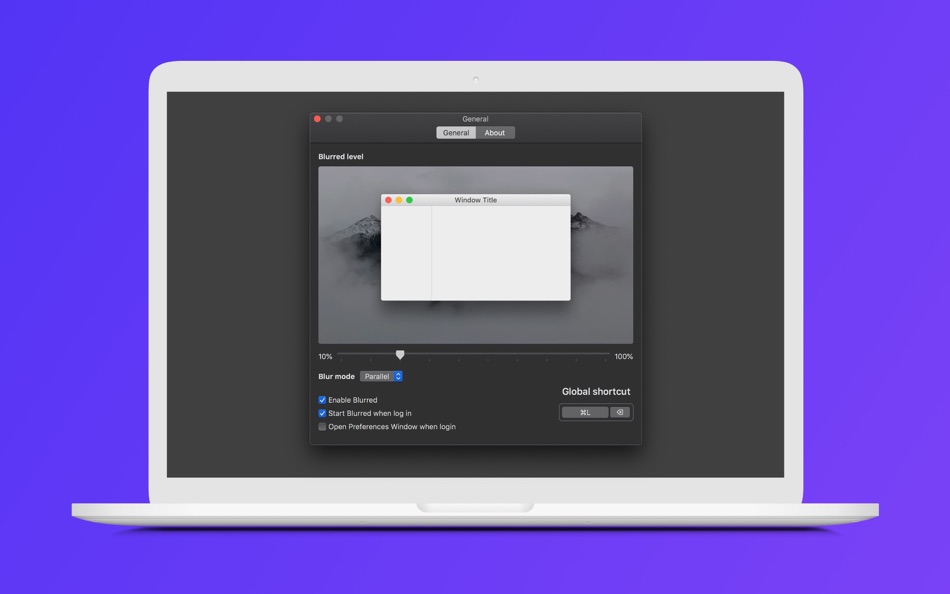
- Dim mode:
- Single: Focus to a frontmost window in the main screen
- Parallel: Focus to frontmost windows in all screens
- Launch at login
- Enable/disable with customizable global shortcut
If you require any further information or feature, feel free to contact us: macos@d.foundation
Ekran görüntüleri
Yenilikler
- Sürüm: 1.2.0
- Güncellendi:
- - User can now use the scroll gesture on the Menu Bar icon to quickly adjust the blurred level
- Support the Chinese language
Fiyat
- Bugün: Ücretsiz
- En az: Ücretsiz
- Maksimum: Ücretsiz
Fiyatları takip et
Geliştirici
- Dwarves Foundation
- Platformlar: macOS Uygulamalar (5)
- Listeler: 2 + 1
- Puanlar: 3 + 0 ¡
- Sıralamalar: 0
- Yorumlar: 0
- İndirimler: 0
- Video: 0
- RSS: Abone ol
Puanlar
0 ☹️
Sıralamalar
0 ☹️
Listeler
- Blurred

Yorumlar
İnceleme yazan ilk kişi siz olun 🌟
Ek Bilgi
- Sürüm: 1.2.0
- Kategori:
macOS Uygulamalar›Kamu hizmetleri - İşletim Sistemleri:
macOS,macOS 10.15 ve sonrası - Boyut:
3 Mb - Desteklenen diller:
Chinese,English - İçerik Derecelendirmesi:
4+ - Mac App Store Kullanıcı Oyu:
0 - Güncellendi:
- Satışa çıkış tarihi:
Blurred Kısa URL: Kopyalandı!- 🌟 Paylaş
- Mac App Store
Şunları da beğenebilirsiniz
-
- Image Deblur - Blurred & Shaky
- macOS Uygulamalar: Kamu hizmetleri Göre: GENOVA Softworks
- $8.99
- Listeler: 0 + 0 Sıralamalar: 0 Yorumlar: 0
- Puanlar: 0 + 0 Sürüm: 1.0.8 Image Deblur is a professional tool that lets you remove the blur from your photos. Thanks to its deconvolution algorithm it is possible to bring out the details you are looking for ... ⥯
-
- Workflow Tools
- macOS Uygulamalar: Kamu hizmetleri Göre: Workflow Network
- Ücretsiz
- Listeler: 0 + 1 Sıralamalar: 0 Yorumlar: 0
- Puanlar: 8 + 0 Sürüm: 1.4.1 Introducing Workflow Tools! Simply drag & drop files (and folders) to the menu bar icon, then applicable actions will enable based upon what you have added. Then just work away! FILE ... ⥯
-
- MakePass: AI Wallet Editor
- macOS Uygulamalar: Kamu hizmetleri Göre: Pedro Jose Pereira Vieito
- * Ücretsiz
- Listeler: 1 + 0 Sıralamalar: 0 Yorumlar: 0
- Puanlar: 7 + 272 (4.3) Sürüm: 5.3 With MakePass, you can customize Apple Wallet like never before: create and personalize passes with AI-driven design, advanced editing tools, smart barcode importing, date and location ⥯
-
- Store ScreenShot Maker
- macOS Uygulamalar: Kamu hizmetleri Göre: 袁杰 张
- $3.99
- Listeler: 1 + 0 Sıralamalar: 0 Yorumlar: 0
- Puanlar: 0 + 6 (4.3) Sürüm: 2.1.3 Store ScreenShot Maker is an efficiency tool that was originally designed to help regular users solve the problem of screenshot shells, making this tedious task simple and efficient. ... ⥯
-
- Hide My Screen
- macOS Uygulamalar: Kamu hizmetleri Göre: Blue Speck
- * Ücretsiz
- Listeler: 0 + 0 Sıralamalar: 0 Yorumlar: 0
- Puanlar: 0 + 0 Sürüm: 1.11 Screen Privacy, No Matter Where You Are Introducing Hide My Screen, a cutting-edge solution designed to protect your screen's visibility wherever you are. Ideal for professionals and ... ⥯
-
- FocusLayer
- macOS Uygulamalar: Kamu hizmetleri Göre: Haeseong Jung
- * Ücretsiz
- Listeler: 0 + 0 Sıralamalar: 0 Yorumlar: 0
- Puanlar: 0 + 0 Sürüm: 1.0.1 FocusLayer enhances your productivity by dimming everything on your screen except the active window, allowing you to focus without distractions. Hide your desktop icons, reduce visual ... ⥯
-
- Ultrawidify
- macOS Uygulamalar: Kamu hizmetleri Göre: Martin Mlostek
- Ücretsiz
- Listeler: 0 + 0 Sıralamalar: 0 Yorumlar: 0
- Puanlar: 0 + 0 Sürüm: 1.0.5 Ultrawidify allows to mirror and blur your content on the edges of the screen in case the content you are watching does not properly stretch to your screen dimensions. The settings ... ⥯
- Yeni
- Hush: Screen Share Focus
- macOS Uygulamalar: Kamu hizmetleri Göre: Oleksandr Kozlovskyi
- $3.99
- Listeler: 0 + 0 Sıralamalar: 0 Yorumlar: 0
- Puanlar: 0 + 0 Sürüm: 1.1.1 Stop exposing your messy desktop and private apps during screen sharing. Hush gives you instant presentation mode with one click. TWO POWERFUL MODES Desktop Mode Instantly blur or hide ⥯