
Đã lưu
Chọn tên sẽ hiển thị trong menu Đã lưu của bạn.
Làm xong!
| Nhà phát triển: | Maksym Cherniaiev (5) | ||
| Giá bán: | $14.99 | ||
| Điểm: | 9,220 | ||
| Xếp hạng: | 0 | ||
| Bình luận: | 0 Đăng bình luận | ||
| Danh sách: | 2 + 2 | ||
| Điểm: | 0 + 0 ¡ | ||
| +1 Điểm | |||
Mô tả

“Swift, easy to use, thorough, analyzes specific libraries, can search according to various criteria, offers choices in photo handling” - TheNextWeb
"PhotoSweeper packs a powerful punch in de-cluttering any size collection. 9/10" - Mac.AppStorm
"PhotoSweeper is a simple and efficient utility for organizing photos. 4.5/5" - Macworld
“I like PhotoSweeper because you can tweak it to compare with different criteria… not a one-trick-pony.” - MacRumors forum user
"This tool does a great job of finding duplicates, not just exact duplicates, but photos that have been rotated, resized, or are even just very similar. It also has a great set of default rules for figuring out which image to keep automatically, which can save hours." - Mac App Store Review
PhotoSweeper is perfect for you if:
• You often take a series of shots to get the perfect image and want to remove the extras.
• You edit photos in apps like Photoshop or Capture One and create multiple versions or backups.
• You have photos spread across folders, external drives, and libraries like Apple Photos, Lightroom Classic, or Capture One.
• Your photo library feels messy, disorganized, or too full, and you want to reclaim space by removing unnecessary files.
Key Features
• Deep Integration with Popular Photo Libraries
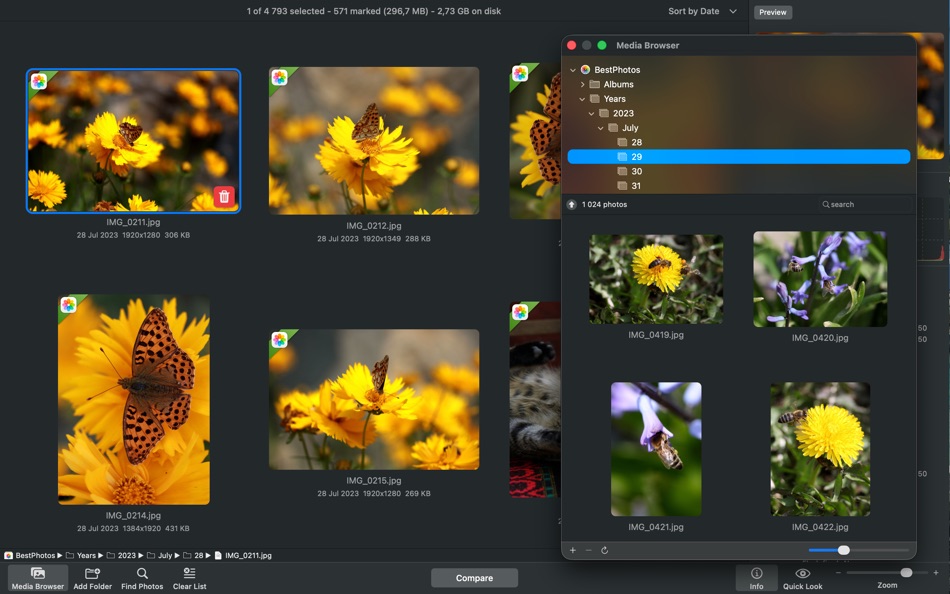
Works seamlessly with Apple Photos, Lightroom Classic, and Capture One. You can also scan any folder or external drive, with no need to move or reorganize your files beforehand.
• Fast and Accurate Comparison Engine
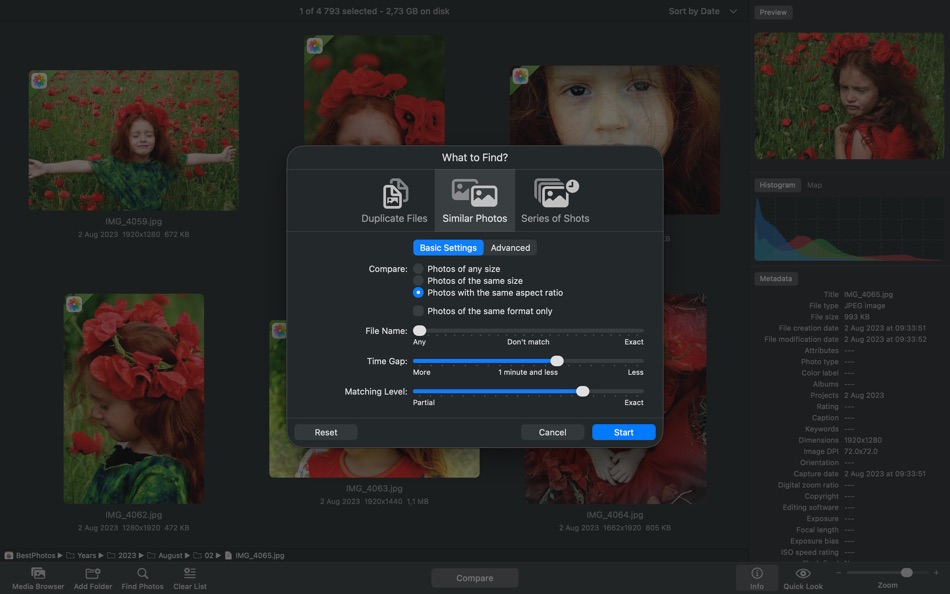
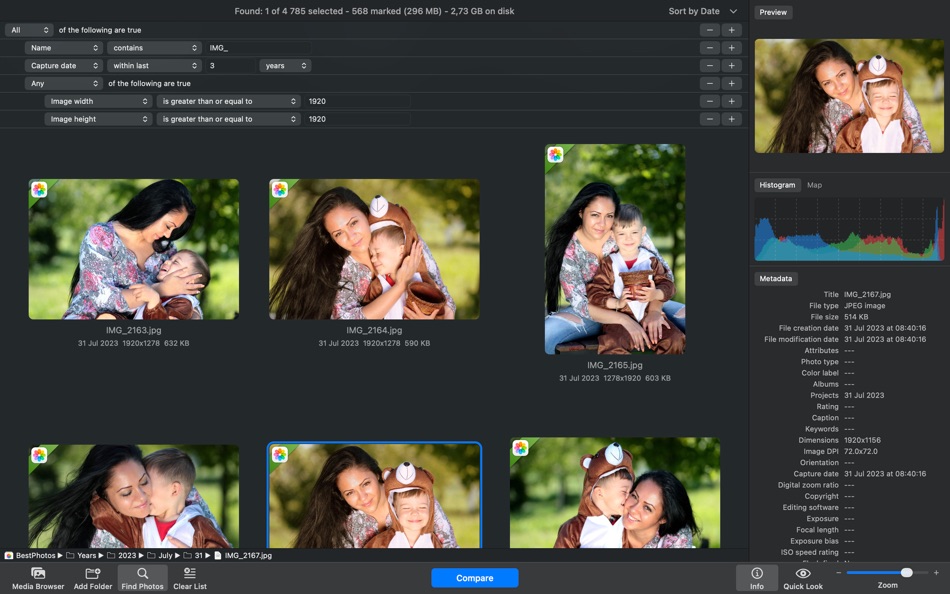
Under the hood is a lightning-fast engine that detects both exact duplicates and visually similar images. It goes beyond filenames by analyzing content, composition, and capture time. You can fine-tune the matching level to catch everything from identical copies to burst shots and edits.
• Flexible, User-Friendly Workflow
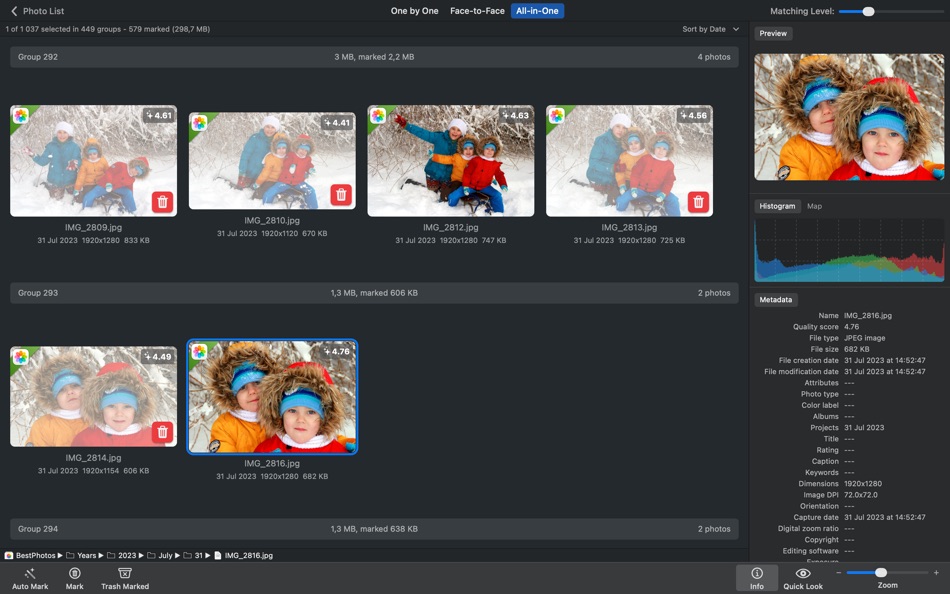
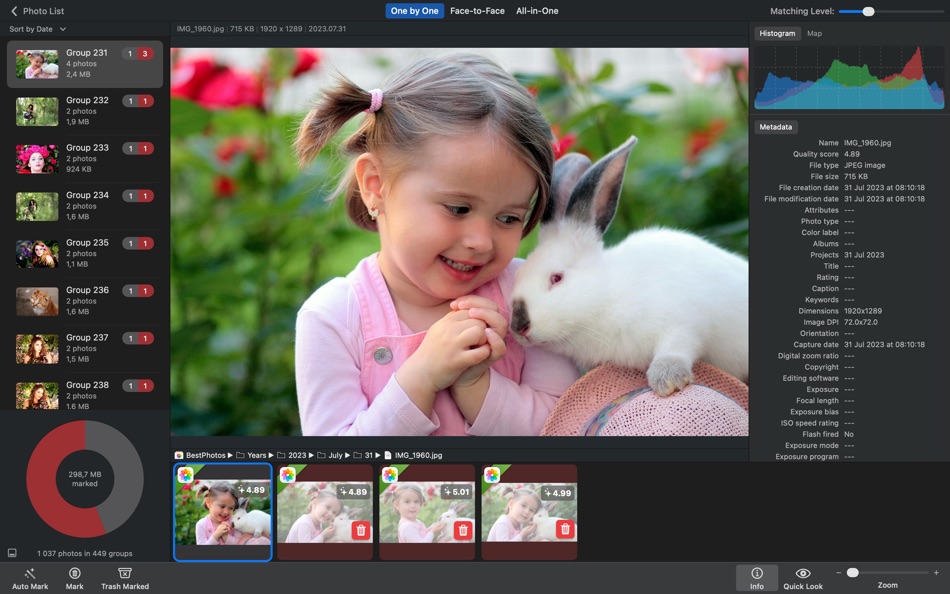
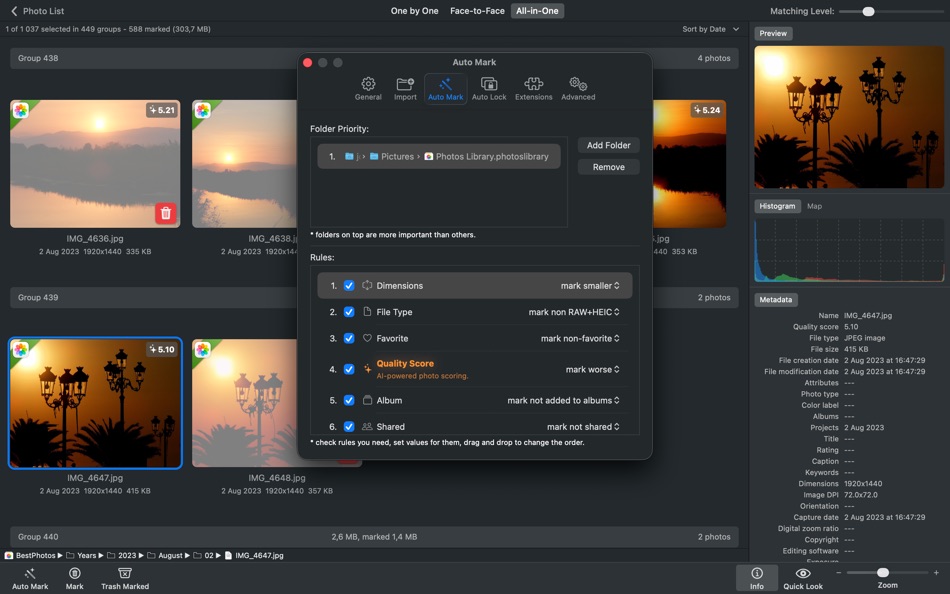
Clean up your library with ease. Similar photos are grouped side by side for quick visual comparison. Use Auto Mark to automatically select the best image in each group, or choose manually. Lock important photos, view EXIF data, preview with Quick Look, and apply customizable marking rules.
• AI-Powered Photo Scoring
Evaluates the visual quality of photos using AI and displays a visual badge on each image. Use the “Quality Score” auto mark rule to automatically keep the best shots.
• Smart Cleanup with Safety in Mind
You're always in control. Review all marked photos before deleting. Nothing is permanently erased. Photos go to the system Trash, are marked “Rejected” in Lightroom, or moved to a special album in Photos so you can recover them later if needed.
• Optimized for Performance / Handles Large Libraries
Whether you have thousands or hundreds of thousands of photos, PhotoSweeper runs fast and smooth. It's optimized for macOS and runs natively on Apple Silicon for top performance on your Mac.
Why Choose PhotoSweeper?
• Works with Photos, Lightroom Classic, Capture One, folders, and more
• Detects both exact duplicates and similar-looking photos
• Lets you compare side-by-side with clear previews and detailed info
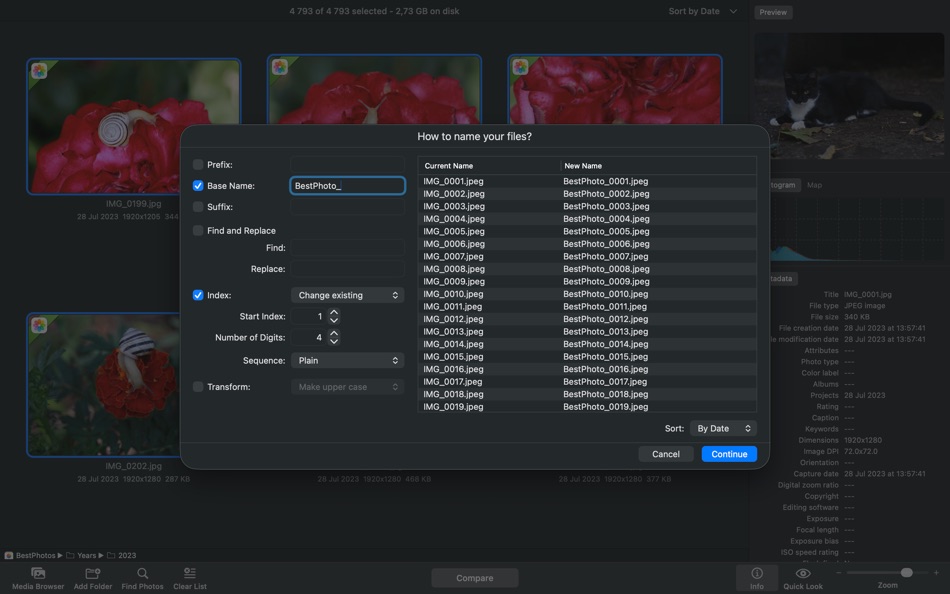
• Features Auto Mark, customizable rules, and flexible cleanup options
• Supports RAW, JPEG, HEIC, PNG, TIFF, and other popular formats
• Designed for both casual users and professionals
• Keeps your photo collection tidy, organized, and free of clutter
Declutter your photo library, free up disk space, and enjoy your best memories without the noise. With PhotoSweeper, cleaning up your Mac has never been so smart and satisfying.
Need help or want to learn more? Check out the full user manual at http://overmacs.com, or drop us a line at support@overmacs.com — we’re happy to help!
Ảnh chụp màn hình

Ad
Lịch sử giá
- Giá hiện tại: $14.99
- Tối thiểu: $5.99
- Tối đa: $14.99
Theo dõi giá
Điểm AppAgg
9,220
Điểm AppAgg ước tính cho
PhotoSweeper
9,220
Điểm cao hơn thường cho thấy tín hiệu mạnh hơn trên AppAgg.
Dựa trên: 🔥 độ phổ biến · ⭐ đánh giá của người dùng · 🕒 độ mới · 🏷️ ưu đãi · 🏬 dữ liệu cửa hàng · 👥 hoạt động cộng đồng
Được tính lại hằng ngày từ dữ liệu AppAgg mới nhất.
URL ngắn: Đã sao chép!
Tính năng mới
- Phiên bản: 5.5.2
- Cập nhật lần cuối:
- + XMP sidecar files: support for reading metadata from sidecar files.
+ DNG extension: improved reading of Adobe DNG images.
+ Adobe Lightroom: improved handling of previews.
+ Import: new options to ignore hidden photos in Apple Photos and rejected ones in Adobe + Lightroom.
+ Bug fixes and performance improvements based on user feedback.
Thông tin bổ sung
- Ngày phát hành:
- Danh mục:
macOS Ứng dụng›Nhiếp ảnh - HĐH:
macOS,macOS 10.15 trở lên - Kích thước:
42 Mb - Ngôn ngữ được hỗ trợ:
English,French,German,Italian,Russian,Spanish,Ukrainian - Xếp hạng nội dung:
4+ - Mac App Store Xêp hạng:
0 - Trang web:
 https://overmacs.com
Nhà phát triển
- Maksym Cherniaiev
- Nền tảng: iOS Ứng dụng (1) macOS Ứng dụng (3) macOS Trò chơi (1)
- Danh sách: 3 + 2
- Điểm: 2 + 28 ¡
- Xếp hạng: 0
- Bình luận: 0
- Giảm giá: 0
- Video: 0
- RSS: Đăng ký
Danh sách (2)
- PhotoSweeper


Điểm (0)
0 ☹️
Xếp hạng (0)
0 ☹️
Bình luận (0)
Hãy là người đầu tiên nhận xét 🌟
«PhotoSweeper». Nền tảng: macOS. Thể loại: Nhiếp ảnh. Nhà phát triển: «Maksym Cherniaiev». Bản phát hành đầu tiên: . Cập nhật lần cuối: . Giá hiện tại: $14.99. Giá thấp nhất được ghi nhận: $5.99 (). Giá cao nhất được ghi nhận: $14.99 (). Tiêu đề này chưa nhận được xếp hạng hoặc đánh giá trên AppAgg. Danh sách: công khai 2, riêng tư 2. Ngôn ngữ có sẵn: English, French, German, Italian, Russian, Spanish, Ukrainian. AppAgg theo dõi lịch sử giá, xếp hạng và phản hồi của người dùng cho «PhotoSweeper». Theo dõi ưu đãi và cập nhật trong tương lai qua RSS. AppAgg không lưu trữ ứng dụng hoặc phân phối phần mềm. Tất cả các nhãn hiệu, logo và ảnh chụp màn hình đều thuộc về chủ sở hữu tương ứng.
PhotoSweeper URL ngắn: Đã sao chép!- 🌟 Chia sẻ
- Mac App Store
Tương tự
-
- Photo Naminator
- macOS Ứng dụng: Nhiếp ảnh Bởi: Bjoern Goerke
- * Miễn phí
- Danh sách: 0 + 1 0 0
- Điểm: 8 + 0 7k Phiên bản: 2.27 Photo Naminator is a 3rd-party utility for Apple macOS that takes photo and video files as input (like JPEG, PNG, GIF or RAW format files) and renames their filenames based on metadata ⥯
- mới
- Photo Export - Local Backup
- macOS Ứng dụng: Nhiếp ảnh Bởi: Valtteri Luoma
- $3.99
- Danh sách: 0 0 0
- Điểm: 0 + 0 3k Phiên bản: 1.2.0 Photo Export is an open-source macOS app that backs up your Apple Photos library to any local or external drive organized by year and month, exactly the way you'd expect. No account. ... ⥯
-
- Photo Editor for Seedream
- macOS Ứng dụng: Nhiếp ảnh Bởi: Yasir Islam
- * Miễn phí
- Danh sách: 0 0 0
- Điểm: 0 + 0 4k Phiên bản: 1.3 Photo Editor for Seedream is an all-in-one AI photo editing app that turns your imagination into art. Create stunning visuals with Text to Image or transform existing photos using ... ⥯
-
- Photo Strip for Mac OS X
- macOS Ứng dụng: Nhiếp ảnh Bởi: Andre Yonadam
- $0.99
- Danh sách: 0 0 0
- Điểm: 0 + 0 2k Phiên bản: 1.0 Photo Strip is a super fun and easy-to-use photography app that returns your photos just as if you were in a photo booth. The drag and drop interface is super easy to use and makes ... ⥯
-
- Photo Pixel Filter
- macOS Ứng dụng: Nhiếp ảnh Bởi: Jan Nutbroek
- Miễn phí
- Danh sách: 0 + 2 0 0
- Điểm: 11 + 0 7k Phiên bản: 1.9 Unleash Your Creativity with Our User-Friendly Photo Editing App! Master the art of photo editing with ease using our intuitive application, designed to eliminate the learning curve. ... ⥯
-
- Photo Distributor M
- macOS Ứng dụng: Nhiếp ảnh Bởi: Pekka Leppanen
- $6.99
- Danh sách: 0 0 0
- Điểm: 1 + 0 3k Phiên bản: 2.0.1 Perfecting photographs requires adapting them to the viewing situation: scaling them for the viewing or printing device and setting optimal sharpening based on the expected viewing ... ⥯
-
- Photo Date Editor+
- macOS Ứng dụng: Nhiếp ảnh Bởi: Don Miller
- $4.99
- Danh sách: 0 0 0
- Điểm: 0 + 0 2k Phiên bản: 1.1 Simply, with Photo Date Editor+, you can edit photos with often random or meaningless dates to the actual dates when the photos were taken. That means you can search or sort those ... ⥯
-
- Photo Print
- macOS Ứng dụng: Nhiếp ảnh Bởi: Brendan Murphy
- $19.99
- Danh sách: 0 0 0
- Điểm: 0 + 0 2k Phiên bản: 4.1.0 The fastest way to format and print your pictures! Photo Print is an application designed to transform your photos into print. Photo Print is as simple as drag and drop. You drop in a ... ⥯
-
- Photo Compressor
- macOS Ứng dụng: Nhiếp ảnh Bởi: Ruchira Ramesh
- $4.99
- Danh sách: 0 0 0
- Điểm: 0 + 0 3k Phiên bản: 12.2 Compress JPG, PNG & HEIC photos and reduce them to size of your choice.You could either use Lossless method, Lossy method or just set what size you want.For example, if there is a ... ⥯
-
- Photo Organizer - Sort photos
- macOS Ứng dụng: Nhiếp ảnh Bởi: Giuseppe Cigala
- $3.99
- Danh sách: 0 0 0
- Điểm: 0 + 0 2k Phiên bản: 1.9 It happens to everyone not being able to find a photo because it was saved with a random name and an incremental counter (eg IMG_1234) and not remembering exactly when it was taken. ... ⥯
-
- Photo Watermark Plus
- macOS Ứng dụng: Nhiếp ảnh Bởi: 颖淑 唐
- $3.99
- Danh sách: 0 0 0
- Điểm: 0 + 0 2k Phiên bản: 1.2 Give your photo to add multiple images (LOGO) and text watermarks, QRCode watermark ,and you can set the rotation angle, opacity, shadow, adjust up and down the hierarchy of each ... ⥯
-
- Photo Developer
- macOS Ứng dụng: Nhiếp ảnh Bởi: Andre Berg-Stølen
- $29.99
- Danh sách: 0 0 0
- Điểm: 0 + 0 5k Phiên bản: 1.1.2 After twenty years with a market-leading tool, I had opinions about how a RAW editor should work. So I built one. No catalog, no import step, no subscription. Open a file, develop it, ... ⥯
-
- Photo Flipbook Studio
- macOS Ứng dụng: Nhiếp ảnh Bởi: Solaz Dazen srl
- $14.99
- Danh sách: 0 0 0
- Điểm: 0 + 0 4k Phiên bản: 1.7.2 Create your own flipbooks with ease! This software takes your chosen photos of pdfs and generates a beautiful HTML flipbook that you can publish online or view on your computer or ... ⥯
-
- Photo Editor
- macOS Ứng dụng: Nhiếp ảnh Bởi: Codeway
- * Miễn phí
- Danh sách: 0 0 0
- Điểm: 0 + 0 4k Phiên bản: 1.1 Fotoris AI Photo Editor is your ultimate creative powerhouse packed with advanced AI tools to transform any photo into something extraordinary. Create, design, edit, and imagine ... ⥯
Bạn cũng có thể thích
Đã xem gần đây
Cập nhật lần cuối:
Toán tử tìm kiếm bạn có thể sử dụng với AppAgg