
| Nhà phát triển: | Best App Limited (17) | ||
| Giá bán: | * Miễn phí | ||
| Xếp hạng: | 0 | ||
| Đánh giá: | 0 Viết đánh giá | ||
| Bình luận: | 0 Đăng bình luận | ||
| Danh sách: | 1 + 0 | ||
| Điểm: | 1 + 0 ¡ | ||
| Mac App Store | |||
Mô tả

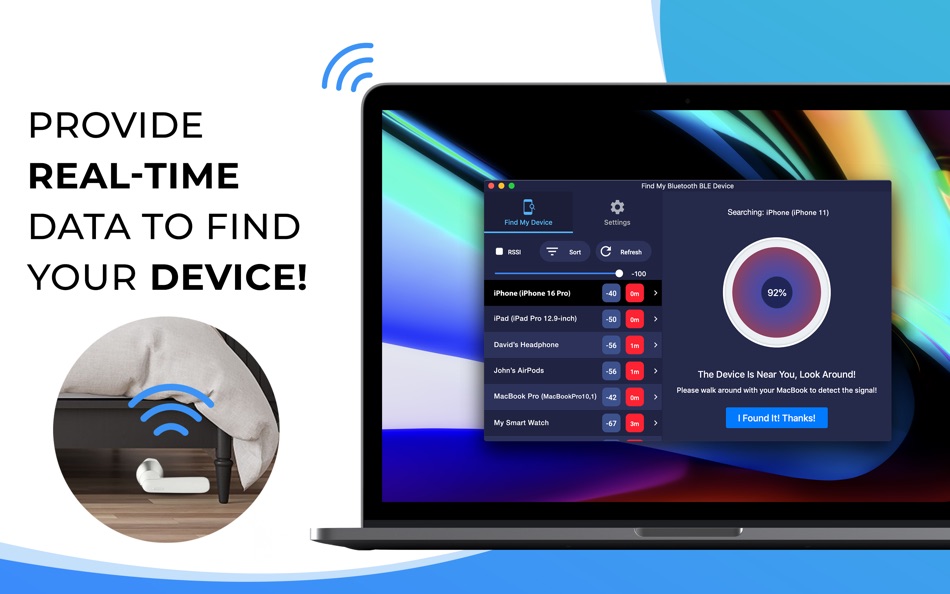
*** Find your lost Bluetooth device quickly, before its battery runs out! ***
*** Just use this app when you or your family misplace a device. It can save you the money you'd have to spend to buy a new one! ***
HOW TO FIND YOUR LOST DEVICES:
1. Find and select your lost device on the list.
2. Move around slowly and keep watching the signal strength, estimated distance, and hints on the screen of your MacBook.
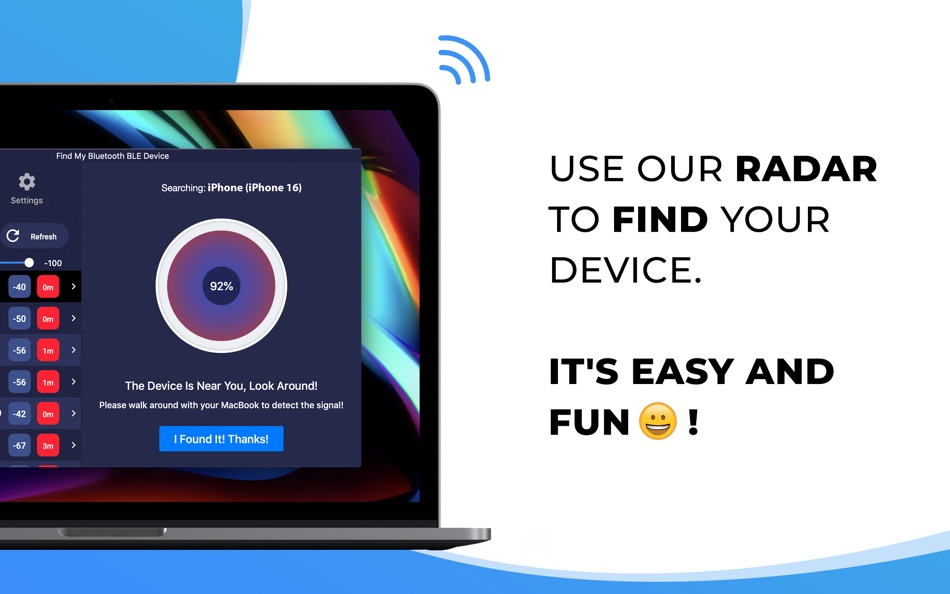
3. When it reads "The Device Is Near You, Look Around!", look around. You should find your device nearby.
KEY FEATURES:
• Bluetooth Radar can detect all nearby devices!
• Find your lost Bluetooth device using our radar. It's fun! No need to read a manual. **
• Show hints, signal strength, and the estimated distance between you and your lost device to help you find it quickly. **
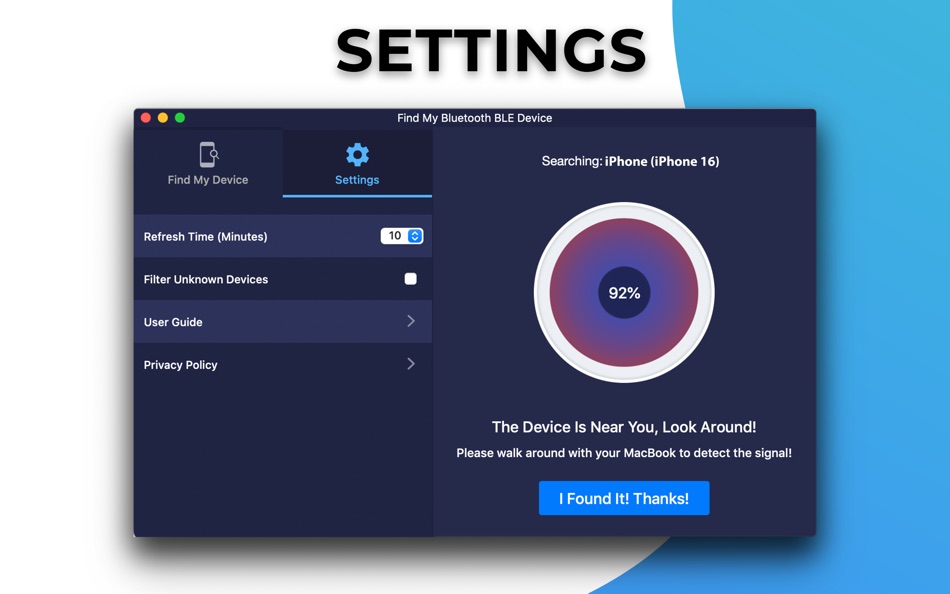
• Filter out Bluetooth devices based on their RSSI signal strength.
** Requires In-App Purchase.
THE APP CAN FIND THE FOLLOWING DEVICES:
• Apple Devices such as AirPods, AirTag, iPhones, iPads, Apple Watches, Apple Pencils, MacBooks.
• Smartphones, Tablets, Smart Watches, and Smart Bands such as Samsung Gear, Microsoft Band, Pixel Watch, Amazfit Band, etc.
• Bluetooth Headphones, Earbuds, and Speakers such as Bose, Beats, Galaxy Buds, JBL, Jabra, etc.
• Fitness Trackers such as Fitbits, Garmin, Oura, etc.
• All other Bluetooth BLE (Bluetooth Low Energy) Device.
SUBSCRIPTION:
Payment will be charged to iTunes Account at confirmation of purchase.
Subscription automatically renews unless auto-renew is turned off at least 24-hours before the end of the current period.
Account will be charged for renewal within 24-hours prior to the end of the current period. The cost depends on the selected plan.
Subscriptions may be managed by the user and auto-renewal may be turned off by going to the user's Account Settings after purchase.
Please contact support if you can't find your device.
Thank you!
Service Terms: http://www.9bestapp.com/terms/
Privacy Policy: http://www.9bestapp.com/resources/privacy-policy.html
Ad
Ảnh chụp màn hình

Lịch sử giá
-
* Trong ứng dụng mua hàng - Hôm nay: Miễn phí
- Tối thiểu: Miễn phí
- Tối đa: Miễn phí
Theo dõi giá
Tính năng mới
- Phiên bản: 2.2.5
- Cập nhật:
- Thank you for using Find My Bluetooth BLE Device. We keep updating this app to bring you the latest performance improvements and bug fixes.
Bình luận (0)
Hãy là người đầu tiên nhận xét 🌟
Nhà phát triển
- Best App Limited
- Nền tảng: iOS Ứng dụng (6) macOS Ứng dụng (11)
- Danh sách: 3 + 3
- Điểm: 21 + 16,870 ¡
- Xếp hạng: 0
- Đánh giá: 0
- Bình luận: 0
- Giảm giá: 0
- Video: 0
- RSS: Đăng ký
Điểm (1)
-

- 11,153 Simon Chan
- +1

Xếp hạng (0)
0 ☹️
Danh sách (1)
- Find My Bluetooth BLE Device

Đánh giá (0)
Hãy là người đầu tiên đánh giá 🌟
Thông tin bổ sung
- Phiên bản: 2.2.5
- Danh mục:
macOS Ứng dụng›Tiện ích - HĐH:
macOS,macOS 10.13 trở lên - Kích thước:
12 Mb - Ngôn ngữ được hỗ trợ:
English - Xếp hạng nội dung:
4+ - Mac App Store Xêp hạng:
0 - Cập nhật:
- Ngày phát hành:
«Find My Bluetooth BLE Device». Nền tảng: macOS. Thể loại: Tiện ích. Nhà phát triển: «Best App Limited». Bản phát hành đầu tiên: . Cập nhật lần cuối: . Giá hiện tại: miễn phí. Tiêu đề này chưa nhận được xếp hạng hoặc đánh giá trên AppAgg. Danh sách: công khai 1, riêng tư 0. Điểm được theo dõi: xác nhận 1, gián tiếp 0. Ngôn ngữ có sẵn: English. AppAgg theo dõi lịch sử giá, xếp hạng và phản hồi của người dùng cho «Find My Bluetooth BLE Device». Theo dõi ưu đãi và cập nhật trong tương lai qua RSS. AppAgg không lưu trữ ứng dụng hoặc phân phối phần mềm. Tất cả các nhãn hiệu, logo và ảnh chụp màn hình đều thuộc về chủ sở hữu tương ứng.
Find My Bluetooth BLE Device URL ngắn: Đã sao chép!- 🌟 Chia sẻ
- Mac App Store
Ad
Tương tự
-
- BlueSpy: Find Bluetooth Device
- macOS Ứng dụng: Tiện ích Bởi: Phil Trevor
- $1.99
- Danh sách: 0 + 0 Xếp hạng: 0 Đánh giá: 0
- Điểm: 0 + 0 0 Phiên bản: 1.0 Find your lost Bluetooth devices with ease. With BlueSpy: Find Bluetooth Device, you can quickly locate nearby Bluetooth devices directly from your Mac simple, accurate, and powerful. ... ⥯
-
- Find My Cursor - Mouse Finder
- macOS Ứng dụng: Tiện ích Bởi: Clement Rousseau
- * Miễn phí
- Danh sách: 0 + 0 Xếp hạng: 0 Đánh giá: 0
- Điểm: 0 + 0 0 Phiên bản: 1.1 Have you ever struggled to find your cursor on a large screen or during a presentation? Find My Cursor solves that problem with a simple and elegant solution: a dynamic ripple effect ... ⥯
-
- Device Checker & Device Test
- macOS Ứng dụng: Tiện ích Bởi: 余 张
- $0.99
- Danh sách: 0 + 0 Xếp hạng: 0 Đánh giá: 0
- Điểm: 0 + 0 0 Phiên bản: 1.0.0 A comprehensive application for hardware and system diagnostics, designed to help users verify the functionality of their Device s essential components. Features Hardware Detection - ... ⥯
-
- Find and Replace Text in Files
- macOS Ứng dụng: Tiện ích Bởi: Thomas Osthege
- * Miễn phí
- Danh sách: 1 + 2 Xếp hạng: 0 Đánh giá: 0
- Điểm: 4 + 0 0 Phiên bản: 2.0.2 Find and Replace Text in Files Save hours of text editing process hundreds of files with a single click! Why this app? Stop the tedious opening and editing of individual files! This ... ⥯
-
- Bluetooth Hub
- macOS Ứng dụng: Tiện ích Bởi: Victor Jorgensen
- Miễn phí
- Danh sách: 0 + 0 Xếp hạng: 0 Đánh giá: 0
- Điểm: 1 + 0 0 Phiên bản: 1.0 Bluetooth Hub is a fast, keyboard first Bluetooth switcher for macOS. Instantly connect or disconnect paired devices, move audio output with one keystroke, and keep your favorites at ... ⥯
-
- Bluetooth Battery Monitor
- macOS Ứng dụng: Tiện ích Bởi: 仁超 张
- $0.99
- Danh sách: 0 + 0 Xếp hạng: 0 Đánh giá: 0
- Điểm: 0 + 0 0 Phiên bản: 7.2.2 Bluetooth Battery Monitor is a practical tool designed for real-time battery monitoring of Bluetooth devices. It seamlessly connects to Bluetooth devices and provides real-time battery ⥯
-
- Device Guardian
- macOS Ứng dụng: Tiện ích Bởi: 春华 高
- * Miễn phí
- Danh sách: 0 + 0 Xếp hạng: 0 Đánh giá: 0
- Điểm: 0 + 0 0 Phiên bản: 1.0.3 Device Guardian is a security protection app designed specifically for MacBook. It provides anti-theft protection in public places such as cafés, libraries, and airports. When you need ⥯
-
- Find It Server
- macOS Ứng dụng: Tiện ích Bởi: Appersian
- Miễn phí
- Danh sách: 0 + 0 Xếp hạng: 0 Đánh giá: 0
- Điểm: 0 + 0 0 Phiên bản: 2.1 Find It is all you need to easily search, view, download, and share files from your Mac directly to your iPhone or iPad. Easily connect with your Mac with "Find It Server" and follow ... ⥯
-
- Find Any File (FAF)
- macOS Ứng dụng: Tiện ích Bởi: Thomas Tempelmann
- $8.00
- Danh sách: 5 + 2 Xếp hạng: 0 Đánh giá: 0
- Điểm: 1 + 0 0 Phiên bản: 2.6.1 Search Beyond The Spotlight Unhappy with Spotlight because it does not find files that you know to be there? Use FAF to find every file on your disks, including those usually hidden. ... ⥯
-
- Bluetooth Mic Switch
- macOS Ứng dụng: Tiện ích Bởi: du nguyen
- Miễn phí
- Danh sách: 1 + 0 Xếp hạng: 0 Đánh giá: 0
- Điểm: 0 + 0 0 Phiên bản: 1.01 Fixes thebluetooth audio by automatically switching away from the bluetooth mic. (this fixes the bandwidth issues which causes horrible audio) Key Features: Detects when Bluetooth ... ⥯
-
- Find My RAW
- macOS Ứng dụng: Tiện ích Bởi: 实 许
- Miễn phí
- Danh sách: 1 + 0 Xếp hạng: 0 Đánh giá: 0
- Điểm: 0 + 0 0 Phiên bản: 1.0.0 You ve just purchased a valuable new camera, gone out to capture thousands of exquisite photos, and returned home to open your favorite photo editing software. You re all set to ... ⥯
-
- Device Information | | CPU-Z
- macOS Ứng dụng: Tiện ích Bởi: Md Zahidul Islam Mazumder
- Miễn phí
- Danh sách: 0 + 0 Xếp hạng: 0 Đánh giá: 0
- Điểm: 0 + 0 0 Phiên bản: 2 User can get his device information with our application. So, install & enjoy. ⥯
-
- Find My Screenshot
- macOS Ứng dụng: Tiện ích Bởi: Adish Padhani
- Miễn phí
- Danh sách: 1 + 0 Xếp hạng: 0 Đánh giá: 0
- Điểm: 1 + 0 0 Phiên bản: 1.13 Do you take a lot of screenshots? If a lot then this app is for you. == Search your screenshots, other PNG, and JPEG files == - Select a Directory/Folder where you keep your files - ... ⥯
-
- Auto Scroll and Find
- macOS Ứng dụng: Tiện ích Bởi: Alfredo Grassau
- $2.99
- Danh sách: 0 + 1 Xếp hạng: 0 Đánh giá: 0
- Điểm: 1 + 0 0 Phiên bản: 1.0.16 "Auto Scroll and Find" for Safari: Dive Deeper into Infinite Scrolling Pages! Ever tried searching for something specific on a social media feed, only to manually scroll endlessly, ... ⥯