
Đã lưu
Chọn tên sẽ hiển thị trong menu Đã lưu của bạn.
Làm xong!
| Nhà phát triển: | Zac Cohan (1) | ||
| Giá bán: | * Miễn phí | ||
| Xếp hạng: | 0 | ||
| Bình luận: | 0 Đăng bình luận | ||
| Danh sách: | 1 + 3 | ||
| Điểm: | 5 + 396 (4.9) ¡ | ||
| App Store | |||
Mô tả

This is the third major release of a much beloved product that's been available for Apple's platforms since 2005.
# Coming from Soulver 2?
Soulver 3 for iPhone & Soulver 3 for iPad are one time (non-subscription) purchases and the first paid to Soulver on iPad & iPhone since the original version released in 2009.
You can import your Soulver 2 files by tapping the "+" button and selecting them from Files.
Enable iCloud syncing with Soulver 3 for Mac in Soulver's sheetbook settings.
# Why do I need Soulver?
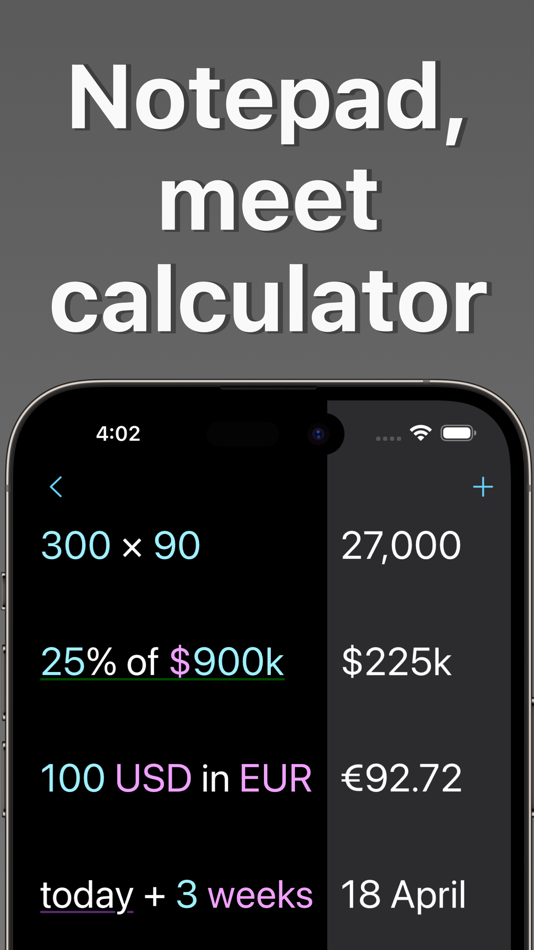
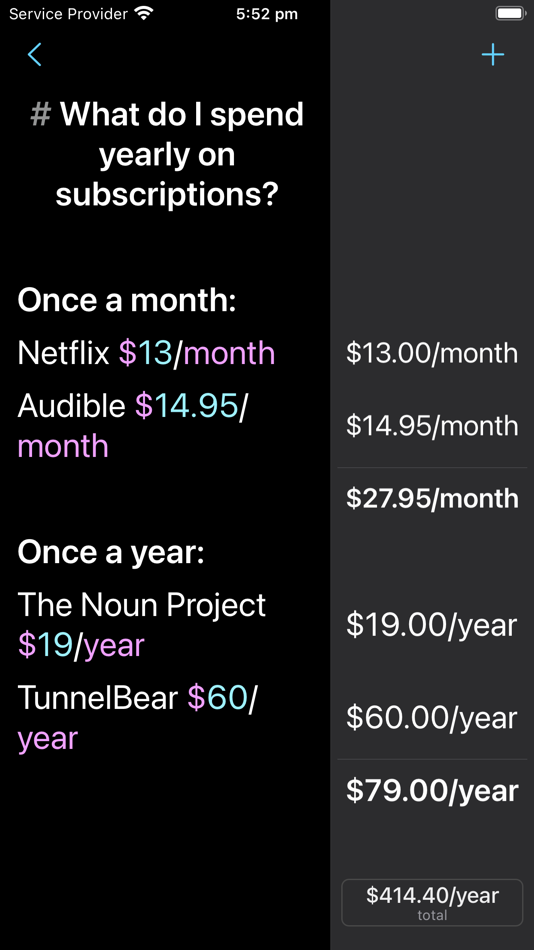
The goal of Soulver is to reduce your mental load when working things out.
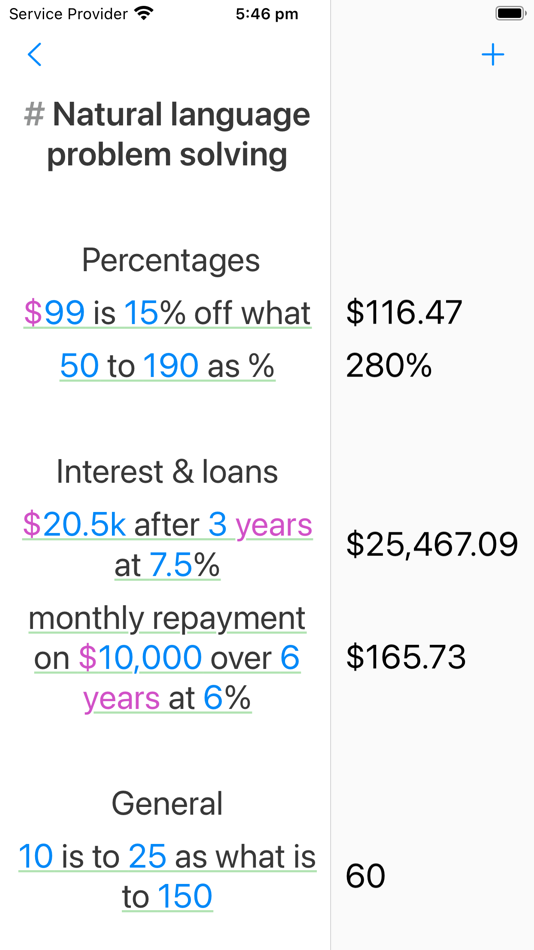
It includes natural language phrases for all the kinds of calculations you do regularly, including working with:
- Percentages ("20% of 900", "$399 - 20% discount")
- Unit conversions (300+ units supported)
- Dates & times ("March 12 + 3 weeks")
- Time zones ("10am New York to London")
- Business day calculations ("5 business days from today")
- Cooking calculations
- Financial functions (compound interest, mortgage repayments)
- Video time codes & frame rates
# Best iPhone calculator number pad
The Soulver numeric keyboard on iPhone has been meticulously designed to make doing calculations quicker.
Select from 1 of 6 specialized accessory keyboards, including for:
- Working with currencies
- Working out percentages
- Doing date & time math
- Doing calculations with variables
You can also set up your own custom accessory keyboard with button titles customized for your particular needs.
# Live Currency Conversions, Stock Prices & Weather
Soulver is connected to the internet & offers:
- Live & historical currency conversions (200+ real-world & popular crypto currencies & commodities)
- Live weather for most locations on Earth
- Live (popular) tech stock prices. Access 150,000+ stock tickers with the optional Soulver Stocks subscription
- Accurate public holiday data for your particular country is taken into account in business day calculations
# Advanced Workflows & Customizability
Soulver offers many useful tools for more advanced workflows including:
- Line references (like in spreadsheets)
- Variables (defined with the syntax "variable = 123", or define global variables in the settings)
- Conditional "if" statements (like in programming languages)
- Many settings for customizing the editing experience & preferred syntax colors
- Font & font size options
# Organisation & Sharing
Your calculations are saved automatically into sheets (like the Notes app).
Add text comments anywhere alongside your calculations to help them make sense to you later, and to others.
Choose iCloud as the sheetbook location to sync with Soulver 3 for Mac.
You can share your calculations with other as a PDF (just take a screenshot!) or print your sheet out, or send a stylish HTML email directly from Soulver.
# Best-of-class iPad app
We think Soulver is the best calculator app ever designed specifically for the iPad, including best-in-class integration with iPadOS & hardware features. This includes…
- Support for the magic keyboard & tons of keyboard shortcuts
- Multiple windows, Slide Over & Split View so you can use Soulver as a floating calculator alongside Notes or Safari
- Scribble & Apple Pencil support
- Powerful text editor with handy editing features like a line styling palette & find & Replace
- Automation features (URL schemes & Siri Shortcuts)
# No-commitment 30 day trial
We offer a trial that does not need to be cancelled. You will NOT be charged automatically when the trial finishes.
Delete (or purchase) Soulver at any time during or after the trial.
------------
Terms of Use (EULA)
https://www.apple.com/legal/internet-services/itunes/dev/stdeula/
Ad
Ảnh chụp màn hình



Lịch sử giá
-
* Trong ứng dụng mua hàng - Giá hiện tại: Miễn phí
- Tối thiểu: Miễn phí
- Tối đa: Miễn phí
Theo dõi giá
Thông tin bổ sung
 https://soulver.app
Tính năng mới
- Phiên bản: 3.16
- Cập nhật:
- # Languages
- Added Japanese, Korean, & Italian localizations
- Soulver's documentation is now translated into all languages
# General
- Additional cases in which the previous line will be inserted on a new line, including starting a line with a currency, a percentage phrase, "to", and other specifiers
- Added a setting under **Styling** to select whether a line reference token shows the referenced result (the default), or the line number of the referenced line
# Calculator
Screen Density Calculations
- Added PPI/DPI units
- Convert between physical length and pixels at a given density, for example `1 cm in px @ 326 ppi` or `40 px to cm at 96 dpi`.
- Added a screen density function like `ppi of 15" screen at 1024x768`.
Trigonometry
- Added cotangent & cosecant trigonometry functions (cot, csc) and their hyperbolic, inverse, and degree variants (Coth, csch, acot, acsc, cotd, cscd, acotd, and acscd)
Units
- Added rates for the Uniswap (UNI) cryptocurrency
Functions
- Added an "is x prime" function: "is 59 prime" (= true)
Statistics
- Added standard deviation: "standard deviation of 20, 30 and 40" (=10)
- Added "avg" as a synonym for "average" ("avg of 3,4,5")
Calendar & timezone calculations
- Added a shorthand time difference function: "time difference Paris" [interpreted as "what is the time difference between here and Paris], also "time diff paris" & "diff paris"
- Added a “years to” function (years to 2029)
Percentage phrases now support arbitrary comment words in more cases. For example:
- 20% discount off $500
- 5% gratuity on $95
- 40% of 90
United States customary units
Improved handling of US customary units.
* US customary units are now returned in certain cases when the input uses US customary units
* Added support for compound feet-and-inches expressions using “and”
* `5 feet and 3 inches in cm`
* Added additional feet/inches aliases
Cities and airports
- Added 119 additional tourist-destination cities and airports
Bug fixes
- Fixed an issue with rounding functions and lap times (thanks Jasper)
- Fixed an issue with line dp settings not applying to feet & inches (thanks Jon)
- Fixed an issue with locales that use a dot as a decimal separator and space as the thousands separator (though uncommon, this can be set as a custom locale in macOS system settings)
- Fixed an issue with adding clock-formatted times around daylight savings change boundaries
Nhà phát triển
- Zac Cohan
- Nền tảng: iOS Ứng dụng (1)
- Danh sách: 1 + 3
- Điểm: 5 + 396 ¡
- Xếp hạng: 0
- Bình luận: 0
- Giảm giá: 0
- Video: 0
- RSS: Đăng ký
Danh sách (1)
- Soulver 3

Điểm (5)
-

- 534 MichaelTheGeek
- +1
-
- 9 HT
- +1
-
- 2,979 바람처어럼
- +1
-
- 11,339 Simon Chan
- +1
-
- 1 Iulian
- +1




Xếp hạng (0)
0 ☹️
Bình luận (0)
Hãy là người đầu tiên nhận xét 🌟
«Soulver 3». Nền tảng: iOS. Thể loại: Năng suất. Nhà phát triển: «Zac Cohan». Bản phát hành đầu tiên: . Cập nhật lần cuối: . Giá hiện tại: miễn phí. Tiêu đề này chưa nhận được xếp hạng hoặc đánh giá trên AppAgg. Danh sách: công khai 1, riêng tư 3. Điểm được theo dõi: xác nhận 5, gián tiếp 396. Cửa hàng: App Store. Đánh giá cửa hàng: 4.9. Phiếu bầu: 396. Ngôn ngữ có sẵn: Chinese, English, French, German, Italian, Japanese, Korean, Russian, Spanish. AppAgg theo dõi lịch sử giá, xếp hạng và phản hồi của người dùng cho «Soulver 3». Theo dõi ưu đãi và cập nhật trong tương lai qua RSS. AppAgg không lưu trữ ứng dụng hoặc phân phối phần mềm. Tất cả các nhãn hiệu, logo và ảnh chụp màn hình đều thuộc về chủ sở hữu tương ứng.
Soulver 3 URL ngắn: Đã sao chép!- 🌟 Chia sẻ
- App Store
Tương tự
-
- Soulver
- iOS Ứng dụng: Năng suất Bởi: Acqualia Software OU
- $2.99
- Danh sách: 1 0 0
- Điểm: 2 + 763 (4.8) Phiên bản: 2.9.4 Soulver is a beautiful notepad calculator app that you will love. It has a new kind of interface that is far more useful than a traditional calculator. It lets you use words alongside ... ⥯
-
- Actions
- iOS Ứng dụng: Tiện ích Bởi: Sindre Sorhus
- Miễn phí
- Danh sách: 4 + 6 0 0
- Điểm: 4 + 366 (4.9) Phiên bản: 4.0.1 Supercharge your shortcuts with lots of useful actions. It provides additional actions for the Shortcuts app. IMPORTANT: Because of an iOS bug, to make the actions show up in the ... ⥯
-
- PacketCalc
- iOS Ứng dụng: Tiện ích Bởi: Allen ROBEL
- Miễn phí
- Danh sách: 0 + 1 0 0
- Điểm: 2 + 2 (5.0) Phiên bản: 2020.11(27) A Calculator for Packets Ridding the world of uncalculated packets, one engineer at a time. PacketCalc answers questions like: - What size payload does a 128 byte ethernet frame carry? ⥯
-
- NoteCalc - LLM & Ask
- iOS Ứng dụng: Lối sống Bởi: 艳君 武
- * Miễn phí
- Danh sách: 0 0 5 (1)
- Điểm: 0 Phiên bản: 1.0.4 A calculator that works like a notepad reinvent your calculation experience! Forget punching numbers line by line. On a clean page, just write down what you need in your own words: My ... ⥯