
已儲存
選擇要顯示在你的已儲存選單中的名稱。
完成!
| 開發人員: | Wise Tech Labs Private Limited (30) | ||
| 價錢: | $4.99 | ||
| 評價: | 6,860 白金 | ||
| 排名: | 0 | ||
| 註釋: | 0 發表評論 | ||
| 清單: | 2 + 2 | ||
| 點數: | 14 + 0 ¡ | ||
| +1 點數 | |||
描述

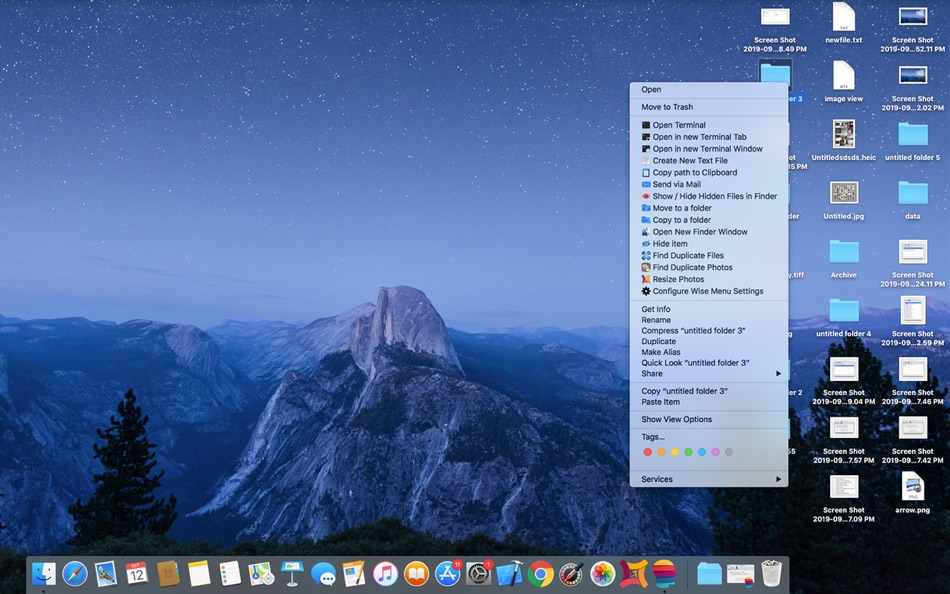
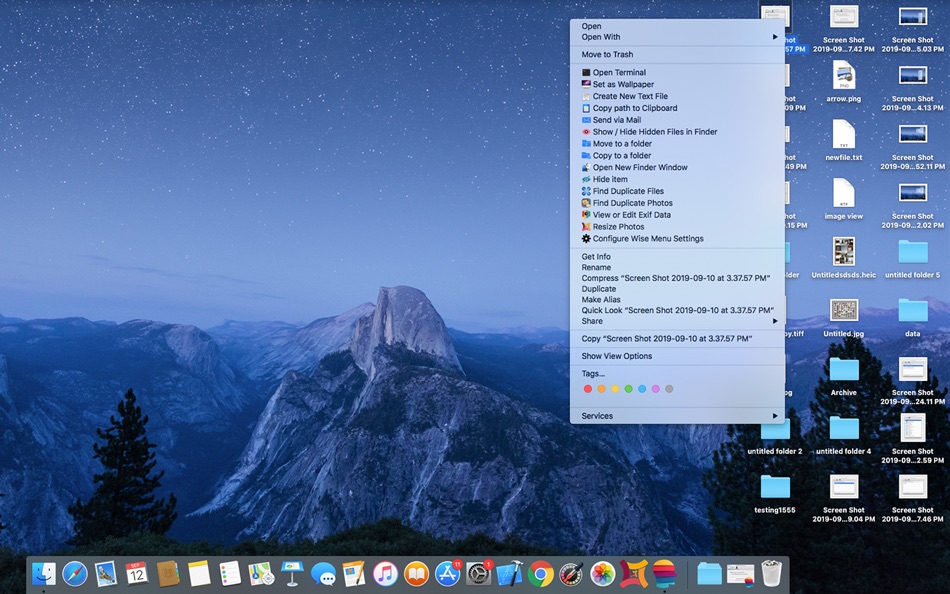
Let's take a look as what all additional Menu options are available in Wise Menu:
1. Open Terminal
This Menu Item action allows you to open Terminal instantly.
2. Open in new Terminal Tab
This Menu Item action allows you to open a new Terminal tab in an open Terminal window and will change the directory to the location of the selected directory in the Finder.
3. Open in new Terminal Window
This Menu Item action allows you to open a Terminal window at the location of the selected directory in the Finder.
4. Set as Wallpaper
This menu item option is available when you right click on an image and you can set that image as desktop Wallpaper in just a click.
5. Create New Text File
Sometimes we need to quickly create a new document file but Finder lacks to give an easy way to create new text files option in the Context menu. Wise Menu makes this possible with just few clicks using the Right Click Menu item.
6. Copy path to Clipboard
This menu item action copies the entire full file path of the selected file to your clipboard.
7. Send via Mail
Select a file within Finder, right click and then use this menu item action to attach them to an email automatically. Your mail client must be configured to support this functionality.
8. Show / Hide Hidden Files in Finder
The menu item allows you to easily toggle whether to allow Finder to show or hide the hidden files.
9. Move to a folder
Moving files and folders on your Mac is made much easier with Wise Menu, simply right click on any file or folder, click menu option to move that item, authorize in Open panel and instantly choose destination and the selected file/folder will be moved.
10. Copy to a folder
Copying files and folders on your Mac is made much easier with Wise Menu, simply right click on any file or folder that you want to copy to another location, click menu option to copy that item, authorize in Open panel and instantly choose destination and the selected file/folder will be copied.
11. Open New Finder Window
Wise Menu makes it very easy to quickly open a new Finder window at a specific location. Having this menu item in the Context Menu can result in a huge improvement to your Finder workflow as well as will help to save time by getting quick actions.
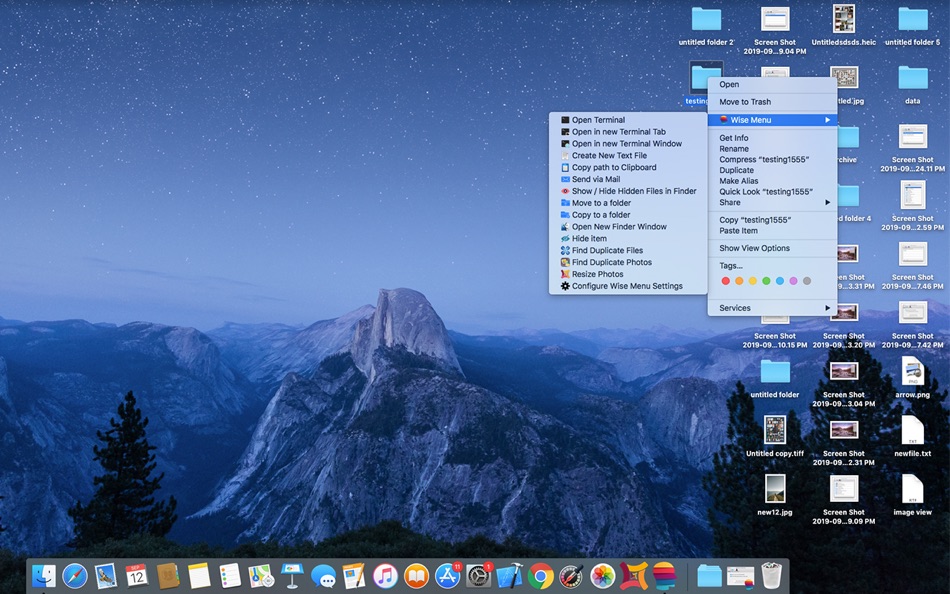
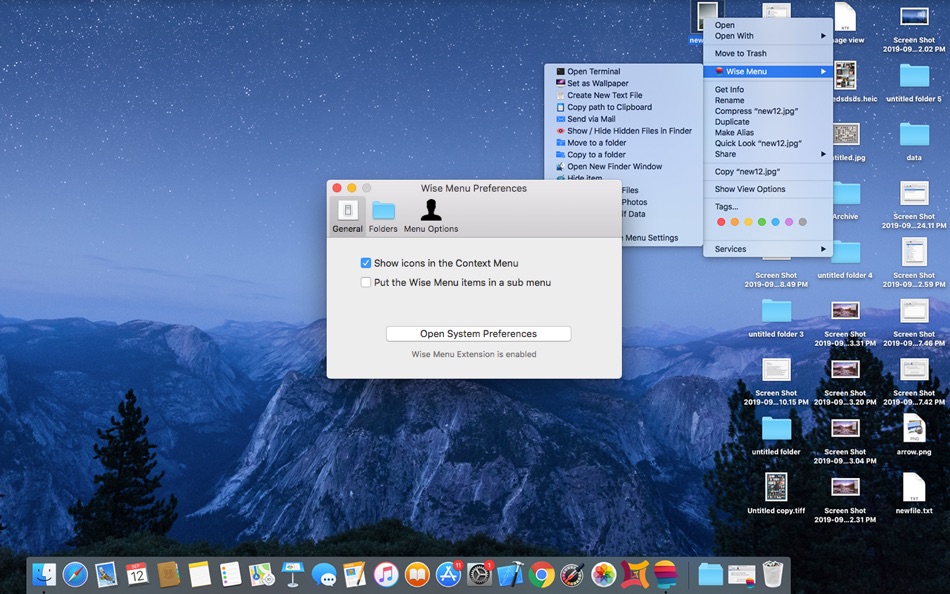
You can have the added menu items directly listed in the Context Menu or you can choose to put them in a Sub menu under 'Wise Menu'.
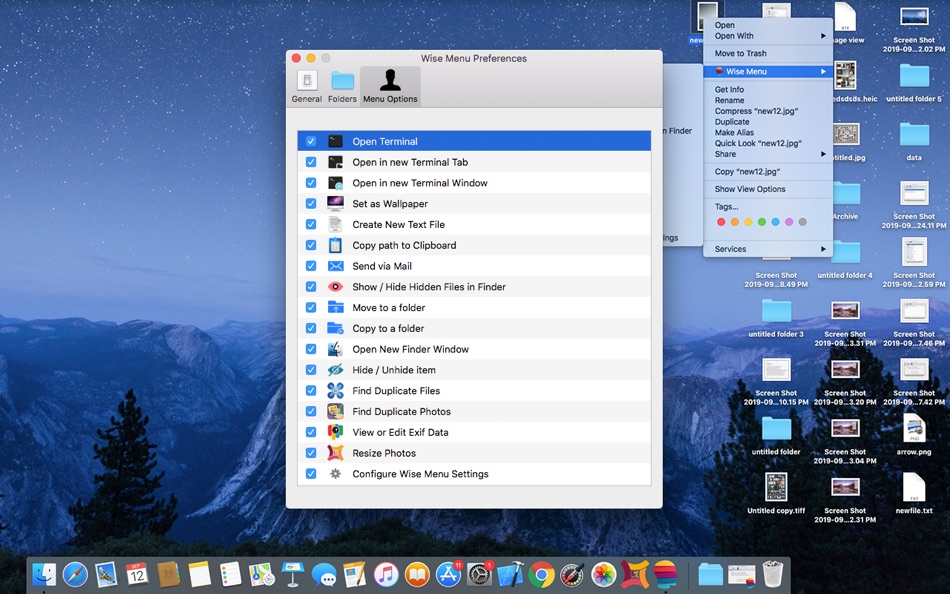
You can configure as which menu items you want or do not want from the Application Settings.
You will need to allow the extension to work in System Preferences when installing Wise Menu.
Menu item option to Scan for Duplicate Files will need the application "Duplicate Files Sweeper" to be installed on your Mac. This is available on the Mac App Store.
Menu item option to Scan for Similar Photos will need the application "Duplicate Photos Sweepoff" to be installed on your Mac. This is available on the Mac App Store.
Menu item option to Resize Photos will need the application "Photos Resizer" to be installed on your Mac from the Mac App Store.
Menu item option to View or edit Exif Data will need the application "EXIF Studio" to be installed on your Mac from the Mac App Store.
We are committed to give you the best services. Let us know if you need any additional menu item and we will try to include that in the next update.
Visit our blog at http://blogs.wisetechlabs.com to remain updated about latest technology updates and learn daily how to articles for various tasks.
螢幕擷取畫面
Ad
價格歷史
- 目前價格: $4.99
- 最小值: 免費
- 最大值: $9.99
追蹤票價
AppAgg 評價
6,860
AppAgg 預估評價:
Wise Menu
6,860 白金
評價越高,通常代表在 AppAgg 上的信號越強。
基於: 人氣 · 使用者評分 · 新鮮度 · 優惠 · 商店資料 · 社群活躍度
根據最新 AppAgg 資料每日重新計算。
縮短網址: 已複製!
其他資訊
- 發行日期:
- 類別 :
macOS 應用程式›生產應用 - OS:
macOS,macOS 10.12 以上版本 - 大小:
7 Mb - 支援的語言 :
English - 內容分級:
4+ - Mac App Store 評分:
0
 http://blogs.wisetechlabs.com
開發人員
- Wise Tech Labs Private Limited
- 平台: iOS 應用程式 (1) macOS 應用程式 (29)
- 清單: 6 + 6
- 點數: 202 + 24 ¡
- 排名: 0
- 註釋: 0
- 折扣: 0
- 影片: 1
- RSS: 訂閱
清單 (2)
- Wise Menu


點數 (14)



排名 (0)
0
註釋 (0)
成為第一個發表評論的人
簡要
Wise Menu 縮短網址: 已複製!- 分享
- Mac App Store
«Wise Menu». 平台: macOS. 類別: 生產應用. 開發商: «Wise Tech Labs Private Limited». 首次發布: . 最後更新: . 目前價格: $4.99. 最低記錄價格: $0.00 (). 最高記錄價格: $9.99 (). 此項目尚未在 AppAgg 上獲得評分或評論。 列表: 公開: 2, 私人: 2. 追蹤點: 已確認: 14, 間接: 0. 可用語言: English. AppAgg 會追蹤 «Wise Menu»的價格歷史、評分和用戶回饋。 AppAgg 不託管應用程式或分發軟體。 所有商標、標誌和螢幕截圖均屬於其各自所有者。 關注未來折扣和更新: RSS
類似
-
- Menu AI: Ask AI in menu bar.
- macOS 應用程式: 生產應用 由: INII Co., Ltd.
- * 免費
- 清單: 0 0 0
- 點數: 1 + 0 600 · 白銀 版本: 1.2.0 Menu AI - Ask AI in menu bar. Menu AI is a powerful AI chat assistant that lives in your menu bar, providing instant access to both GPT and Claude AI capabilities. With its sleek and ...
-
- Menu Bar Quick Calc
- macOS 應用程式: 生產應用 由: Mark Huber
- $0.99
- 清單: 0 0 0
- 點數: 0 + 0 560 · 青銅 版本: 1.0 Menu Bar Calculator is a lightweight, always-accessible calculator that lives in your Mac's menu bar. Perfect for quick calculations without interrupting your workflow. Features: ...
-
- Menu Bar Calendar
- macOS 應用程式: 生產應用 由: Sindre Sorhus
- 免費
- 清單: 1 + 1 0 0
- 點數: 4 + 0 5K · 白金 版本: 1.7.0 Quickly access a monthly calendar from your menu bar. You can click a date in the calendar to reveal it in the Calendar app or Google Calendar. The calendar displays dates and days in ...
-
- Menu Quotes
- macOS 應用程式: 生產應用 由: Tyler Durette
- 免費
- 清單: 0 0 0
- 點數: 1 + 0 740 · 白銀 版本: 1.0.1 A lightweight, simple app built natively for macOS Tahoe. Keeps and rotates through your favorite quotes in your menu bar throughout the day. Open source on GitHub: ...
-
- Menu Bar Timer
- macOS 應用程式: 生產應用 由: Efe Ertugrul
- $0.99
- 清單: 0 0 0
- 點數: 1 + 0 1K · 黃金 版本: 2.4.5 Menu Bar Timer adds a Stopwatch or a Timer to your menu bar so you can keep track of time whatever you've been working on without an extra app icon on your dock. You can choose ...
-
- Menu QuickNote
- macOS 應用程式: 生產應用 由: Oyvind Snekkestad
- * 免費
- 清單: 0 0 0
- 點數: 0 + 0 580 · 青銅 版本: 1.1.2 Menu QuickNote - Quick Notes for Your Mac Menu Bar Transform your note-taking experience with Menu QuickNote, the elegant and lightweight app that puts beautiful, colorful notes right ...
-
- Menu Meter Pro
- macOS 應用程式: 生產應用 由: Christian Ahrweiler
- $1.99
- 清單: 0 0 0
- 點數: 0 + 0 570 · 青銅 版本: 1.0.1 Menu Meter Pro shows essential system information directly in your menu bar so you always know what your Mac is doing. Designed to be minimal and unobtrusive, it displays only the ...
-
- Menu bar Launcher
- macOS 應用程式: 生產應用 由: Pawan Dixit
- $1.99
- 清單: 1 + 1 0 0
- 點數: 3 + 0 3K · 黃金 版本: 1.4 This is a simple menu bar utility to keep your frequent Files and Apps right into the menu bar so that you can quickly launch them when you want to work on them without locating then ...
-
- Menu Bar Reminder: Dojo
- macOS 應用程式: 生產應用 由: Florian Schweizer
- 免費
- 清單: 0 + 1 0 0
- 點數: 3 + 0 1K · 白銀 版本: 1.1 Add a single reminder to your menu bar - always visible. You can enter any text that you'd like to have on the menu bar and it will be shown to you at all times. You can also activate ...
-
- Menu Bar Hub: work.bench
- macOS 應用程式: 生產應用 由: Dimitri Giani
- * 免費
- 清單: 0 0 0
- 點數: 1 + 0 830 · 白銀 版本: 1.2 work.bench is the ultimate menu bar utility for macOS that revolutionizes your workflow. Designed exclusively for Mac with a beautiful notch-inspired interface, work.bench brings ...
-
- Menu Timers - High Precision
- macOS 應用程式: 生產應用 由: DevStorm
- 免費
- 清單: 0 0 0
- 點數: 1 + 0 580 · 青銅 版本: 1.0 Time your important tasks straight from the menu bar with this utility app! With millisecond precision, any task can be precisely measured. Features always on screen. The app lives in ...
-
- Menu Muncher
- macOS 應用程式: 生產應用 由: 经纬 宛
- $1.99
- 清單: 0 0 0
- 點數: 0 + 0 560 · 青銅 版本: 1.5 Q: How should I use this software? A: After opening the software for the first time, two icons will be generated on the leftmost side of the status bar, please drag the word "吃" (hold ...
-
- Cool Menu
- macOS 應用程式: 生產應用 由: SolutionShare Technologies Private Limited
- $3.99
- 清單: 1 0 0
- 點數: 3 + 0 6K · 白金 版本: 1.57 Cool Menu is an assortment of 10 super useful features that are not available on macOS. Instead of multiple menubar apps for each feature wasting your menubar s precious real estate, ...
-
- Notepad Menu Edition
- macOS 應用程式: 生產應用 由: Solaz Dazen srl
- $2.99
- 清單: 0 + 1 0 0
- 點數: 3 + 0 1K · 黃金 版本: 2.0 Write your ideas quickly without disturbing your window setup. Notepad Menu Edition allows you to jot down text fast anywhere, any time. Focus entirely on the text you write with the ...