
Salvos
Escolha o nome que será mostrado no seu menu Salvos.
Feito!
| Desenvolvedor: | FIPLAB Ltd (29) | ||
| Preço: | $4.99 | ||
| Pontuação: | 6,020 | ||
| Classificações: | 0 | ||
| Comentários: | 0 Postar comentário | ||
| Listas: | 1 + 0 | ||
| Pontos: | 0 + 0 ¡ | ||
| +1 Pontos | |||
Descrição

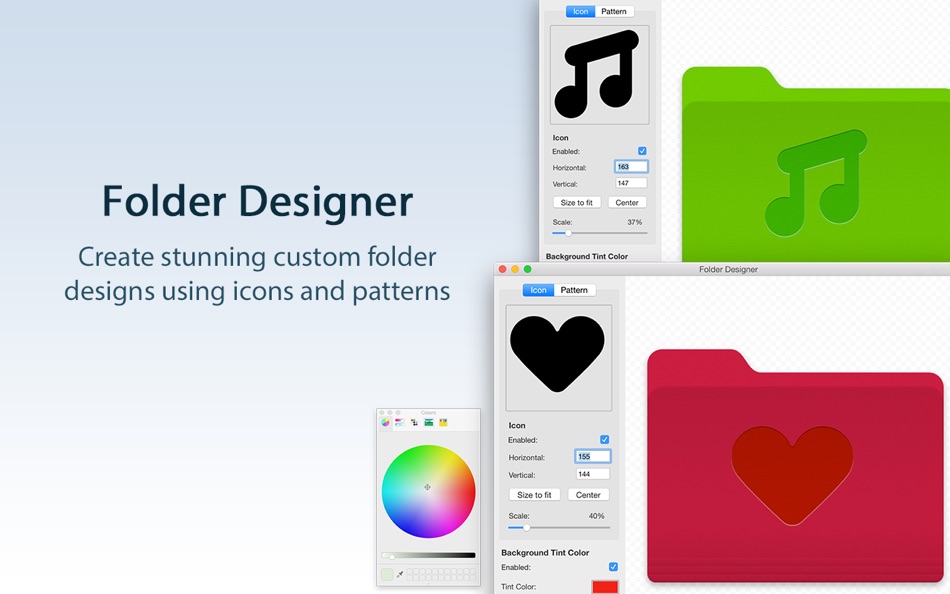
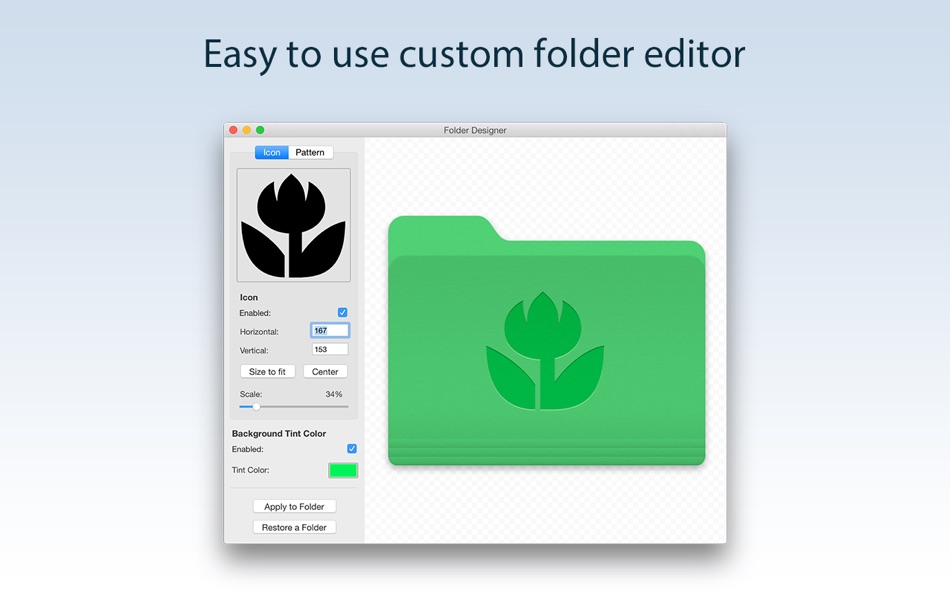
Folder Designer is the coolest and easiest way to customize Folders on your Mac. We’ve made this app perfectly simple to use so that anyone can give their Folders a totally unique appearance.
KEY FEATURES:
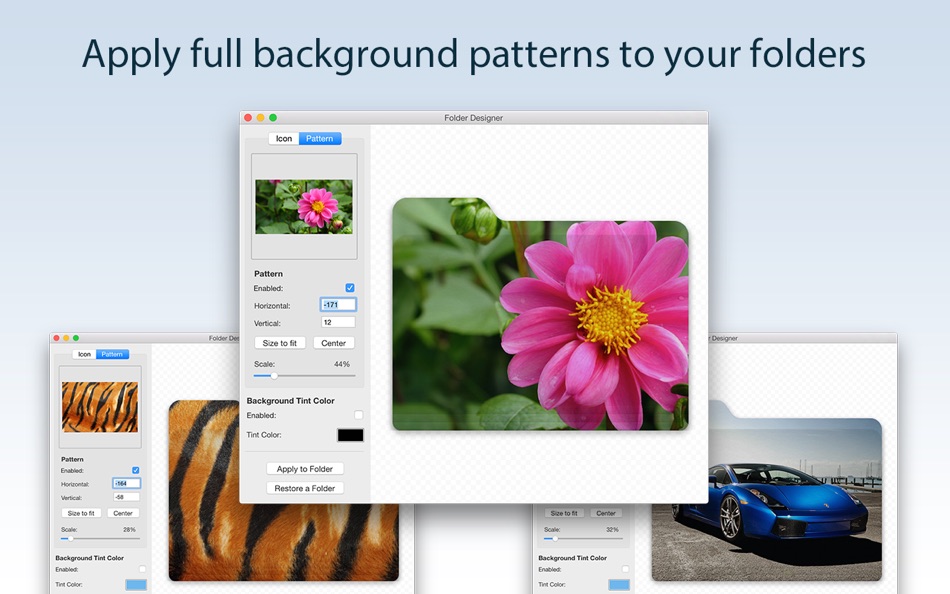
• Customize your Mac’s folders with a unique new icon or pattern
• Choose from a large selection of pre-installed icon images within the app
• Ability to add any image/pattern of your choice to a Folder
• Ability to edit the icon/pattern scale to allow a perfect fit according to your tastes
• Auto center/auto fit an icon or pattern
• Ability to position the icon using the mouse to exactly where you want
• Change the background colour to one of your choice
BENEFITS OF FOLDER DESIGNER:
• Instantly create Folders on your Mac that are entirely unique in appearance
• Have Folders that feature either a unique icon, pattern or even a different background colour than the regular blue shade
• Folders can be easily distinguishable and identifiable on your Mac directly by appearance
• An extremely easy app to use offering infinite customization possibilities
• Regular free updates
We've worked hard to make Folder Designer as simple and efficient as possible for you to use. We would love to hear your thoughts via email and make any improvements to future versions of this app. We intend to have an active development cycle powered by your feedback, love and support!
Capturas de ecrã
Ad
Histórico de preços
- Preço atual: $4.99
- Mínimo: $2.99
- Máximo: $4.99
Monitorizar preços
Pontuação AppAgg
Pontuação AppAgg estimada de Folder Designer: Custom Icons
6,020
Pontuações mais altas geralmente indicam sinais mais fortes no AppAgg.
Com base em: 🔥 popularidade · ⭐ avaliações dos usuários · 🕒 atualidade · 🏷️ ofertas · 🏬 dados das lojas · 👥 atividade da comunidade
Recalculado diariamente com dados AppAgg atualizados.
URL abreviado: Copiado!
Novidades
- Versão: 1.93
- Última atualização:
- - Fixed a crash that could occur when selecting an icon or pattern on certain systems
- Fixed icons and patterns appearing oversized and off-center on Retina displays
- The Fit and Center buttons now position overlays accurately on all display types
- Improved the Fit scale so icons sit comfortably within the folder rather than filling the entire face
Informações adicionais
- Data de lançamento:
- Categoria:
macOS Apps›Utilitários - Sistemas operacionais:
macOS,macOS 11.5 ou superior - Tamanho:
9 Mb - Idioma compatível:
English - Classificação do conteúdo:
4+ - Mac App Store Avaliação:
0 - Site:
 https://fiplab.com
Desenvolvedor
- FIPLAB Ltd
- Plataformas: macOS Apps (29)
- Listas: 6 + 13
- Pontos: 35 + 0 ¡
- Classificações: 5 (1)
- Comentários: 0
- Descontos: 0
- Vídeos: 0
- RSS: Subscrever
Listas (1)
- Folder Designer: Custom Icons

Pontos (0)
0 ☹️
Classificações (0)
0 ☹️
Comentários (0)
Seja o primeiro a comentar 🌟
«Folder Designer: Custom Icons». Plataforma: macOS. Categoria: Utilitários. Desenvolvedor: «FIPLAB Ltd». Primeiro lançamento: . Última atualização: . Preço atual: $4.99. Preço mais baixo registrado: $2.99 (). Preço mais alto registrado: $4.99 (). Este título ainda não recebeu classificações ou comentários no AppAgg. Listas: públicas 1, privadas 0. Idiomas disponíveis: English. AppAgg rastreia histórico de preços, classificações e feedback de usuários para «Folder Designer: Custom Icons». Acompanhe futuros descontos e atualizações via RSS. AppAgg não hospeda aplicativos nem distribui software. Todas as marcas registradas, logotipos e capturas de tela pertencem aos seus respectivos proprietários.
Folder Designer: Custom Icons URL abreviado: Copiado!- 🌟 Compartilhar
- Mac App Store
Semelhantes
-
- Folder Designer - Custom icons
- macOS Apps: Utilitários Por: Marcin Chojnacki
- $1.99
- Listas: 0 0 0
- Pontos: 0 + 0 2k Versão: 1.0.0 Introducing Folder Designer, the ultimate macOS app that empowers you to redefine your desktop aesthetics. Unleash your creativity by choosing custom colors, symbols, and adding ... ⥯
-
- Color Folder - Custom Icons
- macOS Apps: Utilitários Por: 万林 彭
- * Grátis
- Listas: 1 + 1 0 0
- Pontos: 6 + 0 7k Versão: 5.1 Color Folder lets you change folder icons instantly and manage your directories more efficiently. Freely customize folder icons with multiple templates, any color, and your own images. ⥯
-
- Folder Theme - Change icon
- macOS Apps: Utilitários Por: 哲颖 孙
- * Grátis
- Listas: 0 0 0
- Pontos: 0 + 0 4k Versão: 1.0 Folder Theme - Customize Your Mac Folders Like Never Before! Folder Theme (百变文件夹) is a powerful macOS app designed to transform your desktop with stunning custom folder icons. Say ... ⥯
-
- Folder by Color - Change color
- macOS Apps: Utilitários Por: 清碧 饶
- Grátis
- Listas: 1 + 1 0 0
- Pontos: 6 + 0 1k Versão: 1.8.2 [Folder by Color] is a folder color changing tool. Using different colored folder icons can keep your files well organized, thereby increasing the efficiency of file management. you ... ⥯
-
- Folder - Custom your folder
- macOS Apps: Utilitários Por: 玉 李
- $0.99
- Listas: 0 0 0
- Pontos: 2 + 0 4k Versão: 1.0.1 Folder App is an app for customizing folders on macOS. You can set folders to different colors, and you can also add text, emoji, or icons to folders. Of course, the colors of text and ⥯
-
- Folder Snapshot Utility
- macOS Apps: Utilitários Por: David Gradwell
- $4.99
- Listas: 0 0 0
- Pontos: 0 + 0 2k Versão: 2021.06.11 Folder Snapshot Utility will make a rapid backup copy (a snapshot ) of anything you throw at it. This is much faster than a traditional backup copy (think ~1200x faster) and uses ... ⥯
-
- Folder Dater
- macOS Apps: Utilitários Por: Dalamser
- $2.99
- Listas: 1 0 0
- Pontos: 0 + 0 3k Versão: 2.3.2 Folder Dater sets a folder s modification date or creation date attributes based on the attributes of its descendants. All changes can be previewed in the Finder and undone before ... ⥯
-
- Folder Rack – File Manager
- macOS Apps: Utilitários Por: Ivo Wessel
- * Grátis
- Listas: 0 0 0
- Pontos: 1 + 0 6k Versão: 1.27 FOLDER RACK Manage your files and folders The Finder was always my most-used tool. However, there were many functions that I missed in my day-to-day work or that I would have done ... ⥯
-
- Folder Previewer Pro
- macOS Apps: Utilitários Por: Nikhil Anshuman
- $1.99
- Listas: 0 0 0
- Pontos: 0 + 0 4k Versão: 1.0 Folder Previewer Pro lets you instantly preview the contents of any folder or archive (ZIP) directly in Finder s Quick Look, without opening or extracting files. Just select a folder ... ⥯
-
- Folder Peek
- macOS Apps: Utilitários Por: Sindre Sorhus
- $4.00
- Listas: 5 + 3 0 0
- Pontos: 9 + 0 12k Versão: 1.13.1 Quickly access documents, files, folders, and apps from the menu bar. Think of it as an alternative to Dock folders, just more powerful and customizable. Each folder you add gets its ... ⥯
-
- Folder - Colorful folder maker
- macOS Apps: Utilitários Por: 余 张
- * Grátis
- Listas: 1 + 1 0 0
- Pontos: 12 + 0 6k Versão: 1.3.1 How many folders do you have on your computer? Scores of them? Hundreds? Thousands? Are all of them are alike: default folder, default folder, default folder, default folder... It's so ⥯
-
- Folder Analyze
- macOS Apps: Utilitários Por: 培基 王
- * Grátis
- Listas: 0 0 0
- Pontos: 1 + 0 4k Versão: 2.0.1 A powerful and easy-to-use folder content analysis tool that displays content as charts, making the size and number of files clearly visible. It also supports an edit mode, where you ... ⥯
-
- Folder Crazy Desktop
- macOS Apps: Utilitários Por: Steve Mills
- $0.99
- Listas: 0 0 0
- Pontos: 0 + 0 2k Versão: 1.5.3 Remember how great the Desktop image feature in macOS was before they removed the Tile option? Just like Folder Crazy vastly improves the screensaver experience, Folder Crazy Desktop ... ⥯
-
- Folder Sizes
- macOS Apps: Utilitários Por: Roberto Piccirilli
- $2.99
- Listas: 0 0 0
- Pontos: 0 + 0 2k Versão: 2.2.1 Show in easy and intuitive way the space occupied by files and folders . With this app you can immediately identify the space occupied for easy cleaning of their own archives. Now you ... ⥯
Você também pode gostar de
Vistos recentemente
Última atualização:
Operadores de pesquisa que podem ser usados com o AppAgg