
| Desenvolvedor: | Chen Wang (19) | ||
| Preço: | $24.99 | ||
| Classificações: | 0 | ||
| Resenhas: | 0 Escrever um comentário | ||
| Comentários: | 0 Postar comentário | ||
| Listas: | 1 + 0 | ||
| Pontos: | 2 + 0 ¡ | ||
| Mac App Store | |||
Descrição

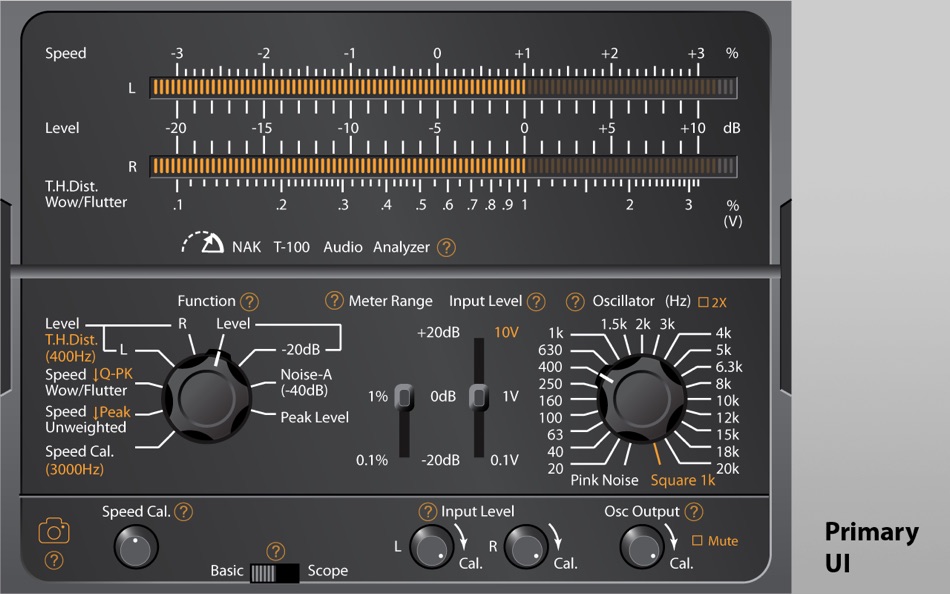
The app features modern DSP core with traditional analog skin. It adopts the "Skeuomorphism" design philosophy to offer era-specific operational experience in working with analog audio devices. However, the underlaying engine works purely from digital domain after all, which does not have to follow the analog measurement principles and yield strict identical readings. Typical tolerances across typologies of test instruments should be expected.
Features and Specifications
[Generator]
21 spot sine wave, plus one additional customizable frequency
White, Pink noise and 1kHz square wave
Frequency doubler (if sample-rate is higher than 88kHz)
[Level]
-80dB ~ +10dB
(extendable to +30dB with physical input attenuator),
RMS or peak, 0dB = 1.0V (after calibration)
[AC Volt]
10mV ~ 300mV, 0.1V ~ 1V,
1V ~ 10V (with physical input attenuator)
20Hz ~ 20kHz
Requires calibration with reference AC volt-meter
[THD+N or HD3]
0.01% ~ 0.3%, 0.1% ~ 3%
400Hz/1000Hz
[Speed]
3000Hz/3150Hz ±3%
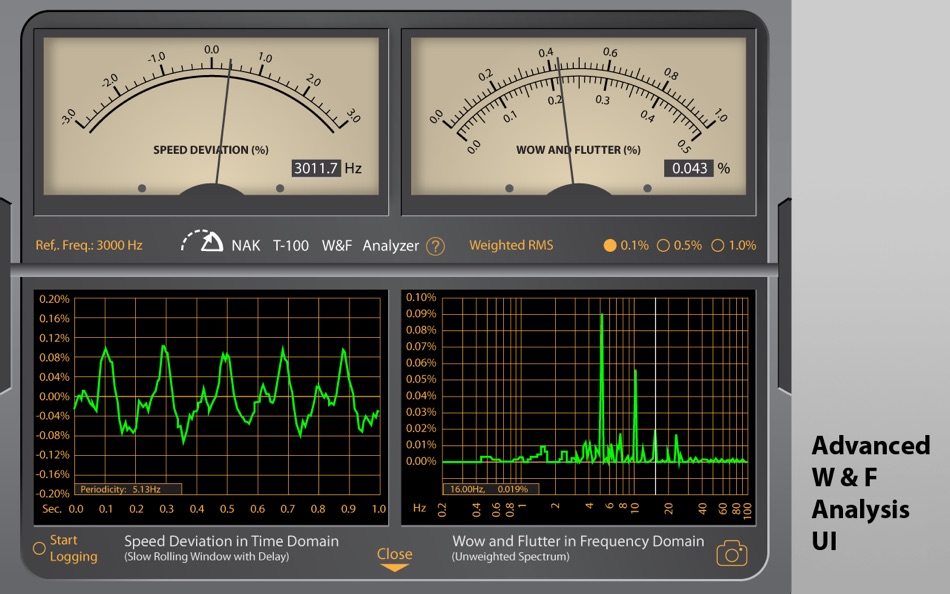
[Wow & Flutter]
0.01% ~ 0.3%, 0.1% ~ 3%
Quasi-Peak (DIN 45507)
WRMS (JIS)
Peak unweighted
RMS unweighted
Spectrum display: 0.2 ~ 100Hz
[Signal/Noise Ratio]
-100dB ~ -10dB
IHF-A weighted
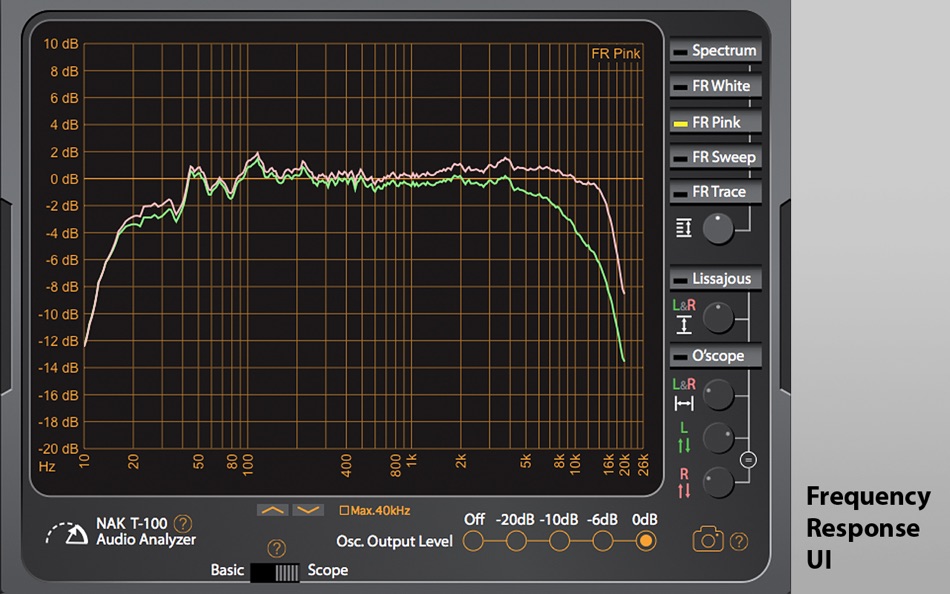
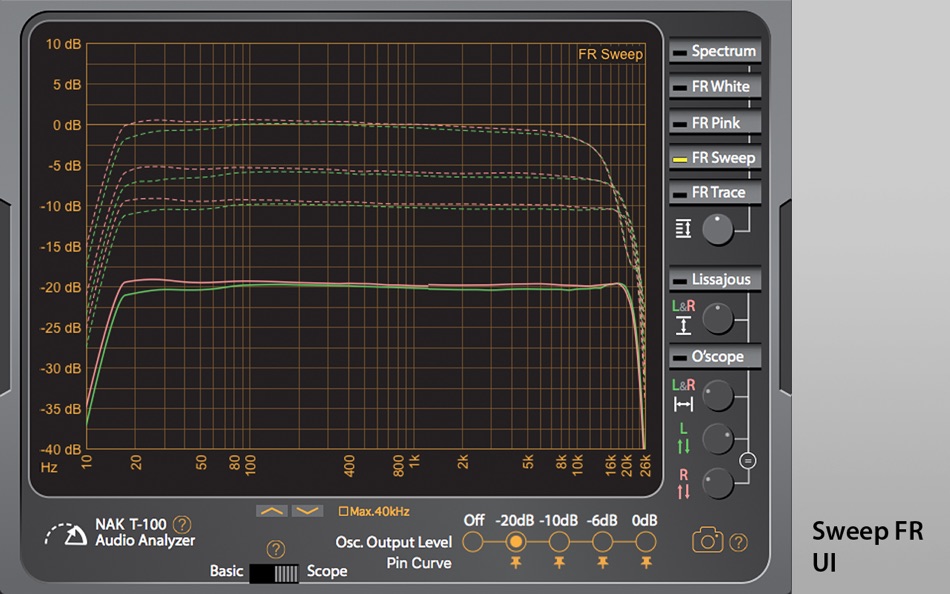
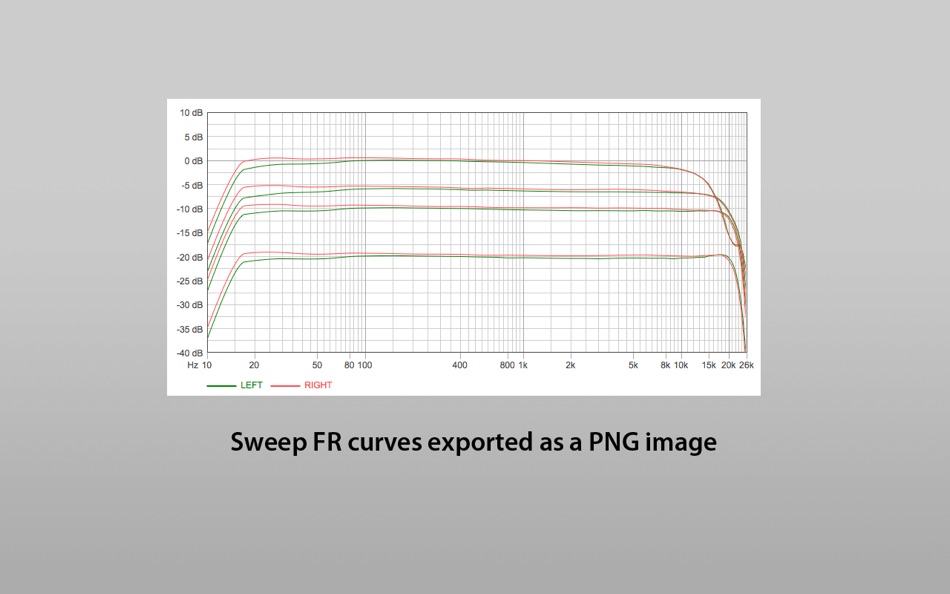
[Frequency Response]
20 ~ 20kHz (extendable to 40kHz at 88.2kHz sample rate or higher)
-100dB ~ +10dB
White noise
Pink noise
Sweep frequency (asynchronous)
Auto Trace (driven by external test signal)
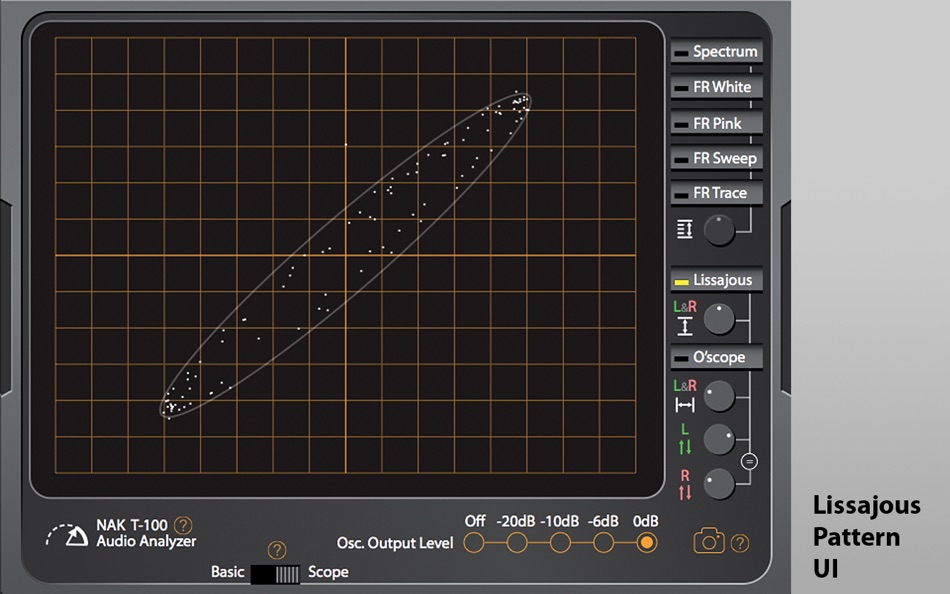
[Lissajous]
Ellipse figure with time stabilizer
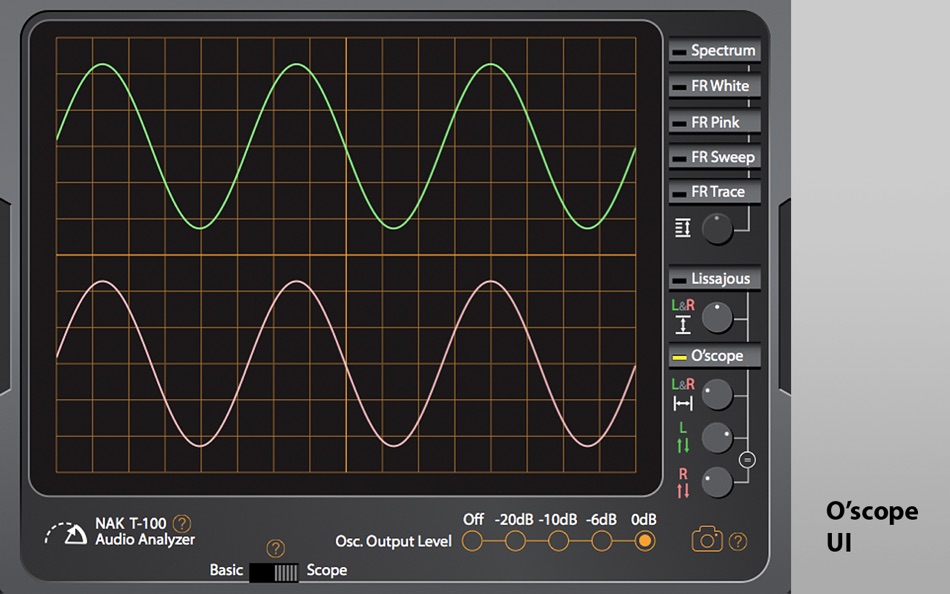
[Oscilloscope]
Two channel, non-quantitative
[Meter Ballistics]
RMS: 300mS
Peak: 10mS raise, 2000mS fall
[Sound Card]
Must have standard stereo input and stereo output, sample rate
44.1kHz ~ 96kHz (higher sample rate may work but without
guarantee)
Please note:
1. This app is by no means a replacement of laboratory grade instrument.
2. This app is intentionally designed in favour of simplicity and convenience without excessive configurability.
3. This app operates in two switchable modes: Basic and Scope.
4. The Basic mode is the primary working mode. Its UI panel may be unfamiliar to new users at first. But the same ergonomics has been repeatedly proven in the former practices.
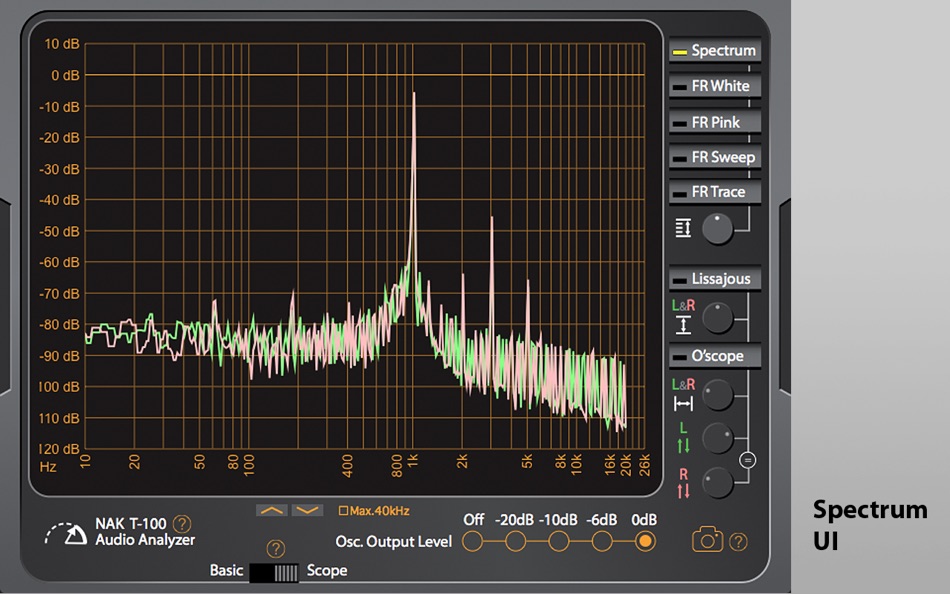
5. The Scope mode is a GUI add-on that displays complex measurement results in 2-dimensional plots. It is a lite graphic console without a set of pro implications.
6. The specifications may vary depending on actual sound card used.
7. Calibration will be needed prior to working with a specific audio device on a specific computer.
8. The computer must have standard stereo audio input (line-in) and standard stereo audio output (regardless of built-in or external) in order to allow the app functioning properly.
9. Sound devices that have uncommon channel layouts need to be configured for re-mapping the selected channels to the standard stereo channels by using tools outside of this app.
10. Relatively faster computer with less busy multi-tasking workload is recommended.
Ad
Capturas de ecrã
Histórico de preços
- Hoje: $24.99
- Mínimo: $24.99
- Máximo: $24.99
Monitorizar preços
Comentários (0)
Seja o primeiro a comentar 🌟
Desenvolvedor
- Chen Wang
- Plataformas: iOS Apps (10) macOS Apps (9)
- Listas: 1 + 0
- Pontos: 12 + 2,840 ¡
- Classificações: 0
- Resenhas: 0
- Comentários: 0
- Descontos: 0
- Vídeos: 1
- RSS: Subscrever
Pontos (2)
-

- 1 Лось Прикамский
- +1
-
- 1 Андрей Кувалдин
- +1


Classificações (0)
0 ☹️
Listas (1)
- NAK T-100 Audio Analyzer
Resenhas (0)
Seja o primeiro a comentar 🌟
Informações adicionais
- Versão: 3.7.3
- Categoria:
macOS Apps›Utilitários - Sistemas operacionais:
macOS,macOS 10.11 ou superior - Tamanho:
5 Mb - Idioma compatível:
English - Classificação do conteúdo:
4+ - Mac App Store Avaliação:
0 - Atualizado:
- Data de lançamento:
Contactos
 http://www.anaxwaves.com/NAKT100
 «NAK T-100 Audio Analyzer». Plataforma: macOS. Categoria: Utilitários. Desenvolvedor: «Chen Wang». Primeiro lançamento: . Última atualização: . Preço atual: $24.99. Preço mais baixo registrado: $24.99. Preço mais alto registrado: $24.99. Este título ainda não recebeu classificações ou comentários no AppAgg. Listas: públicas 1, privadas 0. Pontos rastreados: confirmados 2, indiretos 0. Idiomas disponíveis: English. AppAgg rastreia histórico de preços, classificações e feedback de usuários para «NAK T-100 Audio Analyzer». Acompanhe futuros descontos e atualizações via RSS. AppAgg não hospeda aplicativos nem distribui software. Todas as marcas registradas, logotipos e capturas de tela pertencem aos seus respectivos proprietários.
NAK T-100 Audio Analyzer URL abreviado: Copiado!- 🌟 Compartilhar
- Mac App Store
Ad
Semelhantes
-
- Audio Converter・MP3 Converter
- macOS Apps: Utilitários Por: Muhammad Qasim Wali
- * Grátis
- Listas: 0 + 0 Classificações: 0 Resenhas: 0
- Pontos: 0 + 0 0 Versão: 1.3 Audio Converter & Convert to MP3 Fast, Clean & Reliable MP3 Converter App Audio Converter is a simple and powerful app designed to convert audio files into different formats with high ... ⥯
-
- Dipper - Audio Capture
- macOS Apps: Utilitários Por: Existential Audio
- * Grátis
- Listas: 0 + 1 Classificações: 0 Resenhas: 0
- Pontos: 6 + 0 0 Versão: 1.12 Introducing Dipper, the ultimate audio capture companion for your Mac. With its powerful capabilities, Dipper revolutionizes the way you effortlessly capture and manipulate audio from ... ⥯
-
- Audio Logger
- macOS Apps: Utilitários Por: Pavel Aristov
- $5.99
- Listas: 0 + 0 Classificações: 0 Resenhas: 0
- Pontos: 1 + 0 0 Versão: 2.0.1 This program is designed for archiving of audio content, e.g. live radio broadcasts, to AAC, MP3, WAV or Apple Lossless files. As a source, you can use a microphone or any sound card ... ⥯
-
- Audio Connection Information
- macOS Apps: Utilitários Por: Daniel Gauthier
- $4.99
- Listas: 0 + 0 Classificações: 0 Resenhas: 0
- Pontos: 0 + 0 0 Versão: 26.5 Your interface says 96kHz. But is it actually running at 96kHz right now? Audio Connection Information lives in your menu bar and shows exactly what your audio devices are doing...not ... ⥯
-
- Audio Manager
- macOS Apps: Utilitários Por: Amzu Information Technology Ltd
- $3.99
- Listas: 0 + 0 Classificações: 0 Resenhas: 0
- Pontos: 0 + 0 0 Versão: 1.1 Your audio, your way. Audio Profile Manager is a simple menu bar utility that helps you manage your Mac's audio devices effortlessly. Set your preferred speakers and microphone, and ... ⥯
-
- audio-control
- macOS Apps: Utilitários Por: 禹 袁
- $0.99
- Listas: 0 + 0 Classificações: 0 Resenhas: 0
- Pontos: 0 + 0 0 Versão: 1.2.0 Main Features: Device Management - Automatically identify all audio devices (speakers, headphones, AirPlay, etc.) - Real-time display of device status and system default device - ... ⥯
-
- Audio Book
- macOS Apps: Utilitários Por: 栋 陈
- * Grátis
- Listas: 0 + 1 Classificações: 0 Resenhas: 0
- Pontos: 14 + 0 0 Versão: 1.9.8 Audio Book is a powerful and practical macOS Text-to-Speech, Document-to-Audio application, which enables you to convert text content and various types of document file to audio ... ⥯
-
- Audio Owl
- macOS Apps: Utilitários Por: Deniz Polat
- $3.99
- Listas: 0 + 0 Classificações: 0 Resenhas: 0
- Pontos: 0 + 0 0 Versão: 1.1.1 Audio Owl - Smart Audio Switching for macOS Effortlessly manage and prioritize your audio devices with intelligent automatic switching. Audio Owl is a powerful yet simple menu bar ... ⥯
-
- Audio Auto Sampler
- macOS Apps: Utilitários Por: Original Minds AB
- $0.49
- Listas: 0 + 0 Classificações: 0 Resenhas: 0
- Pontos: 0 + 0 0 Versão: 1.0 Audio Auto Sampler is a hands-free audio recording tool for musicians, sound designers, and producers who want fast, clean sample capture without manual editing. The app listens to ... ⥯
-
- Audio Selector
- macOS Apps: Utilitários Por: DUKHYUN HWANG
- * Grátis
- Listas: 0 + 0 Classificações: 0 Resenhas: 0
- Pontos: 0 + 0 0 Versão: 1.3.0 AUDIO SELECTOR: PRO AUDIO & DEVICE MANAGER Audio Selector: Total control over your macOS audio environment, right from the menu bar. KEY FEATURES * One-Click Switching: Instantly ... ⥯
-
- Audio Profile Manager
- macOS Apps: Utilitários Por: Septimal Mind Limited
- $4.99
- Listas: 0 + 0 Classificações: 0 Resenhas: 0
- Pontos: 0 + 0 0 Versão: 1.1.7.18 Audio Profile Manager allows you to lock default input and output audio devices so it will be impossible for other apps to switch your microphone and speaker. Also, it allows you to ... ⥯
-
- Audio Transcribe audio to text
- macOS Apps: Utilitários Por: Emanuele Floris
- * Grátis
- Listas: 0 + 1 Classificações: 0 Resenhas: 0
- Pontos: 4 + 0 0 Versão: 2.6 Tired of spending hours transcribing interviews, lectures, or audio and video recordings? This app transforms your Mac into a powerful transcription studio. Stop hitting pause and play ⥯
-
- Audio file and text conversion
- macOS Apps: Utilitários Por: 晓栋 周
- Grátis
- Listas: 0 + 1 Classificações: 0 Resenhas: 0
- Pontos: 2 + 0 0 Versão: 1.0.0 Features * Convert audio files to text. * Convert text to audio, and can export to audio file. Audio file support formats: aac, aif, aifc, aiff, caf, mp3, m4a, wav Export to audio file ⥯
-
- Audio Conversion Studio
- macOS Apps: Utilitários Por: SCORPIOX, INC LIMITED
- $2.99
- Listas: 0 + 0 Classificações: 0 Resenhas: 0
- Pontos: 0 + 0 0 Versão: 1.0 Effortlessly convert between a wide array of audio and video formats to your preferred audio file type. Our studio supports a comprehensive list of formats, including but not limited ... ⥯