
已儲存
選擇要顯示在你的已儲存選單中的名稱。
完成!
描述
Note: On macOS 26, a system bug causes the color sampler to sometimes pick the wrong color. The app relies on macOS's color sampler and canot fix this.
■ Features
- Palettes
- Recently picked colors
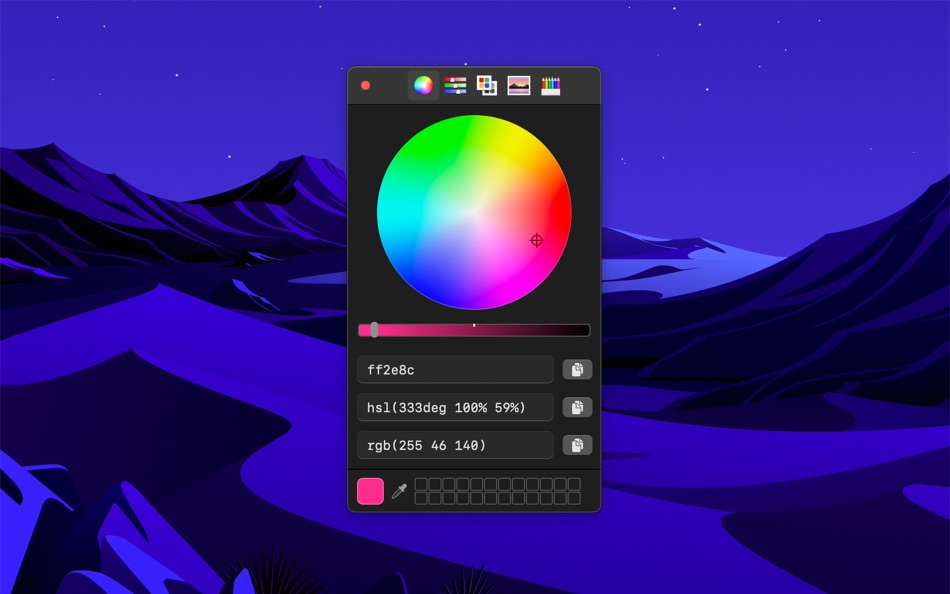
- Quickly copy, paste, and convert colors in Hex, HSL, RGB, Unit RGB (0-1), OKLCH, LCH, CMYK format
- Show as a normal app or in the menu bar
- Pick a color or toggle the window from anywhere with a global keyboard shortcut
- Make the window stay on top of all other windows
- Launch it at login (when in the menu bar)
- Hide menu bar icon
- Shortcuts support
- Import Simple Color Palette and Adobe Swatch Exchange (ASE) palettes
■ Tip
Press the Space key while using the color sampler to show the RGB values. The color sampler is a system component and it can unfortunately not show other kinds of color values.
■ Keyboard shortcuts
You can use the following keyboard shortcuts in the app:
- Pick color: Command+p
- Copy as Hex: Shift+Command+h
- Copy as HSL: Shift+Command+s
- Copy as RGB: Shift+Command+r
- Copy as Unit RGB: Shift+Command+u
- Copy as OKLCH: Shift+Command+o
- Copy as LCH: Shift+Command+l
- Copy as CMYK: Shift+Command+k
- Paste color: Shift+Command+v (In the format Hex, HSL, RGB, Unit RGB, OKLCH, LCH, or CMYK)
- Reset opacity: Control+Shift+o
■ Support
Use the feedback button in the “Help” menu in the app.
螢幕擷取畫面

Ad
價格歷史
- 目前價格: 免費
- 最小值: 免費
- 最大值: 免費
追蹤票價
AppAgg 評價
1,700
AppAgg 預估評價:
System Color Picker
1,700 黃金
評價越高,通常代表在 AppAgg 上的信號越強。
基於: 人氣 · 使用者評分 · 新鮮度 · 優惠 · 商店資料 · 社群活躍度
根據最新 AppAgg 資料每日重新計算。
縮短網址: 已複製!
其他資訊
- 發行日期:
- 類別 :
macOS 應用程式›工具 - OS:
macOS,macOS 26.1 以上版本 - 大小:
7 Mb - 支援的語言 :
English - 內容分級:
4+ - Mac App Store 評分:
0
 https://sindresorhus.com/system-color-picker
開發人員
- Sindre Sorhus
- 平台: iOS 應用程式 (21) macOS 應用程式 (34)
- 清單: 19 + 19
- 點數: 223 + 2,129 ¡
- 排名: 1 (2)
- 註釋: 0
- 折扣: 0
- 影片: 0
- RSS: 訂閱

點數 (6)





排名 (0)
0
註釋 (0)
成為第一個發表評論的人
簡要
System Color Picker 縮短網址: 已複製!- 分享
- Mac App Store
«System Color Picker». 平台: macOS. 類別: 工具. 開發商: «Sindre Sorhus». 首次發布: . 最後更新: . 目前價格: 免費. 此項目尚未在 AppAgg 上獲得評分或評論。 列表: 公開: 1, 私人: 3. 追蹤點: 已確認: 6, 間接: 0. 可用語言: English. AppAgg 會追蹤 «System Color Picker»的價格歷史、評分和用戶回饋。 AppAgg 不託管應用程式或分發軟體。 所有商標、標誌和螢幕截圖均屬於其各自所有者。 關注未來折扣和更新: RSS
類似
-
- Color Picker Plus
- macOS 應用程式: 工具 由: 万林 彭
- 免費
- 清單: 2 + 1 0 0
- 點數: 5 + 0 950 版本: 1.8 Color Picker Plus is a simple tool to pick up color for users, which can optimize their workflow and process. Pick HEX, RGB, HSL Main functions Zoom pick up a pixel color Support dark ... ⥯
-
- Color Picker
- macOS 應用程式: 工具 由: Patrik Tomas Chamelo
- $2.99
- 清單: 1 0 0
- 點數: 1 + 0 1K 版本: 2.0.0 Color Picker is a utility app built for Cocoa developers and designers who care about a fast, frictionless workflow. Pick any color from anywhere on your screen using the built-in ... ⥯
-
- Color Picker For Xcode
- macOS 應用程式: 工具 由: Kais Karim
- 免費
- 清單: 0 + 1 0 0
- 點數: 3 + 0 680 版本: 2.0 Color Picker for Swift is a simple but powerful tool that generates a SwiftUI, UIKit, and Cocoa color code for you. Simply pick your colors, save them, and click to see the code. ⥯
-
- Color Picker - Palette Manager
- macOS 應用程式: 工具 由: Elisa Valeria Distefano
- $1.99
- 清單: 0 0 0
- 點數: 0 + 0 550 版本: 3.0.0 Color Picker is designed for all macOS, iOS and web developers. Simple and extreme easy to use color picker for pro users who care about a fast workflow to speed up their works. Color ... ⥯
-
- Color Picker & Library
- macOS 應用程式: 工具 由: Dan Merlea
- $3.99
- 清單: 0 0 0
- 點數: 0 + 0 640 版本: 2.0.2 Color Picker & Library is a handy tool for our community of makers. Great for designers and developers. Easy to keep your colors organized by project and share it between team members. ⥯
-
- Color Picker - Pikka
- macOS 應用程式: 工具 由: Ruslan Sayfutdinov
- * 免費
- 清單: 2 + 1 0 0
- 點數: 6 + 0 8K 版本: 4.0.4 ** Apple's pick for Apps And Games We Love Right Now ** Pikka - Color Picker is an easy-to-use color picker and palette generator for developers and designers that works well with ... ⥯
-
- Color Picker Tool
- macOS 應用程式: 工具 由: 冬洋 梁
- $4.99
- 清單: 0 0 0
- 點數: 0 + 0 550 版本: 2.1.1 Easy and convenient color picker tool!! Features: - Hotkey to open - Menubar show - Auto copy - Supports multiple color code format Support: - Mac os [NSColor ... ⥯
-
- System-i DBcompare
- macOS 應用程式: 工具 由: System-i snc
- $4.99
- 清單: 0 0 0
- 點數: 0 + 0 600 版本: 2024.7.1 System-I DB Compare helps you to compare structure between two different databases. The comparison is first of all the tables, and then field by field. The comparison will be made ONLY ⥯
-
- Colorify - Color Picker
- macOS 應用程式: 工具 由: Uzay Altiner
- $1.99
- 清單: 0 0 0
- 點數: 0 + 0 580 版本: 1.0.0 Colorify: Organize Your Colors with Ease Colorify is a powerful tool designed to enhance your creativity and streamline your design process. Effortlessly select and save your preferred ⥯
- 全新
- HexDrop – Color Picker
- macOS 應用程式: 工具 由: Rodrigo Flores
- $7.99
- 清單: 0 0 0
- 點數: 0 + 0 600 版本: 1.1.1 HexDrop is a fast, lightweight color picker for macOS that lives in your menu bar. Pick any color on your screen without breaking your flow, then copy it in the format you need HEX, ... ⥯
-
- Hameleon Menu Bar Color Picker
- macOS 應用程式: 工具 由: Pavel Devyatov
- 免費
- 清單: 0 0 0
- 點數: 0 + 0 870 版本: 1.2.0 Pick any color from your screen in one click right from your menu bar. Hameleon is a fast, lightweight color picker and eyedropper designed for developers and designers who need ... ⥯
-
- Cherry Color Picker for Safari
- macOS 應用程式: 工具 由: The Moonshot Lab
- $0.99
- 清單: 0 0 0
- 點數: 0 + 0 580 版本: 1.0 Cherry Color Picker - The Professional s Choice for Safari Color Sampling Transform your Safari browser into a powerful color discovery tool. Cherry Color Picker delivers pixel-perfect ⥯
-
- Color Contrast Inspector
- macOS 應用程式: 工具 由: Östling IT
- 免費
- 清單: 0 0 0
- 點數: 0 + 0 540 版本: 1.1 Color Contrast Inspector helps you verify whether your color combinations meet WCAG 2.1 accessibility requirements. Features: Real-time contrast ratio calculation Support for WCAG ... ⥯
-
- Color Code Copy
- macOS 應用程式: 工具 由: Albert Parti
- $1.99
- 清單: 1 0 0
- 點數: 3 + 0 1K 版本: 2.0 Color Code Copy is a sleek and modern macOS utility that lets developers quickly generate and copy color codes for a wide range of programming languages and frameworks. Simply pick a ... ⥯