
| 開發人員: | Abdusodiq Saidov (27) | ||
| 價錢: | ▼ * 免費 | ||
| 排名: | 0 | ||
| 評測: | 0 寫評論 | ||
| 清單: | 1 + 3 | ||
| 點數: | 30 + 0 ¡ | ||
| Mac App Store | |||
描述

Create text and graphic notes from captured parts!
Initiater is an easy to use small macOS OCR (Optical Character Recognition) app that extracts and recognizes any non-editable text on your Mac computer's screen. As an extra feature, it can turn graphic files into editable text.
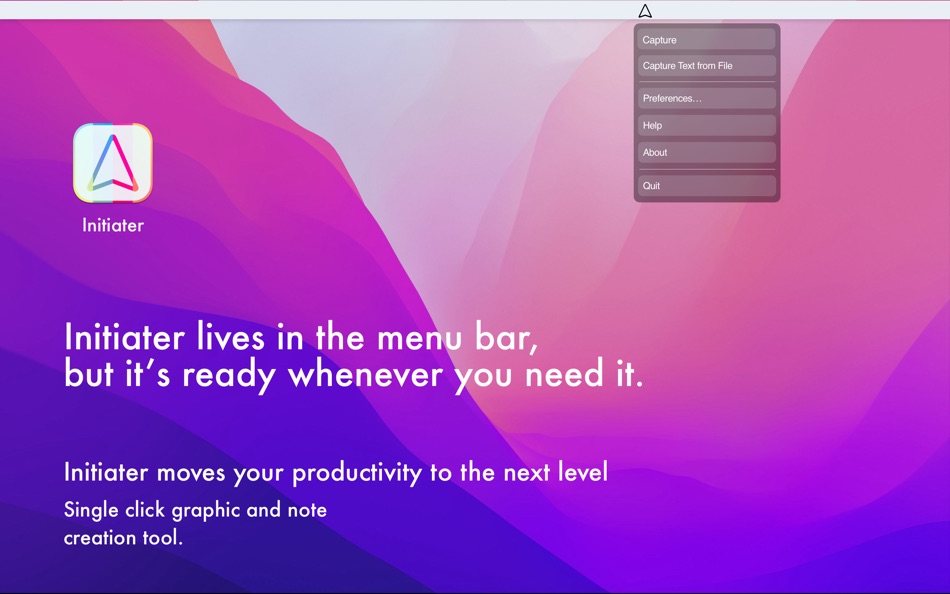
Initiater is a small app which lives in menu bar, it's accessible whenever you need it. The app is convenient to use and makes extracting text from your images, scanned documents, or even videos easy.
If you have ever used a built-in Mac's screen capture application or any other screenshot app before, then it's not difficult for you to work with Iitiater. Select with a mouse any part of the image, photo, document, or anything on the screen, and the app will process and recognizes any text within this selection. Grabbed part of the screen and having any text in that area be instantly recognized and copied to clipboard or shown in a small window.
Screenshot images containing text part, convert them into editable text files or copy to clipboard where you can paste as a text. Or just save selected part as an image file.
Additionally, the application supports recognizing text from PNG, JPG, JPEG, BMP, TIFF and PSD files, and convert them into plain text. All conversion and screenshots are done securely only on your device, none of your images or texts are sent to any third-party services in the cloud.
This app's OCR engine or any other feature doesn't need an internet connection to process function. Secure optical character recognition or screenshot solution for those who are concerned about privacy. The application doesn't collect any users' data.
- Features in Short -
* Grab an screen area
* Recognize text - copy to clipboard or save as text file
* Save screenshot as an image file
* Recognize text from graphic files
* Ultra light app which runs as a menu bar app
* Runs natively on Apple M Series and Intel processors
* On-device OCR Technology, no internet connection is needed
* Instant text recognition. No need to upload files into the network
* Running macOS Catalina: English language is only supported
* Create automated Notes from capturex texts
This version of the app recognizes primarily written in English, French, German, Italian, Spanish, Portuguese and Chinese languages. You can change default recognition language in Settings window.
For best results, use "Best" mode, or "Normal" mode for lighting speed results. For corrupted or old images, using "Best" mode is recommended.
Ad
螢幕擷取畫面


價錢
-
* 應用內購買 - 今天: 免費
$0.99-100% - 最小值: ▼ 免費
- 最大值: $4.99
追蹤票價
開發人員
- Abdusodiq Saidov
- 平台: iOS 應用程式 (3) iOS 遊戲 (2) macOS 應用程式 (21) macOS 遊戲 (1)
- 清單: 8 + 6
- 點數: 269 + 14 ¡
- 排名: 0
- 評測: 0
- 折扣: 3
- 影片: 1
- RSS: 訂閱
Ad
點數
-

- 27 Tim
- +1
-
- 9,792 Pui Hang Choi
- +1
-
- 3,926 Brain_vv
- +1
-
- 185 Attila Szucs
- +1
-
- 1,105 眰恦(眰恦)
- +1
-
- 479 QenTox
- +1


排名
0 ☹️
清單
- Initiater

評測
成為第一個評論 🌟
其他資訊
- 版本: 1.1.4
- 類別 :
macOS 應用程式›多媒體設計 - OS:
macOS,macOS 11.0 以上版本 - 大小:
730 Kb - 支援的語言 :
Chinese,English,French,German,Portuguese,Turkish - 內容分級:
4+ - Mac App Store 評分:
0 - 發佈日期:
- 發行日期:
聯絡人
 https://blue-tail.com/initiaterInitiater 縮短網址: 已複製!
- 🌟 分享
- Mac App Store
你可能還喜歡
-
- Creative Convert
- macOS 應用程式: 多媒體設計 由: Splash Colors
- 免費
- 清單: 0 + 1 排名: 0 評測: 0
- 點數: 34 + 0 版本: 1.4.3 Creative Convert is a simple, beautiful app for converting JPG, JPEG, BMP, TIFF, PNG, PDF, Ai, SVG, PSD and/or EPS, PS (PostScript) files into separate Graphic file formats. Creative ... ⥯
-
- Logo Art
- macOS 應用程式: 多媒體設計 由: Abdusodiq Saidov
- 免費
- 清單: 1 + 3 排名: 0 評測: 0
- 點數: 29 + 0 版本: 1.0.6 Drag and Drop Logo and Graphic Design Vector Application. Logo Art is a beautifully designed easy to use vector drawing application to help you create inspiring vector logo graphics. ... ⥯
- -100%
- QR Creator Mini
- macOS 應用程式: 多媒體設計 由: Pavel Kosykh
- ▼ 免費
$1.99-100% - 清單: 0 + 1 排名: 0 評測: 0
- 點數: 26 + 0 版本: 3.1.0 QR Creator Mini is a quick and effective solution to create QR-Codes. Features: Live creation QR-Codes; Save to image file; Resolution setting. ⥯
- -100%
- Super-AI Photo Enlarger
- macOS 應用程式: 多媒體設計 由: 秀英 朱
- ▼ 免費
$9.99-100% - 清單: 0 + 1 排名: 0 評測: 0
- 點數: 23 + 0 版本: 2.0.1 Super-AI Photo Enlarger intelligently enlarges and upscales images quality by up to 800% using smart AI image enhancement technology to fix pixelated, blurry, and low-quality photos ... ⥯
- -100%
- Bluetail - Cut Designer
- macOS 應用程式: 多媒體設計 由: Abdusodiq Saidov
- ▼ * 免費
$9.99-100% - 清單: 0 + 2 排名: 0 評測: 0
- 點數: 17 + 0 版本: 1.0.2 Create posts and prints using Bluetail - Cut Designer, Precisely crafted samples and shape library collections. One-time purchase gives you opportunity to use thousands of templates ... ⥯
-
- Pixen
- macOS 應用程式: 多媒體設計 由: Furnace Creek Software LLC
- * 免費
- 清單: 1 + 2 排名: 0 評測: 0
- 點數: 16 + 0 版本: 6.0 Pixen is a professional pixel art editor designed for working with low-resolution raster art, such as those 8-bit sprites found in old-school video games. Pixen packs all the tools ... ⥯
-
- SVGViewer - Converter
- macOS 應用程式: 多媒體設計 由: Abdusodiq Saidov
- * 免費
- 清單: 1 + 1 排名: 0 評測: 0
- 點數: 14 + 0 版本: 1.6 SVGViewer can be used to open SVG graphics files, display image preview and convert opened them into other file formats as .jpg, .tiff, .png, pdf. SVGViewer supports all types of SVG ... ⥯
-
- PhotoStage Professional
- macOS 應用程式: 多媒體設計 由: NCH Software
- * 免費
- 清單: 0 + 1 排名: 0 評測: 0
- 點數: 13 + 0 版本: 12.11 PhotoStage Professional Whether a home project or a business presentation, PhotoStage Professional allows you to create a dynamic slideshow from your photos and video clips in a quick ... ⥯
-
- Pixave
- macOS 應用程式: 多媒體設計 由: YoungHo Kim
- 免費
- 清單: 3 + 3 排名: 0 評測: 0
- 點數: 10 + 0 版本: 2.3.13 ** BEST OF 2015 APP BY APPLE ** ** FEATURED WORLDWIDE 2015, 2016 AS "BEST NEW APPS" BY APPLE ** Stay Inspired. There is a whole world that we get from images. A single picture can fill ⥯
- -100%
- IconShop - Making Icons Easily
- macOS 應用程式: 多媒體設計 由: 文志 胡
- ▼ 免費
$0.99-100% - 清單: 1 + 1 排名: 0 評測: 0
- 點數: 10 + 0 版本: 1.0.3 【 Making Icons Easily 】 Convert SF Symbols or custom string to icon, export Image Set or App Icon for Xcode. 【 Convert SF Symbols to Image 】 Do you want to use SF Symbols in iOS13 ... ⥯