
Favoriler
Favori menünüzde görünecek adı seçin.
Tamamlandı!
| Geliştirici: | 宁波上官科技有限公司 (26) | ||
| Fiyat: | $12.99 | ||
| Sıralamalar: | 0 | ||
| Yorumlar: | 0 Yorum gönderin | ||
| Listeler: | 2 + 0 | ||
| Puanlar: | 3 + 0 ¡ | ||
| Mac App Store | |||
Açıklama

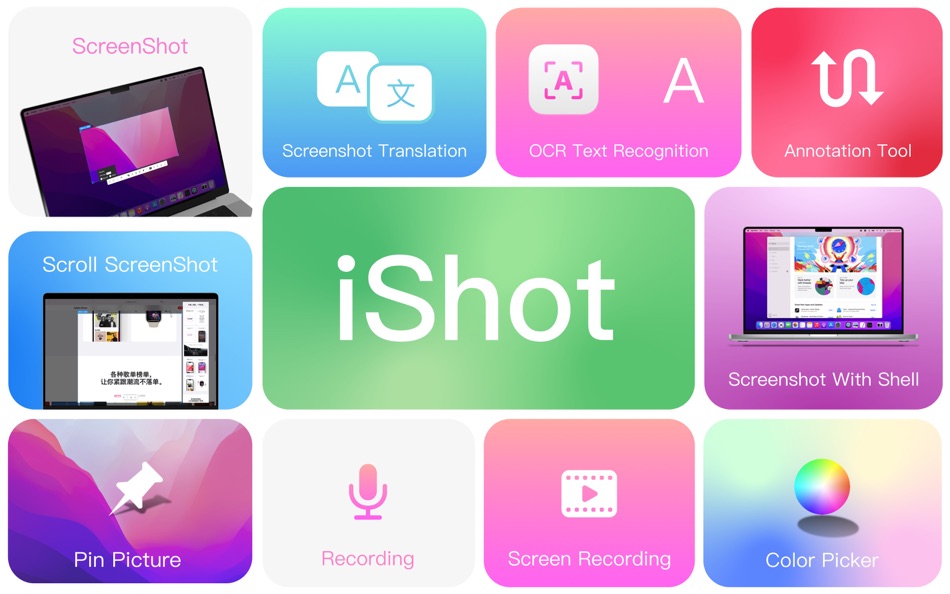
******Screenshot/Long Screenshot/Shell Screenshot/Texture/Annotation/Color Picking/Screen Recording/Recording/OCR/Screenshot Translation Ten in one
******One is equivalent to ten, everything is excellent
iShot is an excellent, full-featured area screenshot, window screenshot, multi-window screenshot, long screenshot, shell screenshot, time-lapse screenshot, quick annotation, texture, color picking, screen recording, audio recording, OCR, screenshot translation tool on Mac .
1. Screenshots
①: Area screenshot, window screenshot
Supports frame selection screenshots, intelligent recognition window screenshots, and custom screenshot shortcuts.
②Multi-window screenshot
Press the screenshot shortcut key, then Shift, and click on multiple windows to take screenshots of multiple windows.
③: Delay full screen screenshot
Delay full-screen screenshots, support countdown sound playback, and use to capture windows that are not easy to select.
④: Take a screenshot of the last screenshot area
Use the shortcut keys to quickly take a screenshot of the area where the last frame was selected.
⑤: Screenshot window under cursor
Use the shortcut key to directly capture the window under the current mouse without activating the window.
⑥ Screenshot rounded corners and shadow effects
⑦ Screenshot to open quickly
After completing the screenshot, you can double-click Option to open the picture with a custom App, so that your screenshot and editing can be seamlessly connected.
⑧Save/Storage
● Support saving to clipboard and local
● Support saving to the clipboard and saving to the local
● Support single save as, custom save name and format
● Support HD and SD image quality
● Support jpg, png, tiff screenshot saving formats
● Support output color standard pictures
2.long screenshots, scrolling screenshots
● Select the scrolling screenshot area, then press the “S” shortcut key and slide the screenshot area upwards to start taking a long screenshot. The length of the long screenshot is unlimited.
● Support automatic scrolling of long screenshots.
3.with shell screenshot
After taking a full screen screenshot, match your picture with a beautiful Mac shell mockup, high-end and elegant.
4.stickers
● After the frame selection area is supported, click the map button to map;
● The sticker library will store the record of the sticker.
● After supporting the texture, right-click, mark and modify the texture image.
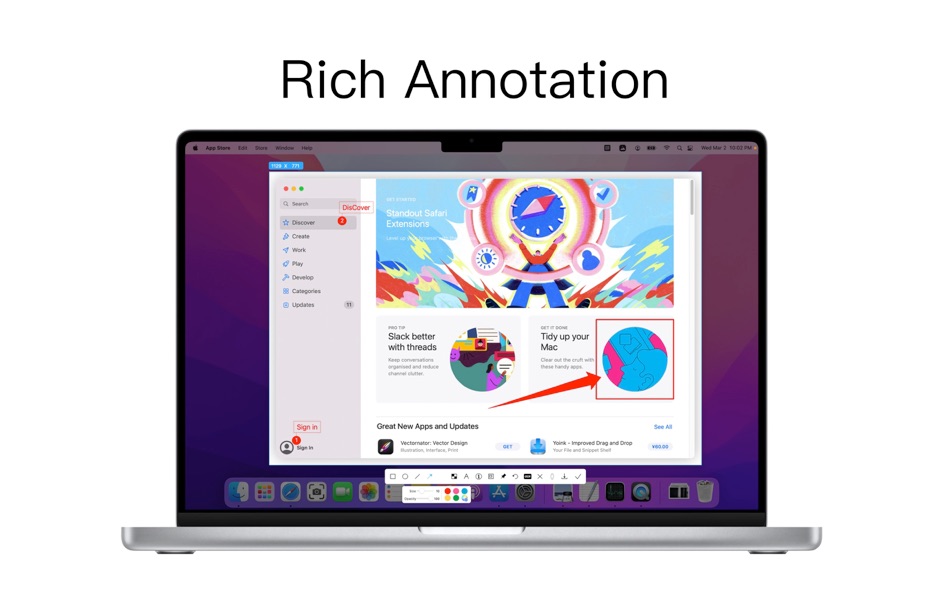
5. Quick Marking
①Marking function:
Rectangle, circle, horizontal line, arrow, brush, mosaic, text mark, serial number label, local highlight;
②Quickly adjust dimension and transparency
③ Rich annotation styles
Arrows, mosaics and other annotation tools provide a variety of styles to choose from, making your annotations colorful.
6. Color picking function
● When you press the screenshot shortcut key, the magnifying glass will display the color name under the current cursor, press R, G to copy the RGB and HEX color codes, and supports custom color codes with powerful functions.
● Support native, normal RGB, SRGB, Adobe RGB, P3 multiple color gamut standards
7. Screen recording function
● Supports screen recording of various resolutions and FPS in Ultra HD, HD and SD;
● Support for recording the internal sound of the system;
● Support for recording online meetings
8. Recording
● Support recording function, recording anytime and anywhere, a good helper for business people.
● Support for recording the internal sound of the system
9.OCR text recognition
● After selecting the screenshot area, click the OCR button to perform text recognition, which is convenient and easy to use
● The OCR function supports QR code recognition and prioritizes QR code recognition
● Support OCR continuous recognition mode
● Support OCR to cancel line feed
10. Screenshot translation
● After selecting the screenshot area for OCR recognition, perform translation
Terms of use: https://www.better365.cn/Terms.html
Ad
Ekran görüntüleri


Fiyat Geçmişi
- Bugün: $12.99
- En az: $11.99
- Maksimum: $12.99
Fiyatları takip et
Yenilikler
- Sürüm: 2.6.7
- Güncellendi:
- [1 is better than 10, all excellent] Screenshot, long screenshot/scrolling screenshot, screenshot with shell, sticker, screen recording, audio recording, OCR text recognition, screenshot translation, annotation, color picking, ten excellent functions in one.
1.Fix bugs.
Thank you for your enthusiastic and positive feedback. You are welcome to give feedback on the official website user support page, click the App Store "Support" button, and submit the problem on the official website. There will be a dedicated person to track and handle it one by one. Thank you.
QQ communication group: 687661905
Ek Bilgi
- Satışa çıkış tarihi:
- Kategori:
macOS Uygulamalar›Verimlilik - İşletim Sistemleri:
macOS,macOS 10.13 ve sonrası - Boyut:
47 Mb - Desteklenen diller:
Chinese,English - İçerik Derecelendirmesi:
4+ - Mac App Store Kullanıcı Oyu:
0 - Web sitesi:
 https://www.better365.cn
Geliştirici
- 宁波上官科技有限公司
- Platformlar: iOS Uygulamalar (1) macOS Uygulamalar (25)
- Listeler: 7 + 3
- Puanlar: 85 + 2 ¡
- Sıralamalar: 0
- Yorumlar: 0
- İndirimler: 0
- Video: 0
- RSS: Abone ol


Puanlar (3)
-

- 774 Rocky4812
- +1
-
- 661 IMO FUCASHI
- +1
-
- 2,979 바람처어럼
- +1



Sıralamalar (0)
0 ☹️
Yorumlar (0)
İlk yorum yapan siz olun 🌟
«iShot Pro-ScreenShot Recording». Platform: macOS. Kategori: Verimlilik. Geliştirici: «宁波上官科技有限公司». İlk sürüm: . Son güncelleme: . Güncel fiyat: $12.99. Kaydedilen en düşük fiyat: $11.99 (). Kaydedilen en yüksek fiyat: $12.99 (). Bu başlık henüz AppAgg'de derecelendirme veya inceleme almadı. Listeler: genel 2, özel 0. Takip edilen noktalar: onaylandı 3, dolaylı 0. Mevcut diller: Chinese, English. AppAgg, «iShot Pro-ScreenShot Recording» için fiyat geçmişini, derecelendirmeleri ve kullanıcı geri bildirimlerini takip eder. Gelecekteki indirimler ve güncellemeler: RSS. AppAgg uygulamaları barındırmaz veya yazılım dağıtmaz. Tüm ticari markalar, logolar ve ekran görüntüleri ilgili sahiplerine aittir.
iShot Pro-ScreenShot Recording Kısa URL: Kopyalandı!- 🌟 Paylaş
- Mac App Store
Benzerleri
-
- iShot-ScreenShot Recording OCR
- macOS Uygulamalar: Verimlilik Göre: 宁波上官科技有限公司
- * Ücretsiz
- Listeler: 0 + 1 0 0
- Puanlar: 8 + 0 Sürüm: 2.6.7 [Native support for Apple M series and Intel chips] Screenshot/Long Screenshot/Shell Screenshot/Texture/Annotation/Color Picking/Screen Recording/Recording/OCR/Screenshot Translation ... ⥯
-
- Screenshot One
- macOS Uygulamalar: Verimlilik Göre: Ruizheng Liu
- $4.99
- Listeler: 0 + 0 0 0
- Puanlar: 1 + 0 Sürüm: 5.0 Screenshot One adds icon to Mac status bar, so you can take screenshot easily anytime! With Screenshot One, you can take screenshot for: - Selected window - Selected window without ... ⥯
-
- Screenshot Text Extractor
- macOS Uygulamalar: Verimlilik Göre: thomas pentzek
- $9.99
- Listeler: 0 + 0 0 0
- Puanlar: 0 + 0 Sürüm: 1.0 Screenshot Text Extractor Turn screenshots into editable text fast. Screenshots are great for saving information, but copying the text inside them is usually slow and frustrating. ... ⥯
- Yeni
- Screenshot Inventory
- macOS Uygulamalar: Verimlilik Göre: Marcelo Mafra
- * Ücretsiz
- Listeler: 0 + 0 0 0
- Puanlar: 0 + 0 Sürüm: 1.0 Screenshot Inventory is a macOS menu bar app that keeps your screenshots always within reach. Capture the full screen or select an area, then access everything from a fast, organized ... ⥯
-
- Screenshot for Street View
- macOS Uygulamalar: Verimlilik Göre: Bilaal Rashid
- $0.99
- Listeler: 0 + 1 0 0
- Puanlar: 6 + 0 Sürüm: 1.1 Capture breathtaking views from Google Street View with ease. Frame your desired location in Street View, and with a click of a button, preserve stunning snapshots of real-world ... ⥯
-
- Screenshot App: Snipping Tool
- macOS Uygulamalar: Verimlilik Göre: Moon Technolabs Pvt Ltd
- Ücretsiz
- Listeler: 0 + 0 0 0
- Puanlar: 2 + 0 Sürüm: 1.7.0 The Ultimate Screenshot & Annotation Tool for Mac & Windows Say hello to your new favorite screen capture tool built for speed, flexibility, and total control. Whether you re snapping ... ⥯
-
- Shot Assistant SE
- macOS Uygulamalar: Verimlilik Göre: Sunset Magicwerks, LLC
- Ücretsiz
- Listeler: 0 + 0 0 0
- Puanlar: 4 + 0 Sürüm: 1.0.1 Shot Assistant provides functionality needed by Media and Entertainment professionals that is not provided elsewhere. -Create and remove multiple Projects as desired. -Import ALEs into ⥯
-
- Screenshot Editor
- macOS Uygulamalar: Verimlilik Göre: 科 姚
- $4.99
- Listeler: 0 + 0 0 0
- Puanlar: 0 + 0 Sürüm: 2.3 Screenshot Editor helps you to easily take screenshot and annotate the screenshot with a set of useful markup tools. Quickly take a screenshot with useful capturing modes: - Capture ... ⥯
-
- Screenshot Text Recognition
- macOS Uygulamalar: Verimlilik Göre: chan hong wing
- Ücretsiz
- Listeler: 0 + 0 0 0
- Puanlar: 2 + 0 Sürüm: 1.4 Text recognition by screenshot, no need Internet Support different languages Fast and accurate recognition using native engine Free, no restrictions and hidden charges ⥯
-
- Snipin - Screenshot & Pin Tool
- macOS Uygulamalar: Verimlilik Göre: 玉娟 陈
- Ücretsiz
- Listeler: 0 + 0 0 0
- Puanlar: 0 + 0 Sürüm: 1.0 Screenshot and pin directly to your desktop - never lose important captures again! Tired of screenshots disappearing after use? Snipin transforms your screenshots into desktop sticky ... ⥯
-
- RICH Shot
- macOS Uygulamalar: Verimlilik Göre: Wise Tech Labs Private Limited
- $9.99
- Listeler: 1 + 1 0 0
- Puanlar: 14 + 0 Sürüm: 2.0 RICH Shot is the fastest tool to Swiftly capture your Mac s screen. Get powerful screen capture and recording with RICH Shot. Swiftly capture Mac s screen without desktop icons, ... ⥯
-
- Longshot - Screenshot & OCR
- macOS Uygulamalar: Verimlilik Göre: 志泉 孔
- * Ücretsiz
- Listeler: 0 + 1 0 0
- Puanlar: 5 + 0 Sürüm: 1.5.2 Annotation and Color Picking Conveniently annotate the screen, a great helper for communicating with colleagues, simple and easy to use. - Drawing tools, shapes, ovals, lines, arrows, ... ⥯
-
- McShot — Screenshot Mastery
- macOS Uygulamalar: Verimlilik Göre: ROMAN SIDOROFF
- Ücretsiz
- Listeler: 0 + 0 0 0
- Puanlar: 4 + 0 Sürüm: 1.1.1 McShot the ultimate screenshot tool carefully crafted by professionals. Capture your screen with unparalleled speed and ease, leaving annotations or marks effortlessly. Share your ... ⥯
-
- iCapturer - Screenshot, Record
- macOS Uygulamalar: Verimlilik Göre: 献 张
- * Ücretsiz
- Listeler: 0 + 0 0 0
- Puanlar: 1 + 0 Sürüm: 2.4 A powerful screen capture, recording, and audio tool. Supports screenshots, screen recording, camera recording, GIF recording, background removal, system sound recording, microphone ... ⥯