
保存済み
保存済みメニューに表示する名前を選択してください。
完了
| デベロッパー: | Sindre Sorhus (55) | ||
| 価格: | $4.00 | ||
| AppAggスコア: | $12,540 | ||
| ランキング: | 0 | ||
| コメント: | 0 コメントを投稿する | ||
| リスト: | 5 + 3 | ||
| ポイント: | 9 + 0 ¡ | ||
| +1 ポイント | |||
説明

Think of it as an alternative to Dock folders, just more powerful and customizable.
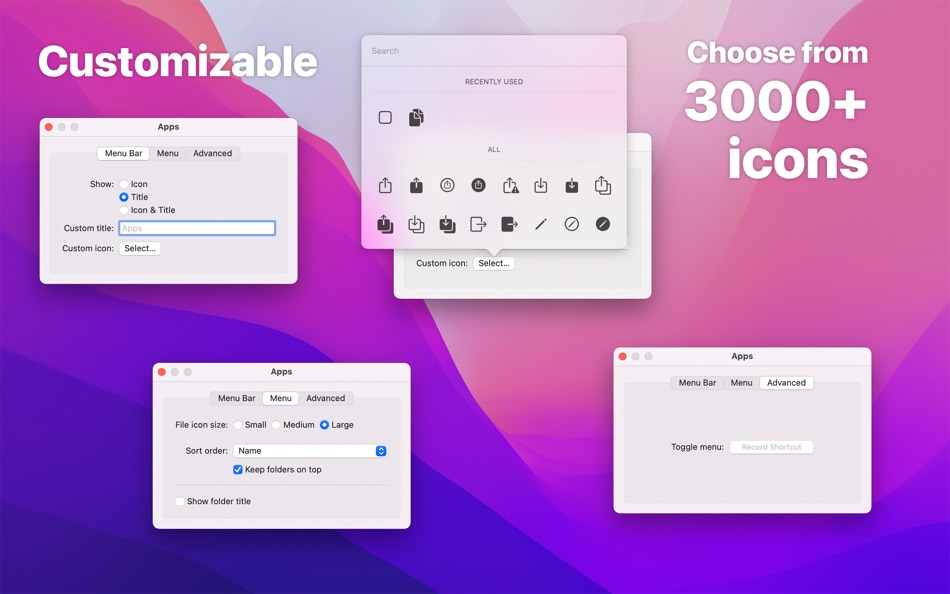
Each folder you add gets its own menu bar icon that you can customize and move around (drag the menu bar item while holding the Command key).
You can click on a file or folder in the menu to open it.
If you have little menu bar space, you can also show multiple folders in a single menu bar item. See the first FAQ.
Example use-cases:
- Access files relating to your current project
- Use it as an app launcher
- Add your home folder to quickly access anything
- View your most recent screenshots (see FAQ)
- Use it to select which Photos library to open
By taking advantage of Finder aliases, you can create a folder that contains aliases to other folders and files, making it possible to completely customize what's shown in a folder menu. See the FAQ for more.
■ Features
- Add multiple folders to the menu bar
- Each folder can be individually customized
- File preview
- View and copy image & video dimensions
- Drag & drop from the file submenu.
- Global keyboard shortcut to show/hide each folder menu (optionally opens at cursor position)
- Open a folder in a specific app
- Follows aliases and symlinks
- Shortcuts support
■ FAQ
‣ How can I show specific files and folders from various places?
You can create a folder that contains aliases to the files and folders you want to be included in the menu.
Create a folder to put aliases in and add that folder to the app. Make aliases for the files and folders you want in the menu and move the aliases into the folder you just made.
‣ What is an alias?
An alias is a shortcut to an app, file, or folder that you can keep anywhere on your Mac. Right-click an item in Finder and select “Make Alias” to make one.
‣ How can I use this as an app launcher?
Yes. Just add the “Applications” folder to the app. If you want to show only specific apps, follow the first FAQ.
‣ How can I show multiple directories at the top level in a single menu?
Follow the first FAQ.
‣ How can I have a menu bar folder with my most recent screenshots?
Make a folder to hold the screenshots and add it to the app. Open the Screenshot app, click “Options”, then “Other Location”, and choose the folder you just made. In Folder Peek, open the folder config, and change the sort order to “Date Created” and set “Max Items” to something like 20.
You can find more info on the app's website.
■ Support
You can contact me through the feedback button in the app.
スクリーンショット



Ad
価格履歴
- 現在の価格: $4.00
- 最小値: フリー
- 最大: $4.00
料金のチェック
AppAggスコア
AppAgg推定スコア: Folder Peek
$12,540
スコアが高いほど、AppAgg 上のシグナルが強い傾向があります。
基準: 🔥 人気 · ⭐ ユーザー評価 · 🕒 新しさ · 🏷️ セール · 🏬 ストアデータ · 👥 コミュニティ活動
このスコアは情報提供のみを目的としています。実際の価格、販売の申し出、市場評価ではありません。
短縮 URL: コピーしました!
情報
 https://sindresorhus.com/folder-peek
デベロッパー
リスト (5)
- Folder Peek


ポイント (9)
-

- 191 Christopher Espero
- +1
-
- 60 FUKASHI NOBE
- +1
-
- 571 Raphael Pinheiro
- +1
-
- 11,445 Simon Chan
- +1
-
- 774 Erin
- +1
-
- 665 IMO FUCASHI
- +1





ランキング (0)
0 ☹️
コメント (0)
最初にコメントしてください 🌟
«Folder Peek». プラットフォーム: macOS. カテゴリ: ユーティリティ. 開発者: «Sindre Sorhus». 最初のリリース: . 最終更新日: . 現在の価格: $4.00. 記録された最低価格: $0.00 (). 記録された最高価格: $4.00 (). このタイトルはまだ AppAgg で評価やレビューを受けていません。 リスト: 公開: 5, 非公開: 3. 追跡ポイント: 確認済み: 9, 間接: 0. 利用可能な言語: English. AppAgg は «Folder Peek»の価格履歴、評価、ユーザーフィードバックを追跡します。 今後の値下げと更新をフォロー: RSS で確認できます. AppAgg はアプリケーションをホストしたり、ソフトウェアを配布したりしません。 すべての商標、ロゴ、スクリーンショットはそれぞれの所有者に帰属します。
Folder Peek 短縮 URL: コピーしました!- 🌟 シェア
- Mac App Store
類似
-
- Folder by Color - Change color
- macOS アプリ: ユーティリティ 作者: 清碧 饶
- フリー
- リスト: 1 + 1 0 0
- ポイント: 6 + 0 $1k バージョン: 1.8.2 [Folder by Color] is a folder color changing tool. Using different colored folder icons can keep your files well organized, thereby increasing the efficiency of file management. you ... ⥯
-
- Folder Snapshot Utility
- macOS アプリ: ユーティリティ 作者: David Gradwell
- $4.99
- リスト: 0 0 0
- ポイント: 0 + 0 $2k バージョン: 2021.06.11 Folder Snapshot Utility will make a rapid backup copy (a snapshot ) of anything you throw at it. This is much faster than a traditional backup copy (think ~1200x faster) and uses ... ⥯
-
- Folder Dater
- macOS アプリ: ユーティリティ 作者: Dalamser
- $2.99
- リスト: 1 0 0
- ポイント: 0 + 0 $3k バージョン: 2.3.2 Folder Dater sets a folder s modification date or creation date attributes based on the attributes of its descendants. All changes can be previewed in the Finder and undone before ... ⥯
-
- Folder - Custom your folder
- macOS アプリ: ユーティリティ 作者: 玉 李
- $0.99
- リスト: 0 0 0
- ポイント: 2 + 0 $4k バージョン: 1.0.1 Folder App is an app for customizing folders on macOS. You can set folders to different colors, and you can also add text, emoji, or icons to folders. Of course, the colors of text and ⥯
-
- Folder Rack – File Manager
- macOS アプリ: ユーティリティ 作者: Ivo Wessel
- * フリー
- リスト: 0 0 0
- ポイント: 1 + 0 $6k バージョン: 1.27 FOLDER RACK Manage your files and folders The Finder was always my most-used tool. However, there were many functions that I missed in my day-to-day work or that I would have done ... ⥯
-
- Folder Previewer Pro
- macOS アプリ: ユーティリティ 作者: Nikhil Anshuman
- $1.99
- リスト: 0 0 0
- ポイント: 0 + 0 $4k バージョン: 1.0 Folder Previewer Pro lets you instantly preview the contents of any folder or archive (ZIP) directly in Finder s Quick Look, without opening or extracting files. Just select a folder ... ⥯
-
- Folder - Colorful folder maker
- macOS アプリ: ユーティリティ 作者: 余 张
- * フリー
- リスト: 1 + 1 0 0
- ポイント: 12 + 0 $6k バージョン: 1.3.1 How many folders do you have on your computer? Scores of them? Hundreds? Thousands? Are all of them are alike: default folder, default folder, default folder, default folder... It's so ⥯
-
- Folder Analyze
- macOS アプリ: ユーティリティ 作者: 培基 王
- * フリー
- リスト: 0 0 0
- ポイント: 1 + 0 $4k バージョン: 2.0.1 A powerful and easy-to-use folder content analysis tool that displays content as charts, making the size and number of files clearly visible. It also supports an edit mode, where you ... ⥯
-
- Folder Crazy Desktop
- macOS アプリ: ユーティリティ 作者: Steve Mills
- $0.99
- リスト: 0 0 0
- ポイント: 0 + 0 $2k バージョン: 1.5.3 Remember how great the Desktop image feature in macOS was before they removed the Tile option? Just like Folder Crazy vastly improves the screensaver experience, Folder Crazy Desktop ... ⥯
-
- Folder Sizes
- macOS アプリ: ユーティリティ 作者: Roberto Piccirilli
- $2.99
- リスト: 0 0 0
- ポイント: 0 + 0 $2k バージョン: 2.2.1 Show in easy and intuitive way the space occupied by files and folders . With this app you can immediately identify the space occupied for easy cleaning of their own archives. Now you ... ⥯
-
- Folder Factory
- macOS アプリ: ユーティリティ 作者: UAB Macmanus
- $3.99
- リスト: 1 + 1 0 0
- ポイント: 3 + 0 $5k バージョン: 4.0 Folder Factory is a neat little app for changing the design of your folder icons. It will help you to match similar folders by the color, text or picture and this will keep your Mac ... ⥯
-
- Folder Color Changer:RightMenu
- macOS アプリ: ユーティリティ 作者: 奕琦 冯
- フリー
- リスト: 1 + 1 0 0
- ポイント: 4 + 0 $1k バージョン: 1.4.0 [Folder Icon Customization Artifact] - Right click to replace folder icon Just right-click on the folder to change the icon - Batch operation Multi-select folders can also be quickly ... ⥯
-
- Folder Colorizer
- macOS アプリ: ユーティリティ 作者: 兰桂 吴
- $1.99
- リスト: 1 + 1 0 0
- ポイント: 0 + 0 $6k バージョン: 1.3.3 Folder Colorizer allows you to customize your folders with just about any color. Would like to make your folders looks cool? Or want to organize your folders to make things easier to ... ⥯
-
- Folder Factory Pro
- macOS アプリ: ユーティリティ 作者: 鑫 金
- $1.99
- リスト: 1 0 0
- ポイント: 0 + 0 $2k バージョン: 1.0 Folder Factory Pro changes the design of your folder icons. It will help you to match similar folders by the color, text or picture and this will keep your Mac organised. The most ... ⥯
あなたも好きかも
最近見た項目
最終更新:
AppAgg で使用できる検索演算子