
Kaydedilenler
Kaydedilenler menünüzde görünecek adı seçin.
Tamamlandı!
| Geliştirici: | Sindre Sorhus (55) | ||
| Fiyat: | $4.00 | ||
| AppAgg Puanı: | $12,540 | ||
| Sıralamalar: | 0 | ||
| Yorumlar: | 0 Yorum gönderin | ||
| Listeler: | 5 + 3 | ||
| Puanlar: | 9 + 0 ¡ | ||
| +1 Puanlar | |||
Açıklama

Think of it as an alternative to Dock folders, just more powerful and customizable.
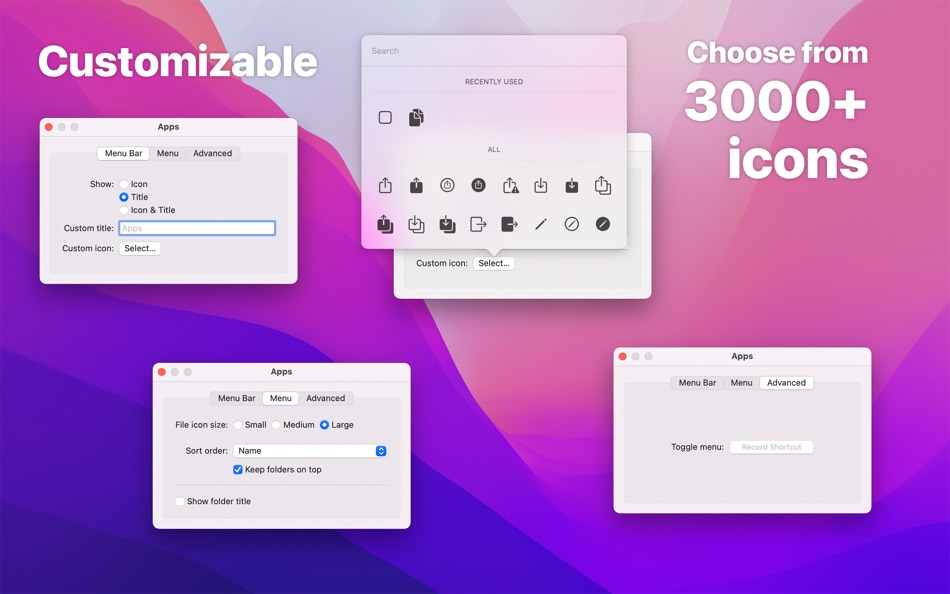
Each folder you add gets its own menu bar icon that you can customize and move around (drag the menu bar item while holding the Command key).
You can click on a file or folder in the menu to open it.
If you have little menu bar space, you can also show multiple folders in a single menu bar item. See the first FAQ.
Example use-cases:
- Access files relating to your current project
- Use it as an app launcher
- Add your home folder to quickly access anything
- View your most recent screenshots (see FAQ)
- Use it to select which Photos library to open
By taking advantage of Finder aliases, you can create a folder that contains aliases to other folders and files, making it possible to completely customize what's shown in a folder menu. See the FAQ for more.
■ Features
- Add multiple folders to the menu bar
- Each folder can be individually customized
- File preview
- View and copy image & video dimensions
- Drag & drop from the file submenu.
- Global keyboard shortcut to show/hide each folder menu (optionally opens at cursor position)
- Open a folder in a specific app
- Follows aliases and symlinks
- Shortcuts support
■ FAQ
‣ How can I show specific files and folders from various places?
You can create a folder that contains aliases to the files and folders you want to be included in the menu.
Create a folder to put aliases in and add that folder to the app. Make aliases for the files and folders you want in the menu and move the aliases into the folder you just made.
‣ What is an alias?
An alias is a shortcut to an app, file, or folder that you can keep anywhere on your Mac. Right-click an item in Finder and select “Make Alias” to make one.
‣ How can I use this as an app launcher?
Yes. Just add the “Applications” folder to the app. If you want to show only specific apps, follow the first FAQ.
‣ How can I show multiple directories at the top level in a single menu?
Follow the first FAQ.
‣ How can I have a menu bar folder with my most recent screenshots?
Make a folder to hold the screenshots and add it to the app. Open the Screenshot app, click “Options”, then “Other Location”, and choose the folder you just made. In Folder Peek, open the folder config, and change the sort order to “Date Created” and set “Max Items” to something like 20.
You can find more info on the app's website.
■ Support
You can contact me through the feedback button in the app.
Ekran görüntüleri



Ad
Fiyat Geçmişi
- Güncel fiyat: $4.00
- En az: Ücretsiz
- Maksimum: $4.00
Fiyatları takip et
AppAgg Puanı
Tahmini AppAgg puanı: Folder Peek
$12,540
Daha yüksek puanlar genellikle AppAgg üzerinde daha güçlü sinyaller anlamına gelir.
Şunlara göre: 🔥 popülerlik · ⭐ kullanıcı puanları · 🕒 güncellik · 🏷️ fırsatlar · 🏬 mağaza verileri · 👥 topluluk etkinliği
Bu puan yalnızca bilgilendirme amaçlıdır. Gerçek bir fiyat, satış teklifi veya piyasa değerlemesi değildir.
Kısa URL: Kopyalandı!
Ek Bilgi
- Satışa çıkış tarihi:
- Kategori:
macOS Uygulamalar›Kamu hizmetleri - İşletim Sistemleri:
macOS,macOS 26.0 ve sonrası - Boyut:
5 Mb - Desteklenen diller:
English - İçerik Derecelendirmesi:
4+ - Mac App Store Kullanıcı Oyu:
0 - Web sitesi:
 https://sindresorhus.com/folder-peek
Geliştirici
- Sindre Sorhus
- Platformlar: iOS Uygulamalar (21) macOS Uygulamalar (34)
- Listeler: 19 + 19
- Puanlar: 222 + 2,113 ¡
- Sıralamalar: 1 (2)
- Yorumlar: 0
- İndirimler: 0
- Video: 0
- RSS: Abone ol
Listeler (5)
- Folder Peek


Puanlar (9)
-

- 191 Christopher Espero
- +1
-
- 60 FUKASHI NOBE
- +1
-
- 571 Raphael Pinheiro
- +1
-
- 11,445 Simon Chan
- +1
-
- 774 Erin
- +1
-
- 665 IMO FUCASHI
- +1





Sıralamalar (0)
0 ☹️
Yorumlar (0)
İlk yorum yapan siz olun 🌟
«Folder Peek». Platform: macOS. Kategori: Kamu hizmetleri. Geliştirici: «Sindre Sorhus». İlk sürüm: . Son güncelleme: . Güncel fiyat: $4.00. Kaydedilen en düşük fiyat: $0.00 (). Kaydedilen en yüksek fiyat: $4.00 (). Bu başlık henüz AppAgg'de derecelendirme veya inceleme almadı. Listeler: genel 5, özel 3. Takip edilen noktalar: onaylandı 9, dolaylı 0. Mevcut diller: English. AppAgg, «Folder Peek» için fiyat geçmişini, derecelendirmeleri ve kullanıcı geri bildirimlerini takip eder. Gelecekteki indirimler ve güncellemeler: RSS. AppAgg uygulamaları barındırmaz veya yazılım dağıtmaz. Tüm ticari markalar, logolar ve ekran görüntüleri ilgili sahiplerine aittir.
Folder Peek Kısa URL: Kopyalandı!- 🌟 Paylaş
- Mac App Store
Benzerleri
-
- Folder by Color - Change color
- macOS Uygulamalar: Kamu hizmetleri Göre: 清碧 饶
- Ücretsiz
- Listeler: 1 + 1 0 0
- Puanlar: 6 + 0 $1k Sürüm: 1.8.2 [Folder by Color] is a folder color changing tool. Using different colored folder icons can keep your files well organized, thereby increasing the efficiency of file management. you ... ⥯
-
- Folder Snapshot Utility
- macOS Uygulamalar: Kamu hizmetleri Göre: David Gradwell
- $4.99
- Listeler: 0 0 0
- Puanlar: 0 + 0 $2k Sürüm: 2021.06.11 Folder Snapshot Utility will make a rapid backup copy (a snapshot ) of anything you throw at it. This is much faster than a traditional backup copy (think ~1200x faster) and uses ... ⥯
-
- Folder Dater
- macOS Uygulamalar: Kamu hizmetleri Göre: Dalamser
- $2.99
- Listeler: 1 0 0
- Puanlar: 0 + 0 $3k Sürüm: 2.3.2 Folder Dater sets a folder s modification date or creation date attributes based on the attributes of its descendants. All changes can be previewed in the Finder and undone before ... ⥯
-
- Folder - Custom your folder
- macOS Uygulamalar: Kamu hizmetleri Göre: 玉 李
- $0.99
- Listeler: 0 0 0
- Puanlar: 2 + 0 $4k Sürüm: 1.0.1 Folder App is an app for customizing folders on macOS. You can set folders to different colors, and you can also add text, emoji, or icons to folders. Of course, the colors of text and ⥯
-
- Folder Rack – File Manager
- macOS Uygulamalar: Kamu hizmetleri Göre: Ivo Wessel
- * Ücretsiz
- Listeler: 0 0 0
- Puanlar: 1 + 0 $6k Sürüm: 1.27 FOLDER RACK Manage your files and folders The Finder was always my most-used tool. However, there were many functions that I missed in my day-to-day work or that I would have done ... ⥯
-
- Folder Previewer Pro
- macOS Uygulamalar: Kamu hizmetleri Göre: Nikhil Anshuman
- $1.99
- Listeler: 0 0 0
- Puanlar: 0 + 0 $4k Sürüm: 1.0 Folder Previewer Pro lets you instantly preview the contents of any folder or archive (ZIP) directly in Finder s Quick Look, without opening or extracting files. Just select a folder ... ⥯
-
- Folder - Colorful folder maker
- macOS Uygulamalar: Kamu hizmetleri Göre: 余 张
- * Ücretsiz
- Listeler: 1 + 1 0 0
- Puanlar: 12 + 0 $6k Sürüm: 1.3.1 How many folders do you have on your computer? Scores of them? Hundreds? Thousands? Are all of them are alike: default folder, default folder, default folder, default folder... It's so ⥯
-
- Folder Analyze
- macOS Uygulamalar: Kamu hizmetleri Göre: 培基 王
- * Ücretsiz
- Listeler: 0 0 0
- Puanlar: 1 + 0 $4k Sürüm: 2.0.1 A powerful and easy-to-use folder content analysis tool that displays content as charts, making the size and number of files clearly visible. It also supports an edit mode, where you ... ⥯
-
- Folder Crazy Desktop
- macOS Uygulamalar: Kamu hizmetleri Göre: Steve Mills
- $0.99
- Listeler: 0 0 0
- Puanlar: 0 + 0 $2k Sürüm: 1.5.3 Remember how great the Desktop image feature in macOS was before they removed the Tile option? Just like Folder Crazy vastly improves the screensaver experience, Folder Crazy Desktop ... ⥯
-
- Folder Sizes
- macOS Uygulamalar: Kamu hizmetleri Göre: Roberto Piccirilli
- $2.99
- Listeler: 0 0 0
- Puanlar: 0 + 0 $2k Sürüm: 2.2.1 Show in easy and intuitive way the space occupied by files and folders . With this app you can immediately identify the space occupied for easy cleaning of their own archives. Now you ... ⥯
-
- Folder Factory
- macOS Uygulamalar: Kamu hizmetleri Göre: UAB Macmanus
- $3.99
- Listeler: 1 + 1 0 0
- Puanlar: 3 + 0 $5k Sürüm: 4.0 Folder Factory is a neat little app for changing the design of your folder icons. It will help you to match similar folders by the color, text or picture and this will keep your Mac ... ⥯
-
- Folder Color Changer:RightMenu
- macOS Uygulamalar: Kamu hizmetleri Göre: 奕琦 冯
- Ücretsiz
- Listeler: 1 + 1 0 0
- Puanlar: 4 + 0 $1k Sürüm: 1.4.0 [Folder Icon Customization Artifact] - Right click to replace folder icon Just right-click on the folder to change the icon - Batch operation Multi-select folders can also be quickly ... ⥯
-
- Folder Colorizer
- macOS Uygulamalar: Kamu hizmetleri Göre: 兰桂 吴
- $1.99
- Listeler: 1 + 1 0 0
- Puanlar: 0 + 0 $6k Sürüm: 1.3.3 Folder Colorizer allows you to customize your folders with just about any color. Would like to make your folders looks cool? Or want to organize your folders to make things easier to ... ⥯
-
- Folder Factory Pro
- macOS Uygulamalar: Kamu hizmetleri Göre: 鑫 金
- $1.99
- Listeler: 1 0 0
- Puanlar: 0 + 0 $2k Sürüm: 1.0 Folder Factory Pro changes the design of your folder icons. It will help you to match similar folders by the color, text or picture and this will keep your Mac organised. The most ... ⥯
Şunları da beğenebilirsiniz
Son görüntülenenler
Son güncelleme:
AppAgg'de kullanabileceğiniz arama operatörleri