
| Nhà phát triển: | Sigurdur Tomasson (11) | ||
| Giá bán: | Miễn phí | ||
| Xếp hạng: | 0 | ||
| Đánh giá: | 0 Viết đánh giá | ||
| Danh sách: | 1 + 1 | ||
| Điểm: | 16 + 0 ¡ | ||
| Mac App Store | |||
Mô tả

Noob Music also lets you shuffle without tag-shuffling if you have not assigned tags to your songs or you just want a totally random playlist. Noob Music uses NumRand a random number generator based on chaotic motion for the best random result. Because the randomisation method is complex it takes some time to shuffle large playlists.
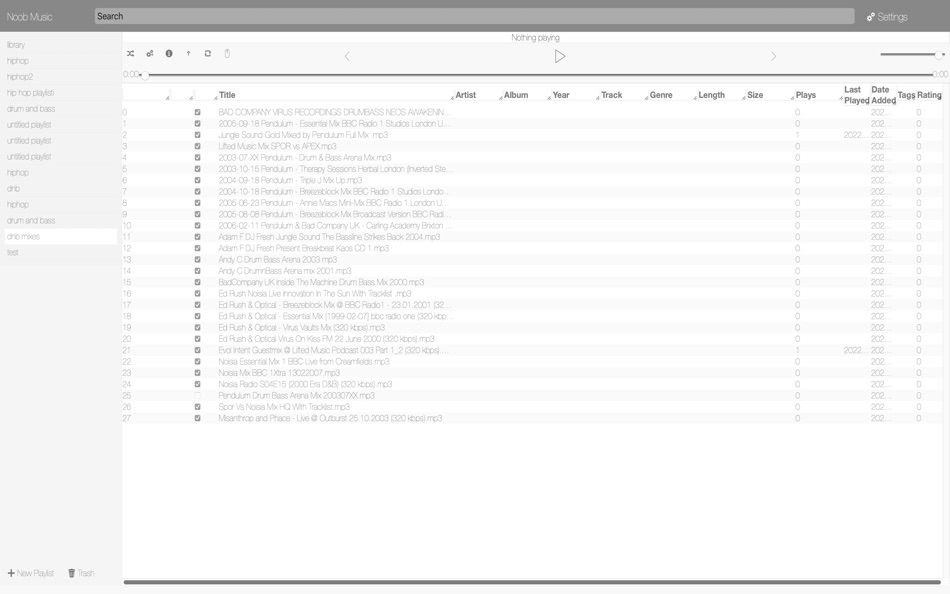
You are prompted to grant access to the library location you choose if it is outside your Music folder in your home folder. You can choose on primary library location as well as multiple secondary locations, note that you must grant access to library folders each time the app is launched (upon playing a song or indexing your library). You must choose the folder in the Settings section. And then index the folder. Music information is read from song files when you play each song and saved to the your library. Songs that don't contain information can be edited manually. Noob Music lets you create playlists and drag and drop songs to your playlist you can also drag and drop a playlist onto another playlist.
Move mouse cursor over buttons to see button description.
Noob Music supports mp3, m4a, wav, flac and aif.
The search bar supports query strings with specific columns for example type: plays:0;rating>4; to search for songs with zero plays and rating equal or greater than four. Make sure you delimit each column with a semicolon and each column value pair with a colon. Another example: title:interlude;date_added
Column names for search are: title, artist, album, year, track, genre, length (length must be inputted as seconds only, for example 2:01 is 121 seconds.), plays, last_played, date_added, tags, rating. Type numeric value of tag for searching for a specific tag. You can also search by relative_filepath.
To save a search, click the button right next to the search field, this will also display saved searches, click the button again to hide saved searches. To delete a saved search: double click on a saved search. Click on a saved search to deploy that search. When searching with date values you can specify 3w for three weeks ago, 2m for 2 months ago 1y for 1 year. For example date_added:>1m; for songs added in the past one month. You can browse by date range by pressing the "browse by date" button found in the button toolbar.
You can change the theme of the application in settings.
You can customise the tag-shuffle by command-clicking on the tag shuffle button and there you can create your own shuffle-template by adding tags and ordering them in the desired ordering for the resulting playlist. You can prioritize songs not played recently by checking the checkbox with the "prioritize" label
Click "browse options" button to see collections, there you can add collections (command click on a collection to edit its name) then you can drag and drop songs onto a collection name to assign the song to that collection, you can also select artists which will appear in the right column to constrain the playlist view to the selected browsing options, you must check the checkbox marked "constrain library/playlist view.." for the constraints to take place. Drag collection to the back button to move collection up one level you can also drag collections onto other collections to add as sub collection.
Ảnh chụp màn hình


Giá bán
- Hôm nay: Miễn phí
- Tối thiểu: Miễn phí
- Tối đa: $29.99
Theo dõi giá
Nhà phát triển
- Sigurdur Tomasson
- Nền tảng: macOS Ứng dụng (11)
- Danh sách: 1 + 1
- Điểm: 65 + 0 ¡
- Xếp hạng: 0
- Đánh giá: 0
- Giảm giá: 0
- Video: 0
- RSS: Đăng ký
Điểm


Xếp hạng
0 ☹️
Danh sách

Đánh giá
Hãy là người đầu tiên đánh giá 🌟
Thông tin bổ sung
- Phiên bản: 4.0.0
- Danh mục:
macOS Ứng dụng›Nhạc - HĐH:
macOS,macOS 13.0 trở lên - Kích thước:
44 Mb - Ngôn ngữ được hỗ trợ:
English - Xếp hạng nội dung:
4+ - Mac App Store Xêp hạng:
0 - Cập nhật:
- Ngày phát hành:
Danh bạ
- Trang web:
 https://noob.software
Noob Music URL ngắn: Đã sao chép!- 🌟 Chia sẻ
- Mac App Store
Bạn cũng có thể thích
-
- X Djing - Music Mix Maker
- macOS Ứng dụng: Nhạc Bởi: Music Topia
- * Miễn phí
- Danh sách: 0 + 0 Xếp hạng: 0 Đánh giá: 0
- Điểm: 3 + 0 Phiên bản: 2.3.0 X DJing is a DJ software that lets you easily mix music, set loops, and hot cues and play with audio effects. >> POWERFUL TOOL FOR YOUR FIRST PERFORMANCE Created according to all ... ⥯
- -50%
- Music-Discovery
- macOS Ứng dụng: Nhạc Bởi: SORIN NAE
- ▼ $4.99
$9.99-50% - Danh sách: 0 + 0 Xếp hạng: 0 Đánh giá: 0
- Điểm: 0 + 0 Phiên bản: 3.0 Music Discovery is the essential tool for DJs and music professionals managing large local collections. Search thousands of tracks instantly, prepare setlists, organize your music, and ⥯
-
- Music-Player Lite
- macOS Ứng dụng: Nhạc Bởi: 育平 姚
- Miễn phí
- Danh sách: 0 + 0 Xếp hạng: 0 Đánh giá: 0
- Điểm: 2 + 0 Phiên bản: 2.0 Music-Player Lite is a music player app. Supported more than 20 formats audio. Supported movie play(supported more than 50 formats video). Supported network play. Supported Hardware ... ⥯
-
- Music Recognizer
- macOS Ứng dụng: Nhạc Bởi: Yue Chen
- $2.99
- Danh sách: 0 + 0 Xếp hạng: 0 Đánh giá: 0
- Điểm: 1 + 0 Phiên bản: 1.1 Music Recognizer is an app designed to automatically fix hundreds of songs that have inaccurate/missing information, like an empty title, missing album, or just blurry artwork. It goes ⥯
-
- Music Player - for YouTube
- macOS Ứng dụng: Nhạc Bởi: 岩柯 李
- $1.99
- Danh sách: 0 + 0 Xếp hạng: 0 Đánh giá: 0
- Điểm: 0 + 0 Phiên bản: 2.1.2 Experience Music Like Never Before All in One Place Music Player - for YouTube brings the freedom of web-based music to your Mac in a beautifully integrated experience. Stream your ... ⥯
-
- Music Search Helper
- macOS Ứng dụng: Nhạc Bởi: Dmitrii Nikolaev
- Miễn phí
- Danh sách: 0 + 0 Xếp hạng: 0 Đánh giá: 0
- Điểm: 1 + 0 Phiên bản: 1.0 Find royalty-free music that matches your video's vibe. Music Match analyzes any audio or video file and suggests similar tracks from the YouTube Audio Library the free music ... ⥯
-
- Music Collector
- macOS Ứng dụng: Nhạc Bởi: John D Gauchat
- Miễn phí
- Danh sách: 0 + 1 Xếp hạng: 0 Đánh giá: 0
- Điểm: 2 + 2 (2.5) Phiên bản: 3.3 Music Collector helps you keep track of your collection, especially in those moments at the store or the flea market where everything is on sale and you are not sure if you already ... ⥯
-
- Music Tag Editor
- macOS Ứng dụng: Nhạc Bởi: 恒卓 刘
- * Miễn phí
- Danh sách: 0 + 0 Xếp hạng: 0 Đánh giá: 0
- Điểm: 4 + 0 Phiên bản: 9.6 Music Tag Editor is a professional all-around tool for editing metadata of audio and video files. The concise and clear interactive method can help you modify metadata in batches ... ⥯
-
- Music Transfer for iTunes
- macOS Ứng dụng: Nhạc Bởi: Amvidia Limited
- * Miễn phí
- Danh sách: 0 + 1 Xếp hạng: 0 Đánh giá: 0
- Điểm: 1 + 0 Phiên bản: 2.0.1 Music Transfer for iTunes exports songs from iTunes/Apple Music app to external devices like USB sticks, SD cards, NAS, and local or networked folders. You can transfer the whole Music ⥯
-
- Music Library Exporter
- macOS Ứng dụng: Nhạc Bởi: Kyle King
- $3.99
- Danh sách: 0 + 1 Xếp hạng: 0 Đánh giá: 0
- Điểm: 1 + 0 Phiên bản: 1.2.2 Music Library Exporter allows you to export your library and playlists from the native macOS Music app. The library is exported in an XML format, and is compatible with other ... ⥯
-
- Music Maker C
- macOS Ứng dụng: Nhạc Bởi: Janek Soomets
- * Miễn phí
- Danh sách: 0 + 0 Xếp hạng: 0 Đánh giá: 0
- Điểm: 1 + 0 Phiên bản: 2.1 Music Maker is a music making program. The application uses loops to make music. In addition to loops, you can add music: BeatBox, Microphone, Piano, Drum Pad, Line In, Playing Center ... ⥯
-
- Music Binder Pro
- macOS Ứng dụng: Nhạc Bởi: VadeCreation
- $4.99
- Danh sách: 0 + 0 Xếp hạng: 0 Đánh giá: 0
- Điểm: 0 + 0 Phiên bản: 3.17 Music sheets organizer and Music Player designed for live performance. Features: 1. Basic - Support PDF and Chordpro files - Quickly sort your songs by Title or Artist - Embedded ... ⥯
-
- Music Converter Pro
- macOS Ứng dụng: Nhạc Bởi: ShedWorx
- $9.99
- Danh sách: 0 + 0 Xếp hạng: 0 Đánh giá: 0
- Điểm: 0 + 0 Phiên bản: 1.6.4 Music Converter Pro lets you quickly and simply convert your albums, music and sound files to all popular formats. The app provides full Music integration; lets you edit album, artist ... ⥯
-
- Music CD Creator
- macOS Ứng dụng: Nhạc Bởi: 玉兰 雷
- $3.99
- Danh sách: 0 + 0 Xếp hạng: 0 Đánh giá: 0
- Điểm: 0 + 0 Phiên bản: 1.0 Music CD Creator supports burning music CD from any popular audio and video format files including AVI, MPEG, WMV, MP4, FLV, MKV, H.264/MPEG-4 AVC, AVCHD, MP3, WMA, WAV, AAC, FLAC, ... ⥯