
Opgeslagen
Kies de naam die in je menu Opgeslagen moet worden weergegeven.
Klaar!
| Ontwikkelaar: | 雅 田 (8) | ||
| Prijs: | $1.99 | ||
| AppAgg-score: | $7,030 | ||
| Beoordelingen: | 0 | ||
| Reacties: | 0 Plaats reactie | ||
| Lijsten: | 1 + 1 | ||
| Punten: | 10 + 0 ¡ | ||
| +1 Punten | |||
Beschrijving

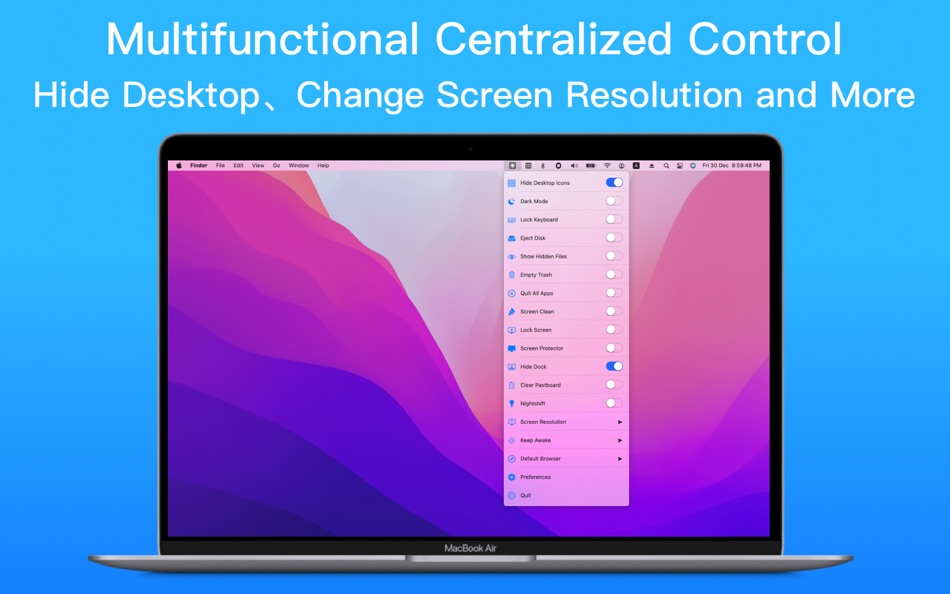
The main function:
1 Show and hide desktop icons
2 Toggle dark mode
3 Show and hide system hidden files
4 Empty the trash
5 Close all apps that are not running in the background
6 One-click eject disk
7 Set the default browser (select all browsers on the computer to set)
8 Keep the computer screen awake (permanent screen and screen time can be set)
9 Support keyboard lock, prohibit keyboard input
10 Support entering the screen cleaning mode, easy to clean the screen
11 Support screen resolution modification
12 Support HIDPI (Retina) and non-HIPID (non-Retina) settings
13 Support screen lock
14 Support to open the screen saver
15 Support to clear the clipboard
16 Support to show and hide Dock
17 Support turning on and off the night shift mode
18 Support opening and closing stage manager
Screenshots


Prijsgeschiedenis
- Huidige prijs: $1.99
- Minimum: Gratis
- Maximaal: $4.99
Prijzen volgen
AppAgg-score
Geschatte score voor deze app
$7,030
Hogere scores betekenen meestal sterkere signalen op AppAgg.
Gebaseerd op: 🔥 populariteit · ⭐ gebruikersbeoordelingen · 🕒 actualiteit · 🏷️ deals · 🏬 winkelgegevens · 👥 community-activiteit
Deze score is alleen bedoeld ter informatie. Het is geen echte prijs, geen verkoopaanbod en geen marktwaardering.
Korte URL: Gekopieerd!
Ad
Aanvullende informatie
- Releasedatum:
- Categorie:
macOS Apps›Productiviteit - Besturingssystemen:
macOS,macOS 10.14 en hoger - Grootte:
3 Mb - Ondersteunde talen:
Chinese,English - Beoordeling van content:
4+ - Mac App Store Beoordeling:
0
Ontwikkelaar
- 雅 田
- Platforms: macOS Apps (8)
- Lijsten: 1 + 1
- Punten: 22 + 0 ¡
- Beoordelingen: 0
- Reacties: 0
- Kortingen: 0
- Videos: 0
- RSS: Abonneren
Lijsten (1)
- Quick Switcher-Set Resolution

Punten (10)





Beoordelingen (0)
0 ☹️
Reacties (0)
Reageer als eerste 🌟
«Quick Switcher-Set Resolution». Platform: macOS. Categorie: Productiviteit. Ontwikkelaar: «雅 田». Eerste uitgave: . Laatste update: . Huidige prijs: $1.99. Laagste geregistreerde prijs: $0.00 (). Hoogst geregistreerde prijs: $4.99 (). Deze titel heeft nog geen beoordelingen of recensies ontvangen op AppAgg. Lijsten: openbare 1, privé 1. Bijgehouden punten: bevestigde 10, indirecte 0. Beschikbare talen: Chinese, English. AppAgg houdt de prijsgeschiedenis, beoordelingen en gebruikersfeedback bij «Quick Switcher-Set Resolution». Volg toekomstige kortingen en updates via RSS. AppAgg host geen applicaties en distribueert geen software. Alle handelsmerken, logo's en screenshots zijn eigendom van hun respectievelijke eigenaren.
Quick Switcher-Set Resolution Korte URL: Gekopieerd!- 🌟 Delen
- Mac App Store
Vergelijkbare
-
- Quick Notes
- macOS Apps: Productiviteit Door: loay setrak
- $0.99
- Lijsten: 0 0 0
- Punten: 0 + 0 Score: $2k Versie: 2.0.1 Quick Notes is a simple note taking App and Menu bar widget Features: - 15 Notes - Today View Widget - 13 Font Colours - 27 Font Sizes - Text Alignment options - iCloud Sync - App and ... ⥯
-
- Quick Join: Google Meet & Zoom
- macOS Apps: Productiviteit Door: Erik Wegener
- Gratis
- Lijsten: 0 + 1 0 0
- Punten: 4 + 0 Score: $4k Versie: 1.7.1 Quick Join lets you join your meetings faster - no more digging around for that invite link! Quick Join retrieves the upcoming events over the next seven days from your calendar and ... ⥯
-
- Quick Blackout Redactor
- macOS Apps: Productiviteit Door: Teus Benschop
- Gratis
- Lijsten: 0 0 0
- Punten: 2 + 0 Score: $2k Versie: 1.01 Use Quick Blackout Redactor to quickly and safely black out certain parts of your images and PDF files. Drag and drop an image file or a PDF file into the application. Use the mouse to ⥯
- Nieuw
- Quick Reads for Safari
- macOS Apps: Productiviteit Door: Matt Birchler
- Gratis
- Lijsten: 0 0 0
- Punten: 0 + 0 Score: $3k Versie: 1.0 Save articles to Quick Reads directly from Safari. Whenever you come across something worth reading later, tap the extension icon to add it to your Quick Reads list in one click. Quick ⥯
-
- Quick Reminder: ADHD-friendly
- macOS Apps: Productiviteit Door: Digital Hole Pvt. Ltd.
- $1.99
- Lijsten: 0 + 1 0 0
- Punten: 6 + 0 Score: $5k Versie: 1.0 Quick Reminder is a fast, simple menu bar app designed to help you stay on track throughout the day. When a task is due, it shows a full-screen reminder that appears above all other ... ⥯
-
- Quick Note
- macOS Apps: Productiviteit Door: Diigo Inc.
- Gratis
- Lijsten: 0 + 1 0 0
- Punten: 2 + 0 Score: $3k Versie: 1.3.11 Quick Note is especially designed for lightweight note-taking. 【Quick to add and edit 】 Add and edit note in the app 【Quick to search 】 Instant search for all notes 【Quick to access ... ⥯
-
- Quick Apps Launcher
- macOS Apps: Productiviteit Door: Harshad Jadav
- $0.99
- Lijsten: 0 0 0
- Punten: 2 + 0 Score: $4k Versie: 1.4 Quick App Launcher Open your favorite Mac apps instantly Quick App Launcher helps you launch apps faster using custom keyboard shortcuts. Stop digging through folders or Dock open what ⥯
-
- Quick Sticky Notes
- macOS Apps: Productiviteit Door: Prakash Joshi
- * Gratis
- Lijsten: 0 0 0
- Punten: 1 + 0 Score: $4k Versie: 1.32 Quick Sticky Notes brings modern note-taking to your Mac. Create floating notes that stay visible while you work. KEY FEATURES: Always-on-top notes Beautiful color themes Markdown ... ⥯
-
- Quick App Launcher (QAL) Lite
- macOS Apps: Productiviteit Door: Baser Kandehir
- Gratis
- Lijsten: 0 0 0
- Punten: 1 + 0 Score: $3k Versie: 1.4.9 Quick App Launcher (QAL) is a fast, minimalistic, customizable app launcher. There are 2 versions available: QAL Lite, the free version, has the core functionality and then some. QAL ... ⥯
-
- Quick Translate - Fast & Smart
- macOS Apps: Productiviteit Door: Veysel Bozkurt
- * Gratis
- Lijsten: 0 0 0
- Punten: 0 + 0 Score: $3k Versie: 1.4.1 Quick Translator lives quietly in your menu bar, ready the moment you need it. Press Cmd+C twice on any text, anywhere on your Mac, and the translation appears instantly. No need to ... ⥯
-
- Quick Capture - Markdown notes
- macOS Apps: Productiviteit Door: Pradeep Burugu
- * Gratis
- Lijsten: 0 0 0
- Punten: 0 + 0 Score: $3k Versie: 1.6 Quick Capture - Markdown Notes It's an app designed for taking notes throughout your day in markdown files, allowing you to capture notes instantly from anywhere on macOS. You don't ... ⥯
-
- Quick Note Taking – Type
- macOS Apps: Productiviteit Door: Papercones Inc.
- * Gratis
- Lijsten: 1 + 1 0 0
- Punten: 11 + 0 Score: $7k Versie: 1.5.1 Type lets you quickly capture notes from anywhere. Type does quick note-taking better than Quick Notes Justin Pot, Lifehacker Being able to quickly note without being taken out of my ... ⥯
-
- Quick Launcher - Easy Launch
- macOS Apps: Productiviteit Door: 经纬 宛
- Gratis
- Lijsten: 2 + 1 0 0
- Punten: 3 + 0 Score: $3k Versie: 1.1 Are you upset about the messy icons on the Dock? Quick Launcher can solve this problem very well. Place a floating window on your desktop, add "applications, system preferences, ... ⥯
-
- Resolution Changer Pro
- macOS Apps: Productiviteit Door: 方成 印
- $1.99
- Lijsten: 0 0 0
- Punten: 0 + 0 Score: $2k Versie: 1.1 ON SALE FOR A LIMITED TIME: 50% OFF Resolution Changer Pro is a simple tool to lets you change the resolution of your Mac at just one click. So you don t have to go to System ... ⥯
Mogelijk vindt u dit ook interessant
Recent bekeken
Laatst bijgewerkt:
Zoekoperators die je kunt gebruiken met AppAgg