
| Desarrollador: | The Document Foundation (7) | ||
| Precio: | $8.99 | ||
| Clasificaciones: | 0 | ||
| Opiniones: | 0 Escribir una opinión | ||
| Comentarios: | 0 Publicar comentario | ||
| Listas: | 1 + 1 | ||
| Puntos: | 0 + 0 ¡ | ||
| Mac App Store | |||
Descripción

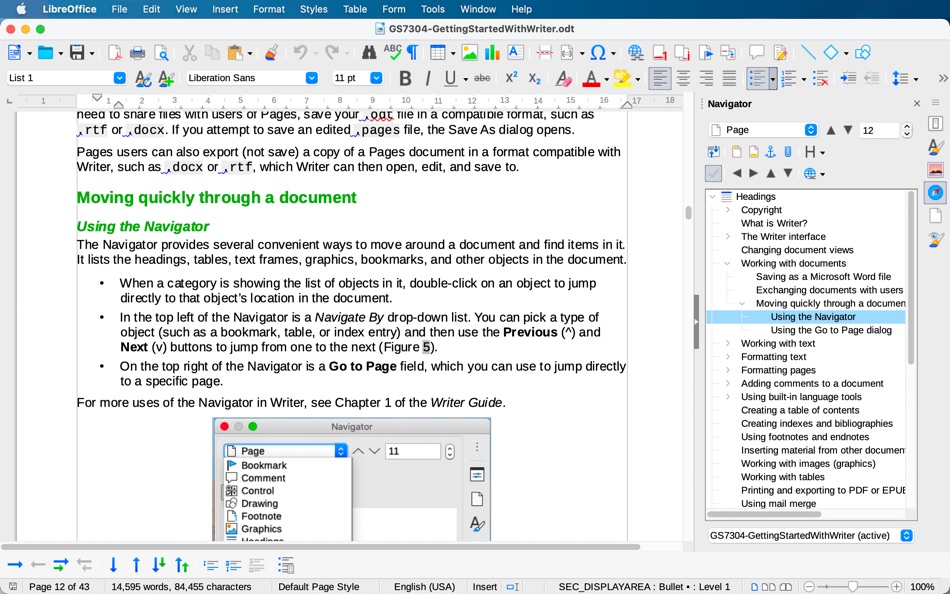
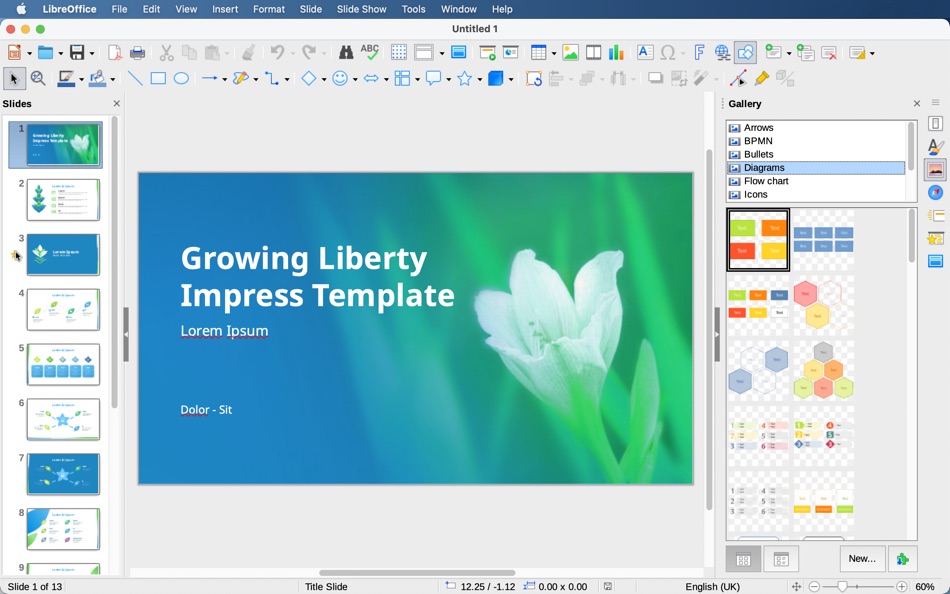
Included: Writer (word processing), Calc (spreadsheets), Impress (presentations), Draw (vector graphics and flowcharts), Base (databases), and Math (formula editing).
LibreOffice is compatible with a wide range of document formats such as Microsoft® Word (.doc, .docx), Excel (.xls, .xlsx), PowerPoint (.ppt, .pptx) and Publisher. But LibreOffice goes much further with its native support for a modern and open standard, the Open Document Format (ODF). With LibreOffice, you have maximum control over your data and content – and you can export your work in many different formats including PDF.
LibreOffice is made by a worldwide community, who can help you:
* Do you have a question about LibreOffice? See https://ask.libreoffice.org
* Want to report a problem? Let our QA community know: https://bugs.documentfoundation.org
Please note that the version provided in the App Store cannot support Java functionality, such as Java-based extensions.
Ad
Capturas...
Historial de precios
- Hoy: $8.99
- Mínimo: $8.99
- Máximo: $8.99
Realizar un seguimiento de los precios
Novedades
- Versión: 25.8.6
- Actualizado:
- LibreOffice 25.8 contains these changes and more:
== Writer ==
* "Move line hyphenation" rule is added to choose whether or not to hyphenate the last line words of the pages and move the whole lines to the next pages instead.
* A command was added to insert a paragraph break before a table: “.uno:BreakAboveTable”.
* It is now easier to control how text is selected while scrolling the view.
* An option to redact images was added in the Auto-Redact dialog Tools ▸ Auto-Redact ▸ Add Target.
* It is now possible to ‘reinstate’ changes in Writer (reject with history)
== Calc ==
* The Text Import dialog, that is used in CSV import, now has an "Always show on import" checkbox (enabled by default).
* Conditional formatting operators in icon sets can now be customized.
* A “Clear AutoFilter” option was added to the context menu of Calc cells.
* Text Import dialog is now only shown for Paste Special actions to avoid unnecessary interruptions.
* New functions: CHOOSECOLS/ROWS, DROP, EXPAND, HSTACK, TAKE, TEXTAFTER/TEXTBEFORE/TEXTSPLIT, TOCOL/TOROW, VSTACK, and WRAPCOLS/WRAPROWS
== Impress & Draw ==
* Cmd + scrollwheel changes how many slides are displayed per row in the Slide Sorter view.
* Embedded fonts in PPTX files are now supported.
* Master Slides in Impress and Master Pages in Draw can now be copied.
* In Draw, Boundaries are shown for page margins.
== General ==
* Background image in the document now visible as a bitmap thumbnail in Page Style ▸ Area ▸ Bitmap.
* Encrypted hybrid PDFs can now be imported.
* Support for exporting PDF 2.0 (ISO 32000-2) was added.
* The UI picker View ▸ User Interface… allows users to activate toolbars.
see https://wiki.documentfoundation.org/ReleaseNotes/25.8 for a more detailed list of new features and improvements
Comentarios (0)
Sé el primero en comentar 🌟
Desarrollador
- The Document Foundation
- Plataformas: Android Aplicaciones (2) iOS Aplicaciones (1) macOS Aplicaciones (1) Windows Aplicaciones (2) Meta Juegos (1)
- Listas: 1 + 1
- Puntos: 0 + 11,329 ¡
- Clasificaciones: 0
- Opiniones: 0
- Comentarios: 0
- Descuentos: 0
- Vídeos: 3
- RSS: Suscribirse
Puntos (0)
0 ☹️
Clasificaciones (0)
0 ☹️
Listas (1)
- LibreOffice

Opiniones (0)
Sé el primero en escribir una reseña 🌟
Información adicional
- Versión: 25.8.6
- Categoría:
macOS Aplicaciones›Productividad - Sistemas operativos:
macOS,macOS 11.0.0 y versiones posteriores - Tamaño:
568 Mb - Idiomas admitidos:
Catalan,Chinese,Croatian,Czech,Danish,Dutch,English,Finnish,French,German,Greek,Hungarian,Indonesian,Italian,Japanese,Korean,Malay,Norwegian,Polish,Portuguese,Romanian,Russian,Slovak,Spanish,Swedish,Thai,Turkish,Ukrainian,Vietnamese - Clasificación de contenido:
4+ - Mac App Store Puntuación:
0 - Actualizado:
- Fecha de lanzamiento:
Contactos
- Sitio:
 https://www.libreoffice.org
«LibreOffice». Plataforma: macOS. Categoría: Productividad. Desarrollador: «The Document Foundation». Primer lanzamiento: . Última actualización: . Precio actual: $8.99. Precio más bajo registrado: $8.99. Precio más alto registrado: $8.99. Este título aún no ha recibido calificaciones ni reseñas en AppAgg. Listas: públicas 1, privadas 1. Idiomas disponibles: Catalan, Chinese, Croatian, Czech, Danish, Dutch, English, Finnish, French, German, Greek, Hungarian, Indonesian, Italian, Japanese, Korean, Malay, Norwegian, Polish, Portuguese, Romanian, Russian, Slovak, Spanish, Swedish, Thai, Turkish, Ukrainian, Vietnamese. AppAgg rastrea el historial de precios, las calificaciones y los comentarios de los usuarios para «LibreOffice». Siga futuros descuentos y actualizaciones a través de RSS. AppAgg no aloja aplicaciones ni distribuye software. Todas las marcas comerciales, logotipos y capturas de pantalla pertenecen a sus respectivos propietarios.
LibreOffice URL corta: Copiado!- 🌟 Compartir
- Mac App Store
Ad
Similares
-
- Office Viewer for Safari
- macOS Aplicaciones: Productividad De: Denk Alexandru
- $1.99
- Listas: 1 + 0 Clasificaciones: 0 Opiniones: 0
- Puntos: 1 + 0 0 Versión: 1.9.0 With Office Viewer for Safari you can read online Office and PDF documents directly in your browser without download and without native applications. Usually when you are searching for ⥯
-
- Polaris Office - Docs & PDF
- macOS Aplicaciones: Productividad De: Polaris Office Corp.
- * Gratis
- Listas: 0 + 0 Clasificaciones: 0 Opiniones: 0
- Puntos: 1 + 0 0 Versión: 9.0.78 The best office program selected by 100 million users around the world - Try Polaris Office for free on Mac, which improves stability as well as performance with the latest engine ... ⥯
-
- OfficeDocs - Templates for Microsoft Office for Mac OS X
- macOS Aplicaciones: Productividad De: Pocket Bits LLC
- $39.99
- Listas: 1 + 0 Clasificaciones: 0 Opiniones: 0
- Puntos: 0 + 0 0 Versión: 1.3 The ultimate Bundle of MS Office templates. Suite for MS Office includes hundreds of templates for MS Word, MS Excel, and MS PowerPoint. This bundle of templates is not affiliated and ... ⥯
-
- Collabora Office Desktop
- macOS Aplicaciones: Productividad De: Collabora Productivity
- Gratis
- Listas: 0 + 0 Clasificaciones: 0 Opiniones: 0
- Puntos: 0 + 0 0 Versión: 25.04.9.2 The new Collabora Office for desktop brings the familiar Collabora Online experience to your computer - so you can create, edit, and present with a beautiful, modern UI. Based on ... ⥯
-
- Task Office: to-do, calendar
- macOS Aplicaciones: Productividad De: DK CONSULTING, TOV
- * Gratis
- Listas: 0 + 0 Clasificaciones: 0 Opiniones: 0
- Puntos: 10 + 0 0 Versión: 9.0 Task Office is the best of ever existing GTD, to do lists, projects and contacts management apps. Designed to make business planning, scheduling and getting things done more efficient. ⥯
-
- Ace Office:for word processing
- macOS Aplicaciones: Productividad De: CYNOBLE TECHNOLOGY LIMITED
- Gratis
- Listas: 0 + 0 Clasificaciones: 0 Opiniones: 0
- Puntos: 1 + 0 0 Versión: 1.2.1 Ace Office is a comprehensive office suite for viewing and editing a wide range of documents. Not only it can support Microsoft Office file formats like Word, Excel, and PowerPoint but ⥯
-
- Templates - for MS Office
- macOS Aplicaciones: Productividad De: 顺华 吕
- * Gratis
- Listas: 0 + 0 Clasificaciones: 0 Opiniones: 0
- Puntos: 1 + 0 0 Versión: 4.6 Templates - for MS Office contains 160 high quality PowerPoint templates,160 high quality Word templates and 41 high quality Excel templates, colorful background with appropriate ... ⥯
-
- HR Buddy Office AI Assistant
- macOS Aplicaciones: Productividad De: Limits Pushers
- * Gratis
- Listas: 0 + 0 Clasificaciones: 0 Opiniones: 0
- Puntos: 0 + 0 0 Versión: 1.0 Elevate your HR management with HR Buddy office AI Assistant, the ultimate Mac app designed to streamline and simplify your HR operations. Powered by cutting-edge artificial ... ⥯
-
- Evolio Synchronizer 2.0
- macOS Aplicaciones: Productividad De: AVE Soft
- Gratis
- Listas: 0 + 0 Clasificaciones: 0 Opiniones: 0
- Puntos: 1 + 0 0 Versión: 24.10.26 Evolio Synchronizer brings a whole new level of effectiveness and user comfort to your work. - Automatically downloads a document from the server and opens it directly from your PC - ... ⥯
-
- Libreoffice Viewer
- macOS Aplicaciones: Productividad De: Aditya Wagh
- $2.99
- Listas: 0 + 0 Clasificaciones: 0 Opiniones: 0
- Puntos: 1 + 0 0 Versión: 1.0 This app lets you view and read Libreoffice documents like ODT and ODS easily. Just select the file and click open and you can easily see the document, spreadsheet of libre office or ... ⥯
-
- Fantastical - Calendar
- macOS Aplicaciones: Productividad De: Flexibits Inc.
- * Gratis
- Listas: 5 + 7 Clasificaciones: 0 Opiniones: 0
- Puntos: 9 + 0 0 Versión: 4.1.10 Fantastical is the multiple award-winning calendar app with powerful features including intuitive natural language text parsing, a full calendar window with day, week, month, quarter ... ⥯
-
- Noise for noise
- macOS Aplicaciones: Productividad De: Aliaksandr Melnikau
- $4.99
- Listas: 0 + 1 Clasificaciones: 0 Opiniones: 0
- Puntos: 16 + 0 0 Versión: 2.0 Some researchers and enthusiasts report that playing White or Pink or Red noise in the background helps to stay focused in noisy areas, such as open office spaces. There is also ... ⥯
-
- Microsoft OneNote
- macOS Aplicaciones: Productividad De: Microsoft Corporation
- * Gratis
- Listas: 2 + 3 Clasificaciones: 5 (1) Opiniones: 0
- Puntos: 3 + 0 0 Versión: 16.107.2 Capture your thoughts, discoveries, and ideas in your very own digital notebook using OneNote for Mac. Now it is easier than ever capture your thoughts, add pictures or files, and ... ⥯
-
- MultiNotepad
- macOS Aplicaciones: Productividad De: devulder jean-paul
- $0.99
- Listas: 0 + 1 Clasificaciones: 0 Opiniones: 0
- Puntos: 12 + 0 0 Versión: 1.11 Make the best use of this new text editor! You can put a window in the foreground. You can set the transparency level of each window. Backups are automatic. You can export the texts in ⥯