
| Concepteur: | Metromedya Digital Ad Agency (16) | ||
| Prix: | $0.99 | ||
| Classements: | 0 | ||
| Avis: | 0 Rédiger un avis | ||
| Commentaires: | 0 Publier un commentaire | ||
| Listes: | 1 + 1 | ||
| Points: | 14 + 0 ¡ | ||
| Mac App Store | |||
Description

Automatic Format Stripping
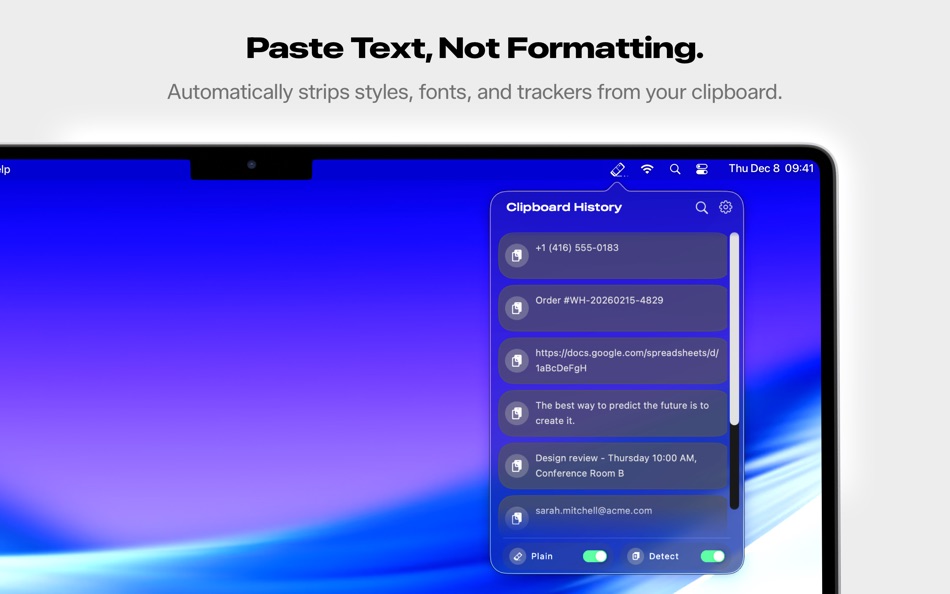
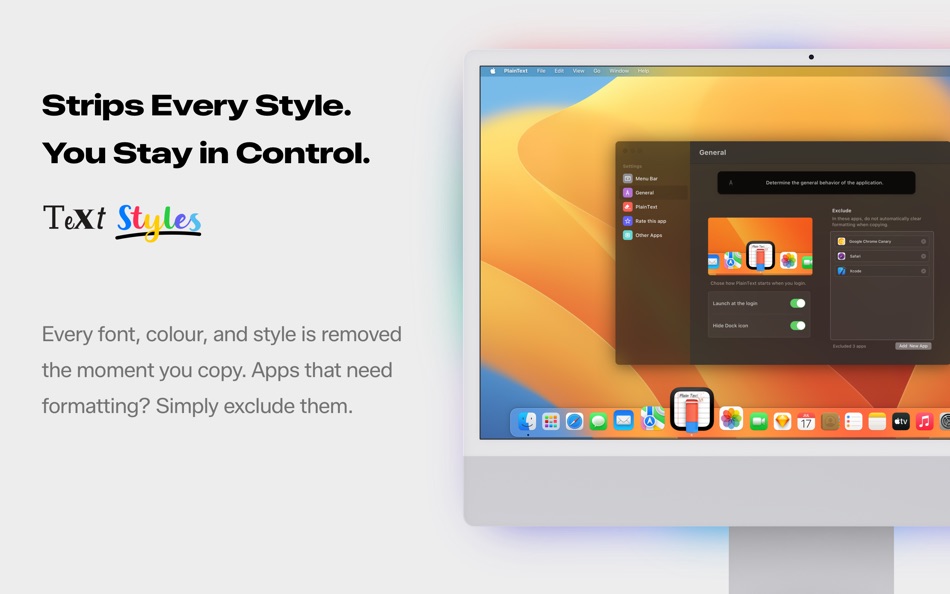
When you copy styled text from websites, Word documents, PDFs, or emails, PlainText instantly removes all formatting attributes including fonts, colors, sizes, bold, italics, links, and embedded styles. The text arrives as pure, unformatted content matching your document's existing style. RTF and HTML structures are completely eliminated.
UTM Tracking Removal
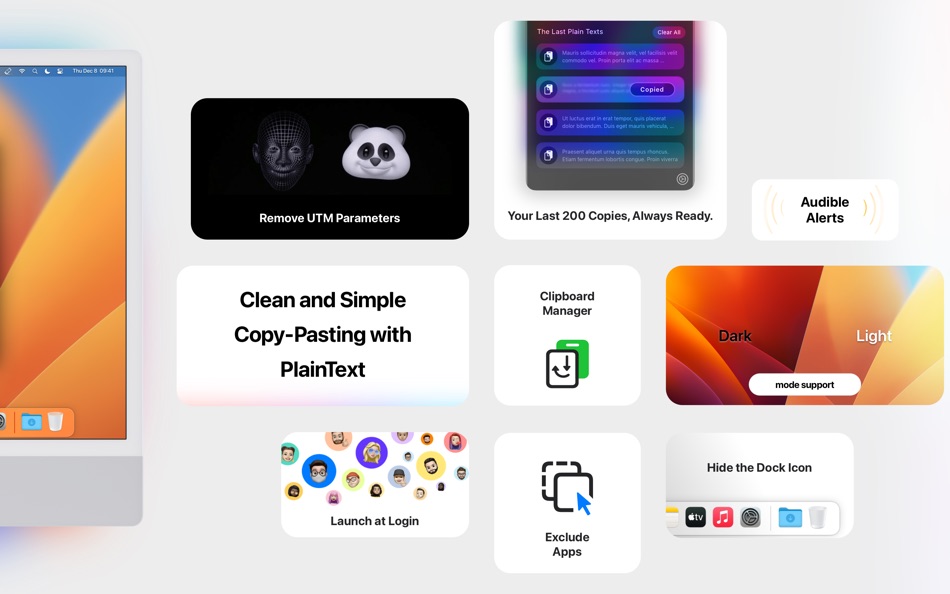
PlainText recognizes and removes over 200 UTM tracking parameters from URLs you copy. Marketing links filled with utm_source, utm_medium, fbclid, gclid, and other tracking codes are automatically cleaned. Share links with colleagues without exposing where you came from. The cleaned URLs are shorter, more readable, and respect your privacy.
Clipboard History
Every item you copy is saved to a searchable history containing your last 200 clipboard entries. Access the history through the menu bar icon or detachable panel. Type to search through previous copies instantly. Lost something you copied an hour ago? It is still there. The history persists across app restarts.
Detachable Panel
The clipboard history panel can be detached from the menu bar and positioned anywhere on your screen as a floating window. Use a flick gesture to snap the panel to any screen edge where it docks neatly. The panel remembers its position between sessions, letting you keep frequently used clipboard items visible while working.
Menu Bar App
PlainText lives in your menu bar, consuming minimal system resources. The menu bar icon provides instant access to clipboard history, preferences, and app controls. No dock clutter. No full-screen interface to manage. Just a simple, always-accessible utility that does its job without interrupting workflow.
App Exclusion List
Some applications require formatted text to function properly. PlainText includes an exclusion list where you can specify apps that should bypass automatic format stripping. When you copy from or paste into excluded applications, formatting is preserved.
Who Is It For?
Writers who copy research from websites into manuscripts. Developers who paste code snippets between editors. Marketers who share clean links without tracking baggage. Knowledge workers who copy content between documents daily. Anyone frustrated by formatting chaos when moving text between applications.
Privacy
All clipboard processing happens locally on your Mac. Nothing is sent to external servers. Your clipboard history is stored locally. No analytics, no tracking, no cloud sync, no account required. What you copy stays on your computer.
Technical Details
PlainText runs on macOS 10.13 High Sierra and later using native clipboard APIs for maximum compatibility. The app can launch automatically at login with optional sound notifications. Memory footprint is under 50MB with negligible CPU usage during idle periods.
Usage Scenarios
Copy a product description from a website and paste it into your spreadsheet without unwanted fonts. Copy a code snippet from Stack Overflow without embedded links disrupting your IDE. Share a news article URL without Facebook tracking parameters. Retrieve a customer email you copied two hours ago.
Support
Contact support through the app's menu bar icon or visit plain.tr for documentation and updates.
Ad
Captures d'écran

Historique des prix
- Aujourd’hui: $0.99
- Minimum: Gratuit
- Maximum: $0.99
Suivre l'évolution des prix
Nouveautés
- Version: 1.2
- Mis à jour:
- PlainText is now a full clipboard manager!
• Clipboard history: 200 items instead of 4, search support, detachable panel
• Format stripping and clipboard history can be toggled independently
• Redesigned interface for macOS 26
• 200+ UTM parameter removal
• Performance improvements and bug fixes
Concepteur
- Metromedya Digital Ad Agency
- Plateformes: iOS Applications (7) macOS Applications (9)
- Listes: 5 + 2
- Points: 80 + 6,820 ¡
- Classements: 0
- Avis: 0
- Commentaires: 0
- Remises: 0
- Vidéos: 0
- RSS: S'abonner
Points (14)




Classements (0)
0 ☹️
Listes (1)
- PlainText - Clipboard Cleaner
Avis (0)
Soyez le premier à donner votre avis 🌟
Informations supplémentaires
- Version: 1.2
- Catégorie:
macOS Applications›Productivité - Systèmes d'exploitation:
macOS,macOS 10.13 ou version ultérieure - Taille:
11 Mb - Langues prises en charge:
Chinese,English,German,Japanese,Spanish,Turkish - Classification du contenu:
4+ - Mac App Store Note:
0 - Mis à jour:
- Date de sortie:
Contacts
- Site Web:
 https://plain.tr/en/
«PlainText - Clipboard Cleaner». Plateforme : macOS. Catégorie : Productivité. Développeur : «Metromedya Digital Ad Agency». Première version : . Dernière mise à jour : . Prix actuel : $0.99. Prix le plus bas enregistré : $0.00 (). Prix le plus élevé enregistré : $0.99 (). Ce titre n'a pas encore reçu de notes ou d'avis sur AppAgg. Listes : publiques 1, privées 1. Points suivis : confirmés 14, indirects 0. Langues disponibles : Chinese, English, German, Japanese, Spanish, Turkish. AppAgg suit l'historique des prix, les notes et les commentaires des utilisateurs pour «PlainText - Clipboard Cleaner». Suivez les futures réductions et mises à jour via RSS. AppAgg n'héberge pas d'applications et ne distribue pas de logiciels. Toutes les marques, logos et captures d'écran appartiennent à leurs propriétaires respectifs.
Commentaires (0)
Soyez le premier à commenter 🌟
PlainText - Clipboard Cleaner URL courte: Copié!- 🌟 Partager
- Mac App Store
Ad
Similaires
-
- Plain Text Editor Pro
- macOS Applications: Productivité De: 远腾 李
- $4.99
- Listes: 0 + 1 Classements: 0 Avis: 0
- Points: 9 + 0 0 Version: 6.6.6 Plain Text Editor Pro is a minimalist text editor designed for speed, clarity, and distraction-free writing. Whether you re jotting down notes, editing code, or cleaning up copied ... ⥯
-
- Plain Text
- macOS Applications: Productivité De: Marian Raafat
- $0.99
- Listes: 0 + 0 Classements: 0 Avis: 0
- Points: 0 + 0 0 Version: 1.0.3 1- Simple and Clean text editor. 2- Format remover. Text editor: Full screen mode, distraction free text writer. Simple and Clean Interface. 2- Format remover. Do you want to get rid ... ⥯
-
- Clipboard Cleaner: CleanBoard
- macOS Applications: Productivité De: TomPod Apps
- * Gratuit
- Listes: 0 + 1 Classements: 0 Avis: 0
- Points: 4 + 0 0 Version: 2.4.0 CleanBoard is a lightweight clipboard utility for macOS that removes unwanted formatting from copied text - so you can paste clean, plain text into any app with ease. Whether you're ... ⥯
-
- Text Clipboard Manager
- macOS Applications: Productivité De: Pradap Pandiyan
- Gratuit
- Listes: 0 + 0 Classements: 0 Avis: 0
- Points: 1 + 0 0 Version: 1.1 Transform Your Mac's Clipboard Into a Powerful Productivity Tool Text Clipboard Manager is the ultimate clipboard management solution for macOS, designed to revolutionize how you ... ⥯
-
- TaskPaper – Plain text to-dos
- macOS Applications: Productivité De: Jesse Grosjean
- $24.99
- Listes: 2 + 3 Classements: 0 Avis: 0
- Points: 2 + 0 0 Version: 3.9.4 Make lists and get organized. TaskPaper is a plain text to-do list that s surprisingly adept. Thoroughly modernized. TaskPaper 3 is all new, while still retaining the same plain text ... ⥯
- -43%
- Clipboard Manager
- macOS Applications: Productivité De: Jan Valta
- $3.99
$6.99-43% - Listes: 1 + 0 Classements: 0 Avis: 0
- Points: 8 + 0 0 Version: 2.7.2 Clipboard Manager is a smart clipboard history manager that saves everything you copy for later use. Key Features: Direct Paste - Paste items directly into the active application. ... ⥯
-
- Clipboard Center
- macOS Applications: Productivité De: Jeremy Marchand
- $6.99
- Listes: 0 + 1 Classements: 0 Avis: 0
- Points: 0 + 0 0 Version: 2.2.2 Clipboard Center is an easy-to-use and powerful clipboard manager. Through a history, lists and a flexible UI, this app allows you to copy and paste texts, images, and files in the ... ⥯
-
- Clipboard Manager Pro
- macOS Applications: Productivité De: Cederic Schmid
- * Gratuit
- Listes: 0 + 0 Classements: 0 Avis: 0
- Points: 0 + 0 0 Version: 1.0 Clipboard History Pro helps you remember everything you copy on your Mac. Every time you copy text, images, links, or files, the app saves them in a clean, searchable history so you ... ⥯
-
- Clipboard Safe
- macOS Applications: Productivité De: 俊杰 黎
- * Gratuit
- Listes: 0 + 0 Classements: 0 Avis: 0
- Points: 0 + 0 0 Version: 1.9.2 Clipboard Safe - A fully offline clipboard manager for Mac, designed for heavy copy-and-paste workflows. Clipboard Safe automatically saves everything you copy locally and lets you ... ⥯
-
- Clipboard Recall
- macOS Applications: Productivité De: Pomme Shift
- $9.99
- Listes: 0 + 0 Classements: 0 Avis: 0
- Points: 0 + 0 0 Version: 1.0 "Clipboard Recall" is a powerful and elegant clipboard manager for macOS, designed to save you time and keep everything you copy perfectly organized. Never lose copied content again. ... ⥯
-
- Text to Speech-AI Audio Maker
- macOS Applications: Productivité De: 崴 杨
- * Gratuit
- Listes: 0 + 0 Classements: 0 Avis: 0
- Points: 0 + 0 0 Version: 1.0.4 Text to Speech is a professional AI-powered voice synthesis app that makes converting text into natural speech simple and efficient. Core Features Voice Cloning Upload audio samples to ⥯
-
- Clipboard History - ClyPaste
- macOS Applications: Productivité De: 超 程
- * Gratuit
- Listes: 0 + 1 Classements: 0 Avis: 0
- Points: 8 + 0 0 Version: 1.0.5 ClyPaste is a menubar app designed to streamline your workflow by offering advanced clipboard management capabilities. ClyPaste empowers users to save, and swiftly paste the copied ... ⥯
-
- Clipboard Manager — Pasty
- macOS Applications: Productivité De: Ivan Sapozhnik
- * Gratuit
- Listes: 0 + 0 Classements: 0 Avis: 0
- Points: 4 + 0 0 Version: 1.9.1 Pasty is a clipboard manager that provides a user-friendly interface for accessing and organizing clipboard history. It is a useful tool for anyone who frequently copies and pastes ... ⥯
-
- Plain Texts Editor
- macOS Applications: Productivité De: Harshad Jadav
- $0.99
- Listes: 0 + 0 Classements: 5 (1) Avis: 0
- Points: 0 + 0 0 Version: 1.0 Simple distraction-free text editor without any rich text nonsense. The simplicity is a feature. HIGHLIGHTS - No formatting. Just text. - Edit any plain text file like .txt, .csv, .md, ⥯