
Enregistrés
Choisissez le nom qui sera affiché dans votre menu Enregistrés.
Terminé!
| Concepteur: | Blackmagic Design Inc (12) | ||
| Prix: | Gratuit | ||
| Classements: | 0 | ||
| Commentaires: | 0 Publier un commentaire | ||
| Listes: | 3 + 3 | ||
| Points: | 5 + 2,678 (4.5) ¡ | ||
| +1 Points | |||
Description

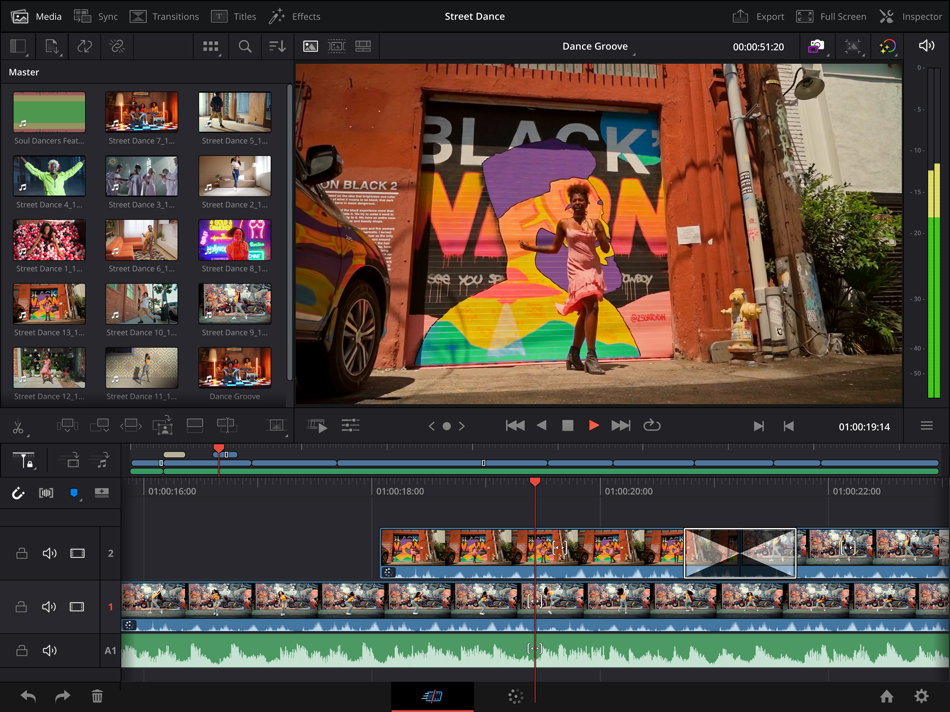
DaVinci Resolve for iPad is the world’s only solution that combines editing and color correction in one software tool! Its elegant, modern interface is fast to learn and easy for new users, yet powerful for professionals. DaVinci Resolve lets you work faster and at a higher quality because you don’t have to learn multiple apps or switch software for different tasks. That means you can work with camera original quality images throughout the entire process. It’s like having your own post production studio in a single app! Best of all, by learning DaVinci Resolve, you’re learning how to use the exact same tools used by Hollywood professionals in high end post production studios!
Turn work around fast using cut page editing!
The cut page is perfect for projects with tight deadlines that you have to turn around quickly. It’s also great for documentary work. The cut page has a streamlined interface that’s fast to learn and designed for speed. Features such as source tape for visual media browsing, fast review, and smart editing tools help you work faster than ever. The sync bin and source overwrite tools are the fastest way to edit multi-cam programs, with easy to create perfectly synchronized cut aways! With DaVinci Resolve you’ll spend more time editing and less time hunting for shots.
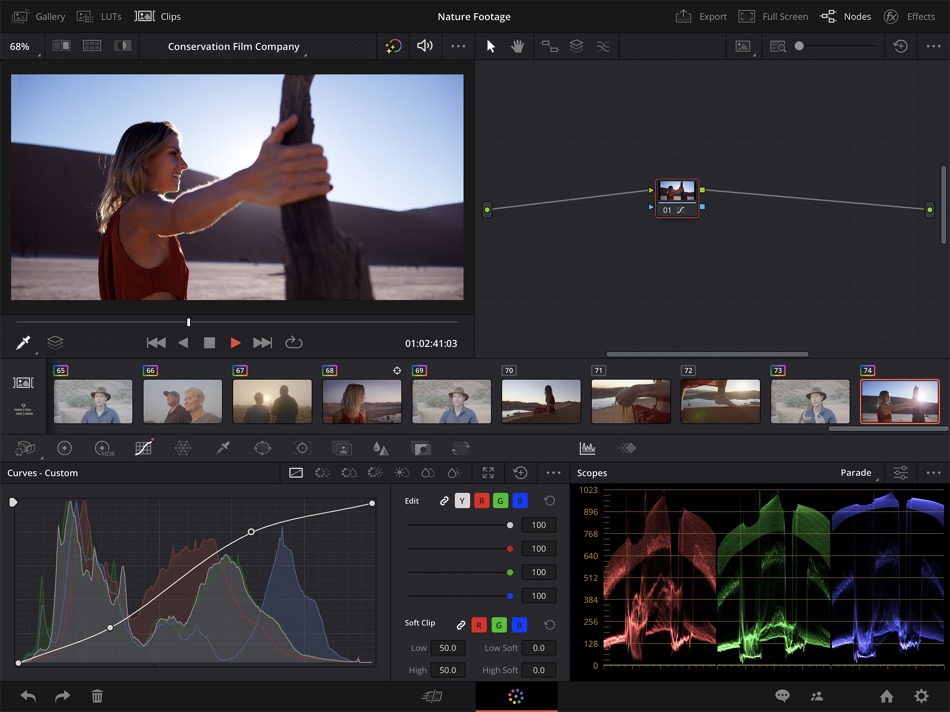
Hollywood’s favorite color corrector!
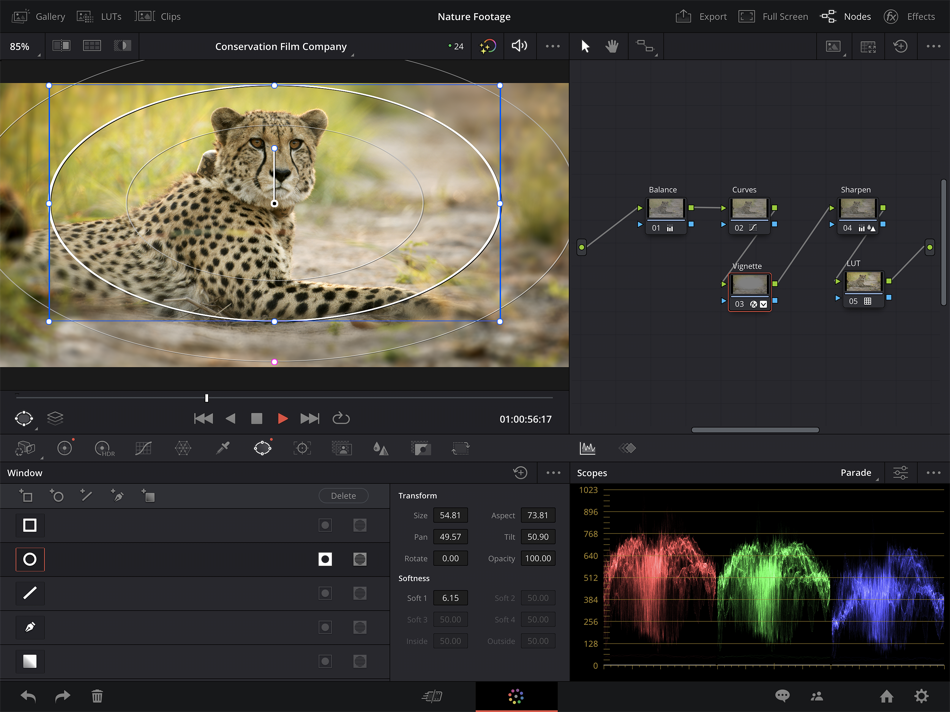
The DaVinci Resolve for iPad color page is Hollywood’s most advanced color corrector and has been used to color and finish more high end feature films and television shows than any other system! It’s also approachable with features designed to make it easier for new users to get great results while they continue to learn the advanced tools. For example, primary control sliders will be familiar to anyone who’s used image editing software, making it easy to adjust contrast, temperature, mid-tone detail, saturation and more. The color page has an incredible range of primary and secondary color grading features including PowerWindows™, qualifiers, 3D trackers, advanced HDR grading tools and more!
Blackmagic Cloud Collaboration
DaVinci Resolve for iPad supports the revolutionary Blackmagic Cloud, a whole new way of collaborating using cloud based workflows. Simply create a Blackmagic Cloud ID and set up a project library for your project. You can assign any number of collaborators to a project, using Blackmagic Cloud to share projects. Multiple people can work on the same timeline! When changes are made, you can see and accept them, changes are only applied when you accept updates. A single click can relink files, update timelines, or view changes. Built in timeline compare tools let you merge changes into a master timeline so others can continue with edits.
AI Tools for Creativity with Studio In-App-Purchase
DaVinci Resolve features cutting edge AI processing powered by the DaVinci AI Neural Engine. Tools such as magic mask need only a single stroke to locate and track people, features and objects in a shot. You can make characters stand out in an under lit shot, or invert the mask and stylize the background. Smart reframe repurposes footage to dramatically different aspect ratios by recognizing the action in a scene and panning within it so you can quickly create square or vertical versions for posting to social media. Voice isolation lets you easily remove loud, undesirable sounds from interviews and dialogue recordings from noisy locations. AI tools create quick, accurate results saving you hours of time!
Compatibility
Recommended for use with Apple iPad Pro M1 or newer models with a minimum of 8GB of RAM. Earlier iPad models may be restricted to HD, and memory limitations may limit some features. DaVinci Resolve projects (drp) and project archives (dra) are fully compatible with DaVinci Resolve 20 on desktop. Supported file formats include H.264, H.265, Apple ProRes and Blackmagic RAW. Supports the Magic Keyboard, Apple Pencil as well as Studio and PRO XDR Displays.
Captures d'écran




Historique des prix
- Prix actuel : Gratuit
- Minimum: Gratuit
- Maximum: Gratuit
Suivre l'évolution des prix
Ad
Informations supplémentaires
- Date de sortie:
- Catégorie:
iOS Applications›Photo et vidéo - Systèmes d'exploitation:
iPad,iOS 18.0 ou version ultérieure - Taille:
4 Gb - Langues prises en charge:
Chinese,English,French,German,Italian,Japanese,Korean,Portuguese,Russian,Spanish,Thai,Vietnamese - Classification du contenu:
4+ - App Store Note:
4.5(2,678) - Site Web:
 https://www.blackmagicdesign.com
Nouveautés
- Version: 20.3.2
- Mis à jour:
- • Magic mask cache is now retained when pasting node attributes.
• Improved render speeds for side-by-side stereoscopic 3D renders.
• Up to 2.5x faster SuperScale Enhanced with Apple Neural Engine.
• Addressed slow media management start up for larger projects.
• Addressed issue with editing effects on a locked node stack layer.
• Analog Damage disabling CRT scan no longer disables restless foot.
• Addressed potential flicker in face refinement eyebag removal.
• Support for Fujifilm F-Gamut C colorspace and F-Log2 C gamma.
• General performance and stability improvements.
Concepteur
- Blackmagic Design Inc
- Plateformes: Android Applications (2) iOS Applications (5) macOS Applications (5)
- Listes: 10 + 7
- Points: 39 + 31,183 ¡
- Classements: 0
- Commentaires: 0
- Remises: 0
- Vidéos: 0
- RSS: S'abonner
Listes (3)
- DaVinci Resolve for iPad


Points (5)
-

- 5,177 Alberto Menendez Prados
- +1
-
- 29,620 Lance Eliakim Sotto
- +1
-
- 1,830 its me jean vargas
- +1
-
- 96 denizzznet
- +1
-
- 430 lista de apps
- +1





Classements (0)
0 ☹️
Commentaires (0)
Soyez le premier à commenter 🌟
«DaVinci Resolve for iPad». Plateforme : iOS. Catégorie : Photo et vidéo. Développeur : «Blackmagic Design Inc». Première version : . Dernière mise à jour : . Prix actuel : gratuit. Ce titre n'a pas encore reçu de notes ou d'avis sur AppAgg. Listes : publiques 3, privées 3. Points suivis : confirmés 5, indirects 2,678. Magasin : App Store. Évaluation du magasin : 4.5. Votes : 2,678. Langues disponibles : Chinese, English, French, German, Italian, Japanese, Korean, Portuguese, Russian, Spanish, Thai, Vietnamese. AppAgg suit l'historique des prix, les notes et les commentaires des utilisateurs pour «DaVinci Resolve for iPad». Suivez les futures réductions et mises à jour via RSS. AppAgg n'héberge pas d'applications et ne distribue pas de logiciels. Toutes les marques, logos et captures d'écran appartiennent à leurs propriétaires respectifs.
DaVinci Resolve for iPad URL courte: Copié!- 🌟 Partager
- App Store
Similaires
-
- Photo Editor Effects + Filters
- iOS Applications: Photo et vidéo De: VINCI APPS
- Gratuit
- Listes: 0 0 5 (1)
- Points: 6 + 1,350 (4.7) Version: 2.3.25 Simple yet powerful, Photo Editor makes it easy to edit your favorite pics the way you like. Our huge collection of filters and effects is designed to make any picture stand out: try ... ⥯
-
- iPhotos • Photo Collage editor
- iOS Applications: Photo et vidéo De: Joao Victor Flores da Costa
- Gratuit
- Listes: 0 0 0
- Points: 1 + 448 (4.0) Version: 1.6.3 Discover a powerful iOS photo editing app packed with impressive features! Express your creativity and transform your images with amazing effects, drawing tools, advanced image editor, ⥯
-
- Photo Lab: AI Trends & Filters
- iOS Applications: Photo et vidéo De: Linerock Investments LTD
- Gratuit
- Listes: 2 0 0
- Points: 6 + 184,492 (4.7) Version: 3.12.107 Get your photos to a new, awesome level. Add realistic effects and stylish filters in a tap. Join the ever-growing Photo Lab community of over 230 million fans: Downloading that app ... ⥯
-
- Cartoon face maker:Photo Art
- iOS Applications: Photo et vidéo De: Chengdu Boluo Unlimited Network Technology Co., Ltd.
- Gratuit
- Listes: 0 0 0
- Points: 1 + 459 (4.7) Version: 4.0 Turn your photos into a CARTOON in one tap! Photo Art cartoon photo editor is powered by AI for the best results. Cartoon yourself and add an impressive layout or toon background! You ... ⥯
-
- Blackmagic Camera
- iOS Applications: Photo et vidéo De: Blackmagic Design Inc
- Gratuit
- Listes: 2 + 1 0 0
- Points: 1 + 17,883 (4.8) Version: 3.3.1 Introducing Digital Film for iPhone and iPad! Blackmagic Camera unlocks the power of your iPhone and iPad by adding digital film camera controls and operating systems! Now you can ... ⥯
-
- Huji Cam
- iOS Applications: Photo et vidéo De: Manhole, Inc.
- Gratuit
- Listes: 1 + 1 0 0
- Points: 0 + 11,804 (4.2) Version: 2.5 DISCLAIMER NOTICE: HUJI CAM IS PROVIDED AS MANHOLE'S OWN PRODUCT. THIS APP IS NOT THE OFFICIAL APP OF FUJIFILM OR ANY OTHERS. MANHOLE HAS MADE EVERY EFFORT TO ENSURE NOT TO INFRINGE ... ⥯
-
- VideoLUT
- iOS Applications: Photo et vidéo De: Enrique Garcia
- * Gratuit
- Listes: 3 + 3 0 0
- Points: 11 + 351 (4.3) Version: 4.45 Transform your videos and images into cinematic masterpieces with VideoLUT, the ultimate color-grading app! With over 2500 presets, you can easily import, edit, and apply LUTs to ... ⥯
-
- Layout for Instagram・Inpreview
- iOS Applications: Photo et vidéo De: Onelight Apps CY Ltd
- Gratuit
- Listes: 0 0 0
- Points: 2 + 7,924 (4.8) Version: 6.11.1 Preview your feed on Instagram with Inpreview: plan aesthetic grid layout, schedule posts, apply trendy filters. No login to Instagram! NEW: Try our unique feature - Highlights ... ⥯
-
- Kino - Pro Video Camera
- iOS Applications: Photo et vidéo De: Lux Optics Incorporated
- $9.99
- Listes: 1 + 5 0 0
- Points: 1 + 1,850 (4.7) Version: 1.4.2 Make great video easy! Kino lets you just press record and create cinematic video with color presets created by expert filmmakers no edit required. Plus, with AutoMotion, the app ... ⥯
-
- LUT Studio: Color Grading App
- iOS Applications: Photo et vidéo De: Georgy Romelashvili
- Gratuit
- Listes: 0 0 0
- Points: 3 + 440 (4.7) Version: 3.0.10 LUT Studio - Cinematic Video LUTs & Film Look Editor Transform your footage with cinematic color grading using LUT Studio - the ultimate video color correction and editing app for ... ⥯
-
- CameraKit: Camera Tools
- iOS Applications: Photo et vidéo De: Zak Ray
- * Gratuit
- Listes: 1 0 0
- Points: 3 + 318 (4.7) Version: 6.17 Everything you need to know about every camera worth using. "How much drive space will I need for this Alexa 35 shoot? "What's the dynamic range of the Venice 2? How long will these ... ⥯
-
- Anime Live Wallpaper - 4K
- iOS Applications: Photo et vidéo De: Abdessamad Idelkaid
- Gratuit
- Listes: 0 0 0
- Points: 1 + 3,087 (4.8) Version: 1.6.1 Anime Live Wallpaper - 4K HD | #1 Anime Wallpaper App 4.8 Transform your iPhone with the best anime wallpapers on the App Store. +500 stunning 4K live wallpapers Naruto, Goku, Demon ... ⥯
-
- Color Grade Video - PeekLut
- iOS Applications: Photo et vidéo De: Lauper Labs
- Gratuit
- Listes: 0 0 0
- Points: 1 + 387 (4.8) Version: 2.17.0 PeekLUT is an all-in-one color grading and color correction app for video and photo. Start fast with LUTs (import your own or choose curated cinematic looks), then fine-tune every ... ⥯
-
- Ovil - backdrop photo editor
- iOS Applications: Photo et vidéo De: Burleigh Creative Apps
- Gratuit
- Listes: 0 0 0
- Points: 1 + 2,017 (4.7) Version: 1.5.6 Ovil helps parents transform DIY baby photos, pregnancy photos & child photos into professionally styled, studio quality photography using beautiful backdrops. Ovil makes capturing ... ⥯