
| Разработчик: | Sigurdur Tomasson (13) | ||
| Цена: | ▼ Бесплатно | ||
| Рейтинги: | 0 | ||
| Отзывы: | 0 Написать отзыв | ||
| Списки: | 1 + 1 | ||
| Очки: | 18 + 0 ¡ | ||
| Mac App Store | |||
Описание

Hovering over buttons in the toolbar will display the 'name' or function of the button.
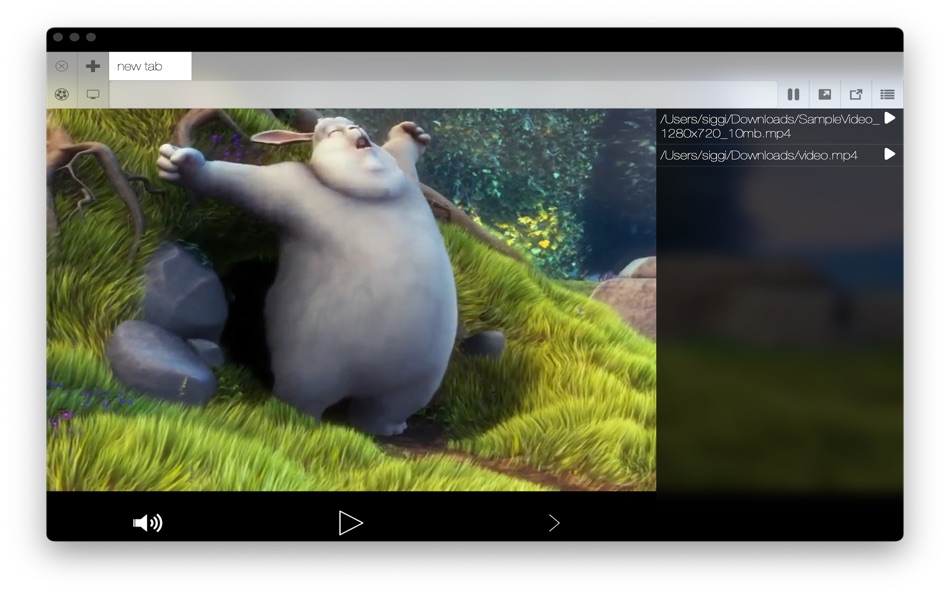
While the mouse is moving and the application is active and in the foreground the video controls, tabs and toolbar will be displayed. If the mouse is not moving or the app is not in the foreground the controls and toolbar will fade out, and the video alone will be displayed. The area above the tabs & toolbar is to be able to drag the window around.
You can access TV show libary and Movies library by clicking the cinema and tv buttons directly beneath the close tab and add tab buttons.
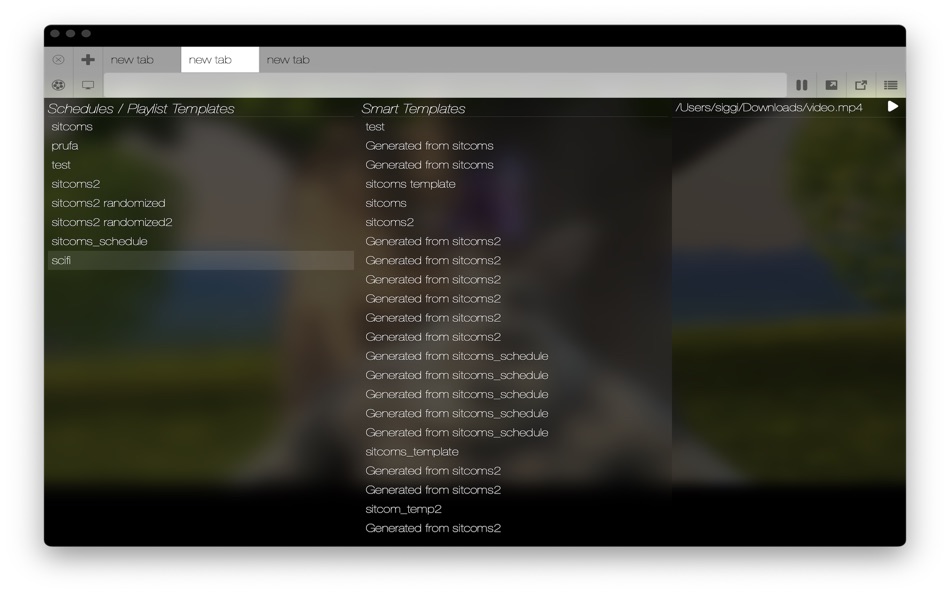
After you have set up and indexed your movie and tv show libraries you can open noob cinema within Noob Media Center by pressing the Noob Cinema button which is the left most button in the toolbar (on the left side of the search bar) and drag movies from your library to the playback queue sidebar or press the play icon next to the movie. You can also open Noob TV within Noob Media Center and see all of your templates / schedules and smart templates. Then you can you select a template or smart template for the currently active tab and the tab will continuously play through the schedule or in the case of a smart template it will infinitely generate shows to watch. Noob Media Center indexes your libraries live in the background, except if you only change a directory name and make no other changes, this will not trigger a live-update of your libraries, in this case you can press the "Index library" buttons. Indexing will not work on network drives.
For those not familiar with the way Noob TV functions: Noob TV allows you create playlist templates called schedules and smart templates. Schedules are static in the sense that they play shows in the order that they are arranged in with the option of playing episodes in-sequence or at random, that is selecting episodes in sequence or randomly. While smart templates play random episodes from random shows based on what is called a smart template color scheme. The smart template color scheme can be generated from a schedule, after you have assigned color tags to each show in the schedule. That way the generated smart template emulates the schedule and behaves like a generalization, hence the name smart template. This allows you to automatically generate an infinite sequence of episodes to watch without having to go through the trouble of generating playlists from Noob TV by hand.
Noob Media Center also has features for viewing all tabs at the same time, by pressing the 'View all screens button' or 'picture in picture' button. After clicking 'View all screens' You must click on one of the video screens to choose that screen to be displayed, same goes for picture in picture. And in the picture and picture mode you can also command+click the screen to keep the picture in picture mode going. This is mostly useful if you have multiple tabs playing at the same time, if you have only one tab active, you will only see one tab to select.
The global pause button allows you to set it so that tabs will pause when switching between tabs, so you dont' miss anything.
You can drag and drop tabs to reorder the tabs.
When playing back video files you are usually asked to grant access to the folder where the video file is located, for convenience it is suggested that you selected the top root folder of the movie or tv show library, or the external drive where the files are located to save you the time of reselecting each parent folder of each video file.
Sync playback across multiple devices, this feature only works if you have an exact duplicate of your media library & and same date&time on the synced devices.
Скриншоты


Что нового
- Версия: 3.3.7
- Обновлено:
- -fixed potential issue with conflicts while indexing
-minor bugfixes
-fixed issue with indexing in cinema part of the app
Цена
- Сегодня: Бесплатно
$6.99-100% - Минимум: ▼ Бесплатно
- Максимум: $24.99
Отслеживайте цены
Разработчик
- Sigurdur Tomasson
- Платформы: macOS Приложения (13)
- Списки: 1 + 1
- Очки: 80 + 0 ¡
- Рейтинги: 0
- Отзывы: 0
- Скидки: 5
- Видео: 0
- RSS: Подписаться


Рейтинги
0 ☹️
Списки
- Noob Media Center

Отзывы
Ваш отзыв будет первым 🌟
Дополнительная информация
- Версия: 3.3.7
- Категория:
macOS Приложения›Развлечения - Операционные системы:
macOS,macOS 10.14 и выше - Размер:
48 Mb - Поддерживаемые языки:
English - Возрастные ограничения:
4+ - Mac App Store Рейтинг:
0 - Обновлено:
- Дата выпуска:
Контакты
 https://noob.software/#mediacenterNoob Media Center Короткий URL: Скопировано!
- 🌟 Поделиться
- Mac App Store
Вам также могут понравиться
- -100%
- Noob Player
- macOS Приложения: Развлечения От: Sigurdur Tomasson
- ▼ Бесплатно
$6.99-100% - Списки: 1 + 1 Рейтинги: 0 Отзывы: 0
- Очки: 7 + 0 Версия: 2.6.4 Noob Player lets you watch multiple playlist at a time with tabs. You can set an option to set whether switching between tabs pauses the video playback of tabs so that if you want you ... ⥯
-
- Media Slide
- macOS Приложения: Развлечения От: Ebey Tech LLC
- $0.99
- Списки: 0 + 1 Рейтинги: 0 Отзывы: 0
- Очки: 6 + 0 Версия: 1.0 Media Slide is a great way to skim through an array of media files. Media files can be images, videos, music, or audio format. Click the 'Choose Media Directory' button in toolbar to ... ⥯
-
- Social Media Tool Box
- macOS Приложения: Развлечения От: 余 张
- $0.99
- Списки: 0 + 0 Рейтинги: 0 Отзывы: 0
- Очки: 0 + 0 Версия: 1.0.1 Social Media Tool Box is a comprehensive social media utility app designed specifically for macOS, providing powerful content creation and editing features for content creators, ... ⥯
-
- Mini Media Player
- macOS Приложения: Развлечения От: Aiden Quinn
- $1.99
- Списки: 0 + 1 Рейтинги: 0 Отзывы: 0
- Очки: 3 + 0 Версия: 3.0 Busy doing work with lots of windows open and want to watch a video at the same time to keep yourself entertained? Get Mini Media Player! Mini Media Player works like the ... ⥯
-
- Easy Media Server
- macOS Приложения: Развлечения От: Richard Stokes
- $9.99
- Списки: 0 + 0 Рейтинги: 0 Отзывы: 0
- Очки: 0 + 0 Версия: 1.16 Stream from your Mac to your TV in seconds. No setup. No subscriptions. Just pick a folder and hit play. Easy Media Server turns your Mac into a simple, lightweight DLNA media server. ... ⥯
-
- Star Media Player
- macOS Приложения: Развлечения От: Danzeng Tudeng
- * Бесплатно
- Списки: 0 + 0 Рейтинги: 0 Отзывы: 0
- Очки: 0 + 0 Версия: 1.6 Star Media Player is a powerful media player , it can support many kinds of audio & video and include equalizer for audio & video , it will satisfy your custom needs. ⥯
-
- MoviePro: 4K Media Player
- macOS Приложения: Развлечения От: Natalia Shemetova
- * Бесплатно
- Списки: 0 + 0 Рейтинги: 0 Отзывы: 0
- Очки: 1 + 0 Версия: 3.73 The ultimate 4K video player for a true cinematic experience. Play any video format with crystal-clear quality, powerful audio controls, and professional viewing features. UNIVERSAL ... ⥯
-
- Teleparty - Watch TV Together
- macOS Приложения: Развлечения От: WP Interactive Media, Inc.
- * Бесплатно
- Списки: 0 + 0 Рейтинги: 0 Отзывы: 0
- Очки: 1 + 0 Версия: 5.5.7 Teleparty is a browser extension for watching TV remotely with friends, e.g., for movie nights with that long-distance special someone. It synchronizes video playback and adds group ... ⥯
-
- Télé-Loisirs Programme TV
- macOS Приложения: Развлечения От: Prisma Media
- Бесплатно
- Списки: 0 + 0 Рейтинги: 0 Отзывы: 0
- Очки: 0 + 0 Версия: 2.3 Retrouvez le programme télé sur votre Mac facilement grâce à la toute nouvelle application Télé-Loisirs pour Mac ! Le programme TV de la TNT "En ce moment", du prime time et de la 2ème ⥯
-
- Shalom World
- macOS Приложения: Развлечения От: Shalom Media USA Inc.
- Бесплатно
- Списки: 0 + 0 Рейтинги: 0 Отзывы: 0
- Очки: 0 + 0 Версия: 1.0.5 SHALOM WORLD is a catholic TV channel reaching out to English-speaking viewers worldwide. This channel aims at supplementing the pastoral efforts of the Church to spread the Good News ... ⥯
-
- Sound Booster Pro
- macOS Приложения: Развлечения От: Twobi Media LTD
- Бесплатно
- Списки: 0 + 0 Рейтинги: 0 Отзывы: 0
- Очки: 0 + 0 Версия: 1.0 Sound Booster Pro is a powerful browser extension designed to enhance your audio experience. With its advanced sound amplification capabilities, it allows you to boost the volume ... ⥯
-
- WidsMob MediaServer
- macOS Приложения: Развлечения От: WidsMob Technology Co., Limited
- $34.99
- Списки: 0 + 1 Рейтинги: 0 Отзывы: 0
- Очки: 16 + 0 Версия: 2.9.1222 WidsMob MediaServer is a standard UPnP (Universal Plug and Play) AV (Audio/Video) media server which automatically recognizes UPnP devices within a network. Using WidsMob MediaServer ... ⥯
-
- Send to TV for Safari
- macOS Приложения: Развлечения От: Denk Alexandru
- * Бесплатно
- Списки: 2 + 1 Рейтинги: 0 Отзывы: 0
- Очки: 12 + 0 Версия: 5.5.4 Enable Samsung, LG, Roku, Chromecast, Google TV, and Android TV in Safari! Send to TV is a simple Safari extension that can send video and web pages from your browser to your smart TV. ⥯
-
- Smart IPTV Player Pro
- macOS Приложения: Развлечения От: 柱荣 李
- $3.99
- Списки: 0 + 1 Рейтинги: 0 Отзывы: 0
- Очки: 12 + 0 Версия: 1.0.3 This is a media player. Users can easily watch live TV from all over the world, such as high-resolution live broadcasts, sports matches, current movies, new season series, and TV ... ⥯