
Salvos
Escolha o nome que será mostrado no seu menu Salvos.
Feito!
| Desenvolvedor: | Apple (166) | ||
| Preço: | Grátis | ||
| Classificações: | 0 | ||
| Comentários: | 0 Postar comentário | ||
| Listas: | 1 + 2 | ||
| Pontos: | 3 + 0 ¡ | ||
| Mac App Store | |||
Descrição
Screen Savers
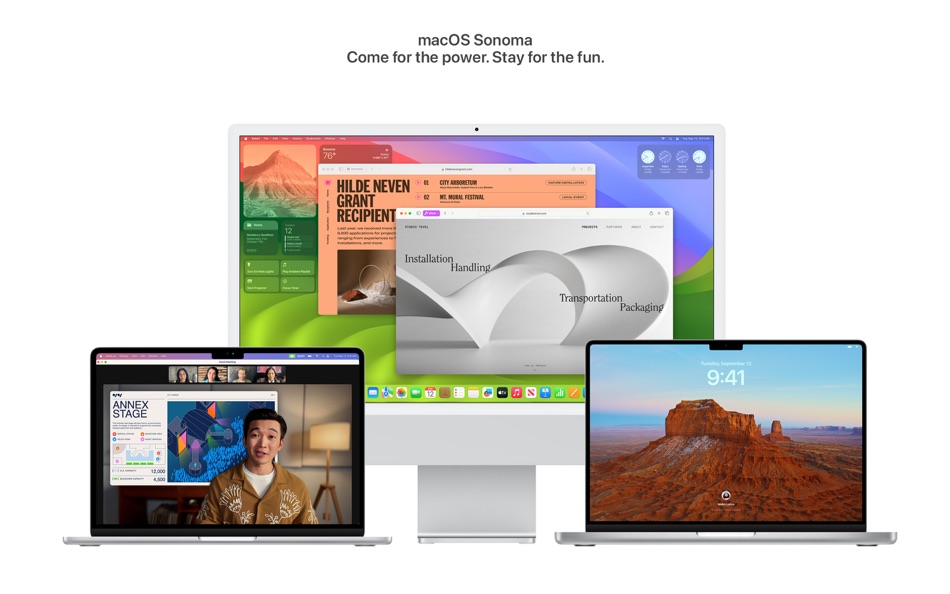
• Stunning screen savers of locations from around the world seamlessly become your desktop wallpaper when you log-in
Widgets
• Widgets can be placed anywhere on the desktop and adapt to the color of your wallpaper while working in apps
• iPhone widgets can be added to your Mac when your iPhone is nearby or on the same Wi-Fi network
• Interactive widgets let you take actions directly from the widget such as running a shortcut, pausing media, and more
Video Conferencing
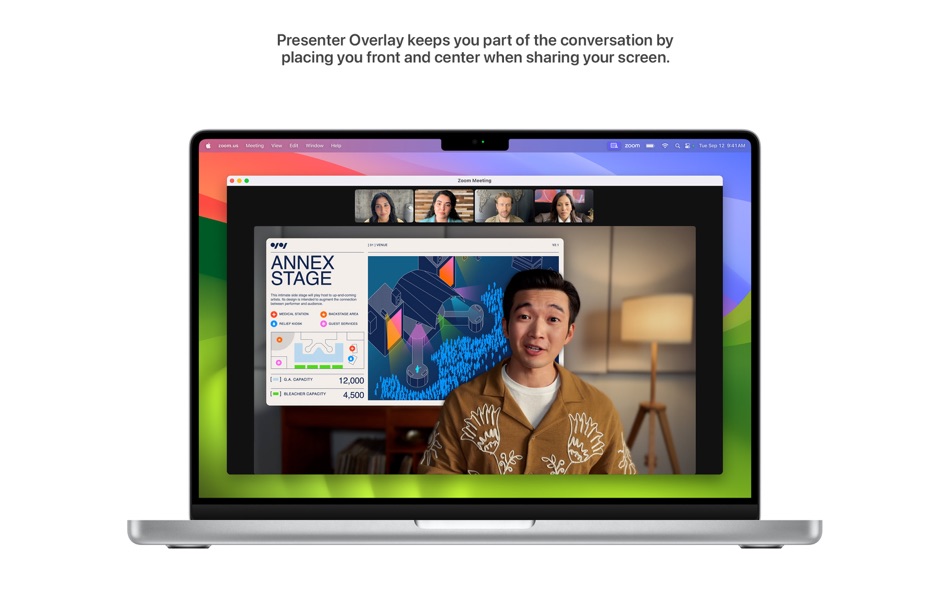
• Presenter Overlay keeps you front and center while sharing your screen
• Reactions layer 3D effects like hearts, balloons, confetti, and more around you in video calls
Safari and Passwords
• Profiles keep your browsing separate for topics like work and personal
• Web apps let you use any website like an app, complete with an icon in the Dock for faster access and a simplified toolbar for easier browsing
• Enhanced Private Browsing locks your private browsing windows when you’re not using them, blocks known trackers from loading, and removes tracking that identifies you from URLs
• Password and passkey sharing with trusted contacts
Messages
• Live Stickers sync from iOS and iPadOS to macOS, giving you access to the Live Stickers you create on your iPhone and iPad
• Search filters for people, keywords, and content types like photos or links
• Swipe to reply inline on any iMessage bubble
Gaming
• Game Mode gives games the highest priority on the CPU and GPU, delivering more consistent frame rates and lower latency to wireless controllers
Keyboard
• Improved autocorrect accuracy makes typing even easier by leveraging a more powerful transformer-based language model
• Inline predictive text shows single- and multi-word predictions that you can add by pressing the Space bar
• Improved Dictation experience supports using your voice and keyboard together to enter text
AirPods
• Adaptive Audio is a new listening mode that dynamically blends Active Noise Cancellation and Transparency to tailor the noise control experience based on the conditions of your environment
• Press to mute and unmute your microphone when on a call
• Improved AirPods automatic switching now detects Mac up to 2X faster
Privacy
• Sensitive Content Warnings can be enabled to help prevent users from unexpectedly viewing sensitive images in Messages
• Expanded Communication Safety protections for children now detect videos containing nudity in addition to photos shared through Messages and the Photos picker
Accessibility
• Live Speech lets you type what you want to say and reads it aloud in FaceTime calls or in-person conversations
• Personal Voice helps users at risk of speech loss create a voice that sounds like them in a private and secure way using on-device machine learning
• Made for iPhone compatible hearing devices can be paired and used with Mac
This release includes other features and improvements:
• One-Time verification code AutoFill from Mail helps you quickly sign into sites in Safari
• Inline PDFs and document scans in Notes are presented full-width making them easy to view
• Grocery Lists in Reminders automatically group related items into sections as you add them
• Option to say "Siri" in addition to "Hey Siri" for a more natural way to activate Siri
• High performance mode in Screen Sharing improves responsiveness while remotely accessing a Mac with Apple silicon
Some features may not be available for all regions or on all Apple devices.
Ad
Capturas de ecrã




Histórico de preços
- Preço atual: Grátis
- Mínimo: Grátis
- Máximo: Grátis
Monitorizar preços
Novidades
- Versão: 14.7.7
- Atualizado:
- This update provides important security fixes and is recommended for all users.
Informações adicionais
- Data de lançamento:
- Categoria:
macOS Apps›Utilitários - Sistemas operacionais:
macOS,macOS 10.13 ou superior - Tamanho:
11 Gb - Idioma compatível:
Arabic,Catalan,Chinese,Croatian,Czech,Danish,Dutch,English,Finnish,French,German,Greek,Hebrew,Hindi,Hungarian,Indonesian,Italian,Japanese,Korean,Malay,Norwegian,Polish,Portuguese,Romanian,Russian,Slovak,Spanish,Swedish,Thai,Turkish,Ukrainian,Vietnamese - Classificação do conteúdo:
4+ - Mac App Store Avaliação:
0
 https://www.apple.com/macos/sonoma
Desenvolvedor
- Apple
- Plataformas: Android Apps (7) iOS Apps (126) iOS Jogos (1) macOS Apps (32)
- Listas: 161 + 85
- Pontos: 356 + 41,620,322 ¡
- Classificações: 4.5 (12)
- Comentários: 0
- Descontos: 0
- Vídeos: 1
- RSS: Subscrever
Listas (1)
- macOS Sonoma

Pontos (3)
-

- 11,273 Simon Chan
- +1
-
- 3,739 Dragon
- +1
-
- 474 QenTox
- +1


Classificações (0)
0 ☹️
Comentários (0)
Seja o primeiro a comentar 🌟
«macOS Sonoma». Plataforma: macOS. Categoria: Utilitários. Desenvolvedor: «Apple». Primeiro lançamento: . Última atualização: . Preço atual: grátis. Este título ainda não recebeu classificações ou comentários no AppAgg. Listas: públicas 1, privadas 2. Pontos rastreados: confirmados 3, indiretos 0. Idiomas disponíveis: Arabic, Catalan, Chinese, Croatian, Czech, Danish, Dutch, English, Finnish, French, German, Greek, Hebrew, Hindi, Hungarian, Indonesian, Italian, Japanese, Korean, Malay, Norwegian, Polish, Portuguese, Romanian, Russian, Slovak, Spanish, Swedish, Thai, Turkish, Ukrainian, Vietnamese. AppAgg rastreia histórico de preços, classificações e feedback de usuários para «macOS Sonoma». Acompanhe futuros descontos e atualizações via RSS. AppAgg não hospeda aplicativos nem distribui software. Todas as marcas registradas, logotipos e capturas de tela pertencem aos seus respectivos proprietários.
macOS Sonoma URL abreviado: Copiado!- 🌟 Compartilhar
- Mac App Store
Semelhantes
-
- macOS Sonoma Beta
- macOS Apps: Utilitários Por: Apple
- Grátis
- Listas: 0 0 0
- Pontos: 4 Versão: 14.6 beta 4 Get an early preview of the next major release of macOS. When you install the macOS beta, you can try out upcoming apps, features, and technologies and let us know what you think. It s ⥯
-
- MouseBoost
- macOS Apps: Utilitários Por: 惠源 赵
- * Grátis
- Listas: 2 + 1 0 0
- Pontos: 8 Versão: 4.2.1 Unlock your Mac's full potential with MouseBoost! Add over 30 powerful tools directly to your right-click menu. Fully customizable for programmers, designers, and power users, it s the ⥯
-
- NTFS Read&Write -iBoysoft NTFS
- macOS Apps: Utilitários Por: Chengdu Aibo Tech Co., Ltd.
- * Grátis
- Listas: 4 0 5 (1)
- Pontos: 3 Versão: 3.5 A professional NTFS for Mac tool to open NTFS drive in read-write mode, copy and write files fast and effectively. Insert your NTFS drive, it will be automatically mounted without ... ⥯
-
- PeakHour
- macOS Apps: Utilitários Por: Edward Lawford
- * Grátis
- Listas: 0 + 1 0 0
- Pontos: 2 Versão: 5.2.11 PeakHour: Maximize Your Internet What is PeakHour? Discover PeakHour, a revolutionary tool that transforms your Mac's menu bar into a powerful command center for monitoring Internet ... ⥯
-
- Widgetter - Custom Desktop
- macOS Apps: Utilitários Por: Villow
- * Grátis
- Listas: 2 0 0
- Pontos: 4 Versão: 2.3.5 Widgetter is a direct line to upscaling your desktop into a work station perfectly tailored to your needs. Start building a CUSTOMIZED HOME SCREEN to have all the key data points and ... ⥯
-
- KeyboardAutomate
- macOS Apps: Utilitários Por: Nicholas Alexander Kuhn
- Grátis
- Listas: 0 0 0
- Pontos: 1 Versão: 5.51.001 KeyboardAutomate is a macOS automation tool that lets you record, replay, and visualize your keyboard and mouse activity with pixel-perfect accuracy. Designed for creators, developers, ⥯
-
- EaseUS NTFS Writer
- macOS Apps: Utilitários Por: EaseUS Software
- * Grátis
- Listas: 0 0 0
- Pontos: 2 Versão: 3.8.1 EaseUS NTFS Writer is a professional utility that enables users to grant full disk access to read and write, copy, delete, and rename files, and mount, eject, and open NTFS drives, USB ⥯
-
- SnapSFTP
- macOS Apps: Utilitários Por: Christopher Williams
- Grátis
- Listas: 0 0 0
- Pontos: 0 Versão: 1.0 Securely connect to your SFTP servers with a b SnapSFTP is a fast, modern SFTP client built exclusively for macOS 14+. Connect to your remote servers with a clean, native interface ... ⥯
- -50% Novo
- CopyForge - Clipboard Manager
- macOS Apps: Utilitários Por: Reactive Studio s.r.o.
- ▼ $4.99
$9.99-50% - Listas: 0 0 0
- Pontos: 0 Versão: 1.0 CopyForge is a powerful native macOS clipboard manager that lives in your menu bar. It automatically saves everything you copy text and images and gives you instant access to your full ⥯
-
- QuickGlancer
- macOS Apps: Utilitários Por: Danny Bolick
- $0.99
- Listas: 0 0 0
- Pontos: 0 Versão: 1.0 One click. Instant preview. Zero compromise on privacy. QuickGlancer is a lightweight menu bar utility that gives you instant access to your webcam preview. Perfect for checking your ... ⥯
-
- File Manager AI
- macOS Apps: Utilitários Por: Ahmed Mohamed Ali Ibrahim Almansoori
- * Grátis
- Listas: 0 0 0
- Pontos: 0 Versão: 1.1 File Manager AI is a beautifully designed macOS file organizer that helps you clean up space, find large files, and manage your storage effortlessly powered by intelligent on-device ... ⥯
-
- Trove File Explorer
- macOS Apps: Utilitários Por: Matthias Wissel
- $3.99
- Listas: 0 0 0
- Pontos: 0 Versão: 1.2.4 Finally, a file manager for Mac that works the way you expect from knowing Windows Explorer. If you've recently switched from Windows to macOS and find Finder s logic frustrating, ... ⥯
-
- Monitorly
- macOS Apps: Utilitários Por: Efe Comert
- $1.99
- Listas: 0 0 0
- Pontos: 0 Versão: 1.0 Monitor your Mac's health at a glance. Stay in control of your system performance with Monitorly the minimalist yet powerful system monitor for your Mac's status bar and widgets. Key ... ⥯
-
- Lupita
- macOS Apps: Utilitários Por: Sassy Dog Enterprises LLC
- $4.99
- Listas: 0 0 0
- Pontos: 0 Versão: 1.4.8 Lupita is a beautifully designed performance monitor built exclusively for macOS. Track your system's vital signs with elegant, real-time charts that make monitoring your Mac ... ⥯