
| Concepteur: | Ram Patra (7) | ||
| Prix: | $4.99 | ||
| Classements: | 5 (1) | ||
| Avis: | 0 Rédiger un avis | ||
| Commentaires: | 0 Publier un commentaire | ||
| Listes: | 1 + 1 | ||
| Points: | 2 + 0 ¡ | ||
| Mac App Store | |||
Description

FEATURES
Camera
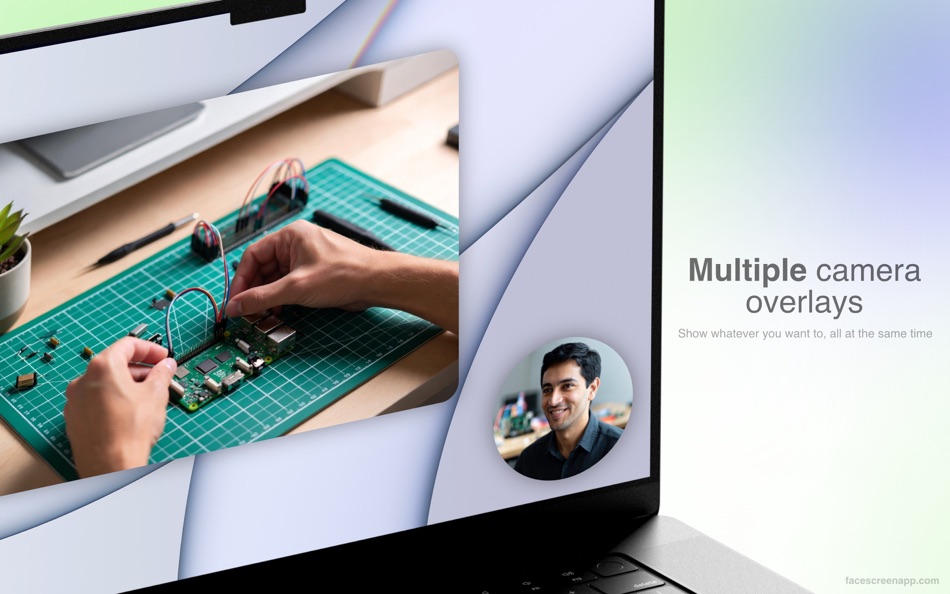
• A sleek camera view that floats on top of all other windows. Give a personal touch to your screen recording or screen shares by adding your face to it.
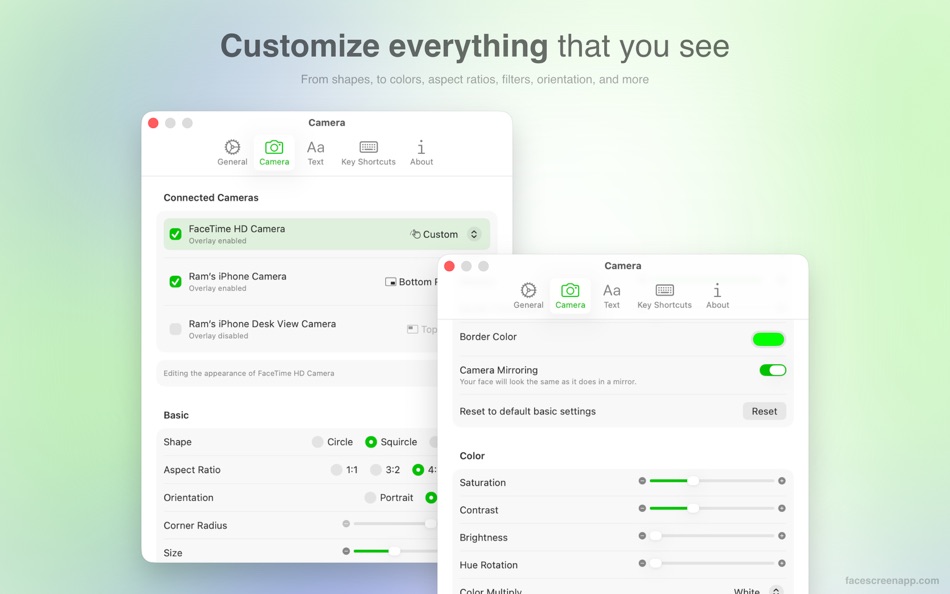
• From the shape of the camera view to the position of the camera, the colors, size, aspect ratios, orientation, and more—you can customize everything.
• Zoom in when your camera is far away for better visibility.
• Works seamlessly over apps in full-screen mode.
• Easily drag the camera view to anywhere on the screen or to a different display. The position is saved for the next time you run FaceScreen.
• You can enable/disable multiple cameras at the same time, if you have more than one available. And, you can style them differently.
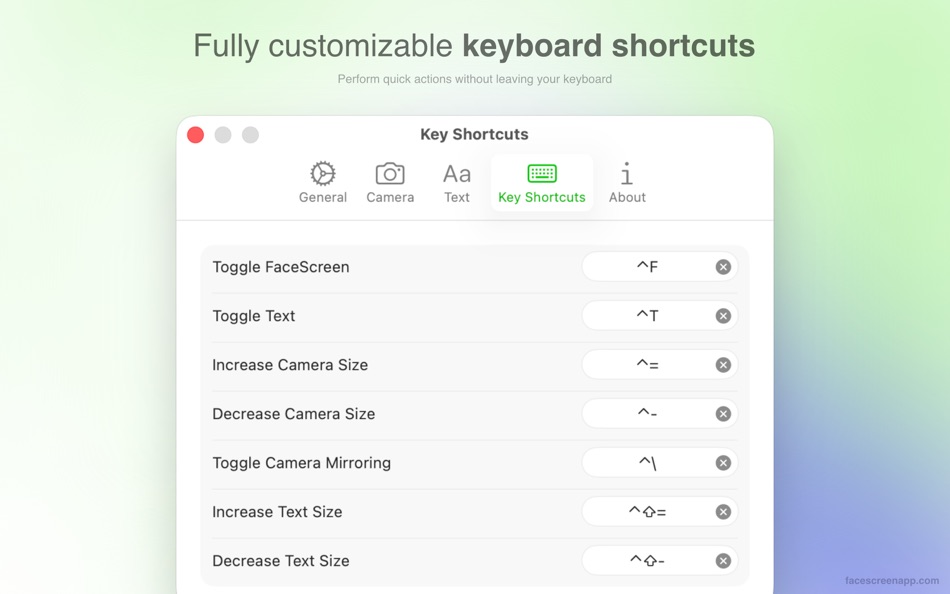
• Assign your own keyboard shortcuts to toggle the camera on and off, change size, and more.
Text
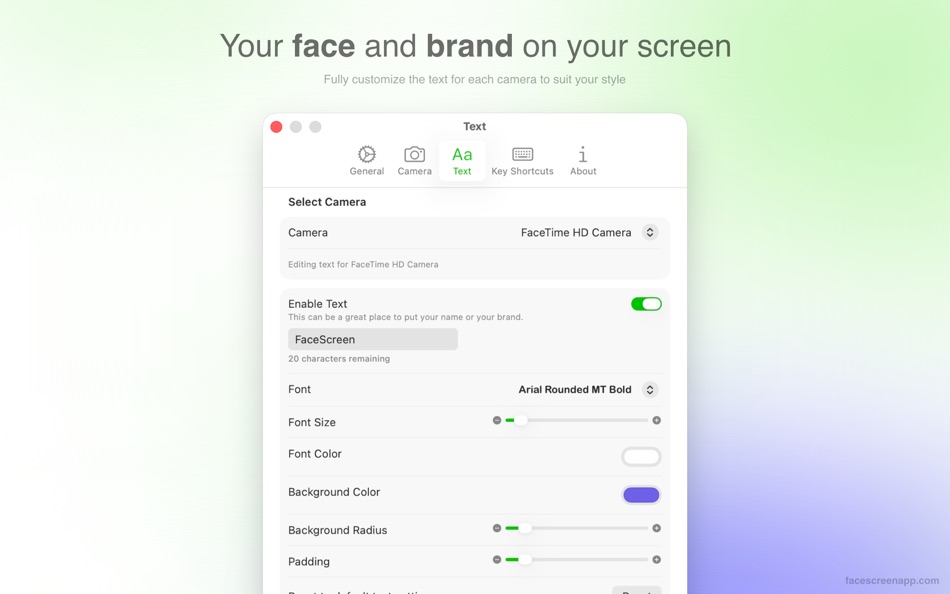
• Adding a face is great, but if you're new to your audience, adding your name, website, or social media handle is even better.
• You can fully customize the text, font, background, and their colors to suit your brand.
• It is possible to only show the camera overlay without the text label.
• Assign your own keyboard shortcuts to toggle the text overlay on and off.
CONTACT
• Website - https://facescreenapp.com
• X - https://x.com/softal_io or https://x.com/rampatra_
EXTRAS
• Faq - https://facescreenapp.com/faq
• Privacy - https://facescreenapp.com/privacy
Ad
Captures d'écran

Historique des prix
- Aujourd’hui: $4.99
- Minimum: $2.99
- Maximum: $4.99
Suivre l'évolution des prix
Nouveautés
- Version: 2.0.0
- Mis à jour:
- • Supports multiple camera overlays at the same time
• Customize the overlay style and the text label for each camera
Commentaires (0)
Soyez le premier à commenter 🌟
Concepteur


Classements (1)
-

- 23 Ram Patra
- 5
Listes (1)
- FaceScreen - Desktop Camera
Avis (0)
Soyez le premier à donner votre avis 🌟
Informations supplémentaires
- Version: 2.0.0
- Catégorie:
macOS Applications›Photo et vidéo - Systèmes d'exploitation:
macOS,macOS 15.0 ou version ultérieure - Taille:
3 Mb - Langues prises en charge:
Chinese,English,French,German,Japanese,Oriya,Russian,Spanish - Classification du contenu:
4+ - Mac App Store Note:
0 - Mis à jour:
- Date de sortie:
Contacts
- Site Web:
 https://facescreenapp.com
«FaceScreen - Desktop Camera». Plateforme : macOS. Catégorie : Photo et vidéo. Développeur : «Ram Patra». Première version : . Dernière mise à jour : . Prix actuel : $4.99. Prix le plus bas enregistré : $2.99 (). Prix le plus élevé enregistré : $4.99 (). Note AppAgg : 5 / 5. Votes : 1. Listes : publiques 1, privées 1. Points suivis : confirmés 2, indirects 0. Langues disponibles : Chinese, English, French, German, Japanese, Oriya, Russian, Spanish. AppAgg suit l'historique des prix, les notes et les commentaires des utilisateurs pour «FaceScreen - Desktop Camera». Suivez les futures réductions et mises à jour via RSS. AppAgg n'héberge pas d'applications et ne distribue pas de logiciels. Toutes les marques, logos et captures d'écran appartiennent à leurs propriétaires respectifs.
FaceScreen - Desktop Camera URL courte: Copié!- 🌟 Partager
- Mac App Store
Ad
Similaires
-
- Screen-Record Lite
- macOS Applications: Photo et vidéo De: 育平 姚
- Gratuit
- Listes: 0 + 0 Classements: 0 Avis: 0
- Points: 0 + 0 0 Version: 3.1 Screen-Record Free is a powerful screen record app. It can screen record and support edit the video. Select Area Auto-identify windows, menus etc Magnifying glass help you accurate ... ⥯
-
- Camera Deck for Sony
- macOS Applications: Photo et vidéo De: CameraDeck
- Gratuit
- Listes: 0 + 0 Classements: 0 Avis: 0
- Points: 0 + 0 0 Version: 1.1 Introducing Camera Deck for Sony - the essential app for streamers and video content creators who want to streamline their workflow. With Camera Deck, you can connect your Sony camera ... ⥯
-
- Camera Preview
- macOS Applications: Photo et vidéo De: Sindre Sorhus
- $6.00
- Listes: 1 + 1 Classements: 1 (1) Avis: 0
- Points: 3 + 0 0 Version: 1.8.0 Instant access to your Mac's camera feed for quick checks before video calls. Key Features Instant Camera Feed: A single click shows your camera's view. Menu Bar & Dock Access: Keep ... ⥯
-
- Camera Photo Timer
- macOS Applications: Photo et vidéo De: Solaz Dazen srl
- $3.99
- Listes: 0 + 2 Classements: 0 Avis: 0
- Points: 6 + 0 0 Version: 1.6 Say goodbye to blurry selfies and missed shots. This powerful Mac app lets you capture photos and time-lapses using your connected cameras all with complete control over timing. ... ⥯
-
- Screen Timelapse lite
- macOS Applications: Photo et vidéo De: 俊 郑
- Gratuit
- Listes: 0 + 0 Classements: 0 Avis: 0
- Points: 0 + 0 0 Version: 2.2 Lightweight Operation: No need to worry about system resource consumption. Screen TimeLapseZ ensures a smooth recording experience while keeping your Mac running seamlessly. Custom ... ⥯
-
- Screen Catcher: Video Recorder
- macOS Applications: Photo et vidéo De: Appfit Studio
- * Gratuit
- Listes: 0 + 1 Classements: 0 Avis: 0
- Points: 6 + 0 0 Version: 1.4.5 Screen Catcher gives you an opportunity to take a video of your screen workflow. Now it is easy to create a system guide or a demo of your software. You can record the whole screen or ... ⥯
-
- Screen Recorder Fluent
- macOS Applications: Photo et vidéo De: 桂莲 李
- * Gratuit
- Listes: 0 + 0 Classements: 0 Avis: 0
- Points: 1 + 0 0 Version: 1.4.1 Screen Recorder Fluent offers you a light but professional tool to capture screen and voice, or create video tutorials. The tool enables you to capture everything that happens on your ... ⥯
-
- DeskTop Photo Player
- macOS Applications: Photo et vidéo De: John Romano
- Gratuit
- Listes: 0 + 0 Classements: 0 Avis: 0
- Points: 0 + 0 0 Version: 3.3 DeskTop Photo Player for your Mac, the best way to enjoy all your digital photos while you work or relax! Photos are displayed randomly from any folder (or folder of folders). ... ⥯
-
- Desktop Player
- macOS Applications: Photo et vidéo De: Sudip Bag
- $0.99
- Listes: 0 + 0 Classements: 0 Avis: 0
- Points: 0 + 0 0 Version: 1.3 Desktop Player is very intuitive and as far as Video Players go this is extremely intelligent and straight forward to use. Desktop Player will make it a lot more enjoyable for you to ... ⥯
-
- Camera Record HD - Capture Video Recorder
- macOS Applications: Photo et vidéo De: 小磊 张
- $4.99
- Listes: 1 + 1 Classements: 0 Avis: 0
- Points: 0 + 0 0 Version: 3.1.8 Camera Record HD compatible with the Mac s built-in camera, or countless other third-party cameras . Camera Record HD is easy to record your camera video and record audio from mic . ... ⥯
-
- Camera Shutter Count
- macOS Applications: Photo et vidéo De: Emre Civan
- $4.99
- Listes: 0 + 0 Classements: 0 Avis: 0
- Points: 0 + 0 0 Version: 1.0 Camera Shutter Count is a powerful macOS tool designed for Nikon camera owners to track shutter count and monitor camera usage. Instantly extract shutter counts from image files and ... ⥯
-
- Camera Suite for GoPro® Hero
- macOS Applications: Photo et vidéo De: Harald Meyer
- $10.99
- Listes: 0 + 0 Classements: 0 Avis: 0
- Points: 0 + 0 0 Version: 1.2.3 Camera Suite allows you to control GoPro® Hero 2, 3, 3+, 4, 5, 6, 7, 8 cameras over Wifi on a Mac. It supports audio and video live streaming, media browsing, and a powerful scripting ... ⥯
-
- Screen Recorder: Record Audio
- macOS Applications: Photo et vidéo De: Samia Asif
- * Gratuit
- Listes: 0 + 0 Classements: 0 Avis: 0
- Points: 1 + 0 0 Version: 1.8 Screen Recorder Record Your Screen, Audio & Webcam with Ease Easily screen record, capture audio, and record video in HD. This all-in-one screen recording tool lets you screen record ... ⥯
-
- Screen Recorder: SC Recorder
- macOS Applications: Photo et vidéo De: Cyber Vision Infotech Private Limited
- Gratuit
- Listes: 0 + 0 Classements: 0 Avis: 0
- Points: 1 + 0 0 Version: 1.3 Screen Recorder: SC Recorder is a powerful and user-friendly Mac screen recording tool designed to capture anything on your screen with ease. Whether you need to record tutorials, ... ⥯