
Enregistrés
Choisissez le nom qui sera affiché dans votre menu Enregistrés.
Terminé!
| Concepteur: | Mariia Bebris (1) | ||
| Prix: | * Gratuit | ||
| Évaluation: | 1,340 | ||
| Classements: | 0 | ||
| Commentaires: | 0 Publier un commentaire | ||
| Listes: | 1 + 0 | ||
| Points: | 2 + 0 ¡ | ||
| +1 Points | |||
Description

If you are looking for a Mac app launcher, or a replacement for Launchpad in macOS 26 Tahoe, LaunchMe gives you full control over how you launch, organize, and customize your apps and files. Features like Spaces and Workflows gives you powerful automation for any work scenarios.
► Why LaunchMe
LaunchMe is more than a Mac app launcher. LaunchMe delivers intelligent automation, flexible workspace management, and full visual customization, helping you organize apps and files efficiently across multiple screens and workflows. With powerful tools like Spaces and Workflows, giving you full control over how you launch, organize, and switch between apps and work scenarios on modern macOS Tahoe.
► Customization
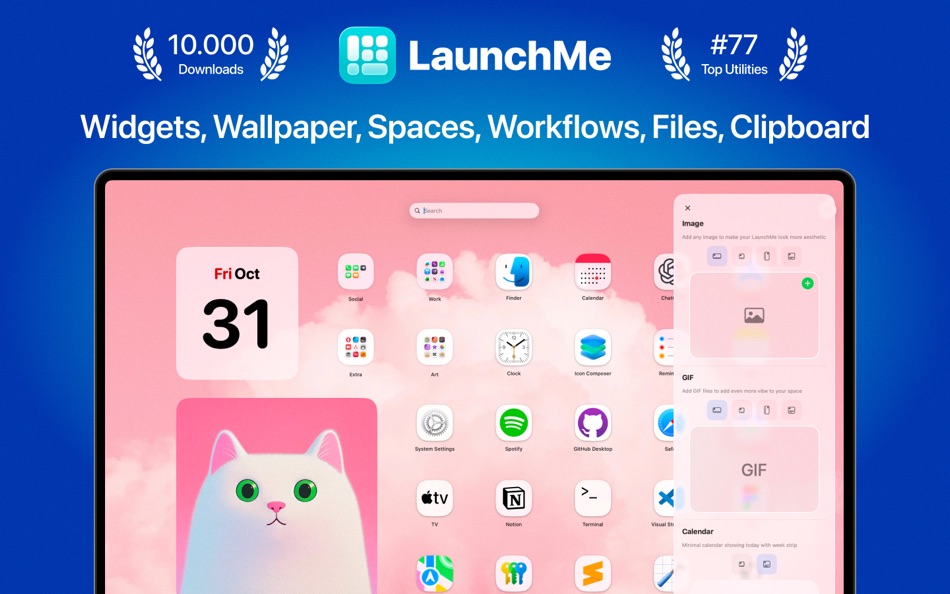
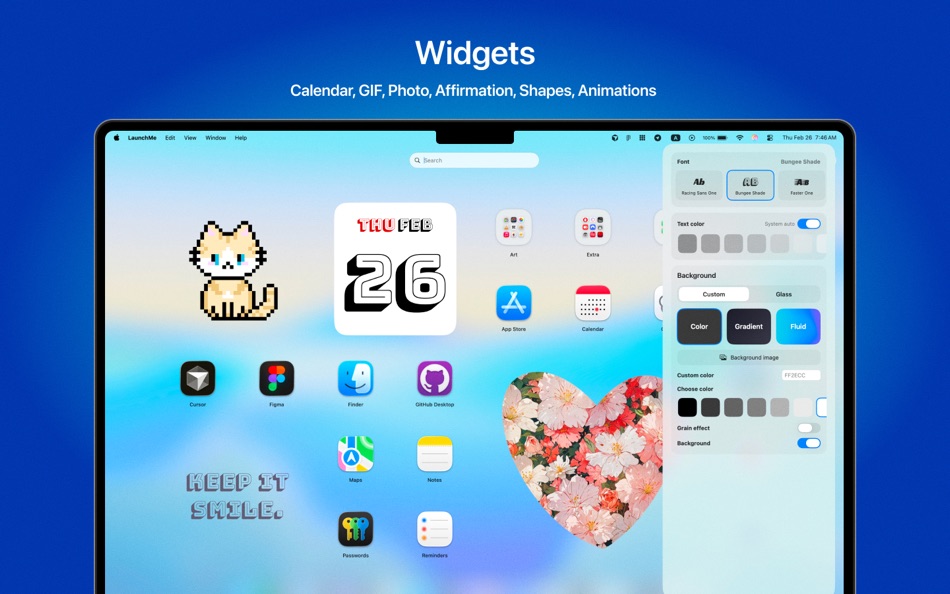
• Widgets: Calendar, Photo, GIF, Text, Animations, Shaped Photos
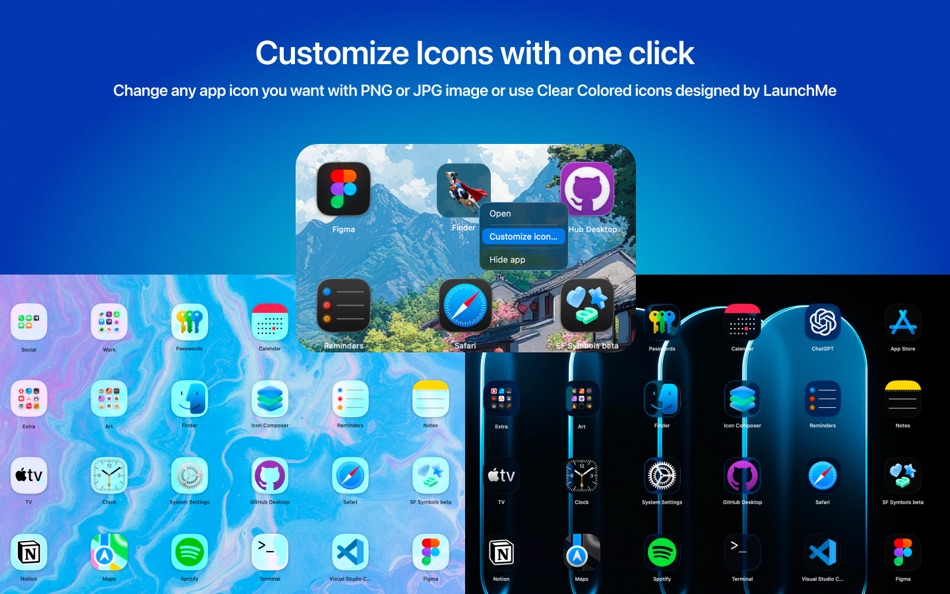
• Customize any app icons with PNG (no background) or JPG image
• Clear Colored icons set designed by LaunchMe
• Custom layouts and icon sizes
• Themes: Glass and Flat
• Dynamic wallpapers with Light & Dark mode support (HEIC)
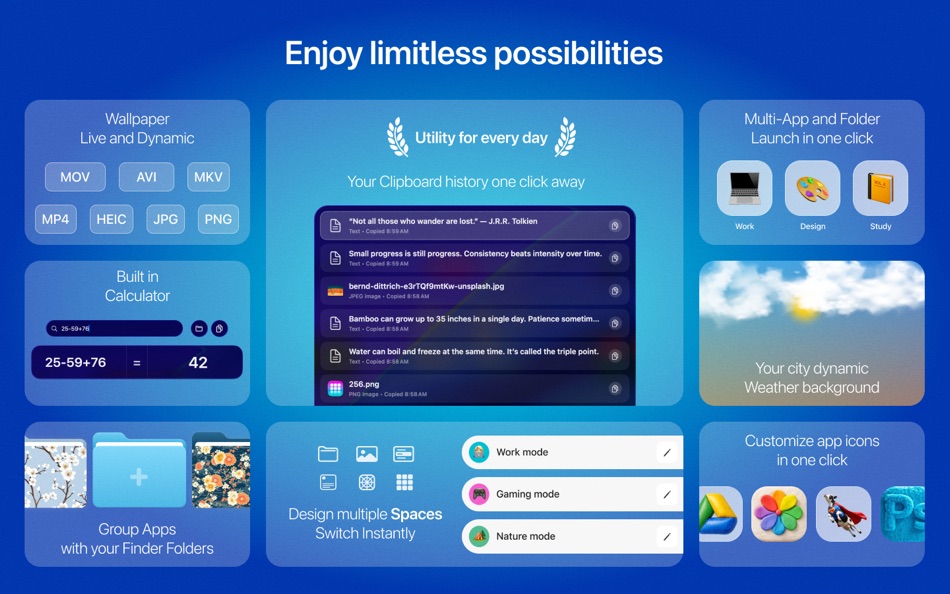
• (Video) Live wallpapers (MP4, MOV, AVI, MKV)
• Change Light / Dark Theme manually or automatically by system
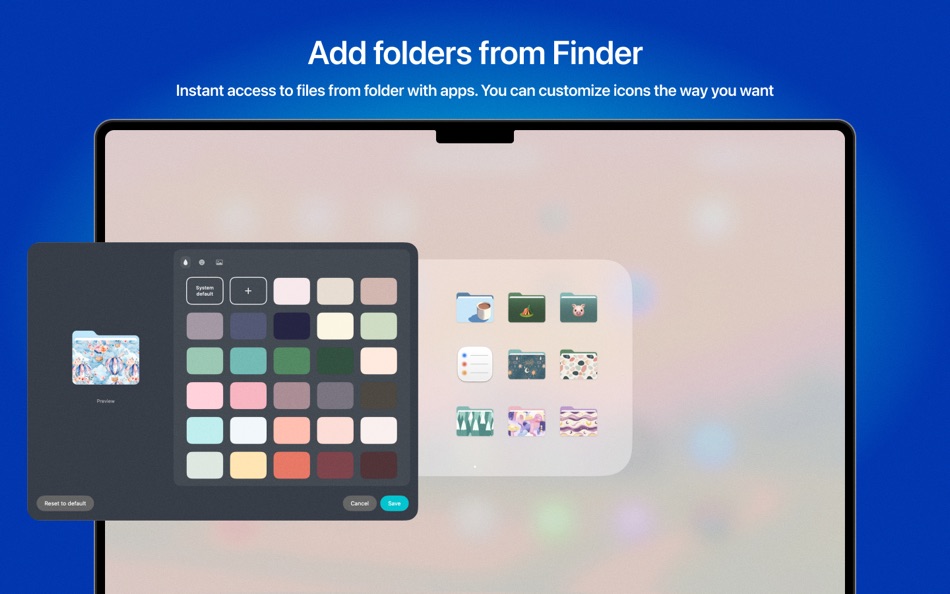
• Customize file's folders with colors, icons, images, and emojis
• Manually change Titles color
• Dynamic Sun wallpaper - Based on your local time, the sun moves throughout the day, and the background smoothly transitions from sunrise to daytime, sunset, and night sky with moving stars.
• Dynamic Weather wallpaper - Choose your city (or any city), and the background will automatically adapt to the real weather outside. Supported weather conditions include: Clear, Cloudy, Rain, Thunderstorm, and Snow. Background colors also change with local time, transitioning from sunset to night.
• App icons support auto switch to system Dark/Light/Tinted
► Apps, files and core features
• Supports any resolution and multiply screens
• Drag & Drop to create folders or remove from folder
• Create folders by simply choosing apps or files from the list
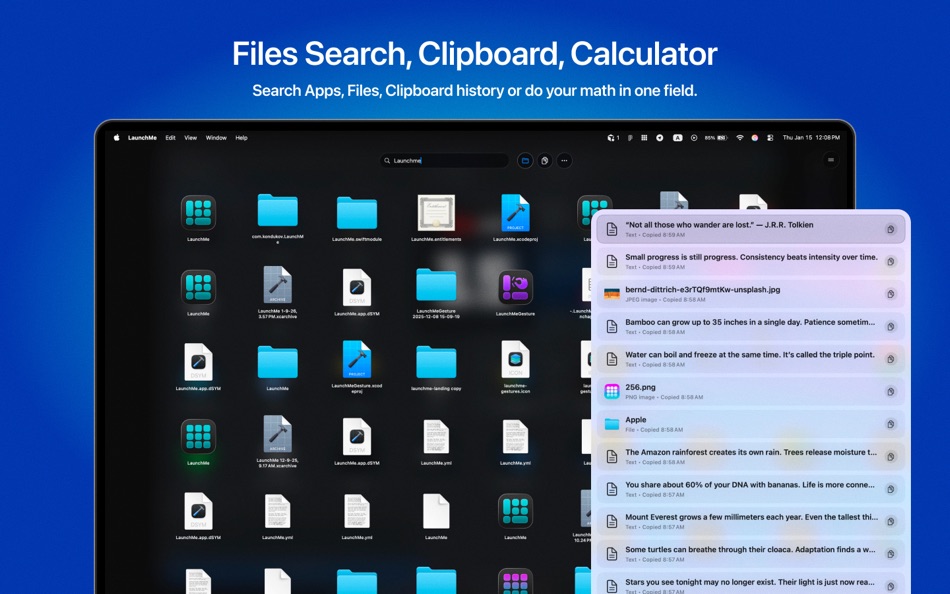
• File Search for quick access to documents and folders on your Mac
• Clipboard manager saves your copy history with text, files, images, links
• Calculator in search field
• Hot Corners for instant invoke
• Invoke with finger gestures (check Help page)
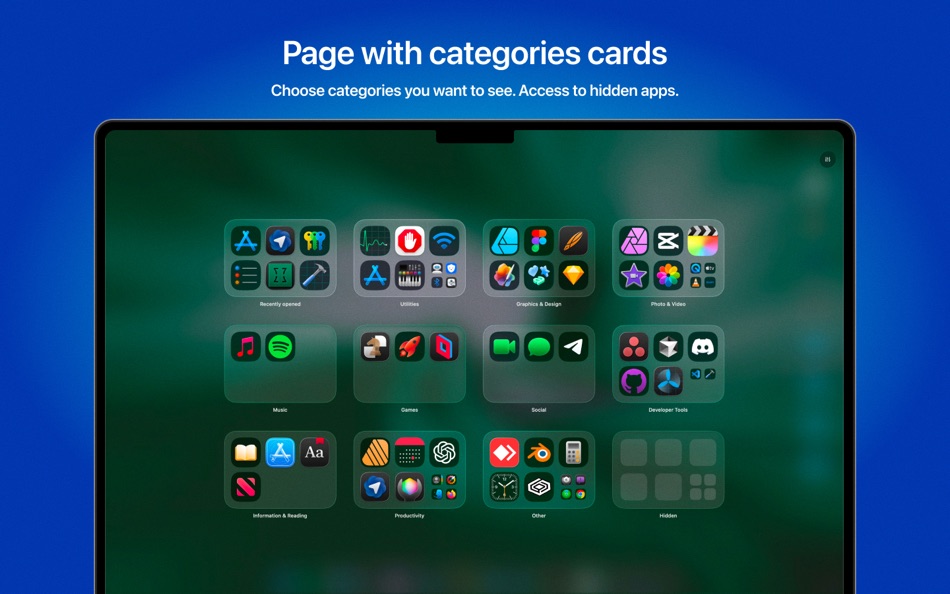
• Pages with categories for better app organization
• Add any file's folders from your Mac for fast navigation
• Hide apps
• Hide Titles
• Save your layouts
• Set custom keyboard shortcuts
• Add extra sources with app. Choose any folder in Finder or on External Drive and LaunchMe will scan these folders for apps.
• Stage Manager ready mode
• Spaces - allow you to save your current settings, layout, widgets, folders, and wallpaper into a Space that you can switch using a hotkey or schedule to change automatically by day and time. Create different Spaces for work, gaming, studying, or simply different moods - all your setups ready in just one click.
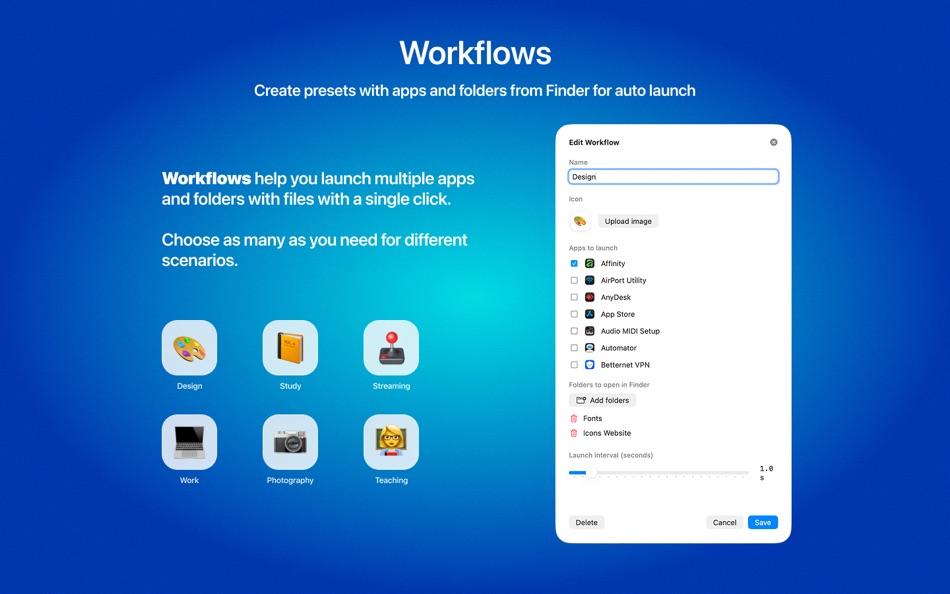
• Workflows. Launch multiple apps and folders with files using a single automation preset. If you have recurring scenarios where you need to open a set of apps and Finder folders, you can create one Workflow, name it, choose apps and files, customize its icon with an emoji or image - and it will look and behave just like an app, only more powerful.
LaunchMe is free to use with many standard features. Unlock even more features and customization with Pro.
Designed exclusively for macOS 26 Tahoe.
In macOS 26 Tahoe, Apple removed Launchpad. LaunchMe is a modern Launchpad replacement for app launching, app management, and desktop customization on Mac.
Compatible only with macOS 26 and later.
Developer Social
Threads: sergey.newton
Instagram: sergey.newton
Twitter: sergeynewton
TikTok: sergey.newton
Official website: launchmeapp.com
Terms of Use - https://www.apple.com/legal/internet-services/itunes/dev/stdeula/
Captures d'écran


Ad
Historique des prix
-
* Achats intégrés - Prix actuel : Gratuit
- Minimum: Gratuit
- Maximum: Gratuit
Suivre l'évolution des prix
Évaluation AppAgg
1,340
Évaluation AppAgg estimée pour
LaunchMe - App Launchpad
1,340 Or
Une évaluation plus élevée indique généralement des signaux plus forts sur AppAgg.
Basé sur : 🔥 popularité · ⭐ notes des utilisateurs · 🕒 actualité · 🏷️ promos · 🏬 données des stores · 👥 activité de la communauté
Recalculé chaque jour à partir des données AppAgg les plus récentes.
URL courte: Copié!
Nouveautés
- Version: 1.112
- Dernière mise à jour:
- Introducing new features: Spaces, Workflows, and dynamic Sun & Weather backgrounds.
• Spaces
Spaces allow you to save your current settings, layout, widgets, folders, and wallpaper into a Space that you can switch using a hotkey or schedule to change automatically by day and time. Create different Spaces for work, gaming, studying, or simply different moods - all your setups ready in just one click.
• Workflows
Launch multiple apps and folders with files using a single automation preset.
If you have recurring scenarios where you need to open a set of apps and Finder folders, you can create one Workflow, name it, choose apps and files, customize its icon with an emoji or image - and it will look and behave just like an app, only more powerful.
• Dynamic Sun background
Based on your local time, the sun moves throughout the day, and the background smoothly transitions from sunrise to daytime, sunset, and night sky with moving stars.
• Dynamic Weather background
Choose your city (or any city), and the background will automatically adapt to the real weather outside.
Supported weather conditions include: Clear, Cloudy, Rain, Thunderstorm, and Snow.
Background colors also change with local time, transitioning from sunset to night.
More changes
• New Appearance tab in settings
• New Themes settings to control Dark / Light / Auto modes
• New Titles settings allows to change titles color manually to White / Black
• Fixed custom icons reset in Dark/Light themes
• Fixed Japanese translations
• Animation optimization for pages
Informations supplémentaires
- Date de sortie:
- Catégorie:
macOS Applications›Utilitaires - Systèmes d'exploitation:
macOS,macOS 26.0 ou version ultérieure - Taille:
22 Mb - Langues prises en charge:
Chinese,English,French,German,Hindi,Italian,Japanese,Korean,Portuguese,Russian,Spanish,Turkish - Classification du contenu:
4+ - Mac App Store Note:
0 - Site Web:
 https://launchmeapp.com
Concepteur
- Mariia Bebris
- Plateformes: macOS Applications (1)
- Listes: 1 + 0
- Points: 2 + 0 ¡
- Classements: 0
- Commentaires: 0
- Remises: 0
- Vidéos: 0
- RSS: S'abonner
Listes (1)
- LaunchMe - App Launchpad


Classements (0)
0 ☹️
Commentaires (0)
Soyez le premier à commenter 🌟
Résumé
LaunchMe - App Launchpad URL courte: Copié!- 🌟 Partager
- Mac App Store
«LaunchMe - App Launchpad». Plateforme : macOS. Catégorie : Utilitaires. Développeur : «Mariia Bebris». Première version : . Dernière mise à jour : . Prix actuel : gratuit. Ce titre n'a pas encore reçu de notes ou d'avis sur AppAgg. Listes : publiques 1, privées 0. Points suivis : confirmés 2, indirects 0. Langues disponibles : Chinese, English, French, German, Hindi, Italian, Japanese, Korean, Portuguese, Russian, Spanish, Turkish. AppAgg suit l'historique des prix, les notes et les commentaires des utilisateurs pour «LaunchMe - App Launchpad». AppAgg n'héberge pas d'applications et ne distribue pas de logiciels. Toutes les marques, logos et captures d'écran appartiennent à leurs propriétaires respectifs. Suivez les futures réductions et mises à jour via RSS
Similaires
-
- Pip Me • Picture in Picture
- macOS Applications: Utilitaires De: Denk Alexandru
- $2.99
- Listes: 0 0 0
- Points: 1 + 0 3K Version: 1.7.1 Pip Me displays your webcam, video camera or iPhone on the screen during a presentation, screencast or recording. The app is perfect when you are broadcasting your desktop and it is ... ⥯
-
- Don't Ask Me Bro
- macOS Applications: Utilitaires De: JAMES ORMAN
- $0.99
- Listes: 0 0 0
- Points: 0 + 0 500 Version: 1.0 Don t Ask Me Bro is a minimalist Safari extension designed to eliminate one annoying thing: YouTube s Continue watching? interruptions. No settings. No bloat. Just peace. Whenever ... ⥯
-
- HotLaunch - App Launchpad
- macOS Applications: Utilitaires De: 方 刘
- * Gratuit
- Listes: 3 + 4 0 0
- Points: 20 + 0 12K Version: 2.5.9 Efficiently switch and open apps, folders, files, URLs. characteristic: 1 Support Option, Control, Command, Shift,fn combination shortcut keys to display switching window view. 2 When ... ⥯
-
- Quick Launch Switcher
- macOS Applications: Utilitaires De: 泳诗 陈
- $7.99
- Listes: 0 + 1 0 0
- Points: 13 + 0 6K Version: 6.5.3 "Quick Launch Switcher" is a productivity tool designed for macOS, aiming to provide a fast and intuitive way to launch and switch applications. It uses a unique radial menu interface, ⥯
-
- StartMyApp: Fast App Launch
- macOS Applications: Utilitaires De: 峰 朱
- Gratuit
- Listes: 0 + 1 0 0
- Points: 8 + 0 1K Version: 1.5 Streamline your workflow with the fastest, smartest way to open anything you need. 1. Smart Search & Instant Launch Search by app name, tag, category, or developer. Fuzzy matching and ... ⥯
-
- Toggo - Menu Bar Quick Launch
- macOS Applications: Utilitaires De: 尚辉 李
- * Gratuit
- Listes: 0 0 0
- Points: 0 + 0 500 Version: 3.0.5 All-In-One Menu Bar Shortcut Hub No setup needed, ready to use instantly. All functions in one menu bar, one-click access, lightweight and Mac-compatible. - Internet Radio: Built-in ... ⥯
-
- LGTM (Looks Good To Me)
- macOS Applications: Utilitaires De: Rafal Grodzinski
- Gratuit
- Listes: 0 0 0
- Points: 0 + 0 500 Version: 1.1.0 LGTM (Looks Good To Me) is a browser extension that allows you to insert an image link directly into a selectd text field. Link can be both in a standard form as well as in Markdown ... ⥯
-
- Spam Me Not
- macOS Applications: Utilitaires De: Jan P. Barnholt
- * Gratuit
- Listes: 0 + 1 0 0
- Points: 1 + 0 1K Version: 3.1.0 This app checks email addresses against the stopforumspam.com database, a crowd-sourced service tracking spam activity. Key features: 1. Checks multiple email addresses at once 2. ... ⥯
-
- Wake Me Up
- macOS Applications: Utilitaires De: Aleksey Sanin
- $0.99
- Listes: 0 0 0
- Points: 0 + 0 500 Version: 1.2 Wake up any computer with enabled Wake-on-LAN or Wake-on-Wireless-LAN. The previously entered computers are saved for quick access in the future and there is a convenient way to add ... ⥯
-
- TV Show Renamer
- macOS Applications: Utilitaires De: Daniil Molchanov
- Gratuit
- Listes: 0 0 0
- Points: 0 + 0 500 Version: 1.0.2 Renaming your favorite TV shows has never been easier. TV Show Renamer is a macOS application which will help to keep your TV series video files organized. The application can fetch ... ⥯
-
- Disconnect Premium
- macOS Applications: Utilitaires De: Disconnect
- Gratuit
- Listes: 0 0 0
- Points: 0 + 0 500 Version: 3.2.4 A new era in VPN protection, Disconnect Premium revolutionizes online privacy. The most powerful and user friendly VPN app empowers you with an unprecedented amount of privacy and ... ⥯
-
- SnapText • Easy OCR Scan Tool
- macOS Applications: Utilitaires De: Eric Maciel
- $4.99
- Listes: 0 0 0
- Points: 1 + 0 670 Version: 1.0 SnapText is a lightweight OCR app that helps you to extract text and QR/barcodes from anywhere in your screen. Highlights Extract text and QR/barcodes from image captures. No internet ... ⥯
-
- Morph Rest - Break Reminder
- macOS Applications: Utilitaires De: 楚权 包
- * Gratuit
- Listes: 0 0 0
- Points: 0 + 0 500 Version: 1.0.0 Morph Rest is a MacOS application with a focus on scheduled break reminders. Too busy working that you forget to take a break, to drink water, or to move around? Install Morph Rest, we ⥯