
Đã lưu
Chọn tên sẽ hiển thị trong menu Đã lưu của bạn.
Làm xong!
| Nhà phát triển: | John Taverna (3) | ||
| Giá bán: | $7.99 | ||
| Xếp hạng: | 5 (1) | ||
| Bình luận: | 0 Đăng bình luận | ||
| Danh sách: | 1 + 0 | ||
| Điểm: | 1 + 0 ¡ | ||
| +1 Điểm | |||
Mô tả

PRIVACY BY DESIGN
• Zero telemetry - No analytics, app account login or usage tracking
• Fully sandboxed - Apple's strictest security standard
• Local storage - All data stays on your device
• No account required - Use every feature without signing up
INSTANT ACCESS
Move your cursor to the screen edge and devPad slides out. Move away and it disappears. Or use ⌘⇧. to toggle from anywhere. Pin it open when you need persistent access.
BUILT-IN BROWSER
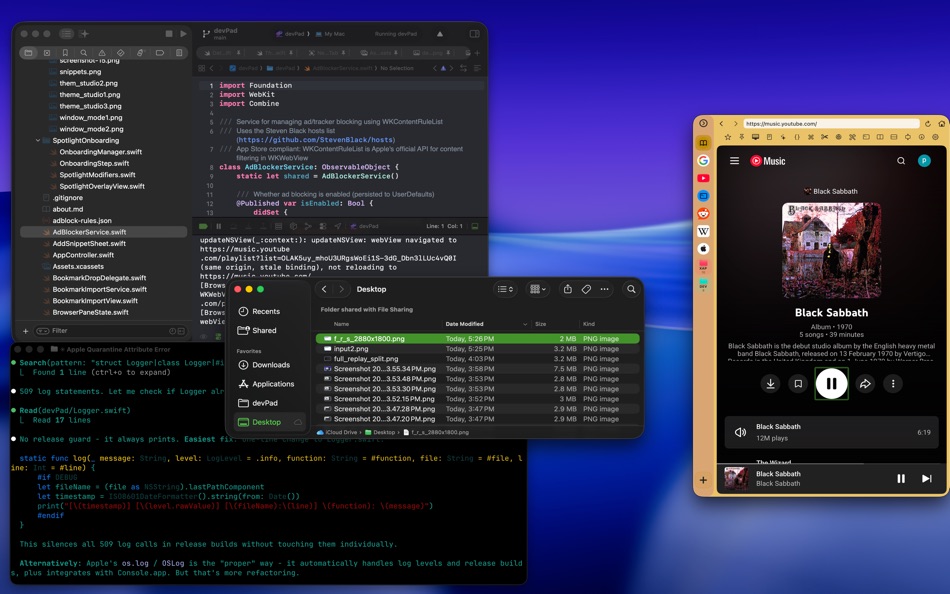
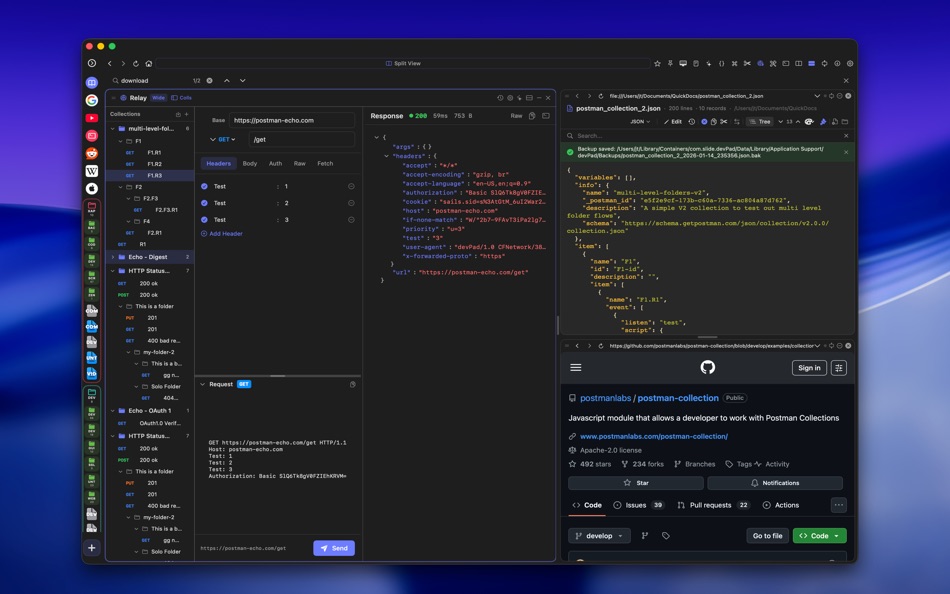
A full WebKit browser with searchable bookmarks, ad blocking, reader mode, and local file browsing. Import bookmarks from Safari, Chrome, Firefox, Brave, or Edge. Bookmark local folders for quick project access. Right click text or images to add to AI Chat context.
CODE VIEWER & EDITOR
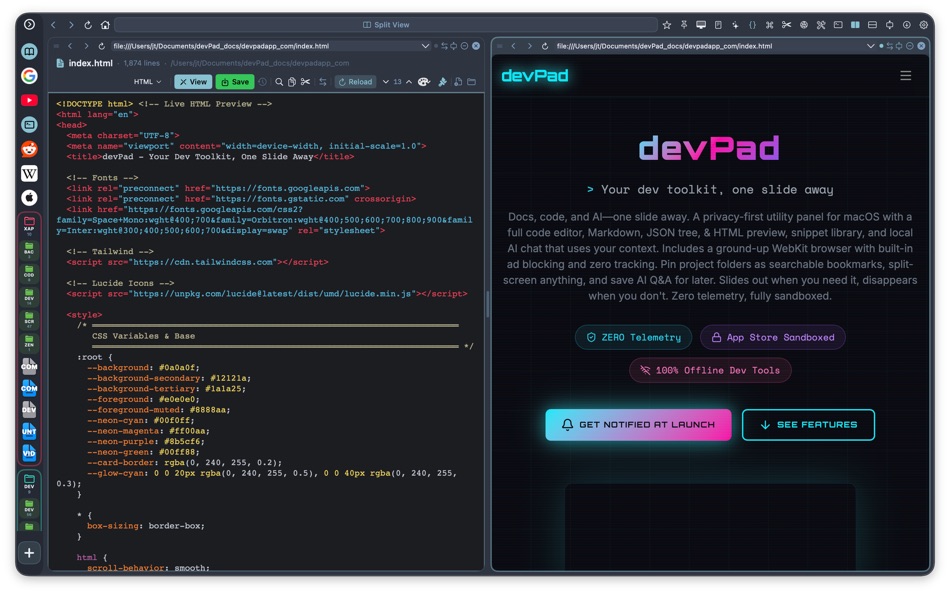
View and edit code with syntax highlighting for 150+ languages. Automatic version history creates backups every time you save. Git integration shows modified status and opens side-by-side diffs against HEAD. Split preview for Markdown and HTML files.
SNIPPETS AND NOTES
CAPTURE ANYTHING, FIND IT INSTANTLY
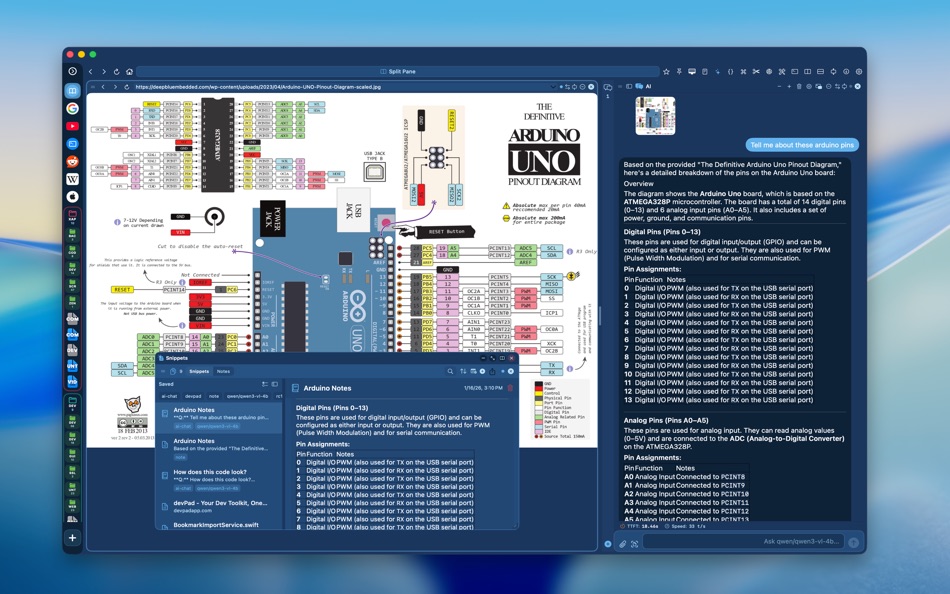
Snippets & Notes is a searchable library for everything you want to remember-code fragments, API responses, configuration blocks, terminal commands, research notes, AI conversations.
MULTIPLE WAYS TO CAPTURE
• Select text on any webpage or in Code Viewer, right-click → Save as Snippet
• Copy from anywhere, open Snippets, click "Paste as Snippet"
• Save AI chat responses with one click-includes the question, answer, model name, and performance metrics
• Quick Note mode for freeform ideas without metadata
ORGANIZED YOUR WAY
Tag snippets with multiple labels (swift, regex, auth, project-x). Create colored folders for project-based organization. Full-text search finds matches across titles, content, tags, and notes instantly.
TWO MODES
Snippet Mode gives you structure-title, language, tags, source URL, and notes fields. Everything is searchable and filterable.
Notes Mode is freeform-a running list, idea pad, or scratch space. No required fields. Just write.
MARKDOWN RENDERING
Saved AI responses and markdown snippets render with proper formatting, code blocks, and syntax highlighting. Toggle to Source view to edit the raw text.
ALWAYS ACCESSIBLE
Open as a slide-down shade over your current work, dock as a split pane, or expand to full panel. Minimize to the tab bar and recall with one click. Your snippets persist across sessions and never leave your device.
Stop losing code you'll need again. Stop searching your chat history for that one command. Snippets & Notes keeps everything in one searchable, organized place.
AI CHAT
Connect to local LLMs (Ollama, LM Studio) or cloud APIs (OpenAI, Anthropic). Send page content as context for summarization and code explanation. Attach images and files. Save responses as searchable snippets.
DEVELOPER TOOLS
• Console Inspector - Capture JavaScript logs with level filtering
• Network Inspector - Monitor fetch() and XHR requests with timing
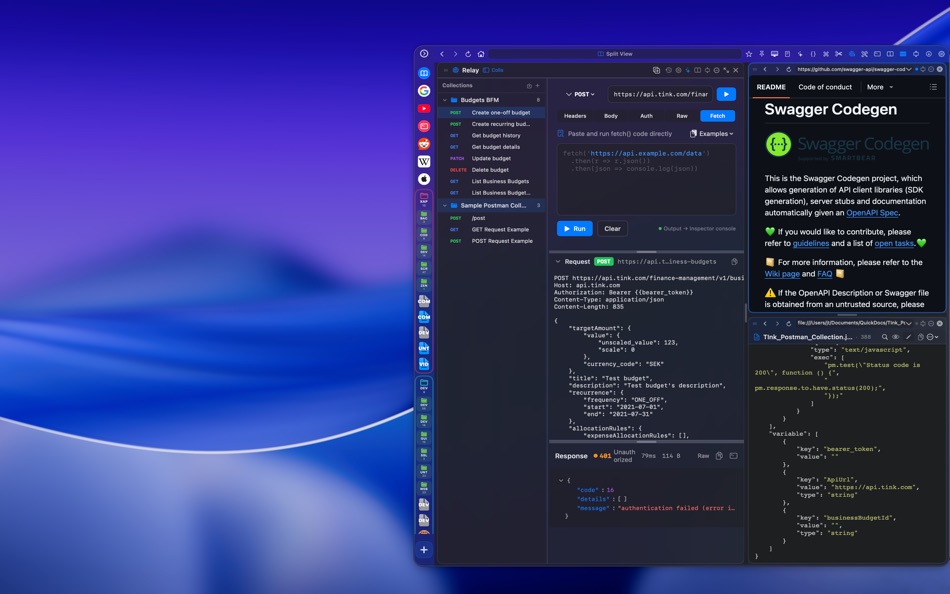
• Relay API Client - Test endpoints with JSON tree view, import Postman collections
• SQLite Browser - Query local databases
DATA TOOLS
JSON & SQL formatters, JWT decoder, UUID generator (v4/v7), Base64/URL/HTML encoder, hash generator (MD5-SHA512), regex tester, password generator with entropy calculation, Unix timestamp converter, color picker, case converter, and more.
N-PANE LAYOUT
Split your workspace into up to 4 panes. Browser alongside code viewer. AI chat beside your documentation. Drag dividers to resize. Save layouts as workspaces.
25+ THEMES + Theme studio to create your own!
Works entirely offline. Your files, your bookmarks, your data-never transmitted anywhere.
Built for developers who want powerful tools without the overhead.
Ad
Ảnh chụp màn hình




Lịch sử giá
- Giá hiện tại: $7.99
- Tối thiểu: $7.99
- Tối đa: $7.99
Theo dõi giá
Thông tin bổ sung
- Ngày phát hành:
- Danh mục:
macOS Ứng dụng›Công cụ - HĐH:
macOS,macOS 15.6 trở lên - Kích thước:
50 Mb - Ngôn ngữ được hỗ trợ:
English - Xếp hạng nội dung:
17+ - Mac App Store Xêp hạng:
0 - Trang web:
 https://devpadapp.com/index.html
Tính năng mới
- Phiên bản: 1.9
- Cập nhật:
- Edge Tab - A new way to reveal your panel. Choose between a full invisible edge trigger, a small draggable pill (Edge Tab), or keyboard-only mode. Less accidental triggers when working with full-screen windows.
What's New System - Existing users now see a brief "What's New" card when updating, highlighting new features. Revisit anytime from the gear menu.
Setup Wizard - New edge detection step walks you through trigger options during first-time setup.
Feature Tour Fix - The spotlight tour no longer hangs when compact toolbar mode is active.
Performance & Stability - Internal architecture refactoring for faster rendering and improved reliability.
Nhà phát triển
- John Taverna
- Nền tảng: macOS Ứng dụng (3)
- Danh sách: 1 + 0
- Điểm: 1 + 0 ¡
- Xếp hạng: 5 (1)
- Bình luận: 0
- Giảm giá: 0
- Video: 0
- RSS: Đăng ký
Danh sách (1)
- devPad

Điểm (1)

Xếp hạng (1)
Bình luận (0)
Hãy là người đầu tiên nhận xét 🌟
«devPad». Nền tảng: macOS. Thể loại: Công cụ. Nhà phát triển: «John Taverna». Bản phát hành đầu tiên: . Cập nhật lần cuối: . Giá hiện tại: $7.99. Giá thấp nhất được ghi nhận: $7.99. Giá cao nhất được ghi nhận: $7.99. Xếp hạng AppAgg: 5 / 5. Phiếu bầu: 1. Danh sách: công khai 1, riêng tư 0. Điểm được theo dõi: xác nhận 1, gián tiếp 0. Ngôn ngữ có sẵn: English. AppAgg theo dõi lịch sử giá, xếp hạng và phản hồi của người dùng cho «devPad». Theo dõi ưu đãi và cập nhật trong tương lai qua RSS. AppAgg không lưu trữ ứng dụng hoặc phân phối phần mềm. Tất cả các nhãn hiệu, logo và ảnh chụp màn hình đều thuộc về chủ sở hữu tương ứng.
devPad URL ngắn: Đã sao chép!- 🌟 Chia sẻ
- Mac App Store
Tương tự
-
- Dev Utils
- macOS Ứng dụng: Công cụ Bởi: Shaun Hirst
- $2.99
- Danh sách: 0 0 0
- Điểm: 1 Phiên bản: 1.3.7 Dev Utils is your Swiss Army knife for macOS development. Whether you're debugging, formatting, encoding, or inspecting data, Dev Utils offers a curated set of powerful, offline-first ... ⥯
-
- Dev Cleanup Utility
- macOS Ứng dụng: Công cụ Bởi: Sergii Koval
- * Miễn phí
- Danh sách: 0 0 0
- Điểm: 0 Phiên bản: 1.0 Keep Xcode fast. Keep your Mac clean. Dev Cleanup Utility helps Apple developers quickly find and remove stale Xcode data without guesswork. Scan, review, and clean the biggest storage ⥯
-
- Dev Assisant-Collection tools
- macOS Ứng dụng: Công cụ Bởi: 万象 包
- $6.99
- Danh sách: 0 + 1 0 0
- Điểm: 4 Phiên bản: 1.4.0 Dev Assistant is a collection of little utilities (4 major features and growing) and converter (3 and growing) that are useful during development. AppIcons It supports every type of ... ⥯
-
- Dev Disk Scanner
- macOS Ứng dụng: Công cụ Bởi: Yuriy Zhuravel
- * Miễn phí
- Danh sách: 0 0 0
- Điểm: 1 Phiên bản: 3.15 Dev Disk Scanner is a lightweight macOS utility designed specifically for iOS and macOS developers who use Xcode. If Xcode takes dozens of gigabytes on your disk and the Other storage ... ⥯
-
- Dev Connector
- macOS Ứng dụng: Công cụ Bởi: Alexander Romanov
- * Miễn phí
- Danh sách: 0 0 0
- Điểm: 0 Phiên bản: 1.0.0 AppConnector is a powerful tool for developers and teams managing apps on the App Store. It streamlines everyday tasks like app submissions, versioning, review responses, and metadata ... ⥯
-
- Dev Kit
- macOS Ứng dụng: Công cụ Bởi: Long Trieu
- $2.99
- Danh sách: 0 0 0
- Điểm: 1 Phiên bản: 1.1 Introducing the powerful Dev Kit: a comprehensive collection of tools designed to assist developers in their day-to-day tasks. This versatile toolkit includes a range of handy ... ⥯
-
- Dev Hub Swiss-Knife
- macOS Ứng dụng: Công cụ Bởi: Shimon Benichou
- Miễn phí
- Danh sách: 0 + 1 0 0
- Điểm: 1 Phiên bản: 1.34 DevHub Swiss-Knife is a versatile application that provides a collection of tools to assist developers and users alike, In their daily tasks. With various features and functionalities, ⥯
-
- Dev Tunnel Share
- macOS Ứng dụng: Công cụ Bởi: Oluwatobiloba Aremu
- Miễn phí
- Danh sách: 0 0 0
- Điểm: 1 Phiên bản: 1.0 DevShare (Local Mesh) transforms how development teams collaborate by creating a secure local network mesh for sharing development services. No more port conflicts, complex ... ⥯
-
- Smart Dev Tools
- macOS Ứng dụng: Công cụ Bởi: Fabian Reyes
- * Miễn phí
- Danh sách: 0 0 0
- Điểm: 1 Phiên bản: 2.0.0 Smart Dev Tools is the ultimate productivity suite for developers, offering 20 essential utilities in one beautifully designed macOS application. Whether you're debugging APIs, ... ⥯
-
- Hotwire Dev Tools
- macOS Ứng dụng: Công cụ Bởi: Leon Vogt
- Miễn phí
- Danh sách: 0 0 0
- Điểm: 1 Phiên bản: 0.3.3 This extension has the goal of helping developers inspect their Turbo and Stimulus applications. Turbo features: - Highlight Turbo Frames - Monitor incoming Turbo Streams - Display ... ⥯
- mới
- CodeCleaner – Dev Disk Cleanup
- macOS Ứng dụng: Công cụ Bởi: Sergey Grigorev
- * Miễn phí
- Danh sách: 0 0 0
- Điểm: 0 Phiên bản: 1.2 Developers often accumulate gigabytes of unnecessary files created by development tools. Build artifacts, caches, logs, simulator data, and temporary files can quickly fill up disk ... ⥯
-
- Movil.dev
- macOS Ứng dụng: Công cụ Bởi: Ihor Trach
- Miễn phí
- Danh sách: 0 0 0
- Điểm: 0 Phiên bản: 1.0 Movil.dev makes professional iOS, iPadOS, macOS, and watchOS design accessible to Every Developer and Creator. Build polished, production-ready interfaces using reusable SwiftUI ... ⥯
-
- Try in Dev Spaces
- macOS Ứng dụng: Công cụ Bởi: Red Hat
- Miễn phí
- Danh sách: 0 0 0
- Điểm: 0 Phiên bản: 1.1.1 The Try in Dev Spaces Safari extension adds a "Dev Spaces" button into GitHub repository pages, allowing you to create a cloud development environment for your Red Hat OpenShift Dev ... ⥯
-
- CodeSwissKnife Bar Dev Tools
- macOS Ứng dụng: Công cụ Bởi: Ottorino Bruni
- * Miễn phí
- Danh sách: 0 0 0
- Điểm: 1 Phiên bản: 1.0.4 CodeSwissKnife Bar: The Developer s Menu Bar Sidekick for macOS CodeSwissKnife Bar is a fast, privacy-first developer toolkit that lives in your Mac s menu bar. No more switching ... ⥯