
Lagrede
Velg navnet som skal vises i menyen Lagrede.
Ferdig!
| Utvikler: | Aptonic LLC (3) | ||
| Pris: | * Gratis | ||
| Score: | 1,770 Gull | ||
| Rangeringer: | 0 | ||
| Kommentarer: | 0 Legg inn kommentar | ||
| Lister: | 1 + 0 | ||
| Poeng: | 1 + 0 ¡ | ||
| +1 Poeng | |||
Beskrivelse

Dropzone 5 is a major update that completely redesigns the app with full support for macOS Tahoe and Liquid Glass.
New multi-grid support makes Dropzone more powerful than ever. Keep collections of the apps, folders, and actions you use most, and switch between them effortlessly.
Dropzone also includes Drop Bar - a place to stash files you'll need later. Just drop files on the Drop Bar icon in the grid and they'll stick there until you're ready to use them. With multi-grid support, you can create multiple Drop Bars to organize files into separate collections.
A fully customizable grid puts your most-used apps, folders, and actions right where you need them.
Features
• Fully updated and optimized for macOS Tahoe.
• Display customized folder icons with colors, symbols, or emojis using Tahoe's new folder icon style.
• Set up multiple grids to keep different collections of apps, folders, and actions at your fingertips.
• Pop out Drop Bar into a floating file shelf that stays on top, ready to drag files wherever you need them.
• Open apps, move and copy files faster than ever.
• Shorten any URL instantly with TinyURL. Select a URL, press Ctrl+Option+Cmd+S, and the short link is copied to your clipboard.
• Send files and folders to nearby Macs with built-in AirDrop support.
• Upload images to Imgur and get a shareable link in seconds.
• Convert images between formats like PNG, JPEG, TIFF, and more.
• Resize images to preset dimensions with a single drop.
• Upload files to Amazon S3 (Dropzone Pro feature).
• Upload files to your SFTP server (Dropzone Pro feature).
• Run multiple tasks simultaneously and track each one through the in-grid status area.
• Monitor task progress at a glance from the animated menu bar icon.
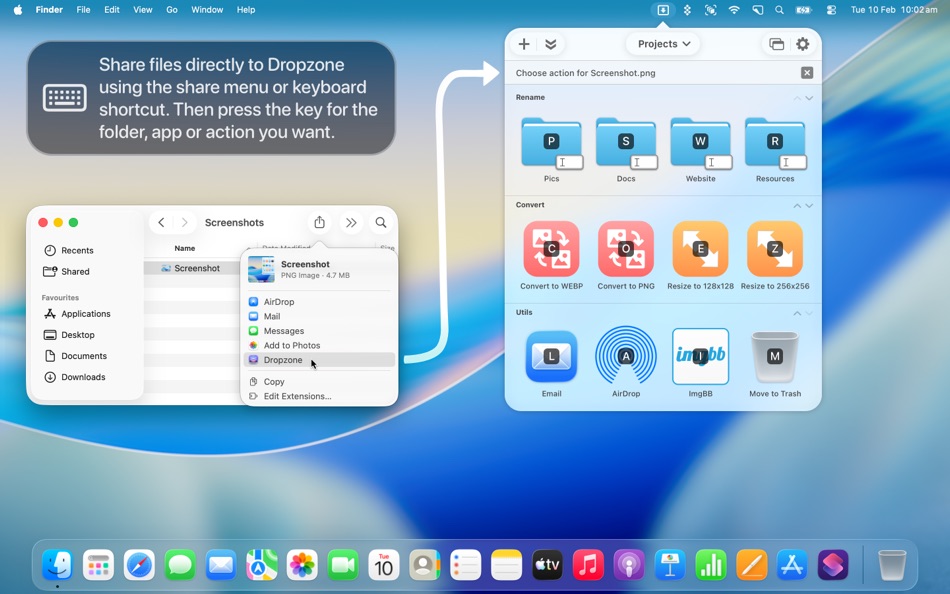
• Launch actions with customizable keyboard shortcuts (Dropzone Pro feature).
• Add apps, folders, or actions to your grid by dragging and dropping them onto the Add to Grid area.
DROPZONE 5 PRO SUBSCRIPTION INFO
• Dropzone 5 offers an optional subscription that includes regular action updates and enhancements, all app updates (including major ones) delivered automatically, access to all new features, and advanced capabilities including Amazon S3 uploading, SFTP uploading, macOS service integration, action keyboard shortcuts, and more.
• Launch Dropzone and choose 'Subscribe to Dropzone 5 Pro...' from the settings menu to begin your 14-day free trial. You can cancel at any point during the trial and you won't be charged.
• After 14 days, you'll automatically be billed 4.99 USD per month (or the equivalent in your country) through an auto-renewing subscription.
• An active subscription entitles you to unlimited app updates, including minor updates and new features.
• You can cancel your subscription at any time. If you do, Dropzone actions and advanced features will no longer be available. You can restart your subscription at any time to regain access.
See our full Terms of Use for Dropzone 5 here:
https://aptonic.com/5/terms
We're always working to improve Dropzone with feature updates and new actions. We'd love to hear what you think - get in touch via the App Store "Support" link.
Annonse
Skjermbilder


Prishistorikk
-
* Kjøp i appen - Gjeldende pris: Gratis
- Minimum: Gratis
- Maksimum: Gratis
Spor priser Legg til i en liste for å få rabattvarsler via e-post eller push
AppAgg-score
1,770
Estimert AppAgg-score for
Dropzone 5: Drag & Drop Magic
Utvikler: Aptonic LLC
1,770 Gull
En høyere score gjenspeiler vanligvis bedre resultater på områdene AppAgg måler.
Basert på: popularitet · brukervurderinger · ferskhet · tilbud · butikkdata · fellesskapsaktivitet
Beregnes på nytt hver dag med ferske AppAgg-data.
Del AppAgg-score
Kort nettadresse: Kopiert! Merke til nettstedet ditt: Dette er nytt
- Versjon: 5.1.3
- Sist oppdatert:
- • Improved drag handling on macOS 27
• Fixed duplicate lines in the Settings toolbar on macOS 27
• Fixed issue where clicking the menu bar icon could fail to toggle the grid on macOS 27
• Improved Drop Bar auto-close animation
Tilleggsinformasjon
- Utgivelsesdato:
- Kategori:
macOS-apper›Produktivitet - Operativsystem:
macOS,macOS 13.0 og nyere - Størrelse:
54 Mb - Språk som støttes:
Chinese,English,French,German,Italian,Japanese,Korean,Polish,Thai - Egnethet:
4+ - Mac App Store Vurdering: ¡
0 - Nettsted:
 https://aptonic.com
Utvikler
- Aptonic LLC
- Følgere: 0
- Plattformer: macOS Apper (3)
- Tilbud: 0
- Lister: 2 + 1
- Poeng: 8 + 0 ¡
- Rangeringer: 0
- Kommentarer: 0
- Videoer: 0
- RSS: Abonner
Lister (1)
- Dropzone 5: Drag & Drop Magic

Poeng (1)
-

- 202 Taban Bovin
- +1
Rangeringer (0)
0
Kommentarer (0)
Vær den første til å kommentere
Kort fortalt
Dropzone 5: Drag & Drop Magic Kort nettadresse: Kopiert!- Mac App Store
På AppAgg kan du følge «Dropzone 5: Drag & Drop Magic», en app fra Aptonic LLC for macOS i kategorien Produktivitet. AppAgg-score: 1,770 (Gull). Appens AppAgg-poeng — bekreftede: 1; indirekte: 0. Offentlige lister med appen: 1. Brukere som har lagret den i private lister: 0. Brukerne på AppAgg har ennå ikke vurdert appen. Bekreftede poeng registrerer butikkbesøk fra innloggede AppAgg-brukere. Indirekte poeng bygger på butikkdata. De to tellerne viser antallet offentlige lister og brukere som har lagret appen eller spillet i private lister. Appen ble først utgitt . Appen ble sist oppdatert . Appen er gratis for øyeblikket. Appen støtter følgende språk: Chinese, English, French, German, Italian, Japanese, Korean, Polish, Thai. Se prishistorikken, legg appen til i en liste, eller følg utvikleren. Følg kommende tilbud og oppdateringer for appen via appens RSS-feed. AppAgg er ikke vert for og distribuerer ikke denne appen. Alle varemerker, logoer og skjermbilder knyttet til appen tilhører sine respektive eiere.

