
| Ontwikkelaar: | Beehive Innovations Services (6) | ||
| Prijs: | $49.99 | ||
| Beoordelingen: | 0 | ||
| Recensies: | 0 Schrijf een review | ||
| Reacties: | 0 Plaats reactie | ||
| Lijsten: | 7 + 6 | ||
| Punten: | 3 + 0 ¡ | ||
| Mac App Store | |||
Beschrijving

See and believe: YouTube.com/The2DoApp
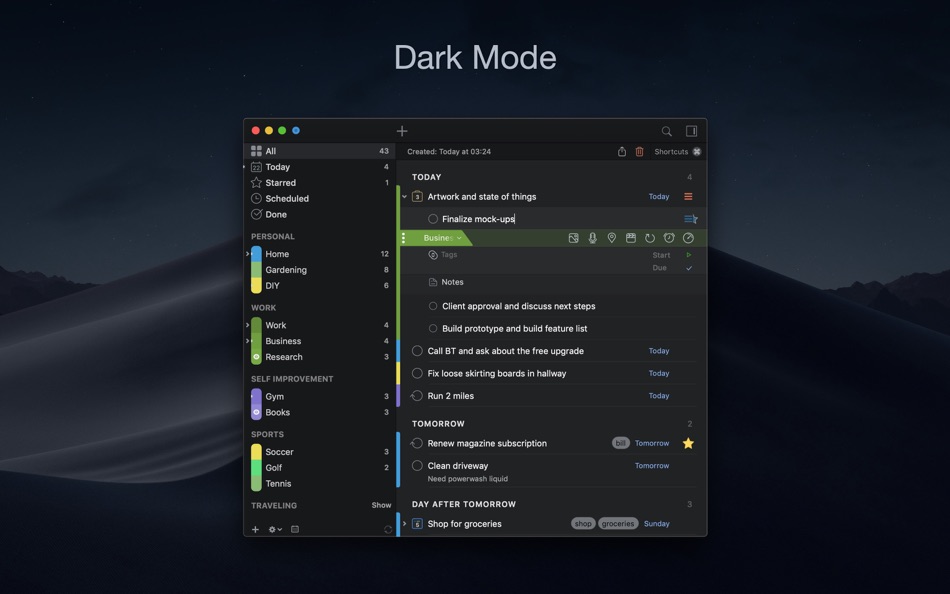
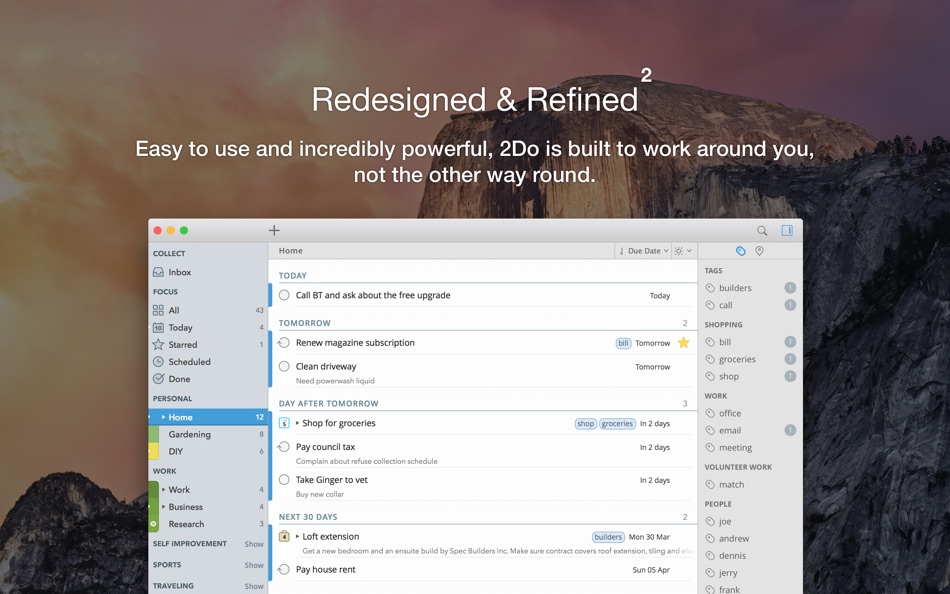
2Do lets you take a completely different approach to managing your tasks. With its extremely simple-to-use interface and a comprehensive and flexible set of powerful features, it lets you focus on what's most important to you: your life. There is no wrong way of using 2Do, and unlike other to-do apps, it won't force you in adhering to a particular task management methodology.
AWARDS
• Apple - Best of 2013 Mac App Store
• Macstories - App of the Year 2015 iOS
• Cult of Mac - Best Task Manager for iOS
SIMPLE TASKS, CHECKLISTS & PROJECTS
• Create simple tasks, or checklists and projects with sub-tasks. Tasks can have notes, attachments and multiple alarms.
• Set any task to repeat using a flexible set of options.
LIST GROUPS, LISTS & SMART LISTS
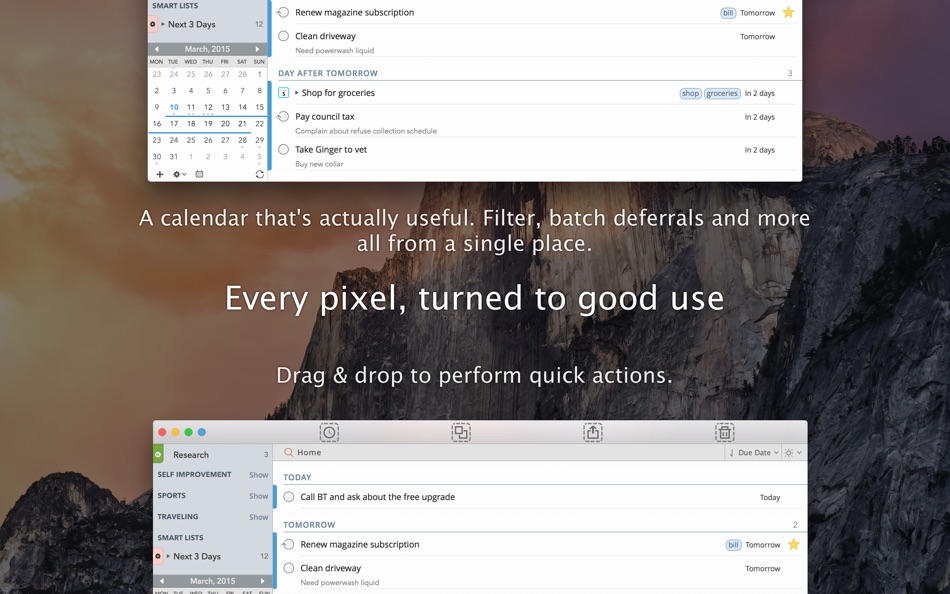
• In addition to built-in Focus lists that allow you to conveniently view upcoming, starred or scheduled tasks, you can create multiple lists to manage and organize your tasks.
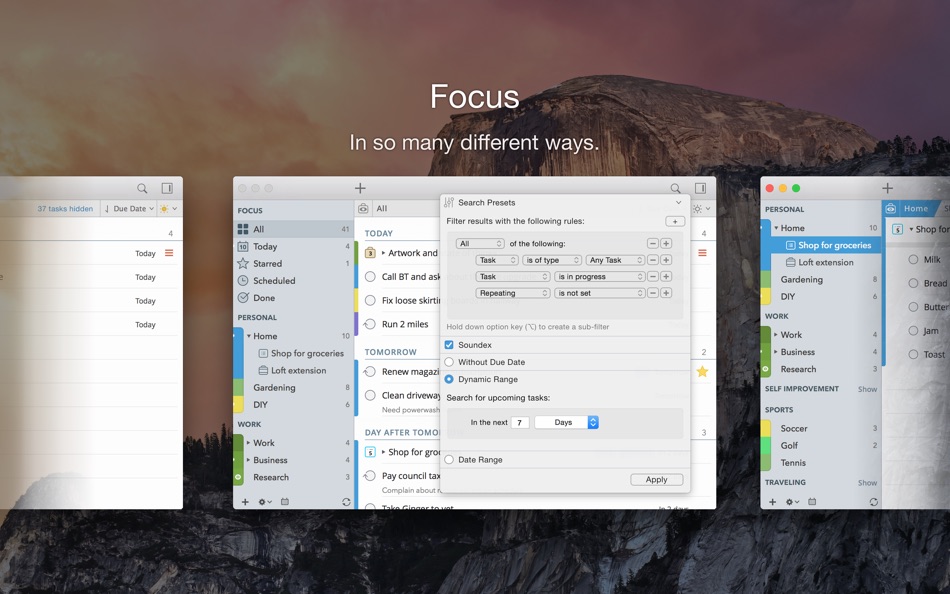
• Smart lists let you harness the true potential of 2Do using a number of search options, filters and search pre-sets. Using Smart Lists, you can create custom views of your tasks and use them to focus-in or find frequently managed tasks.
• Furthermore, related Smart lists and Lists can be grouped together using a List Group in the order you desire.
PROJECT VIEW
• Quickly focus on your projects and their sub-tasks and nothing else
• Access project view directly from the list view or using keyboard shortcuts
• Focus filters and sort options can be applied separately to individual projects using Project View
TAGS
• Manage tags within Tag Groups.
• Easily assign tags to tasks and vice versa.
• Leverage the easy to use yet powerful integration of Tags & Smart Lists to filter on frequently managed tasks.
• Find Used vs. Unused tags with a click.
LOCATIONS
• Easily create, edit and assign locations to tasks
• Create powerful Smart Lists based on Locations
SYNC
• Stay in sync with multiple Macs and mobile devices running 2Do using your favorite sync method over fast and reliable Push Sync: Dropbox, Reminders (CalDAV), 3rd Party CalDAV Servers (iCal, Fruux, ownCloud etc) or Toodledo.
• Using Dropbox, you can keep multiple devices in sync seamlessly. Devices can be added / removed at any time.
• Using Reminders CalDAV sync you can keep 2Do and Reminders in sync as well as create tasks using Siri.
• Unobtrusive automatic background sync supported for Dropbox, Reminders (CalDAV) and CalDAV.
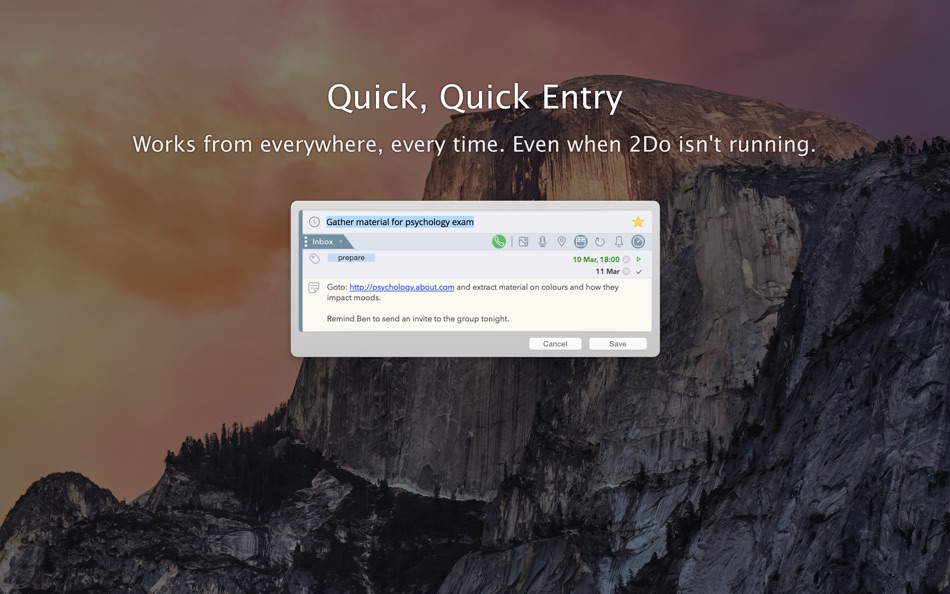
QUICK ENTRY
• Save your thoughts as they come to you. Using a global hotkey, Quick Entry allows you to add tasks from any app or any Space.
• 2Do does it right. Quick Entry works even if 2Do was not launched or is not running in the background.
QUICK LOOK
• Works just the way Quick Look does in Finder or other built-in OS X apps. Use the spacebar to zoom in and out of a task to preview notes, multi-line titles or other details attached to your tasks.
ALARMS & NOTIFICATIONS
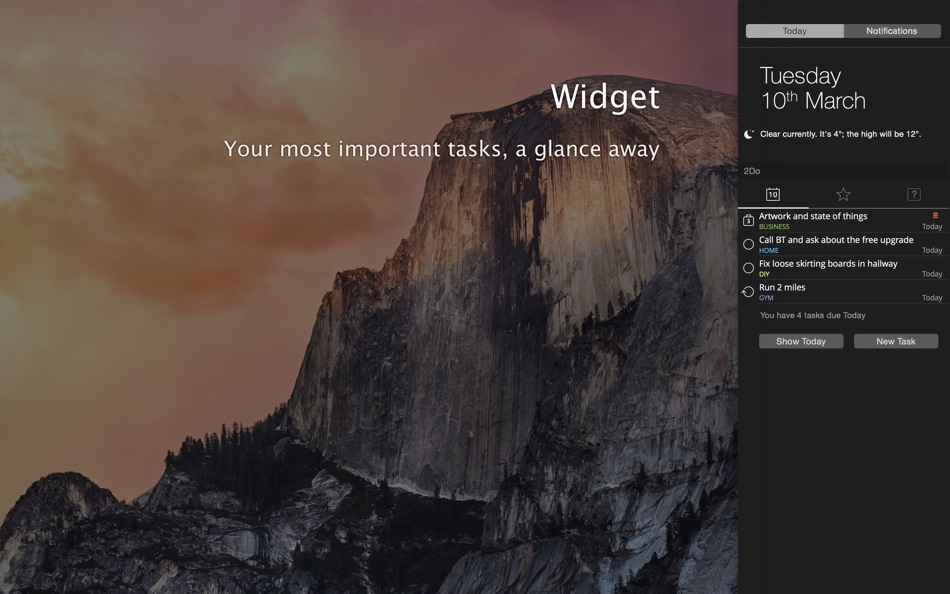
• Stay on top of your tasks with alarms and notifications. Supports Notification Center as well as a built-in notification system which works even when 2Do is *not running*.
• Set up automatic alarms for your tasks.
PASSWORD PROTECTION
• Your life is a private affair. Manage it by locking out individual lists or the whole app with a single click.
AUTOMATIC BACKUPS
• 2Do values your tasks. Periodic automatic backups are created for you which can be transferred from one machine to another or from the iOS version of 2Do to the Mac and vice versa.
• Save & restore of external backups
FLUID
• Adding and editing tasks is blazing fast using in-place editors and popovers
• 2Do supports both mouse users, by offering them numerous shortcuts, as well as keyboard power-users by supporting dozens of keyboard shortcuts
• 2Do won't slow down over time
Ad
Screenshots
Prijsgeschiedenis
- Vandaag: $49.99
- Minimum: $34.99
- Maximaal: $49.99
Prijzen volgen
Wat is er nieuw?
- Versie: 2.9.76
- Bijgewerkt:
- · Improved DST handling and related time display issues
· Fixed bug with note editing around hyperlinks
· Ongoing stability related improvements
Reacties (0)
Reageer als eerste 🌟
Ontwikkelaar
- Beehive Innovations Services
- Platforms: iOS Apps (4) macOS Apps (2)
- Lijsten: 12 + 10
- Punten: 16 + 42,090 ¡
- Beoordelingen: 5 (1)
- Recensies: 0
- Reacties: 0
- Kortingen: 0
- Videos: 0
- RSS: Abonneren
Punten (3)
-

- 8 Yunlong Liao
- +1
-
- 15 Tomas
- +1
-
- 878 Net
- +1


Beoordelingen (0)
0 ☹️
Lijsten (7)


Recensies (0)
Schrijf als eerste een review 🌟
Aanvullende informatie
- Versie: 2.9.76
- Categorie:
macOS Apps›Productiviteit - Besturingssystemen:
macOS,macOS 11.5 en hoger - Grootte:
44 Mb - Ondersteunde talen:
Catalan,Chinese,Czech,Dutch,English,French,German,Italian,Japanese,Korean,Norwegian,Polish,Portuguese,Russian,Spanish,Swedish - Beoordeling van content:
4+ - Mac App Store Beoordeling:
0 - Bijgewerkt:
- Releasedatum:
Contacten
 https://www.youtube.com/user/The2DoApp
 «2Do». Platform: macOS. Categorie: Productiviteit. Ontwikkelaar: «Beehive Innovations Services». Eerste uitgave: . Laatste update: . Huidige prijs: $49.99. Laagste geregistreerde prijs: $34.99 (). Hoogst geregistreerde prijs: $49.99 (). Deze titel heeft nog geen beoordelingen of recensies ontvangen op AppAgg. Lijsten: openbare 7, privé 6. Bijgehouden punten: bevestigde 3, indirecte 0. Beschikbare talen: Catalan, Chinese, Czech, Dutch, English, French, German, Italian, Japanese, Korean, Norwegian, Polish, Portuguese, Russian, Spanish, Swedish. AppAgg houdt de prijsgeschiedenis, beoordelingen en gebruikersfeedback bij «2Do». Volg toekomstige kortingen en updates via RSS. AppAgg host geen applicaties en distribueert geen software. Alle handelsmerken, logo's en screenshots zijn eigendom van hun respectievelijke eigenaren.
2Do Korte URL: Gekopieerd!- 🌟 Delen
- Mac App Store
Ad
Vergelijkbare
-
- VMTek
- macOS Apps: Productiviteit Door: Cyaneous, Inc.
- * Gratis
- Lijsten: 1 + 2 Beoordelingen: 0 Recensies: 0
- Punten: 23 + 0 0 Versie: 3.1.0 VMTek is the Mac virtualization platform you've been waiting for. Run multiple instances and versions of macOS*, Linux and other operating systems side-by-side on your Mac with ease. ... ⥯
-
- NotchBox - Easier Drag & Drop
- macOS Apps: Productiviteit Door: 裕涛 兰
- * Gratis
- Lijsten: 2 + 1 Beoordelingen: 0 Recensies: 0
- Punten: 21 + 0 0 Versie: 1.1.68 NotchBox Turn Your Mac s Notch into a Dynamic Hub NotchBox transforms your Mac s notch into a lively, interactive space just like the iPhone s Dynamic Island. From music playback to ... ⥯
-
- Mountain Duck
- macOS Apps: Productiviteit Door: David Kocher
- * Gratis
- Lijsten: 2 + 6 Beoordelingen: 0 Recensies: 0
- Punten: 19 + 0 0 Versie: 5.2.1 Mountain Duck lets you mount server and cloud storage as a disk on your desktop. With Smart Synchronization, files are synchronized to the local disk when opened to allow offline usage ⥯
-
- Soonie - Meeting Reminder
- macOS Apps: Productiviteit Door: Unit Numberfive oHG
- Gratis
- Lijsten: 0 + 2 Beoordelingen: 0 Recensies: 0
- Punten: 17 + 0 0 Versie: 3.1 You know how it goes: suddenly your meeting is here, and you were deep into something else. Soonie quietly lives in your Mac s menu bar and gently pops up to show you how much time you ⥯
-
- Bridges Link Formatting
- macOS Apps: Productiviteit Door: Jonathan Ruiz
- Gratis
- Lijsten: 1 + 1 Beoordelingen: 0 Recensies: 0
- Punten: 14 + 0 0 Versie: 2.1 Bridges is the best way to collect custom formatted links. Saving a link for your podcast, newsletter, or blog post has never been easier. If you ve ever had the task to collect links ... ⥯
-
- SoundPaste
- macOS Apps: Productiviteit Door: Maxim Kuzmenko
- * Gratis
- Lijsten: 0 + 3 Beoordelingen: 0 Recensies: 0
- Punten: 14 + 0 0 Versie: 1.6.0 Introducing SoundPaste the simple, revolutionary app that lets you copy and paste sound. Tired of saving and dragging sound files around? With SoundPaste, just record and paste. It s ... ⥯
-
- Awesome Copy Clipboard History
- macOS Apps: Productiviteit Door: Evan Jones
- * Gratis
- Lijsten: 0 + 1 Beoordelingen: 0 Recensies: 0
- Punten: 14 + 0 0 Versie: 5.16 AwesomeCopy is a full-featured clipboard history manager built for Apple users who value speed, design, and privacy. It keeps track of everything you copy - text, images, links, files, ⥯
-
- Grila • calendar for typers
- macOS Apps: Productiviteit Door: THE LOW-TECH GUYS SRL
- Gratis
- Lijsten: 0 + 1 Beoordelingen: 0 Recensies: 0
- Punten: 13 + 0 0 Versie: 2.0.4 Grila is a keyboard-driven instantly available calendar. The calendar can be shown instantly using ⌥ Right Option + \ (backslash), which is configurable to any other hotkey. Navigating ⥯
-
- Applight – Smart App Switcher
- macOS Apps: Productiviteit Door: Seungwoo Choe
- * Gratis
- Lijsten: 0 + 3 Beoordelingen: 0 Recensies: 0
- Punten: 13 + 0 0 Versie: 1.1 A smarter, faster way to switch apps. Instead of endless Command-Tabs or Spotlight searches, Applight learns your workflow and predicts what you ll need next so you can jump to the ... ⥯
-
- Canary Mail App
- macOS Apps: Productiviteit Door: Cartasec Pte. Ltd.
- * Gratis
- Lijsten: 3 + 3 Beoordelingen: 0 Recensies: 0
- Punten: 13 + 0 0 Versie: 5.18 The Best Email Client for Mac. Your AI Email Assistant. Canary can be as simple or as powerful as you want it to be: FOREVER FREE: Best for students & personal use Includes: **Unified ... ⥯
-
- Unified Calendar Sync
- macOS Apps: Productiviteit Door: Paulo Soares
- * Gratis
- Lijsten: 0 + 1 Beoordelingen: 0 Recensies: 0
- Punten: 13 + 0 0 Versie: 1.3.1 Unified Calendar Sync is a lightweight macOS menu bar app that creates and maintains a dedicated unified calendar acting as your single source of truth. The app syncs events from ... ⥯
-
- PerfectViewer
- macOS Apps: Productiviteit Door: Abdusodiq Saidov
- * Gratis
- Lijsten: 0 + 1 Beoordelingen: 0 Recensies: 0
- Punten: 13 + 0 0 Versie: 1.0.1 Tool to Open and Convert WordPerfect Documents and Graphics. Simple, beautiful app for viewing WordPerfect .wpd, wpg files and .txt, rtf, rtfd documents. PerfectViewer features: . ... ⥯