
Opgeslagen
Kies de naam die in je menu Opgeslagen moet worden weergegeven.
Klaar!
| Ontwikkelaar: | Alec Burrett (1) | ||
| Prijs: | Gratis | ||
| Beoordeling: | 1,160 Zilver | ||
| Beoordelingen: | 0 | ||
| Reacties: | 0 Plaats reactie | ||
| Lijsten: | 1 + 0 | ||
| Punten: | 0 + 0 ¡ | ||
| +1 Punten | |||
Beschrijving

For the people who keep boxes running: a VPS, a homelab, a build server, the machine your coding agent lives on.
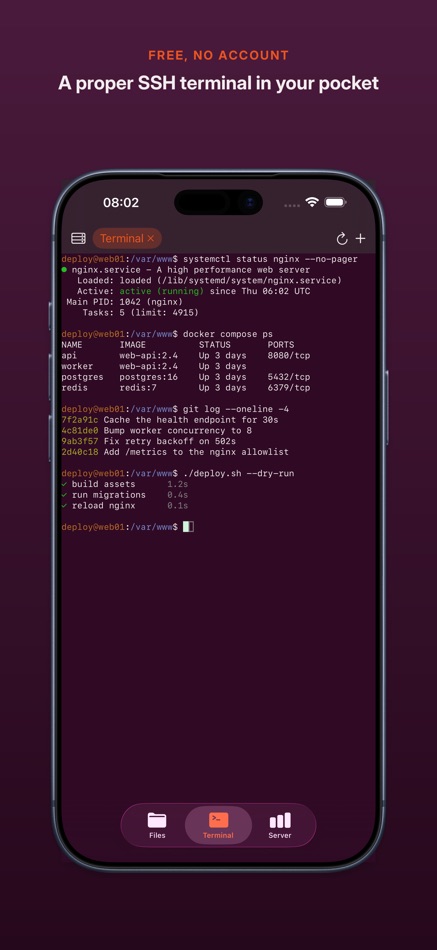
A REAL TERMINAL, NOT A TOY
Proper SSH shells, several at once over one connection. Full colour. A key row for the symbols a shell needs. Pinch to zoom. Tap where you want the cursor and the caret walks there, so fixing a typo mid-command is a tap rather than a marathon on the arrow key. It learns the commands you type and offers them back, on top of a bundled library of common ones. Copy out, paste in, both directions, like every other app on your phone.
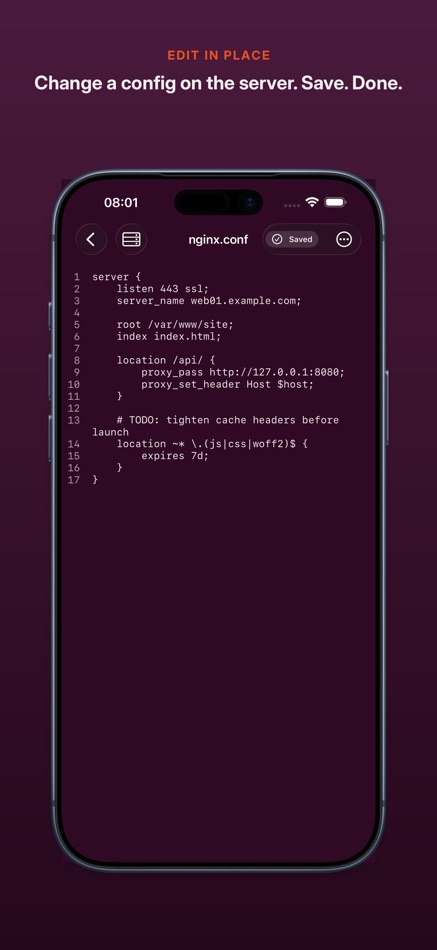
CHANGE A CONFIG. SAVE. DONE.
Open a file over SFTP, edit it, save it, and it goes back exactly where it came from. No sync layer, no local copy to reconcile, no wondering which version is real. Saved means the server confirmed the write. And if a server cannot promise a clean atomic overwrite, the file opens read-only rather than gamble with your data — the one thing a text editor must never get wrong.
YOUR AGENT, WHERE YOUR CODE IS
Save a launch command per server — whatever CLI tool you run — and open a terminal straight into it. It runs on your machine, with your files and your toolchain, at your server's speed rather than your phone's. You just drive.
SEE WHAT THE BOX IS DOING
Uptime, load, memory, disk, and the processes eating your CPU, read off the machine over the connection you already have. Restart the service, watch the load settle, get on with your day.
FILES AT BOTH ENDS
Browse over SFTP — folders first, hidden files one tap away — and create, rename, delete and search filenames under the folder you connected to. Every connection is pinned to one folder you choose, so the browser cannot wander somewhere you did not mean it to go. Point the app at a folder in Files as well — On My iPhone, iCloud Drive, any Files provider — and edit in place, with proper Markdown highlighting. Get interrupted mid-sentence and your unsaved work is still there when you come back.
YOUR SERVERS. YOUR KEYS. NOBODY ELSE.
No account. No relay. No middleman. WriteAccess connects to your machines and nothing else. Sign in with a password, an SSH key — encrypted keys included — or the interactive prompt a lot of servers ask for instead. Host keys are pinned and checked on every connection; if one ever changes you see both fingerprints, and nothing connects until you say so. Credentials stay in the iOS Keychain. Your saved servers can follow you between devices through your own iCloud: the connection details travel, the passwords and keys do not. Those stay on the device you added them on.
BUILT FOR iPAD, NOT JUST RESIZED
Files and terminal side by side on a divider you can drag, vitals underneath. Landscape, multitasking, external keyboards, the lot.
WHAT IT WILL NOT DO
It is a hands-on tool, not a background service: sessions close when you leave, so it will not babysit an overnight job or notify you when one finishes. Logins that need more than one step, like an app code after your password, are not supported yet. UTF-8 text files up to 50 MiB, and anything over 5 MiB asks first. Filename search returns the first 200 matches. It is not an offline sync client and is not pretending to be one.
Free, and free of the usual: no account, no subscription, no ads, no analytics, no telemetry.
Advertentie
Screenshots


Prijsgeschiedenis
- Huidige prijs: Gratis
- Minimum: Gratis
- Maximaal: Gratis
Prijzen volgen Voeg toe aan een lijst voor kortingsmeldingen via e-mail of push
AppAgg-beoordeling
1,160
Geschatte AppAgg-beoordeling voor
WriteAccess: SSH & SFTP Editor
Ontwikkelaar: Alec Burrett
1,160 Zilver
Hogere beoordelingen betekenen meestal sterkere signalen op AppAgg.
Gebaseerd op: populariteit · gebruikersbeoordelingen · actualiteit · deals · winkelgegevens · community-activiteit
Wordt dagelijks opnieuw berekend met actuele AppAgg-gegevens.
Korte URL: Gekopieerd!
Wat is er nieuw?
- Versie: 1.0.133
- Laatst bijgewerkt:
- The first public release.
A REAL SSH TERMINAL
Several shells at once over one connection. Colour, a shell key row, pinch to zoom, and tap where you want the cursor instead of holding down an arrow key. It learns the commands you type and offers them back. Copy and paste works in both directions.
AN EDITOR THAT TELLS THE TRUTH
Edit a file over SFTP and it saves back exactly where it came from, or it says so plainly. Servers that cannot promise a clean atomic overwrite open read-only rather than risk your data.
YOUR AGENT ON THE SERVER
Save a launch command per server and open a terminal straight into it, so the tool runs where your code and your toolchain already are.
LIVE SERVER VITALS
Uptime, load, memory, disk, and the processes eating your CPU, straight off the machine.
FILES AT BOTH ENDS
Browse, create, rename, delete and search over SFTP under the one folder you connected to — or point the app at any folder in Files and edit locally.
SERVERS THAT FOLLOW YOU
Your saved servers and folders can sync between your devices through your own iCloud — connection details only. Passwords and keys stay on the device you added them on.
ON iPAD
Files and terminal side by side on a divider you can drag, with vitals underneath.
Aanvullende informatie
- Releasedatum:
- Categorie:
iOS Apps›Ontwikkelaarstools - Besturingssystemen:
iPad,iPhone,iOS 17.0 en hoger - Grootte:
10 Mb - Ondersteunde talen:
English - Beoordeling van content:
4+ - App Store Beoordeling:
0
 https://alecburrett.co.uk/writeaccess
Ontwikkelaar
- Alec Burrett
- Volgers: 0
- Platforms: iOS Apps (1)
- Kortingen: 0
- Lijsten: 1 + 0
- Punten: 0 + 0 ¡
- Beoordelingen: 0
- Reacties: 0
- Videos: 0
- RSS: Abonneren
Lijsten (1)
- WriteAccess: SSH & SFTP Editor

Punten (0)
0
Beoordelingen (0)
0
Reacties (0)
Reageer als eerste
Samenvatting
WriteAccess: SSH & SFTP Editor Korte URL: Gekopieerd!- Delen
- App Store
«WriteAccess: SSH & SFTP Editor». Platform: iOS. Categorie: Ontwikkelaarstools. Ontwikkelaar: «Alec Burrett». Eerste uitgave: . Laatste update: . Huidige prijs: gratis. Deze titel heeft nog geen beoordelingen of recensies ontvangen op AppAgg. Lijsten: openbare 1, privé 0. Beschikbare talen: English. AppAgg houdt de prijsgeschiedenis, beoordelingen en gebruikersfeedback bij «WriteAccess: SSH & SFTP Editor». AppAgg host geen applicaties en distribueert geen software. Alle handelsmerken, logo's en screenshots zijn eigendom van hun respectievelijke eigenaren. Volg toekomstige kortingen en updates via RSS
Vergelijkbare
-
- SSH, SFTP, databases: Boopbeep
- iOS Apps: Ontwikkelaarstools Door: Gabriel Lopez Santana
- $5.99
- Lijsten: 0 + 1 0 0
- Punten: 1 + 1 8K · Goud Versie: 2.3.1 Boopbeep is a native SSH, SFTP, and database client for iOS and iPadOS. Real PTY terminals vim, tmux, htop, nano, less, anything that needs one. 24-bit ANSI color. Persistent sessions ...
-
- SSH&SFTP Tool
- iOS Apps: Ontwikkelaarstools Door: Beijing Lucky Journey Technology Co., Ltd
- Gratis
- Lijsten: 0 0 0
- Punten: 2 + 1 1K · Zilver Versie: 1.1.18 SSHTool is a modern SSH client for macOS, iPhone, and iPad, delivering a unified, efficient, and secure remote server management experience for developers, operations engineers, and ...
-
- NaviTerm AI - SSH,SFTP,Tunnels
- iOS Apps: Ontwikkelaarstools Door: Wuhan Trivix Technology Co., Ltd
- * Gratis
- Lijsten: 0 + 1 0 0
- Punten: 1 + 3 10K · Goud Versie: 5.0.0 Welcome to the next generation of professional SSH, SFTP, and Port Forwarding clients. Built for maximum productivity, NaviTerm features a deeply integrated AI chat assistant. Break ...
-
- SSHive: SSH, SFTP & Terminal
- iOS Apps: Ontwikkelaarstools Door: NetMeSafe
- * Gratis
- Lijsten: 1 0 0
- Punten: 1 + 0 1K · Zilver Versie: 1.2.2 SSHive is the all-in-one remote access client for iPhone and iPad SSH, SFTP, RDP, VNC and a built-in VPN in one fast, private, native app. Manage your servers, open a full terminal, ...
- Nieuw
- Moray: SSH, SFTP & Terminal
- iOS Apps: Ontwikkelaarstools Door: Bartlomiej Zabicki Mobile Developer
- * Gratis
- Lijsten: 0 0 0
- Punten: 0 + 0 1K · Zilver Versie: 1.0.1 The SSH client that feels like it was made by Apple. Moray is a native SSH, SFTP, and terminal client for iPhone, iPad, and Mac with a real terminal, a dual-pane file manager, ...
-
- DSTerm SSH/SFTP Client
- iOS Apps: Ontwikkelaarstools Door: DSLabs LLC
- $2.99
- Lijsten: 0 + 1 0 0
- Punten: 1 + 0 1K · Zilver Versie: 1.0 DSTerm is a fast, native SSH client built from the ground up for iPad. It connects directly to your servers there is no middleman relay, no cloud account, and no backend. Your ...
-
- TermBean - SSH SFTP Client
- iOS Apps: Ontwikkelaarstools Door: 北京如电科技有限公司
- * Gratis
- Lijsten: 0 0 0
- Punten: 2 + 0 1K · Zilver Versie: 2.3.8 TermBean is a small, professional and free SSH client, developed natively for the Apple platform, with a low resource footprint, fast and smooth startup, security and simplicity to ...
-
- Bracket SSH/SFTP Telnet App
- iOS Apps: Ontwikkelaarstools Door: ViewTextmode
- Gratis
- Lijsten: 0 0 0
- Punten: 1 + 0 770 · Zilver Versie: 1.5 Bracket is a full-featured SSH terminal client built for iOS. Connect to your servers, manage files, and work remotely all from your iPhone or iPad. SECURE SHELL TERMINAL A complete ...
-
- Xcasca - SSH, SFTP Client
- iOS Apps: Ontwikkelaarstools Door: NetSarang, Inc.
- Gratis
- Lijsten: 0 0 0
- Punten: 0 + 9 1K · Zilver Versie: 1.1.0 Simple, Lightweight, and Always in Sync. Xcasca is a cross-platform SSH & SFTP Client that gives you access to your sessions wherever and whenever. With a wide variety of features in a
-
- Write JSON
- iOS Apps: Ontwikkelaarstools Door: Matthew Elliott
- $7.99
- Lijsten: 0 0 0
- Punten: 0 + 0 1K · Zilver Versie: 1.0 Write JSON helps you build clean, valid JSON without frustration whether you re brand new or you work with APIs every day. Build (Visual Builder) Create JSON objects and arrays using a
-
- SSH Client - Terminal & Termux
- iOS Apps: Ontwikkelaarstools Door: Moon Technolabs Pvt Ltd
- Gratis
- Lijsten: 1 + 3 0 0
- Punten: 6 + 405 5K · Goud Versie: 5.3 Here is one of the most intelligent & advanced SSH Client apps to manage and connect remote servers for your iOS and Mac devices About SSH Client: SSH Client is an on-the-go SSH-Telnet
- Nieuw
- SSH Speed
- iOS Apps: Ontwikkelaarstools Door: Abdulhalim Alhossini
- Gratis
- Lijsten: 0 0 0
- Punten: 0 + 0 550 · Brons Versie: 1.2.0 SSH Speed is a mobile SSH and SFTP client designed to make Linux server management fast and comfortable from your iPhone. Connect to remote servers, work in a full interactive ...
-
- SSH Term X
- iOS Apps: Ontwikkelaarstools Door: Haga Kunihiko
- $4.99
- Lijsten: 1 + 1 0 0
- Punten: 1 + 1 9K · Goud Versie: 2.37.14 SSH into your server from your phone. No need to open your laptop. SSH Term is a terminal client designed for serious SSH work on mobile. WHY PEOPLE CHOOSE SSH TERM ・Generate keys ...
-
- SSH Client – Terminal & SFTP
- iOS Apps: Ontwikkelaarstools Door: HANSIFY TECHNOLOGIES
- Gratis
- Lijsten: 0 0 0
- Punten: 0 + 0 1K · Zilver Versie: 2.1 SSH Client - Terminal is a powerful and easy-to-use remote server management app designed for developers, system administrators, and IT professionals. Securely connect to your servers ...

