
Kaydedilenler
Kaydedilenler menünüzde görünecek adı seçin.
Tamamlandı!
| Geliştirici: | Joshua Langberg (6) | ||
| Fiyat: | $29.99 | ||
| Değerlendirme: | 7,450 Platin | ||
| Sıralamalar: | 0 | ||
| Yorumlar: | 0 Yorum gönderin | ||
| Listeler: | 1 + 0 | ||
| Puanlar: | 0 + 0 ¡ | ||
| +1 Puanlar | |||
Açıklama

Point it at your folders and the built-in AI files every document by subject, learning the categories from YOUR collection instead of forcing a fixed list. Research papers are recognized and filed by field with clean titles. Invoices, manuals, receipts, and books each get handled on their own terms.
MORE THAN PDFs
Alongside your PDFs, Bibliome reads Word (.docx), OpenDocument (.odt, .ods), Excel (.xlsx), Rich Text, Markdown, and plain-text files — turn each format on in Settings and the original file is classified, filed, and searched as itself, never converted or copied.
BRING YOUR OLD NOTES WITH YOU
Import an Evernote export (.enex) and choose what comes in, by type, before anything is written. Images and unreadable formats are off by default, damage is named before you commit, stopping keeps what it did, and importing again recognizes what it already brought in. Evernote is a trademark of Evernote Corporation; Bibliome is not affiliated with or endorsed by Evernote.
THE AI LIVES ON YOUR MAC
Built with Llama. A full large language model ships inside the app — classification, semantic search, and "Ask Your Library" answers run entirely on your machine, with no Apple Intelligence required. Requires an Apple silicon Mac (M1 or later). Llama 3.1 is licensed under the Llama 3.1 Community License, © Meta Platforms, Inc.
PRIVATE BY CONSTRUCTION
• The app ships without the network entitlement — macOS makes it impossible for Bibliome to open a connection. Not a promise; a property.
• No accounts, no sign-ins, no API keys, no analytics.
• Optional iCloud sync is performed by macOS inside your own Apple account.
TWO WAYS IN, AND THE SAFE ONE IS THE DEFAULT
• Index & Organize reads every document where it already is and organizes it into searchable categories. Nothing is moved or renamed, and you get the whole app with your folders exactly as you left them.
• Auto-File into Folders is there when you do want the filing done for you, and everything it does is reversible.
WORKS WITH YOUR OTHER TOOLS
Bibliome speaks MCP, an open standard — so any tool that supports it (Claude, Cursor, Zed, editor extensions, your own client) can search, ask and cite your documents. It's read-only, there's nothing to install, and answers come from Bibliome itself, so nothing leaves your Mac.
CHOOSE THE MODEL
The bundled model is the default and the one everything is measured on, but you can point Bibliome at another you've downloaded. It checks the folder before trusting it and tells you plainly whether that model has been tested.
A REAL LIBRARY ENGINE
• Ask a question in plain language. Bibliome finds the passages in your own documents that bear on it, cites them, and writes its answer from them — so you can always check the answer against the source.
• Search by meaning or by keyword — even inside scanned documents (built-in OCR, with a depth you control).
• Highlight as you read, in four colors, with notes — and undo takes one back. They are written into the PDF itself, so Preview and other readers see them, and export as text, Markdown, or CSV.
• Mark up a document: pen, arrows, shapes, text boxes, stamps, images, and a reusable signature.
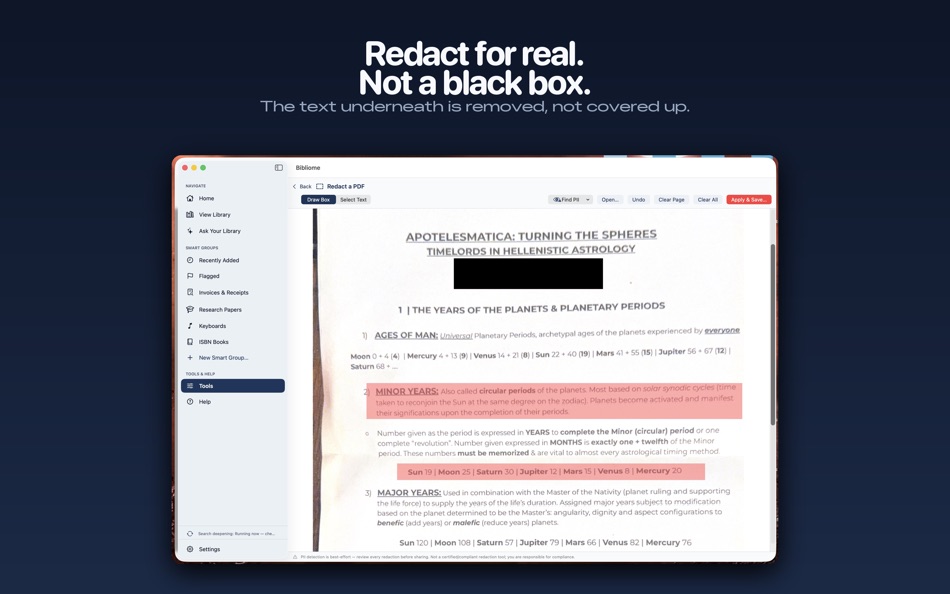
• Redact sensitive content with true rasterization; auto-detect personal info first.
• Merge folders, hunt duplicates, batch-rename cryptic files.
• Page tools, compression, Word-to-PDF, scan-with-iPhone, scheduled overnight runs.
• Smart Groups keep invoices, manuals, and recent additions one click away.
ONE LIBRARY, ALL YOUR DEVICES
The free Bibliome companion for iPhone and iPad lets you read, mark up, bookmark, and file into the same library anywhere — synced through your own iCloud.
One price. No subscription. Your documents never leave your Mac unless you say so.
Reklâm
Ekran görüntüleri




Fiyat Geçmişi
- Güncel fiyat: $29.99
- En az: $29.99
- En fazla: $29.99
Fiyatları takip et E-posta veya anlık bildirimle indirim uyarıları almak için bir listeye ekleyin
AppAgg Puanı
7,450
Tahmini AppAgg değerlendirmesi:
Bibliome Library
Geliştirici: Joshua Langberg
7,450 Platin
Daha yüksek değerlendirmeler genellikle AppAgg üzerinde daha güçlü sinyaller anlamına gelir.
Şunlara göre: popülerlik · kullanıcı puanları · güncellik · fırsatlar · mağaza verileri · topluluk etkinliği
Güncel AppAgg verileriyle her gün yeniden hesaplanır.
Kısa URL: Kopyalandı!
Yenilikler
- Sürüm: 1.7
- Son güncelleme:
- Folders you can actually manage. In the Library's Folders pane, Cmd-click or Shift-click to select several folders, then right-click for Merge Into, Reassess Category, Rename, New Folder Inside, and Move to Trash. Every one of them can be undone from Edit > Undo, with the operation named. Merging moves every document across, keeps folder structure, and sends emptied folders to the Trash rather than deleting them.
Tags merge the same way. In the Tags pane, select two or more tags and choose Merge Into: every document under the other tags gets the surviving tag, nothing moves, and Undo puts each one back.
Drop documents in from the Finder. Drag PDFs onto a folder in the Library to copy them in and start a scan right away, so they show up in search without a manual scan. Undo removes the copies; your originals are never touched.
Find your library from Spotlight. Every document is listed in Spotlight by title and category, and choosing a hit opens it in Bibliome. Nothing leaves your Mac.
Ek Bilgi
- Satışa çıkış tarihi:
- Kategori:
macOS uygulamaları›Verimlilik - İşletim Sistemleri:
macOS,macOS 14.0 ve sonrası - Boyut:
4 Gb - Desteklenen diller:
Chinese,English,French,German,Italian,Spanish - İçerik Derecelendirmesi:
4+ - Mac App Store Puan: ¡
0 - Web sitesi:
 https://psychosonicconsulting.com/bibliome
Geliştirici
- Joshua Langberg
- Takipçiler: 0
- Platformlar: iOS Uygulamalar (5) macOS Uygulamalar (1)
- İndirimler: 0
- Listeler: 1 + 0
- Puanlar: 1 + 3 ¡
- Sıralamalar: 0
- Yorumlar: 0
- Video: 0
- RSS: Abone ol
Listeler (1)
- Bibliome Library

Puanlar (0)
0
Sıralamalar (0)
0
Yorumlar (0)
İlk yorum yapan siz olun
Özet
Bibliome Library Kısa URL: Kopyalandı!- Mac App Store
AppAgg üzerinden Joshua Langberg tarafından geliştirilen “Bibliome Library” uygulamasını takip edebilirsiniz. Platform: macOS. Kategori: Verimlilik. AppAgg Değerlendirmesi: 7,450 (Platin). Uygulamanın AppAgg puanları — onaylı: 0; dolaylı: 0. Uygulamanın yer aldığı herkese açık liste sayısı: 1. Uygulamayı özel listelerine kaydeden kullanıcı sayısı: 0. AppAgg kullanıcıları uygulamayı henüz değerlendirmedi. Onaylı puanlar, oturum açmış AppAgg kullanıcılarının mağazaya geçişlerini kaydeder. Dolaylı puanlar mağaza verilerine dayanır. İki sayaç, uygulamanın veya oyunun yer aldığı herkese açık listelerin sayısını ve onu özel listelerine kaydeden kullanıcıların sayısını gösterir. Uygulama ilk kez tarihinde yayımlandı. Uygulamanın son güncellemesi: . Uygulamanın güncel fiyatı $29.99. Uygulama şu dilleri destekler: Chinese, English, French, German, Italian, Spanish. Fiyat geçmişini inceleyin, uygulamayı bir listeye ekleyin veya geliştiriciyi takip edin. Uygulamayla ilgili yeni fırsatları ve güncellemeleri RSS akışı üzerinden takip edin. AppAgg bu uygulamayı barındırmaz veya dağıtmaz. Uygulamayla ilgili tüm ticari markalar, logolar ve ekran görüntüleri ilgili sahiplerine aittir.

