
저장됨
저장됨 메뉴에 표시할 이름을 선택하세요.
완료!
| 개발자: | MICHAEL ROBERT KENNEDY (5) | ||
| 가격: | * 무료 | ||
| 평가: | 5,660 골드 | ||
| 순위: | 0 | ||
| 댓글: | 0 댓글 게시 | ||
| 목록: | 1 + 0 | ||
| 포인트: | 0 + 0 ¡ | ||
| +1 포인트 | |||
기술

Stop fighting clunky mobile browser experiences. Azure DevOps Companion App gives you fast, focused access to the workflows that matter most—right from your phone.
Key Features
1. Secure Sign-In - Connect using your Azure DevOps account
2. Summary page- Instantly see what needs your attention. Track recent pipelines, pull requests, and work items
3. Repository Browsing - Explore repositories with an intuitive file browser, View code with syntax highlighting, Open and read Markdown files with ease
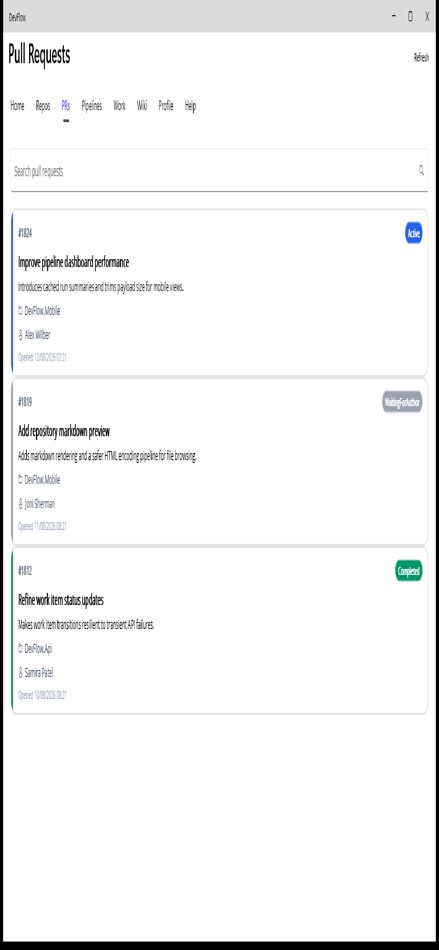
4. Pull Request Reviews - View and review pull requests on the go, Read diffs and changes in a clean, mobile-friendly layout, Approve or comment without needing a desktop
5. Pipelines & Builds - Monitor pipeline status in real time, View detailed logs without the clutter, Trigger, retry, or cancel builds from anywhere
6. Work Items - Stay on top of assigned tasks, View, update, and comment on work items
This companion App is designed with a developer-first mindset: Clean, distraction-free interface and Fast performance, even with large logs and diffs
Terms of Use (EULA): https://www.apple.com/legal/internet-services/itunes/dev/stdeula/
광고
스크린샷




가격 내역
-
* 인앱 구매 - 현재 가격: 무료
- 최소: 무료
- 최대: 무료
AppAgg 평가
5,660
AppAgg 예상 평가:
DevFlow
개발자: MICHAEL ROBERT KENNEDY
5,660 골드
평가가 높을수록 보통 AppAgg에서 더 강한 신호를 의미합니다.
기준: 인기 · 사용자 평점 · 최신성 · 딜 · 스토어 데이터 · 커뮤니티 활동
최신 AppAgg 데이터를 바탕으로 매일 다시 계산됩니다.
단축 URL: 복사됨!
새로운 기능
- 버전: 1.0
- 마지막 업데이트:
추가 정보
개발자
- MICHAEL ROBERT KENNEDY
- 팔로워: 0
- 플랫폼: iOS 앱 (4) iOS 게임 (1)
- 할인: 0
- 목록: 1 + 0
- 포인트: 0 + 0 ¡
- 순위: 0
- 댓글: 0
- 동영상: 0
- RSS: 구독
목록 (1)
- DevFlow

포인트 (0)
0
순위 (0)
0
댓글 (0)
가장 먼저 댓글을 남겨주세요
요약
DevFlow 단축 URL: 복사됨!- 공유하기
- App Store
“DevFlow” 앱은 iOS용 개발자 도구 카테고리에 속합니다. 이 앱은 “MICHAEL ROBERT KENNEDY”에서 개발했으며, 에 처음 출시되고 에 마지막으로 업데이트되었습니다. 이 앱은 현재 무료로 이용할 수 있습니다. 이 앱은 아직 AppAgg에서 평점을 받지 않았습니다. 이 앱은 공개 사용자 목록 1개와 비공개 목록 0개에 포함되어 있습니다. AppAgg는 “DevFlow” 앱의 가격 기록, 평점 및 사용자 리뷰를 추적합니다. AppAgg는 이 앱을 호스팅하거나 배포하지 않습니다. 이 앱과 관련된 모든 상표, 로고 및 스크린샷은 각 소유자에게 귀속됩니다. 이 앱의 향후 할인과 업데이트는 RSS 피드에서 확인할 수 있습니다.
유사 항목
-
- Dev Utils
- iOS 앱: 개발자 도구 게시자: Ryan Fielder
- 무료
- 목록: 1 0 0
- 포인트: 5 + 104 4K · 실버 버전: 1.3.0 Dev Utils is the ultimate toolkit for mobile developers. With features designed to streamline your workflow and increase productivity, Dev Utils is the essential companion for building
-
- Dev Notes++
- iOS 앱: 개발자 도구 게시자: Sylvain Lafrance
- 무료
- 목록: 0 + 1 0 0
- 포인트: 1 + 0 1K · 실버 버전: 1.7 Dev Notes++ is your all-in-one companion for tracking app development. Log bugs, features, and ideas. Plan promotions. Manage App Store screenshots. Take rich text notes. See your ...
-
- Dev Snippets
- iOS 앱: 개발자 도구 게시자: Berke Ozkir
- 무료
- 목록: 0 0 0
- 포인트: 1 + 0 670 · 브론즈 버전: 1.4.4 Maximize your development productivity with our all-in-one utility app, tailored for developers who demand efficiency and precision. Dive into a comprehensive suite of tools designed ...
-
- Dev Auto Capture
- iOS 앱: 개발자 도구 게시자: Half Eaten Toast
- $0.99
- 목록: 0 0 0
- 포인트: 1 + 1 7K · 골드 버전: 1.3.0 Auto Capture allows you to check device information and automate captures of your device for debugging. Auto Capture: Automatically screenshot your device when a logging message for ...
-
- Dev Tools Kit
- iOS 앱: 개발자 도구 게시자: Kevin Cabon
- 무료
- 목록: 0 0 0
- 포인트: 2 + 0 1K · 실버 버전: 0.2 Dev Tools Kit is a handy toolbox for developers. Stop jumping between websites to format JSON, decode Base64 or test a regex. Keep a clean set of offline tools right on your iPhone. ...
-
- Dev Learning Studio
- iOS 앱: 개발자 도구 게시자: Airton Siqueira de Freitas
- 무료
- 목록: 0 + 1 0 0
- 포인트: 0 + 0 1K · 실버 버전: 2.0.0 Dev Learning Studio is a complete mobile IDE that transforms your smartphone into a powerful development environment. Whether you're a beginner learning your first lines of code or an ...
-
- Dev & Ads AI
- iOS 앱: 개발자 도구 게시자: 重庆子媛发国际进出口贸易有限公司
- 무료
- 목록: 0 0 0
- 포인트: 1 + 0 600 · 브론즈 버전: 1.0.7 CameraCode AI lets you control AI development by chat and watch progress through a connected camera view. Start tasks, follow execution, and keep builds, deployment, and testing on ...
-
- Dev Utility Lab
- iOS 앱: 개발자 도구 게시자: Qixin Net (Beijing) Technology Co., Ltd.
- $1.99
- 목록: 0 0 0
- 포인트: 1 + 0 1K · 실버 버전: 1.0 Dev Utility Lab brings focused developer helper tools into one native iPhone and iPad workspace. Use it to create a quick checksum, convert decimal/hex/binary values, test simple regex
-
- Dev Cache
- iOS 앱: 개발자 도구 게시자: Aiden Olsen
- 무료
- 목록: 0 + 1 0 0
- 포인트: 0 + 1 1K · 실버 버전: 1.0 Unleash your creativity, streamline your workflow, and elevate your coding experience with Dev Cache - the must-have note-taking app for developers. Capture your ideas, snippets, and ...
-
- dev HTML Playground: Web IDE
- iOS 앱: 개발자 도구 게시자: KOICHIRO YAMAMOTO
- 무료
- 목록: 0 0 0
- 포인트: 2 + 0 1K · 실버 버전: 1.3 dev HTML Playground lets you build, run and view HTML/CSS/JavaScript entirely on your iPhone. No computer required. WHO IT'S FOR - You want to start programming but don't own a ...
-
- Dev Q
- iOS 앱: 개발자 도구 게시자: jaesung Lee
- 무료
- 목록: 0 0 0
- 포인트: 0 + 1 590 · 브론즈 버전: 1.7 Dev Q: Tech Interview Prep Made Simple Dev Q helps you master key technical questions for developer interviews across CS, iOS, aOS, and Frontend. Whether you re preparing last minute ...
-
- Dev Toolkit
- iOS 앱: 개발자 도구 게시자: Douglas J Farmer
- 무료
- 목록: 0 0 0
- 포인트: 0 + 0 630 · 브론즈 버전: 1.0 Dev Toolkit 1.0 is a free app that gives you the Xcode developer quick and easy access to the iOS native fonts, sounds, haptics and base .fonts you can use in your next great app. ...
-
- Dev Tool box - Developer Tools
- iOS 앱: 개발자 도구 게시자: Seonggon Sim
- 무료
- 목록: 0 0 0
- 포인트: 0 + 0 580 · 브론즈 버전: 1.0.7 DevToolbox is an essential collection of developer utilities designed to streamline your coding workflow. Whether you're debugging APIs, encoding data, or formatting JSON, DevToolbox ...
-
- Dev Eyes
- iOS 앱: 개발자 도구 게시자: Peter Black
- * 무료
- 목록: 0 0 0
- 포인트: 0 + 0 590 · 브론즈 버전: 1.0 As a developer I'm constantly viewing my frontend code as different device and screen sizes. I created Dev Eyes as a way to mirror my local development across various screen sizes at ...

