
Đã lưu
Chọn tên sẽ hiển thị trong menu Đã lưu của bạn.
Làm xong!
| Nhà phát triển: | Luca Torella (4) | ||
| Giá bán: | $0.99 | ||
| Xếp hạng: | 0 | ||
| Bình luận: | 0 Đăng bình luận | ||
| Danh sách: | 1 + 0 | ||
| Điểm: | 1 + 0 ¡ | ||
| Mac App Store | |||
Mô tả

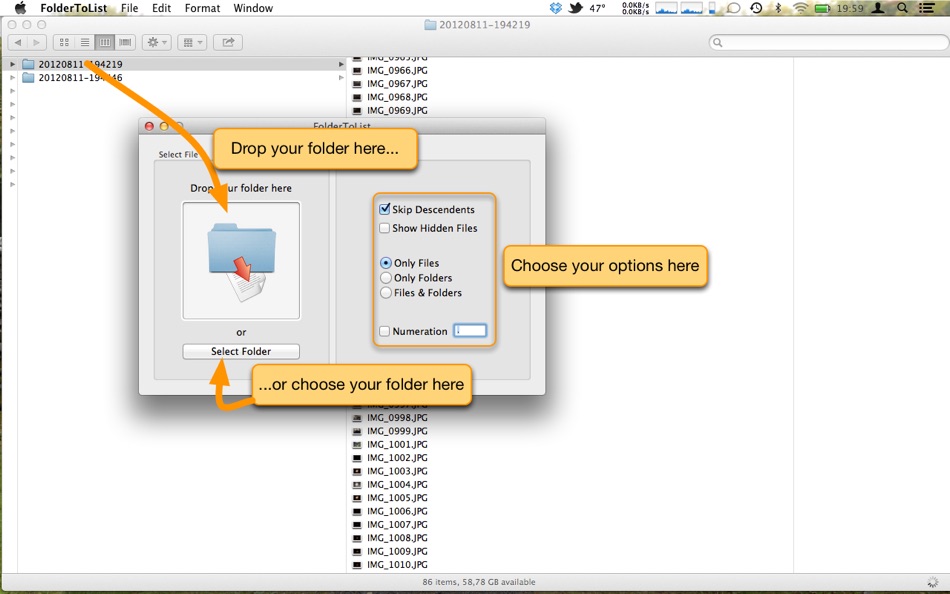
Key features:
- Fast listing of any folder, drive, DVD, or USB stick
- Filter by files, folders, or both
- Optional recursive expansion with depth control
- Clean, ready-to-share output for reports and inventories
Ad
Ảnh chụp màn hình


Lịch sử giá
- Giá hiện tại: $0.99
- Tối thiểu: $0.99
- Tối đa: $0.99
Theo dõi giá
Thông tin bổ sung
- Ngày phát hành:
- Danh mục:
macOS Ứng dụng›Năng suất - HĐH:
macOS,macOS 15.0 trở lên - Kích thước:
3 Mb - Ngôn ngữ được hỗ trợ:
English - Xếp hạng nội dung:
4+ - Mac App Store Xêp hạng:
0
Tính năng mới
- Phiên bản: 1.8.0
- Cập nhật:
- - new icon
- rewritten all the code from Objective-C to Swift 6
Nhà phát triển
- Luca Torella
- Nền tảng: iOS Ứng dụng (1) iOS Trò chơi (1) macOS Ứng dụng (2)
- Danh sách: 1 + 0
- Điểm: 1 + 3 ¡
- Xếp hạng: 0
- Bình luận: 0
- Giảm giá: 0
- Video: 0
- RSS: Đăng ký
Danh sách (1)
- FolderToList

Điểm (1)
-

- 767 Erin
- +1

Xếp hạng (0)
0 ☹️
Bình luận (0)
Hãy là người đầu tiên nhận xét 🌟
«FolderToList». Nền tảng: macOS. Thể loại: Năng suất. Nhà phát triển: «Luca Torella». Bản phát hành đầu tiên: . Cập nhật lần cuối: . Giá hiện tại: $0.99. Giá thấp nhất được ghi nhận: $0.99. Giá cao nhất được ghi nhận: $0.99. Tiêu đề này chưa nhận được xếp hạng hoặc đánh giá trên AppAgg. Danh sách: công khai 1, riêng tư 0. Điểm được theo dõi: xác nhận 1, gián tiếp 0. Ngôn ngữ có sẵn: English. AppAgg theo dõi lịch sử giá, xếp hạng và phản hồi của người dùng cho «FolderToList». Theo dõi ưu đãi và cập nhật trong tương lai qua RSS. AppAgg không lưu trữ ứng dụng hoặc phân phối phần mềm. Tất cả các nhãn hiệu, logo và ảnh chụp màn hình đều thuộc về chủ sở hữu tương ứng.
FolderToList URL ngắn: Đã sao chép!- 🌟 Chia sẻ
- Mac App Store
Tương tự
-
- Folder Commander
- macOS Ứng dụng: Năng suất Bởi: Thomas Weschke
- $7.99
- Danh sách: 0 0 0
- Điểm: 0 Phiên bản: 1.1 Folder Commander helps you create consistent, repeatable folder structures in seconds. If you regularly set up the same folders for projects, clients, or workflows, Folder Commander ... ⥯
-
- Folder Slice - File Shortcuts
- macOS Ứng dụng: Năng suất Bởi: 鸿呈 吉
- * Miễn phí
- Danh sách: 1 0 0
- Điểm: 5 Phiên bản: 1.10.1 Do you often find your workflow interrupted just to search for a file? Folder Slice brings you a brand new experience: instantly call up a floating file window anytime, anywhere. No ... ⥯
-
- Folder Cleaner
- macOS Ứng dụng: Năng suất Bởi: 永康 李
- Miễn phí
- Danh sách: 0 0 0
- Điểm: 5 Phiên bản: 7.5.16 Quickly scan folders, list the files in them according to categories, and you can select unnecessary files to clean up. Default scannable path 1. Home folder 2. Desktop 3. Downloads 4. ⥯
-
- Folder index
- macOS Ứng dụng: Năng suất Bởi: iLike computing limited
- $2.99
- Danh sách: 0 0 0
- Điểm: 1 Phiên bản: 4.1 Need to print a list of files in a folder? Have a directory of files on the web that you want to make an index.html page for? This is what Folder index does. Choose the Folders. Create ⥯
-
- List Focus
- macOS Ứng dụng: Năng suất Bởi: Ebey Tech LLC
- $0.99
- Danh sách: 0 + 1 0 0
- Điểm: 7 Phiên bản: 1.1 Use this productivity app for macOS, to convert a paragraph of text into an easier to read list. Highlight text in the list automatically as content is cycled through either with mouse ⥯
-
- Folder Subdivide for Mac OS X
- macOS Ứng dụng: Năng suất Bởi: feb19
- Miễn phí
- Danh sách: 0 0 0
- Điểm: 1 Phiên bản: 1.0 You'll drag/drop a folder to this, then create sub-folders below and subdivide root folder's files. ⥯
-
- Folder ZIP Widget
- macOS Ứng dụng: Năng suất Bởi: Keen Widget
- * Miễn phí
- Danh sách: 0 0 0
- Điểm: 0 Phiên bản: 1.04 Tired of wasting time zipping folders one by one? Say goodbye to manual file compression and hello to efficiency! With Folder ZIP Widget, you can batch zip multiple folders ... ⥯
-
- Folder Hub - File browser
- macOS Ứng dụng: Năng suất Bởi: 志远 杨
- * Miễn phí
- Danh sách: 1 + 1 0 0
- Điểm: 8 Phiên bản: 2.5.0 Folder Hub is an app hidden under the MacBook's notch, used for quick access and retrieval of files and folders within the working directory. What problems does Folder Hub solve? - In ... ⥯
-
- Folder To Text
- macOS Ứng dụng: Năng suất Bởi: metajournal, llc
- Miễn phí
- Danh sách: 0 0 0
- Điểm: 1 Phiên bản: 1.0 Folder To Text instantly converts your folders and files into clean, organized text documents. Whether you're a developer sharing code, a researcher documenting projects, or anyone who ⥯
-
- Folder Quick Look
- macOS Ứng dụng: Năng suất Bởi: App ahead GmbH
- $3.99
- Danh sách: 0 + 1 0 0
- Điểm: 2 Phiên bản: 1.6 Preview folder and archive contents (ZIP, RAR, and more) instantly in macOS Quick Look. Just select a folder and press the Space bar. Support If you need help or want to make a feature ⥯
-
- Folder Ordering
- macOS Ứng dụng: Năng suất Bởi: 朝品 冯
- $0.99
- Danh sách: 0 0 0
- Điểm: 0 Phiên bản: 1.0 ## Once you organize a folder full of various documents and files, they are easy to find and share. With File Sorting, you can quickly organize all your files by size simply by ... ⥯
-
- folder.me
- macOS Ứng dụng: Năng suất Bởi: Irakli Verdzadze
- Miễn phí
- Danh sách: 0 0 0
- Điểm: 1 Phiên bản: 1.1.3 Notion like editor for creating web pages and personal documents. - Create pages for pretty much everything - Publish with just a few clicks - Simple form builder - Create contact, ... ⥯
-
- Folder Bar
- macOS Ứng dụng: Năng suất Bởi: 栋梁 周
- * Miễn phí
- Danh sách: 0 0 0
- Điểm: 1 Phiên bản: 1.0.2 Show file menu on menu bar 1. You can add multiple folders to the menu bar. 2. Click on a file in the menu to open it. 3. You can drag the file in the menu to any location. 4. You can ... ⥯
-
- Multiple Folder Creator
- macOS Ứng dụng: Năng suất Bởi: Ben Churchill
- $2.99
- Danh sách: 0 0 0
- Điểm: 0 Phiên bản: 1.2 Multiple Folder Creator is the fastest way to make exactly the folders you need all at once. Multiple Folder Creator saves you hours of manual clicking. Just paste in your folder names ⥯