
| 개발자: | Flyingbee Software Co., Ltd. (25) | ||
| 가격: | 무료 | ||
| 순위: | 0 | ||
| 리뷰: | 0 리뷰 작성 | ||
| 목록: | 0 + 0 | ||
| 포인트: | 0 + 2 (3.0) ¡ | ||
| App Store | |||
기술

Flyingbee PDF to Excel OCR Converter is designed to help users to convert scanned image PDF to Excel via OCR (Optical Character Recognition) and recovers all the numbers, text, and layout in the PDF tables, it helps you spend less time retyping, low money, copying-and-pasting PDF data, as it quickly and accurately turns your native PDF files to editable Microsoft Excel spreadsheet(.xlsx), retaining text fonts and table layouts. And you can easily edit, reuse and calculate the data in output excel documents.
PDF to Excel OCR Converter also supports batch conversions from image PDF to Excel and setting output options of conversions from image PDF to Excel. For PDF files protected by passwords, it can convert the PDF files into perfect fully editable Microsoft Excel files every time with an easy-to-use interface.
It supports recognition of several languages including English, French, German, Italian, Spanish, Portuguese, Japanese, Russian and Chinese.
Key Features:
• Support 64bit - iOS 10 Compatibility, Optimized for iPhone 7, iPhone 7 Plus and iPad Pro.
• Conversion Process 100% on your local iOS device, No internet connection need.
• Convert any particular pages (e.g. 1, 3-8, 26 or all pages) to save your time.
• Save time on learning complicated Excel editing knowledge;
• Save energy on skipping ads and annoying pop-up window ask for buying;
• Connect to online cloud storage support, include any FTP or WebDAV Server.
• Offer you 4 ways to transfer files(Open in.., iTunes USB file sharing, Wifi Sharing and Cloud Disk)
• Support Microsoft Office 2007, 2008, 2011 and 2016 Excel Application, not completely compatible with iWorks apps.
== Quick Start ==
Convert pdf to excel in mail app can be as easy as three steps:
1. Open Mail app, use "Open In.." to send source PDF file to PDF to Excel.
2. Go to PDF to Excel app, touch to open the source PDF file where text come from.
3. Click "Convert" button to extract PDF to Excel files.
Other Features:
• Import PDF from Mail, Safari, Adobe Reader, GoodReader, Dropbox and other apps.
• Build-in Text Editor let you view and edit text files.
• Mail out documents as email attachments or Send files to other apps("Open In.." integration).
• Share and Compress files to .zip file.
• File manager, rename, copy, move, delete and compress.
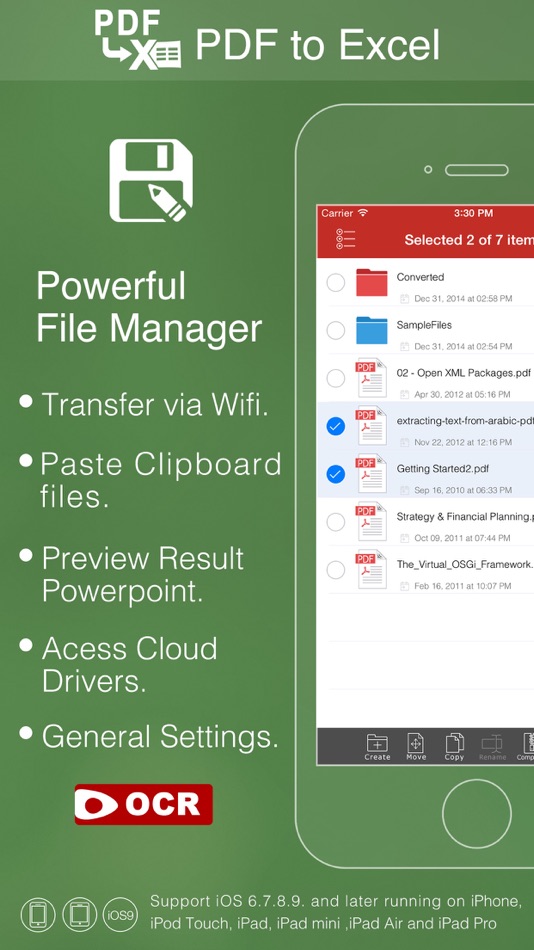
• Paste file(s) from clipboard (Add files from other app).
• Copy file to clipboard (Used for mail or other app).
• Wifi file transfer (Use Web Browser or WebDAV clients to Upload or Download files).
• USB file transfer (iTunes USB file sharing).
• Print to AirPrint-enable printers.
Support both iPhone and iPad!
Several sample files have been included, you can test it right now!
== Note ==
This app use OCR function. it would Convert textual PDF to image PDF firstly, then recognise editable texts from image PDF, if you want to convert textual PDF, we suggest you to use our other PDF Converters.
If you want to convert PDF to more formats, like PDF to Word, PDF to Powerpoint, PDF to JPG etc., please try our Other Converter.
Please send us your PDF file for testing before buying our app, we will test it, and give you the result!
We are continuously developing this app, so please feel free to contact us with your questions, suggestions or any problems, and we will reply ASAP.
스크린샷


새로운 기능
- 버전: 1.0.2
- 업데이트:
가격
- 오늘: 무료
- 최소: 무료
- 최대: 무료
가격 추적
개발자
포인트
0 ☹️
순위
0 ☹️
목록
0 ☹️
리뷰
첫 번째 리뷰를 남겨보세요 🌟
추가 정보
- 버전: 1.0.2
- 카테고리:
iOS 앱›비즈니스 - 운영체제:
Apple Watch,iPad,iPhone,iOS 8.0 이상 - 크기:
495 Mb - 지원되는 언어:
English - 콘텐츠 등급:
4+ - App Store 개의 평가:
3.0(2) - 업데이트:
- 출시일:
주소록
- 웹사이트:
 http://www.flyingbee.com
PDF to Excel With OCR Lite 단축 URL: 복사됨!- 🌟 공유하기
- App Store
당신은 또한 같은 수 있습니다
-
- Excel Driver
- iOS 앱: 비즈니스 게시자: Excel Executive
- 무료
- 목록: 0 + 0 순위: 0 리뷰: 0
- 포인트: 0 + 0 버전: 6.19.11 Presenting the brand new version of Excel's driver app. Besides the new design and powerful capabilities, the new driver app allows for much better location tracking with minimal ... ⥯
-
- PDF Reader Pro - Sign,Edit PDF
- iOS 앱: 비즈니스 게시자: PDF Technologies, Inc.
- $19.99
- 목록: 2 + 2 순위: 0 리뷰: 0
- 포인트: 4 + 223 (4.3) 버전: 3.0.2 PDF Reader Pro helps much for anyone who reads, edit, highlights, OCR, signs, converts, creates, protects, compresses and fills out PDFs on their iPhone and iPad. It also makes it easy ⥯
-
- PDF Scanner App - Scan PDF Doc
- iOS 앱: 비즈니스 게시자: PDF Scanner Editor PDF Converter Expert
- 무료
- 목록: 0 + 0 순위: 0 리뷰: 0
- 포인트: 1 + 241 (4.8) 버전: 1.2 PDF Scanner App allows you to effortlessly scan, import, and instantly share documents within this smart Scanner app. Easily retrieve and access all your previously scanned files using ⥯
-
- PDF Converter ··
- iOS 앱: 비즈니스 게시자: PDF Converter App
- * 무료
- 목록: 0 + 0 순위: 0 리뷰: 0
- 포인트: 0 + 0 버전: 1.0.0 PDF Converter is the easiest way to search, save, create, and edit PDF files. With PDF Converter, you can: * Scan documents using your phone s camera or import them directly from your ... ⥯
-
- OCR Studio
- iOS 앱: 비즈니스 게시자: OCR Studio
- 무료
- 목록: 0 + 0 순위: 0 리뷰: 0
- 포인트: 0 + 0 버전: 1.2.2 OCR Studio presents on-device AI-driven solution for highly accurate and instant recognition of identity documents from 200+ countries in 100+ languages including Hindi, Chinese, ... ⥯
-
- PDF Gear - PDF Editor & Reader
- iOS 앱: 비즈니스 게시자: PDF GEAR TECH PTE. LTD.
- 무료
- 목록: 1 + 1 순위: 0 리뷰: 0
- 포인트: 5 + 7,345 (4.7) 버전: 2.20 Want a well-featured and easy-to-access PDF solution for mobile use? PDFgear for iOS could achieve this! With PDFgear for iOS, users could handle their PDFs with ease, including ... ⥯
-
- Excel Chauffeurs
- iOS 앱: 비즈니스 게시자: Excel Chauffeurs Ltd
- 무료
- 목록: 0 + 0 순위: 0 리뷰: 0
- 포인트: 0 + 0 버전: 1.17.0 Welcome to Excel Chauffeurs, the ultimate app for luxury transportation services. Our Passenger App is designed to provide a seamless and sophisticated travel experience for those who ... ⥯
-
- EXCEL mTRADE
- iOS 앱: 비즈니스 게시자: EXCEL STOCK BROKING PRIVATE LIMITED
- 무료
- 목록: 0 + 0 순위: 0 리뷰: 0
- 포인트: 0 + 0 버전: 1.2 With an innovative and user friendly front end which is connected to our backoffice through the reports section, trading in shares become easy. We have been established since 1996 ... ⥯
-
- Adobe Scan: PDF & OCR Scanner
- iOS 앱: 비즈니스 게시자: Adobe Inc.
- 무료
- 목록: 0 + 2 순위: 0 리뷰: 0
- 포인트: 4 + 1,503,654 (4.9) 버전: 25.12.18 The new Straighten tool fixes pages that come out curved or tilted while you scan. It lines everything up automatically so your PDFs look neat and professional, with no extra steps ... ⥯
-
- CamScan: PDF Scanner, OCR
- iOS 앱: 비즈니스 게시자: Yevheniia Kyian
- * 무료
- 목록: 0 + 0 순위: 0 리뷰: 0
- 포인트: 0 + 8 (4.6) 버전: 1.0.8 Unlock the Full Potential of Your Documents! CamScan transforms your iPhone into a powerful, professional scanner. Experience lightning-fast scanning, precise editing, advanced OCR ... ⥯
-
- Scan PDF & OCR Scanner
- iOS 앱: 비즈니스 게시자: Egorova Ekaterina
- 무료
- 목록: 0 + 0 순위: 0 리뷰: 0
- 포인트: 0 + 2 (3.0) 버전: 1.2.16 PDF Scanner App Your Ultimate Document Management Solution Transform your smartphone into a powerful, portable scanner with PDF Scanner App the easiest and most efficient way to ... ⥯
-
- Scanner Vault: PDF & OCR Scan
- iOS 앱: 비즈니스 게시자: Appsverse Inc.
- 무료
- 목록: 0 + 0 순위: 0 리뷰: 0
- 포인트: 0 + 15,210 (4.6) 버전: 4.09 Scanner Vault scans printed or handwritten documents such as contracts, paper documents, books, receipts, business cards, etc with your iPhone or iPad easily. PDF Scanner allows you to ⥯
-
- DocuScan - PDF & OCR Scanner
- iOS 앱: 비즈니스 게시자: Amad Marwat
- 무료
- 목록: 0 + 0 순위: 0 리뷰: 0
- 포인트: 0 + 122 (4.8) 버전: 1.1.9 DocuScan for iOS converts your device into a portable document scanner. Here are some of the key features of this app. Smart Scanning: Batch scanning Document Border detection Filters ... ⥯
-
- Camera Scanner - PDF Scan OCR
- iOS 앱: 비즈니스 게시자: Labhuben Kachhadiya
- 무료
- 목록: 0 + 0 순위: 0 리뷰: 0
- 포인트: 1 + 1,155 (4.7) 버전: 2.0.9 Turn your iPhone into a powerful PDF scanner! Scan documents, receipts, IDs, photos, and more in seconds. Convert to PDF or JPEG, sign instantly, and share anywhere. OCR scanner app is ⥯