
북마크
| 개발자: | skoroapps s.r.o. (12) | ||
| 가격: | * 무료 | ||
| 종합 점수: | 11,910 골드 | ||
| 순위: | 0 | ||
| 댓글: | 0 댓글 게시 | ||
| 목록: | 1 0 | ||
| 포인트: | 0 | ||
| +1 포인트 | |||
요약
소개합니다. skoroapps s.r.o.에서 만든 ‘개발자 도구’ 카테고리 앱, Code Viewer & Text Editor.
모든 iPhone에 홈 버튼이 있던 시절을 기억해요.
에 출시됐는데 업데이트가 계속 나와요. 가장 최근 건 에 왔어요. 이 정도면 진심이네요.
다운로드는 무료. 그다음은 마음대로예요. 인앱 구매가 있거든요.
iPad 및 iPhone에서 사용할 수 있어요.
iOS 18.0 이상에서 쓸 수 있어요. 내 기기 버전을 확인해 보세요.
App Store 사용자 평점은 5점 만점에 5.0점. 1명이 귀찮음을 무릅쓰고 평점을 남겼어요.
AppAgg 점수는 11,910. 골드 등급이에요.
연령 등급은 ‘4+’, 아이들에게도 괜찮아요.
지원 언어는 딱 하나, 그런데 한국어는 아니에요.
목록 1개에 담겼어요. 누군가 자기만의 TOP 목록을 만들고 있나 봐요.
이 개발자의 게임 2개와 앱 9개가 AppAgg에 더 있어요. 한번 둘러보세요.
참고로, 이 개발자는 지금 할인 1건 진행 중이에요.
업데이트와 새 앱 소식을 가장 먼저 받고 싶나요? 개발자를 팔로우하거나 RSS 피드를 구독하세요. 푸시 알림은 Android와 iOS용 AppAgg Alerts 앱으로 받을 수 있어요.
스크린샷 10





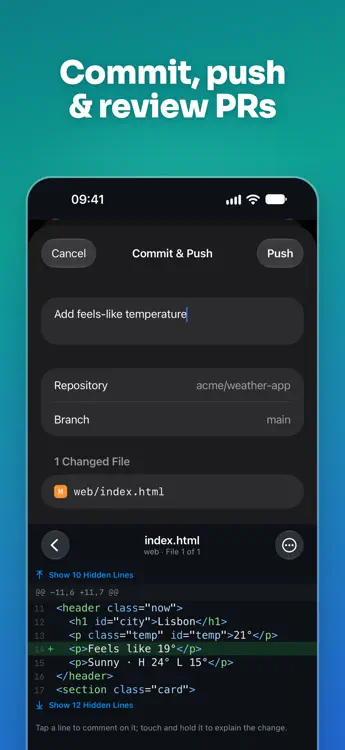
동영상 1
홈 화면의 나만의 피드
설명

READ CODE
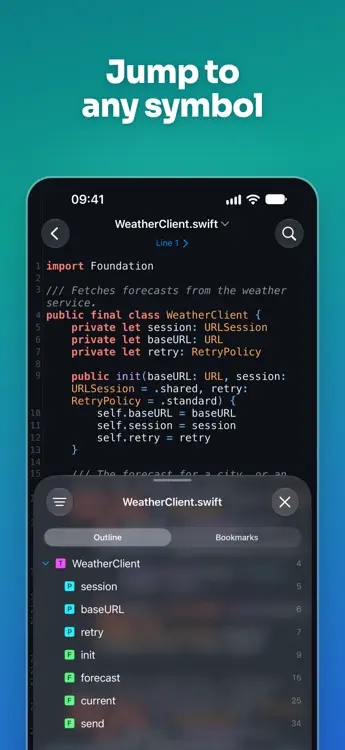
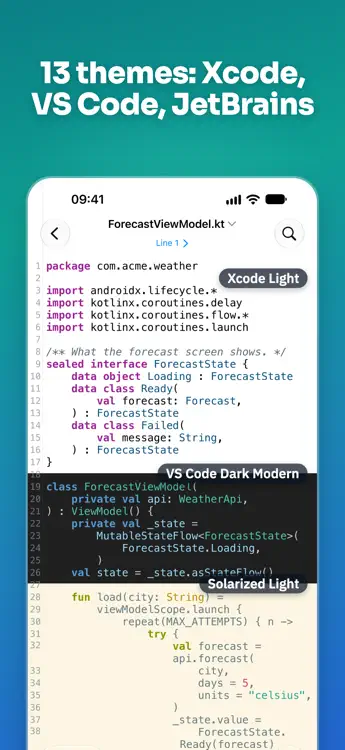
• 25+ languages with Tree-sitter highlighting
• Symbols, Go to Definition and Uses — tap a name to jump
• Project search, Quick Open, Find in file
• Import from GitHub, GitLab, Bitbucket, ZIP or Files; open files in place from iCloud Drive
• Everything in your library works offline
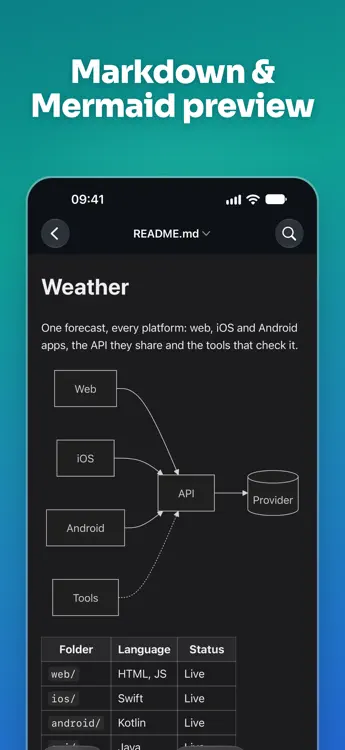
PREVIEW
• Markdown with tables, task lists and Mermaid diagrams
• JSON and YAML as a tree, CSV as a table
• HTML, SVG, images, Jupyter notebooks and diffs
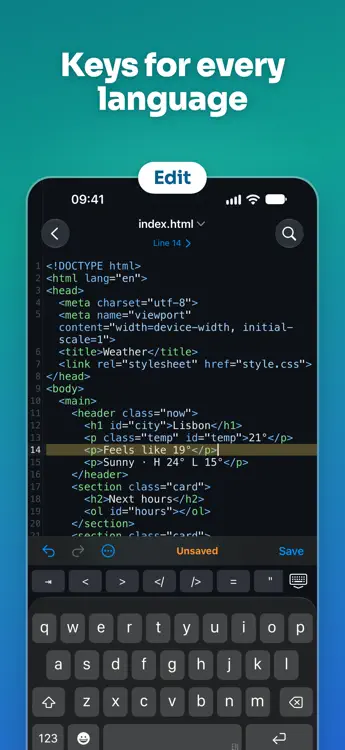
EDIT
• Fix a typo or a config value right in the file, with a diff before saving
• Find & Replace (regex), auto-pairs, comment lines
• Unsaved changes are kept as drafts
AI — WITH YOUR OWN KEY
• Explain a file or a selection: what it does, how it works and what to watch for, with lines that take you there
• Edit with AI: describe a change, check the diff, then Apply — one Undo takes it back
• Write a new file from a description
• Anthropic or OpenAI, with the model you pick; nothing is sent until you tap. Three uses are free
PULL REQUESTS — GitHub, GitLab and Bitbucket
• Syntax-highlighted diffs, line comments and suggested changes
• Approve, request changes, merge, re-run CI
• Commit and push, or open a pull request — no laptop needed
• Explain Changes: a clear breakdown of big PRs with your own AI key
Not an IDE: no build or run — made for reading, reviewing and quick fixes.
FREE & PRO
Reading, previews and editing are free, with no ads, and so are two repositories in your library. Code Viewer Pro adds unlimited and private repositories, your own themes and fonts, and the pull request workflow: line comments, approve and merge, push, GitLab and Bitbucket, unlimited AI explain and edit, and notifications. Yearly with a free week, or once for life.
Terms of Use: https://www.apple.com/legal/internet-services/itunes/dev/stdeula/
GitHub, GitLab, Bitbucket, Anthropic and OpenAI are trademarks of their respective owners. Code Viewer is not affiliated with or endorsed by them.
개발자 소식
다른 플랫폼 0
| Code Viewer & Text EditorApp Store11K 골드iPhoneiPad인앱 구매 $7.99 – $19.99 | 무료 |
현재 이 스토어에서만 이용할 수 있습니다.
가격 기록 0
- 현재 가격: 무료
- 최소: 무료
- 최대: 무료
목록 1
-
 Code Viewer & Text Editor


포인트 0
-

- +1 포인트

순위 0
-
- 내 평점
댓글 0 ¡
개발자 12
- skoroapps s.r.o.
- 팔로워: 0
- 플랫폼: Android 앱 (1) Android 게임 (1) iOS 앱 (9) iOS 게임 (1)
- 할인: 1
- 목록: 1 0
- 포인트: 0
- 순위: 0
- 댓글: 0
- 동영상: 3
- RSS: 구독
새로운 기능
- 버전: 3.2
- 마지막 업데이트:
- New in 3.2
• Explain with AI: select code and tap AI › Explain, or choose Explain File… in the file menu. See what it does, how it works and what to watch for, with lines that take you there
• Edit with AI: describe a change, check it as a diff, then tap Apply. One Undo takes it back. In an empty file, Write File with AI… writes it from your description
• Both use your own Anthropic or OpenAI API key, and you pick the model right where you ask. Three uses are free
• Display in the reader now has Font, Custom Theme and a profile for each language: try them on the file you're reading
• Jupyter notebooks open highlighted
• Fixed a crash when opening Settings from the Mac menu bar
• Bug fixes and improvements
- • Fixed a crash at launch on Mac, plus Mac menu and shortcut fixes
• iPhone Duo: unfold it and get the iPad layout with the sidebar
• Search shows results like your IDE: matches highlighted, previews start right at the match
• More files open highlighted out of the box: Arduino sketches, Liquid templates, crash reports; files with an unknown extension get their language from the content
• New on iPhone: live preview while you edit. Off by default; turn it on in Settings, or long-press Edit for a file
• Bug fixes and improvements - Code Viewer is first of all a place to read code, and 3.1 says so.
• A new icon
• Pro costs less: a year with a free week, or one purchase for life
• The free library holds two repositories; the ones you already have stay, and files are unlimited
• No offer at the end of the first launch - In 3.0.2
Universal links
Bugfixes and improvements
In 3.0.1
Bugfixes and improvements
From 3.0
Code Viewer, rebuilt from scratch.
• Review pull requests from GitHub, GitLab and Bitbucket: diffs, line comments, approve and merge
• Explain Changes with your own AI key
• Edit, commit and push — or open a pull request
• A new reader: Symbols, Go to Definition, project search, 25+ languages
• Markdown, JSON, YAML, CSV, Mermaid and notebook previews
Bought Premium in Code Viewer 2? Pro is yours, free, forever. Thank you! - In 3.0.1
Bugfixes and improvements
From 3.0
Code Viewer, rebuilt from scratch.
• Review pull requests from GitHub, GitLab and Bitbucket: diffs, line comments, approve and merge
• Explain Changes with your own AI key
• Edit, commit and push — or open a pull request
• A new reader: Symbols, Go to Definition, project search, 25+ languages
• Markdown, JSON, YAML, CSV, Mermaid and notebook previews
Bought Premium in Code Viewer 2? Pro is yours, free, forever. Thank you! - Code Viewer, rebuilt from scratch.
• Review pull requests from GitHub, GitLab and Bitbucket: diffs, line comments, approve and merge
• Explain Changes with your own AI key
• Edit, commit and push — or open a pull request
• A new reader: Symbols, Go to Definition, project search, 25+ languages
• Markdown, JSON, YAML, CSV, Mermaid and notebook previews
Bought Premium in Code Viewer 2? Pro is yours, free, forever. Thank you! - Minor bug fixes and improvements
- * New features
Added support for swift language
Added multiple color themes (30+)
Added "Open In" support
Added ability to search for GitHub repository
Added landscape mode for iPhone
Added "line numbers" option
Added ability to customise Font name\size
*Improvements
Reworked all file types images
Minor UI and Productivity improvements
Added support for iOS 9
Added support for iPhone 6 & iPhone 6 Plus
Added support for iPad Pro
Please write your feedback in the AppStore review or on our email support@skoroapps.com - Bug fixes
- - critical bug fixes
- - Minor bug fixes and improvements
- - Minor bug fixes and improvements
- 1.0
추가 정보
 https://skoroapps.com/code-viewer/
AppAgg 점수
AppAgg 예상 점수:
Code Viewer & Text Editor
개발자: skoroapps s.r.o.
점수가 높을수록 대체로 AppAgg의 여러 지표에서 좋은 결과를 보인다는 뜻입니다.
기준: 인기 · 사용자 평점 · 최신성 · 할인 · 스토어 데이터 · 커뮤니티 활동
최신 AppAgg 데이터를 바탕으로 매일 다시 계산됩니다.
공유하기
Code Viewer & Text Editor 단축 URL: 복사됨!- App Store

