
| ผู้พัฒนา: | JONGMIN CHOI (11) | ||
| ราคา: | ฟรี | ||
| การจัดอันดับ: | 0 | ||
| ความเห็น: | 0 เขียนความเห็น | ||
| รายการ: | 0 + 0 | ||
| แต้มแล: | 0 + 0 ¡ | ||
| App Store | |||
คำอธิบาย

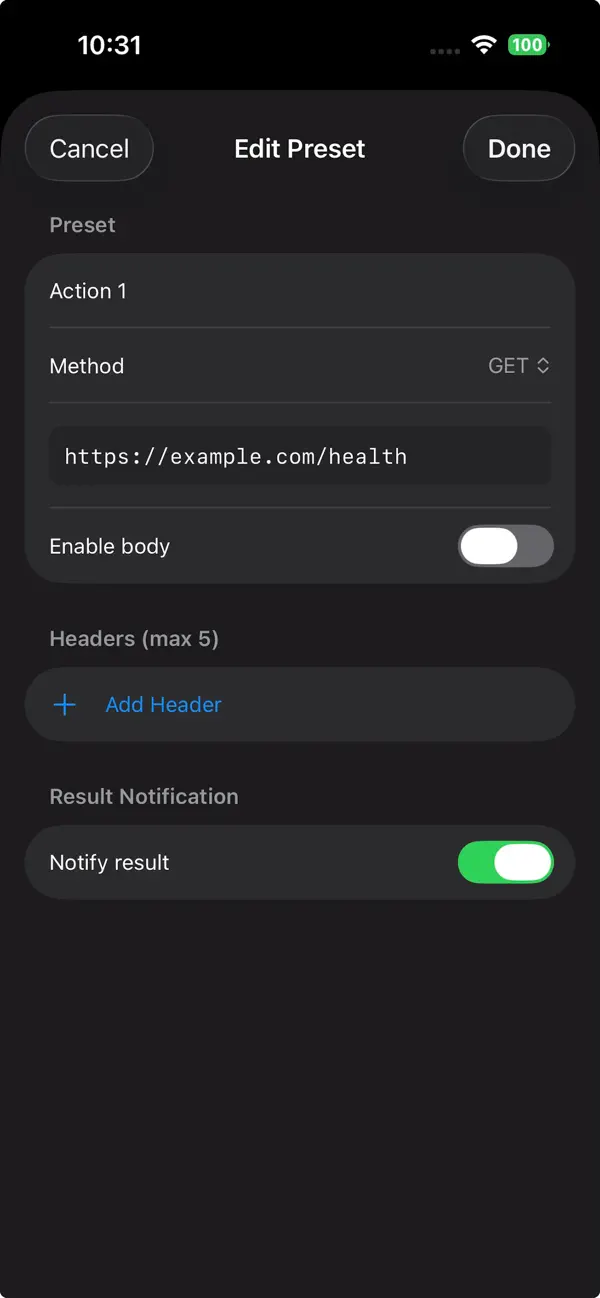
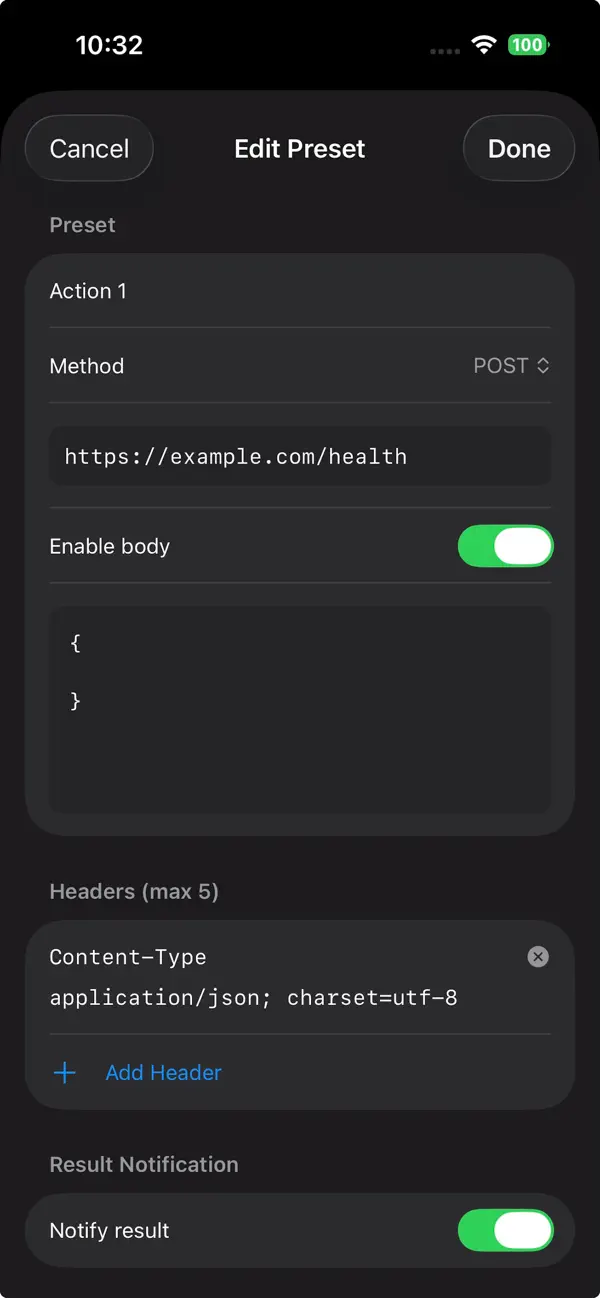
Hey Action is a minimal REST API client designed for developers who just want to trigger a request — fast.
No dashboards. No accounts. No clutter.
Just configure once and tap RUN.
What you can do:
• Save up to 3 preset API endpoints
• Send GET, POST, PUT, PATCH, DELETE requests
• Add custom headers and JSON body
• Receive instant success/failure feedback
• Get optional local notifications
All configurations stay on your device.
No tracking. No analytics.
Perfect for quick tests, webhook triggers, and manual endpoint calls.
Ad
ภาพหน้าจอ


มีอะไรใหม่
- เวอร์ชัน: 1.0.2
- อัปเดต:
- Improved REST API client positioning and presentation.
Minor UI refinements.
ราคา
- วันนี้: ฟรี
- ต่ำสุด: ฟรี
- มากที่สุด: ฟรี
ติดตามราคา
ผู้พัฒนา
- JONGMIN CHOI
- แพลตฟอร์ม: iOS แอป (9) iOS เกม (2)
- รายการ: 0 + 0
- แต้มแล: 6 + 0 ¡
- การจัดอันดับ: 0
- ความเห็น: 0
- ลดราคา: 0
- วิดีโอ: 0
- RSS: ติดตาม
แต้มแล
0 ☹️
การจัดอันดับ
0 ☹️
รายการ
0 ☹️
- Hey Action: REST API Client
ความเห็น
แสดงรีวิวเป็นคนแรกเลย 🌟
ข้อมูลเพิ่มเติม
- เวอร์ชัน: 1.0.2
- หมวดหมู่:
iOS แอป›เครื่องมือ - ระบบปฏิบัติการ:
iPad,iPhone,iOS 17.6 และสูงกว่า - ขนาด:
6 Mb - ภาษาที่สนับสนุน:
English - การจัดประเภทเนื้อหา:
4+ - App Store คะแนนโดย:
0 - อัปเดต:
- วันที่วางจำหน่าย:
Hey Action: REST API Client URL แบบสั้น: คัดลอกแล้ว!- 🌟 แชร์
- App Store
คุณอาจชอบ
-
- REST API Client
- iOS แอป: เครื่องมือ โดย: Tevon Wallace
- ฟรี
- รายการ: 1 + 0 การจัดอันดับ: 0 ความเห็น: 0
- แต้มแล: 3 + 6 (4.3) เวอร์ชัน: 1.2.1 Send and analyze requests with detailed response headers and results. Add query parameters, authorization tokens, headers, or body content to tailor every request. Choose from four ... ⥯
-
- Postmon - Rest API Client
- iOS แอป: เครื่องมือ โดย: Anupkumar Naginbhai Patel
- ฟรี
- รายการ: 0 + 0 การจัดอันดับ: 0 ความเห็น: 0
- แต้มแล: 0 + 0 เวอร์ชัน: 1.0 PostMon is a powerful yet simple API client for iPhone and iPad for working with REST APIs, HTTP APIs, and even occasional SOAP APIs. Use this REST API client and HTTP API client to ... ⥯
- ใหม่
- Curly — REST API Client
- iOS แอป: เครื่องมือ โดย: Artem Sharifullin
- ฟรี
- รายการ: 0 + 0 การจัดอันดับ: 0 ความเห็น: 0
- แต้มแล: 0 + 0 เวอร์ชัน: 1.4.2 Curly is a native REST API client built for iOS and iPad. Designed for developers who need a fast, lightweight tool to test and debug APIs directly from their device. Features: - Send ... ⥯
-
- API Tester REST API HTTP SOAP
- iOS แอป: เครื่องมือ โดย: Marouane Baid
- ฟรี
- รายการ: 0 + 0 การจัดอันดับ: 0 ความเห็น: 0
- แต้มแล: 0 + 13 (4.8) เวอร์ชัน: 1.0.2 API Tester REST API HTTP SOAP API Tester REST API HTTP SOAP is a comprehensive testing tool designed to facilitate seamless and accurate testing of multiple API types and formats. With ⥯
-
- API Dash - API Client, Testing
- iOS แอป: เครื่องมือ โดย: Ashita Prasad
- ฟรี
- รายการ: 0 + 0 การจัดอันดับ: 0 ความเห็น: 0
- แต้มแล: 1 + 0 เวอร์ชัน: 0.4.0 Create & Customize API Requests - Create different types of HTTP requests (GET, HEAD, POST, PATCH, PUT and DELETE). - Easily manipulate and play around with request inputs like ... ⥯
-
- Apiary – API Client
- iOS แอป: เครื่องมือ โดย: Necati Kocak
- ฟรี
- รายการ: 0 + 0 การจัดอันดับ: 0 ความเห็น: 0
- แต้มแล: 0 + 0 เวอร์ชัน: 1.0 APIARY The Ultimate Mobile API Testing Client Take your API development workflow anywhere with Apiary, a professional-grade REST API testing tool designed specifically for mobile ... ⥯
-
- Rest Mate
- iOS แอป: เครื่องมือ โดย: Abdul Salam Waqar Ahmed
- ฟรี
- รายการ: 0 + 0 การจัดอันดับ: 0 ความเห็น: 0
- แต้มแล: 0 + 0 เวอร์ชัน: 1.02 Rest Mate is the lightweight, native HTTP client designed for mobile developers. Whether you are debugging a backend issue while away from your desk or testing a new API endpoint on ... ⥯
-
- API Orbit – REST & GraphQL
- iOS แอป: เครื่องมือ โดย: Stanislav Makushov
- * ฟรี
- รายการ: 0 + 0 การจัดอันดับ: 0 ความเห็น: 0
- แต้มแล: 1 + 0 เวอร์ชัน: 26.1 AI-powered REST & GraphQL client for API testing. API Orbit is a fast and intuitive API client built to help you send requests, debug responses, test endpoints, and generate ... ⥯
- ใหม่
- API Requester - HTTP Client
- iOS แอป: เครื่องมือ โดย: Volodymyr Sichka
- * ฟรี
- รายการ: 0 + 0 การจัดอันดับ: 0 ความเห็น: 0
- แต้มแล: 0 + 0 เวอร์ชัน: 1.1 Requester is your new go-to native HTTP client, built to make API testing fast, simple, and beautiful across iOS and macOS. Whether you are debugging complex backend services, ... ⥯
-
- API Zen
- iOS แอป: เครื่องมือ โดย: Jaseem Valiya Valappil
- * ฟรี
- รายการ: 0 + 0 การจัดอันดับ: 0 ความเห็น: 0
- แต้มแล: 4 + 0 เวอร์ชัน: 3.1 API Zen brings the convenience of HTTP API endpoint testing on the go. With its intuitive request composer and detailed response information, it helps developers test endpoints with ... ⥯
-
- API Inspector for Postman
- iOS แอป: เครื่องมือ โดย: 小玲 王
- * ฟรี
- รายการ: 0 + 0 การจัดอันดับ: 0 ความเห็น: 0
- แต้มแล: 1 + 0 เวอร์ชัน: 1.0.0 API Inspector is a powerful API debugging and management tool designed for developers who need precision and speed. Whether you re testing APIs, analyzing request performance, or ... ⥯
-
- API Widgets
- iOS แอป: เครื่องมือ โดย: Kamil Kujawinski
- ฟรี
- รายการ: 0 + 0 การจัดอันดับ: 0 ความเห็น: 0
- แต้มแล: 1 + 0 เวอร์ชัน: 1.5 API Widgets brings your data to your home screen. Connect any webhook or API endpoint and display the information that matters most to you in customizable iOS widgets. PERFECT FOR N8N ... ⥯
-
- API Bot
- iOS แอป: เครื่องมือ โดย: Alex Rabin
- ฟรี
- รายการ: 0 + 0 การจัดอันดับ: 0 ความเห็น: 0
- แต้มแล: 0 + 13 (4.7) เวอร์ชัน: 1.5.1 API Bot is a supercharged API development tool for your phone. It now uses machine learning right on your device to help you build better APIs. What this means for you: Analyze API ... ⥯
- ใหม่
- Hey Why: SQL Explain Viewer
- iOS แอป: เครื่องมือ โดย: JONGMIN CHOI
- ฟรี
- รายการ: 0 + 0 การจัดอันดับ: 0 ความเห็น: 0
- แต้มแล: 0 + 0 เวอร์ชัน: 1.0.0 Hey Why is a lightweight SQL EXPLAIN viewer for developers. Run EXPLAIN on your MySQL database or paste EXPLAIN JSON to see why your query behaves the way it does. Explore execution ... ⥯