
| 개발자: | Kwong Cheong Yee (1) | ||
| 가격: | * 무료 | ||
| 순위: | 0 | ||
| 리뷰: | 0 리뷰 작성 | ||
| 목록: | 0 + 0 | ||
| 포인트: | 0 + 0 ¡ | ||
| App Store | |||
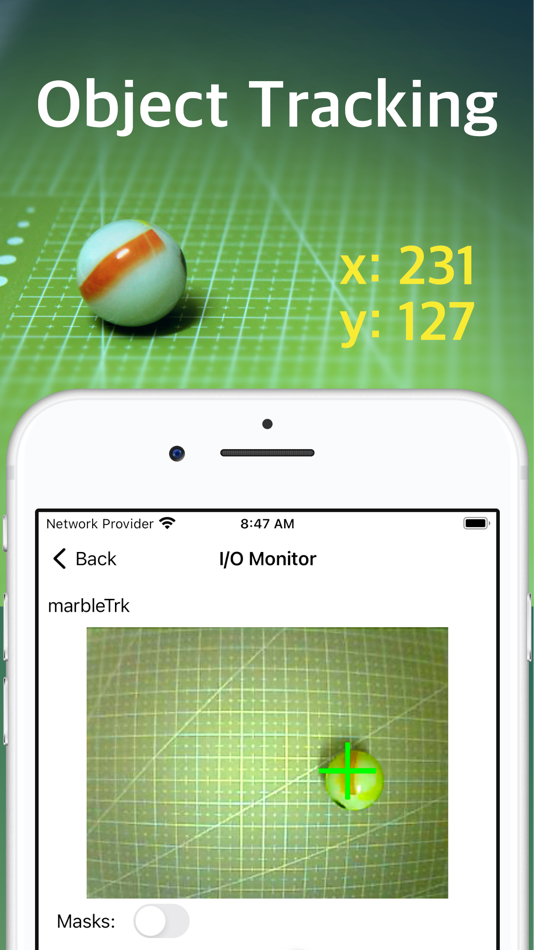
기술

1. MataVision Firmware: This lightweight firmware is flashed onto your ESP32-CAM or ESP32-S3 board, transforming it into a powerful vision system.
2. MataVision iOS App: This intuitive app serves as your command center, allowing you to control and program ESP32 devices.
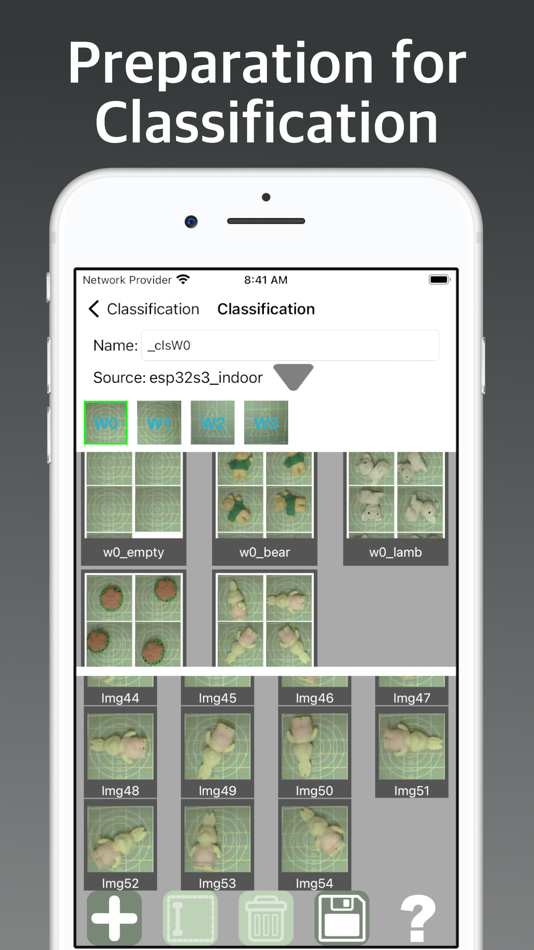
As with any vision task, collecting good representative images and carefully preparing them is crucial for successful vision training. MataVision includes elaborate, easy-to-use tools for these tasks.
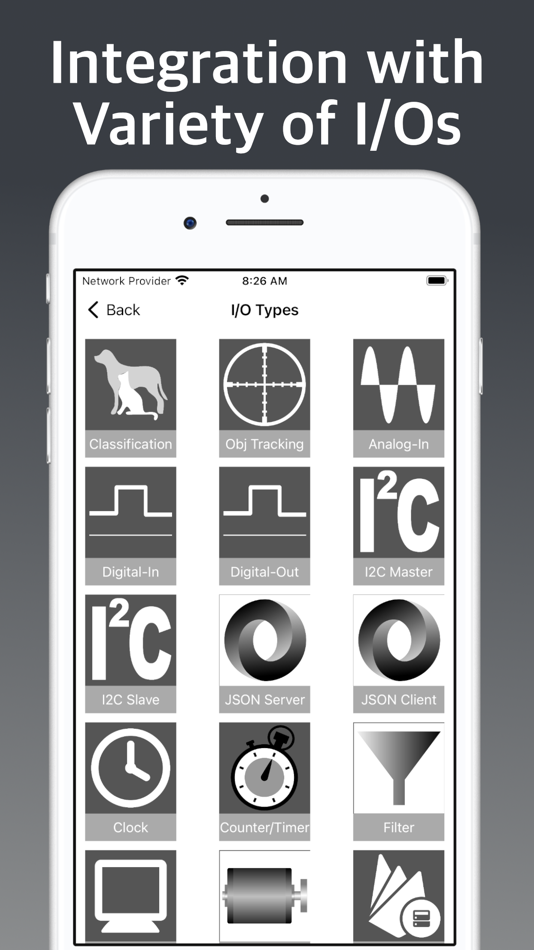
In many practical vision tasks, it is often necessary to incorporate inputs from or output data to external systems. MataVision includes a list of I/O types to enable interaction with some of the common I/O devices.
Finally, we need a method to instruct MataVision on how to integrate all the data from vision and I/O systems into something useful for our application. For this, we devised a minimal programming method.
No, you don’t have to learn a new programming language. It is just basic high school arithmetic and logic. All you need to know are:
1. A MataVision program consists of lines of Simple Logic Instructions (SLI). It executes from top to bottom and will continue to loop over these instructions.
2. An SLI instruction consists of three segments: an input value on the left, a condition in the middle, and one or more output values on the right. When the condition is evaluated to be TRUE, the value on the left will be assigned to the right.
For illustration, the following four example programs will do the same thing: turn ON the LED when the switch is pressed.
```
// Example 1
mySwitch =(True)> myLED
```
```
// Example 2
mySwitch =(1+1>1)> myLED
```
```
// Example 3
mySwitch =(1)> myLED
```
```
// Example 4
mySwitch => myLED
```
Note: Programming in MataVision is meant to allow basic controls and interactions with I/O devices. It is not suitable for creating complex applications.
A Typical Workflow
1. Attaching a camera module, such as OV7670 or OV2640, to the ESP32.
2. Optionally attaching a DS3231 RTC (Real Time Clock) module to the ESP32.
3. Flashing the MataVision Firmware onto the ESP32.
4. Connecting the MataVision iOS App to the ESP32.
5. Collecting sample images for object classification or tracking training.
6. Creating classification objects by grouping images for each class.
7. Creating object tracking objects by drawing bounding boxes on sample images.
8. Creating supporting I/O objects.
9. Writing a small program incorporating all values from vision and I/O objects into a single logic unit and uploading it to the ESP32.
스크린샷



새로운 기능
- 버전: 1.2.3
- 업데이트:
가격
-
* 인앱 구매 - 오늘: 무료
- 최소: 무료
- 최대: 무료
가격 추적
개발자
- Kwong Cheong Yee
- 플랫폼: iOS 앱 (1)
- 목록: 0 + 0
- 포인트: 0 + 0 ¡
- 순위: 0
- 리뷰: 0
- 할인: 0
- 동영상: 0
- RSS: 구독
포인트
0 ☹️
순위
0 ☹️
목록
0 ☹️
리뷰
첫 번째 리뷰를 남겨보세요 🌟
추가 정보
주소록
 https://www.matavision.comMataVision 단축 URL: 복사됨!
- 🌟 공유하기
- App Store
당신은 또한 같은 수 있습니다
-
- System Monitor for vision
- iOS 앱: 개발자 도구 게시자: Up-frontier, Inc.
- 무료
- 목록: 0 + 0 순위: 0 리뷰: 0
- 포인트: 0 + 0 버전: 1.0.0 Description: "System Monitor is an efficient system monitoring tool that helps you monitor the status of your Apple Vision Pro in real time. This app simultaneously displays the status ⥯
-
- Azure Vision Liveness Detect
- iOS 앱: 개발자 도구 게시자: Microsoft Corporation
- 무료
- 목록: 0 + 0 순위: 0 리뷰: 0
- 포인트: 0 + 1 (5.0) 버전: 1.4.3.1 This app is designed to enable functional testing of Microsoft Azure Vision's Face Liveness Detection and Verification feature. It allows users to assess how Azure's face verification ... ⥯
- 새로운
- Chell
- iOS 앱: 개발자 도구 게시자: Alexander Mata
- 무료
- 목록: 0 + 0 순위: 0 리뷰: 0
- 포인트: 1 + 2 (5.0) 버전: 1.0.3 Whether you re self-hosting or using our cloud environments, you have full control over your workflow your project, your way. Run builds, test code, or manage your cloud containers ... ⥯
-
- Device Monitor²
- iOS 앱: 개발자 도구 게시자: Fast-Devs Project
- 무료
- 목록: 5 + 1 순위: 0 리뷰: 0
- 포인트: 11 + 8,130 (4.7) 버전: 26.1.0 Device Monitor² is a one-of-a-kind app designed for iPhone, iPod Touch, iPad, and Apple Watch, providing all the essential information about your device at a glance, quickly and ... ⥯
- -100%
- Runestone Text Editor
- iOS 앱: 개발자 도구 게시자: Simon B. Støvring
- ▼ 무료
$4.99-100% - 목록: 3 + 2 순위: 0 리뷰: 0
- 포인트: 6 + 1,481 (4.8) 버전: 1.6.1 A plain text editor with syntax highlighting, line numbers, search and replace, page guide, and much more. It's like TextEdit but more powerful and optimised for iPhone and iPad. ... ⥯
-
- Animated SF Symbols
- iOS 앱: 개발자 도구 게시자: ferhat ogur
- $0.99
- 목록: 0 + 0 순위: 0 리뷰: 0
- 포인트: 0 + 0 버전: 1.0 Discover the Animated SF Symbols app for Vision Pro, your ultimate tool for exploring over 3,000 customizable symbols perfect for VisionOS, iOS, macOS, watchOS, and tvOS apps. ... ⥯
-
- Tracking Streamer
- iOS 앱: 개발자 도구 게시자: YOUNGHYO PARK
- 무료
- 목록: 0 + 0 순위: 0 리뷰: 0
- 포인트: 0 + 0 버전: 2.4 Want to use your new Apple Vision Pro to control your robot? Want to record how you navigate and manipulate the world to train your robot? This app streams your Head + Wrist + Hand ... ⥯
-
- HDMIViewer
- iOS 앱: 개발자 도구 게시자: Martin Pittenauer
- 무료
- 목록: 0 + 0 순위: 0 리뷰: 0
- 포인트: 0 + 0 버전: 1.0 A simple and free app to display UVC device input (e.g. HDMI capture cards) connected to the Vision Pro developer strap. Please note: A developer strap and a UVC device is mandatory to ⥯
-
- Augmenos Code
- iOS 앱: 개발자 도구 게시자: Miguel Garcia Gonzalez
- 무료
- 목록: 0 + 0 순위: 0 리뷰: 0
- 포인트: 0 + 0 버전: 1.1 Augmenos Code is an educational app that showcases some of visionOS capabilities with open source code. Experience the samples interactively in-app on Apple Vision Pro and view the ... ⥯
-
- MXR Immersive Lab
- iOS 앱: 개발자 도구 게시자: MXR Productions GmbH
- 무료
- 목록: 0 + 0 순위: 0 리뷰: 0
- 포인트: 0 + 0 버전: 1.0 MXR Immersive Lab is a custom-built tool designed primarily for internal testing of our immersive film productions on Apple Vision Pro. To meet the unique demands of immersive content, ⥯
-
- UNIX Timestamper
- iOS 앱: 개발자 도구 게시자: Anthony Li
- 무료
- 목록: 0 + 0 순위: 0 리뷰: 0
- 포인트: 0 + 0 버전: 1.0 Easily convert between dates and UNIX timestamps for databases, software development, and more. Built from the ground up for Apple Vision Pro Copy and paste buttons for easy ... ⥯
-
- SteerCode: Vibe Coding Builder
- iOS 앱: 개발자 도구 게시자: Cognitic
- 무료
- 목록: 0 + 0 순위: 0 리뷰: 0
- 포인트: 1 + 108 (4.5) 버전: 1.4.6 Create mobile apps and websites with AI, as easily as chatting with a friend! No coding required. SteerCode lets you effortlessly build mobile apps, websites and games using just your ... ⥯
-
- AmniSphere
- iOS 앱: 개발자 도구 게시자: Amniscient LLC
- 무료
- 목록: 0 + 0 순위: 0 리뷰: 0
- 포인트: 0 + 7 (5.0) 버전: 4.1.2 Deploy real-time computer vision Al with 99.9% accuracy in just three steps. AmniSphere by Amniscient empowers teams across retail, industrial automation, and autonomous robotics to ... ⥯
- 새로운
- OmniClassify
- iOS 앱: 개발자 도구 게시자: Martin Kropf
- * 무료
- 목록: 0 + 0 순위: 0 리뷰: 0
- 포인트: 0 + 0 버전: 1.0.2 Transform your iPhone into a powerful machine learning lab. OmniClassify is the complete iOS toolkit for training, deploying, and running AI models entirely on-device. Your data never ... ⥯