
| ผู้พัฒนา: | Yasushi Obata (6) | ||
| ราคา: | $9.99 | ||
| การจัดอันดับ: | 0 | ||
| ความเห็น: | 0 เขียนความเห็น | ||
| รายการ: | 0 + 0 | ||
| แต้มแล: | 0 + 0 ¡ | ||
| App Store | |||
คำอธิบาย

Now You Can Use NumPy 1.20.2 on CPython3.9.9.
****How To Use NumPy on PeterJohnNumPyV4;;
Go To
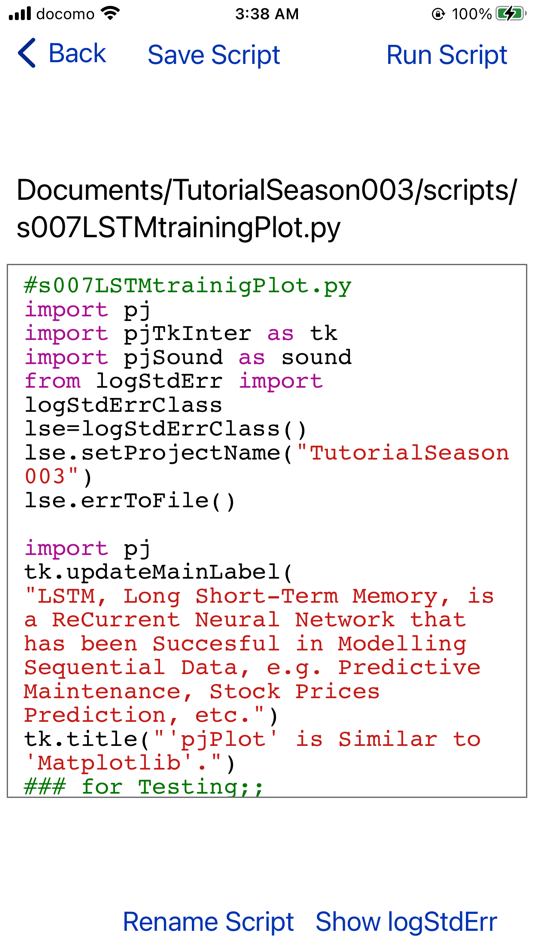
"TutorialSeason003/scripts/s007LSTMtrainingPlot.py".
Then
"Run Script".
****Not Yet implemented Features;;
Basically, you Can Use all Functions of numpy.ndarray.
**1; numpy.random;;
please use Python3 Standard "random" module instead of it.
1.1); numpy.random.randn();;
So we implemented pjRandN() function using NumPy and Python3 Standard "random" module.
Documents/TutorialSeason003/scripts/pjLStermMemory.py;pjRandN()
**2; numpy.linalg;;
2.1); numpy.linalg.norm();;
So we implemented pjNorm() function using NumPy instead of it.
Documents/TutorialSeason003/scripts/pjLStermMemory.py;pjNorm()
2.2); numpy.linalg.qr();;
So we implemented pjQR() function using NumPy instead of it.
Documents/TutorialSeason003/scripts/pjLStermMemory.py;pjQR();
**3; numpy.diag();;
Basically, you Can Use all Functions of numpy.ndarray,
so Please use numpy.ndarray.diagonal() instead of it.
**4; numpy.fft; Not Yet implemented.
**5; numpy.polynomial;; Not Yet implemented.
**6; numpy.ctypeslib;; Not Yet implemented.
****When you Use this App withOut NumPy;;
Using iPhone's "Files.app", Delete the NumPy's "__pycache__" folder below.
Documents/PeterJohnNumPyV4/usrLocal/lib/python3.9/site-packages/numpy/__pycache__
If there doesNot Exist the NumPy's "__pycache__" folder,
when you touched "Edit Script",
this App Calls "Py_FinalizeEx()"
So you Can Enjoy Scripting Comfortably.
****the WorkAround against the Well-Known Bug of NumPy and Python3.9;;
NumPy and Python3.9 have a Well-Known Bug.
While NumPy has been imported, "Py_FinalizeEx()" doesNot Release memory.
So If you imported NumPy at the Second time, Python3 Crashes.
so we made a WorkAround against the Well-Known Bug of NumPy and Python3.9.
As the Specification of this App,
If there Exists the NumPy's "__pycache__" folder,
Documents/PeterJohnNumPyV4/usrLocal/lib/python3.9/site-packages/numpy/__pycache__
Even if you touched "Edit Script",
this App doesNot call "Py_FinalizeEx()"
This is Not a Perfect Solution But you Can Enjoy NumPy withOut Python3 Crashing.
****1st Corinthians 10:31, GNT;
10:31 Well, whatever you do, whether you eat or drink, do it all for God's glory.
Enjoy NumPy on PeterJohnNumPyV4.
Best Regards,
--Yasushi Yassun Obata
ภาพหน้าจอ





มีอะไรใหม่
- เวอร์ชัน: 2026.0121.0504
- อัปเดต:
- the "PyRun_StringFlags() returns Nil but PyErr_Print() outputs Empty" Problem Solved and a 'Caffe' model Tutorial Removed Version;
we Changed Two Things at this time.
****1) we Solved the "PyRun_StringFlags() returns Nil but PyErr_Print() outputs Empty" Problem;
When you go to RunScriptView for the first time after you installed this App,
you needed to once go back to EditScriptView and then needed to go to RunScriptView again.
It was Due to that Py_FinalizeEx() wasNot called before Py_Initialize() was called.
and it was Hard to solve this problem
'cause the error message "fopen failed for data file: errno = 2 (No such file or directory), Errors found! Invalidating cache..." has Hidden this problem for many years.
As a result, the error message "fopen failed for data file: errno = 2 (No such file or directory), Errors found! Invalidating cache..." didNot relate to the problem that PyRun_StringFlags() returns Nil
for the first time when you installed this App.
****2) we Removed the tutorial
2.1) TutorialSeason003/s003DeepLearningColorizes.py
since it seems Richard Zhang's Image Colorization 'Caffe' model is No Longer provided.
Instead of it, Please use
"TutorialSeason008/s002PyTorchMpsDeepColorization.py"
on "PeterJohnPyTorch"
So that you Can use
Richard Zhang's Image Colorization 'PyTorch' model on 'PeterJohnPyTorch'.
Best Regards,
--Yasushi Yassun Obata
ราคา
- วันนี้: $9.99
- ต่ำสุด: $9.99
- มากที่สุด: $9.99
ติดตามราคา
ผู้พัฒนา
- Yasushi Obata
- แพลตฟอร์ม: iOS แอป (5) iOS เกม (1)
- รายการ: 0 + 0
- แต้มแล: 0 + 0 ¡
- การจัดอันดับ: 0
- ความเห็น: 0
- ลดราคา: 0
- วิดีโอ: 0
- RSS: ติดตาม
แต้มแล
0 ☹️
การจัดอันดับ
0 ☹️
รายการ
0 ☹️
ความเห็น
แสดงรีวิวเป็นคนแรกเลย 🌟
ข้อมูลเพิ่มเติม
- เวอร์ชัน: 2026.0121.0504
- หมวดหมู่:
iOS แอป›เครื่องมือ - ระบบปฏิบัติการ:
iPad,iPhone,iOS 15.0 และสูงกว่า - ขนาด:
306 Mb - ภาษาที่สนับสนุน:
English - การจัดประเภทเนื้อหา:
4+ - App Store คะแนนโดย:
0 - อัปเดต:
- วันที่วางจำหน่าย:
PeterJohnNumPyV4 URL แบบสั้น: คัดลอกแล้ว!- 🌟 แชร์
- App Store
คุณอาจชอบ
-
- Python Editor - .py Editor
- iOS แอป: เครื่องมือ โดย: Julian Lau
- ฟรี
- รายการ: 0 + 0 การจัดอันดับ: 0 ความเห็น: 0
- แต้มแล: 0 + 3 (3.7) เวอร์ชัน: 1.2.0 Python Editor is a simple and powerful app for creating, editing, and saving Python files on your device. With its user-friendly interface and essential features such as syntax ... ⥯
-
- BLE Spy
- iOS แอป: เครื่องมือ โดย: Peter Gasche
- $4.99
- รายการ: 1 + 0 การจัดอันดับ: 0 ความเห็น: 0
- แต้มแล: 0 + 4 (4.8) เวอร์ชัน: 1.2.5 A professional utility to examine and control Bluetooth Low Energy devices. Apart from standard features BLE Spy has some unique capabilities in particular for developers. Standard ... ⥯
-
- SimpleGPSApp Lesson 01
- iOS แอป: เครื่องมือ โดย: John Avatar
- ฟรี
- รายการ: 0 + 0 การจัดอันดับ: 0 ความเห็น: 0
- แต้มแล: 2 + 0 เวอร์ชัน: 3 GREAT FUN - GPS 3D MapKit & Speedometer iOS Project - showing RAW GPS Speed of MTS (Meters per Second) & hundredths MPH & KMPH! On the way to Full Level 5 Self Driving for a new EV we ... ⥯
-
- Kubriko Showcase
- iOS แอป: เครื่องมือ โดย: PETER PANDULA
- ฟรี
- รายการ: 0 + 0 การจัดอันดับ: 0 ความเห็น: 0
- แต้มแล: 0 + 0 เวอร์ชัน: 1.0.4 Kubriko is a Compose Multiplatform game engine, an open-source Kotlin library that you can use to create your own 2D games. This app is a collection of small demos that show what can ... ⥯
-
- Dev Eyes
- iOS แอป: เครื่องมือ โดย: Peter Black
- * ฟรี
- รายการ: 0 + 0 การจัดอันดับ: 0 ความเห็น: 0
- แต้มแล: 0 + 0 เวอร์ชัน: 1.0 As a developer I'm constantly viewing my frontend code as different device and screen sizes. I created Dev Eyes as a way to mirror my local development across various screen sizes at ... ⥯
-
- Juno – Python and Jupyter
- iOS แอป: เครื่องมือ โดย: Rational Matter
- ฟรี
- รายการ: 4 + 4 การจัดอันดับ: 0 ความเห็น: 0
- แต้มแล: 6 + 967 (4.6) เวอร์ชัน: 3.9.0 Zero-setup Python environment and developer toolbox in a first-class citizen app for iPad and iPhone. Juno is designed to cover all your Python coding needs, and will work seamlessly ... ⥯
-
- PeterJohn ThreeDim
- iOS แอป: เครื่องมือ โดย: Yasushi Obata
- $5.99
- รายการ: 0 + 0 การจัดอันดับ: 0 ความเห็น: 0
- แต้มแล: 0 + 0 เวอร์ชัน: 2026.0119.0123 What is this;; PeterJohn is a Python3 PlayGrounds runs on iPhone. This enables you to code, run and learn Python3 even on the train, on the bus, even Offline. Why we named ... ⥯
-
- html+css+js-web designer,html5
- iOS แอป: เครื่องมือ โดย: 小文 黄
- ฟรี
- รายการ: 0 + 1 การจัดอันดับ: 0 ความเห็น: 0
- แต้มแล: 1 + 773 (4.6) เวอร์ชัน: 3.1 This is a learning tool for efficient HTML, CSS, and JS learning, fast programming, local execution, Git retrieval, iCloud storage, efficient transfer and sharing via LAN HTTP/FTP ... ⥯
-
- RenPyLinter
- iOS แอป: เครื่องมือ โดย: 武汉小强科技有限责任公司
- $3.99
- รายการ: 0 + 0 การจัดอันดับ: 0 ความเห็น: 0
- แต้มแล: 0 + 5 (4.6) เวอร์ชัน: 1.7.0 RenPyLinter, your lightweight solution for Ren'Py stories. App Intro RenPyLinter is a Ren'Py reading tool for mobile device. Lightweight The App is lightweight and can start in a ... ⥯
-
- Python3IDE
- iOS แอป: เครื่องมือ โดย: 辉 马
- ฟรี
- รายการ: 0 + 0 การจัดอันดับ: 0 ความเห็น: 0
- แต้มแล: 2 + 13 (3.5) เวอร์ชัน: 1.5 Python3IDE is an offline Python3.7 integrated development environment software with built-in common scientific libraries. It is a powerful helper for you to learn and practice Python. ... ⥯
-
- Alive or Dead: Game of Life
- iOS แอป: เครื่องมือ โดย: 金珂 杜
- * ฟรี
- รายการ: 0 + 0 การจัดอันดับ: 0 ความเห็น: 0
- แต้มแล: 3 + 12 (3.8) เวอร์ชัน: 3.4.6 The Game of Life, also known simply as Life, is a cellular automaton devised by the British mathematician John Horton Conway in 1970. The game is a zero-player game, meaning that its ... ⥯
-
- Python Sandbox
- iOS แอป: เครื่องมือ โดย: Leonid Gefter
- $0.99
- รายการ: 0 + 0 การจัดอันดับ: 0 ความเห็น: 0
- แต้มแล: 0 + 0 เวอร์ชัน: 2.0.2 Tired of clunky online editors? Python Sandbox is the ultimate, premium coding environment designed for efficiency, speed, and reliability. Whether you're a student, a professional, or ⥯
-
- Systemprompt MCP client
- iOS แอป: เครื่องมือ โดย: Edward Burton
- * ฟรี
- รายการ: 0 + 0 การจัดอันดับ: 0 ความเห็น: 0
- แต้มแล: 1 + 0 เวอร์ชัน: 1.09 A voice controlled app to securely control MCP servers from your pocket. systemprompt MCP puts Model Context Protocol (MCP) server management capabilities directly into the hands of ... ⥯
-
- PSRayTracing
- iOS แอป: เครื่องมือ โดย: Benjamin Summerton
- ฟรี
- รายการ: 0 + 0 การจัดอันดับ: 0 ความเห็น: 0
- แต้มแล: 0 + 2 (5.0) เวอร์ชัน: 1.1 This is a GUI frontend for the PSRayTracing implementation of the "Ray Tracing in One Weekend" books by Peter Shirley (and others). Which renders the images in the book faster than the ⥯