
| 개발자: | helpful bits GmbH (2) | ||
| 가격: | * 무료 | ||
| 순위: | 0 | ||
| 리뷰: | 0 리뷰 작성 | ||
| 목록: | 0 + 0 | ||
| 포인트: | 1 + 0 ¡ | ||
| App Store | |||
기술

I started the PlanToCode project quite some time ago, before major players delivered good tools for planning. I see that they improve their planning tools greatly almost every month - Cursor plan mode works too, I've tested it recently. PlanToCode is a multi-opinion planning tool that can converge on the same ideas. I personally use PlanToCode explicitly right now because I just like it better - it's a matter of taste. I also trust it more because I know exactly what PlanToCode does, which context it uses for planning, and which system prompts it employs. Accurate planning is truly mission critical, and I would say PlanToCode has higher attention to detail in planning.
The core idea is what I call "Intelligence Driven Development" - squeezing the most out of GPT-5.2 and Gemini 3 Pro. The best way to do that is to carefully craft system prompts and run multiple planning passes in parallel to save time on the same previously prepared context (XML-formatted sections with task description, file content, and directory structure, plus a system prompt) with a simple UI. Then I compare the plans, add my own notes (merge instructions), and send everything to a "chief architect" that rates and merges the best ideas from all plans. It also considers the content of files that truly need adjustment based on the plans, rather than all candidate files that were scoped before planning. This reduces context and makes it more focused. Combined with my merge instructions, this produces a great merged plan. I then run it with Claude Code using multiple subagents - the prepared copy button template specifically instructs the system to read the prepared XML-formatted plan, understand it well, spawn dedicated subagents, and tell them exactly what to do. In about 10 minutes, I can test really complex features because all this preparation has great attention to detail, defines exactly what needs to be changed, and 5-8 subagents running in parallel deliver results really fast.
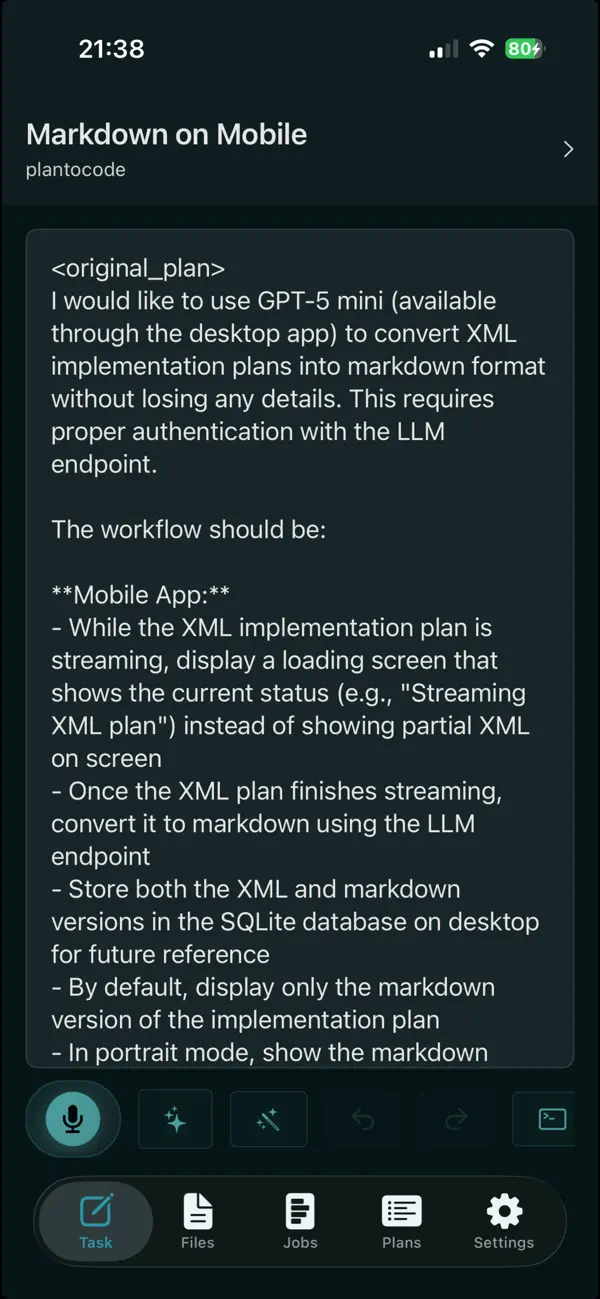
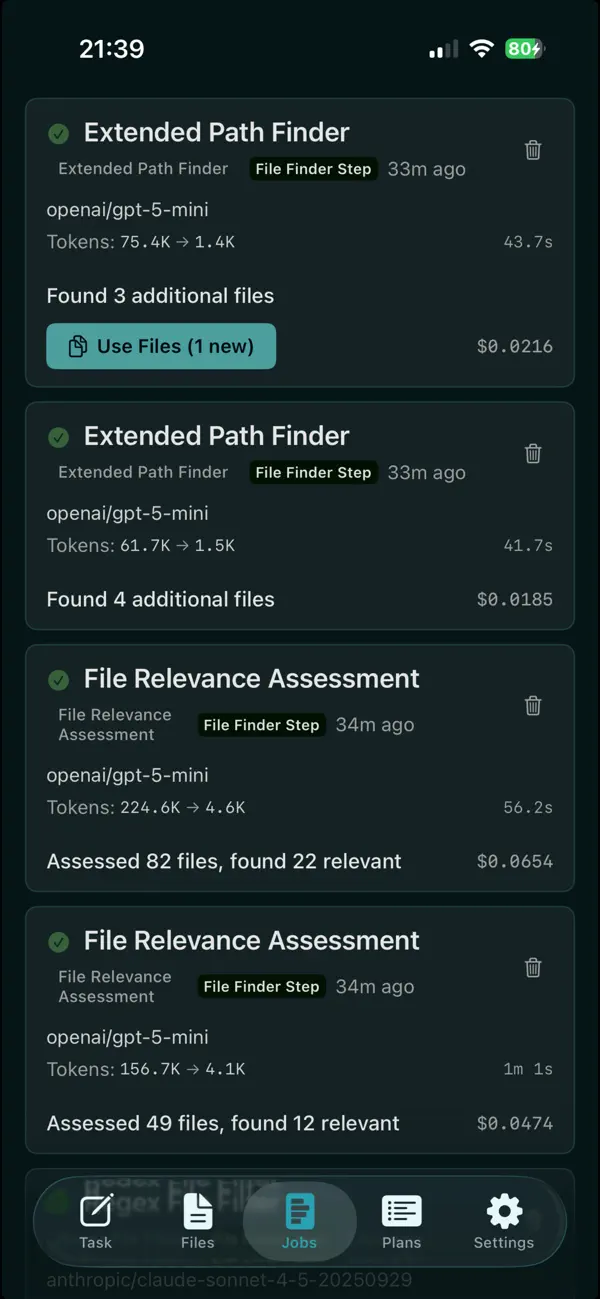
Everything I've described above is available via the mobile app. I can plan in the exact same manner on my iPhone and then actually run Claude Code in the terminal - I see the terminal UI on my phone too. It works with my PC directly without any cloud container runners because I've set up my dev environment as I like. It's very convenient to come back later after being away from the desk and test immediately what was developed remotely, because everything is right there prepared on my PC. This truly helps me because the work of a person utilizing LLMs for software development is highly async - frequently waiting until planning or an agent is done. I can do a healthy activity like go for a walk, hike, or to a restaurant, and when my attention is needed after some time for a short period, I get a healthy phone notification related to my productive work - when a plan is ready, the file context is prepared, or the Claude agent has finished running. I can then provide feedback with my voice (gpt-4o-transcribe) from the phone quickly. There's a full-blown editor with undo/redo, voice input, text corrections, task refinements, and copy button templates, so I can work productively on the phone too.
I'm giving this to the community as a product to see what people think about the tool. Based on feedback, I can improve it even further so that everyone is as productive as possible. System prompts are visible and customizable, and copy button templates are too.
GitHub link: https://github.com/helpful-bits/plantocode
Terms and Conditions: https://plantocode.com/terms
Privacy Policy: https://plantocode.com/privacy
Ad
스크린샷




가격
-
* 인앱 구매 - 오늘: 무료
- 최소: 무료
- 최대: 무료
가격 추적
Ad
개발자
- helpful bits GmbH
- 플랫폼: iOS 앱 (2)
- 목록: 0 + 0
- 포인트: 1 + 0 ¡
- 순위: 0
- 리뷰: 0
- 할인: 0
- 동영상: 0
- RSS: 구독
포인트
-

- 844 SALAH TV
- +1

순위
0 ☹️
목록
0 ☹️
- PlanToCode Remote
리뷰
첫 번째 리뷰를 남겨보세요 🌟
추가 정보
주소록
- 웹사이트:
 https://plantocode.com
PlanToCode Remote 단축 URL: 복사됨!- 🌟 공유하기
- App Store
당신은 또한 같은 수 있습니다
-
- Mobile Code Remote Desktop
- iOS 앱: 개발자 도구 게시자: won choi
- * 무료
- 목록: 0 + 0 순위: 0 리뷰: 0
- 포인트: 0 + 0 버전: 1.0.4 Start Vibe Coding on Mobile Now you can remotely control your desktop and check coding results in real-time right from your mobile device. Currently supports macOS only. Windows and ... ⥯
-
- Code App
- iOS 앱: 개발자 도구 게시자: thebaselab Ltd
- $6.99
- 목록: 2 + 5 순위: 0 리뷰: 0
- 포인트: 9 + 294 (4.0) 버전: 1.12.0 Code App is a MIT-licensed desktop-class code editor for iPadOS with built-in Node.js, Python, C, C++, PHP and Java runtime. We built it because there is nothing else on the App Store ... ⥯
-
- Code Runner App Compiler & IDE
- iOS 앱: 개발자 도구 게시자: Cloudbit d.o.o.
- 무료
- 목록: 1 + 0 순위: 0 리뷰: 0
- 포인트: 1 + 86 (4.0) 버전: 1.5.11 Code Runner is the ultimate app for coding enthusiasts, programmers and developers. Whether you want to learn a new programming language, practice your developer skills, or work on ... ⥯
-
- Code Editor
- iOS 앱: 개발자 도구 게시자: Rainbow Factory LTD - Sticky Notes
- 무료
- 목록: 0 + 1 순위: 0 리뷰: 0
- 포인트: 2 + 88 (4.4) 버전: 26.0.2 Introducing the Visual Code Editor for iOS, the ultimate solution for coding on-the-go. This powerful app is designed to provide you with a seamless coding experience that is both ... ⥯
-
- Code Tool
- iOS 앱: 개발자 도구 게시자: Sebastian Egbers
- $0.99
- 목록: 0 + 0 순위: 0 리뷰: 0
- 포인트: 4 + 0 버전: 1.04 Small but nice app for scanning and creating Barcodes/QR codes. There is no subscription required. You can generate a lot of different codes and encode a lot of different type of data ... ⥯
-
- Code-Viewer
- iOS 앱: 개발자 도구 게시자: 修勇 黄
- 무료
- 목록: 1 + 0 순위: 0 리뷰: 0
- 포인트: 1 + 1 (1.0) 버전: 2.1.2 source code viewer ⥯
-
- Code - Editor Git and Terminal
- iOS 앱: 개발자 도구 게시자: Morella Folesani
- 무료
- 목록: 0 + 0 순위: 0 리뷰: 0
- 포인트: 0 + 29 (4.0) 버전: 1.0.1 Code, Work Anywhere! This app has an entire developer suite embedded in this app, and it's fully native! ## Code Editor - Various Themes - Colored Syntax - Autocompletion - Minimap - ... ⥯
-
- Code Browser - Browser for Dev
- iOS 앱: 개발자 도구 게시자: Shanghai Dazhuo Information Technology Co., Ltd.
- $3.99
- 목록: 0 + 0 순위: 0 리뷰: 0
- 포인트: 1 + 0 버전: 1.0 Code Browser - The Exclusive Code Browser for Developers Browse and edit code efficiently anytime, anywhere! Code Browser is a lightweight browser specially designed for developers. It ⥯
-
- Code Notes
- iOS 앱: 개발자 도구 게시자: Gwinyai Nyatsoka
- 무료
- 목록: 0 + 0 순위: 0 리뷰: 0
- 포인트: 1 + 1 (5.0) 버전: 1.0 Code Notes was developed to free you from tutorial hell by helping you retain crucial coding concepts as you learn how to code. Often times, studying code takes so much longer because ... ⥯
-
- Code Editor - Compiler & IDE
- iOS 앱: 개발자 도구 게시자: Rhythm Software
- 무료
- 목록: 0 + 0 순위: 0 리뷰: 0
- 포인트: 1 + 39 (3.2) 버전: 1.1.7 Code editor is optimized text editor focused on coding. It contains necessary features including syntax highlight, code assist, auto-complete, compile and execute, etc. Features: - ... ⥯
-
- Code Splenda - Static Web IDE
- iOS 앱: 개발자 도구 게시자: Winter Bagley
- * 무료
- 목록: 0 + 0 순위: 0 리뷰: 0
- 포인트: 0 + 2 (5.0) 버전: 1.0.2 Code Splenda is a text editor for static web code such as html, css, js, and jquery. You can code websites and test them in a web view to preview before release. With this app you can ... ⥯
-
- Code Recipes
- iOS 앱: 개발자 도구 게시자: Fedor Obraztsov
- 무료
- 목록: 0 + 1 순위: 0 리뷰: 0
- 포인트: 2 + 58 (4.6) 버전: 3.01 Contains a directory of standard, frequently used operations in Swift, Java, JavaScript, Python, Rust, PHP, C#, C++, Golang, TypeScript, Kotlin, Ruby and SQL queries. Over 300 of code ... ⥯
-
- Code - Compile & Run Program
- iOS 앱: 개발자 도구 게시자: Arjun Komath
- $3.99
- 목록: 0 + 1 순위: 0 리뷰: 0
- 포인트: 1 + 14 (3.9) 버전: 3.8 A coding experience custom tailored for iOS that is useful for learning, experimenting and fast prototyping. No downloads, no configs, no setups required, just login and you re ready ... ⥯
-
- Code Develop IDE
- iOS 앱: 개발자 도구 게시자: 铖 邢
- $0.99
- 목록: 0 + 2 순위: 0 리뷰: 0
- 포인트: 2 + 5 (4.2) 버전: 2.0 -- Support code auto completion; -- Compile, Run Offline C++ (with STL support) Python, and terminal support; -- Support multiply window and split screen (For iPad); An IDE for iPad, ... ⥯