
Закладки
Выберите название для этой закладки.
Закладка сохранена
| Разработчик: | Tim Williams (7) | ||
| Цена: | Бесплатно | ||
| Оценка: | 1 260 Серебро | ||
| Рейтинги: | 0 | ||
| Комментарии: | 0 Оставить комментарий | ||
| Списки: | 0 + 0 | ||
| Очки: | 0 + 0 ¡ | ||
| +1 Очки | |||
Скриншоты 4


Реклама
Видео 3
Описание

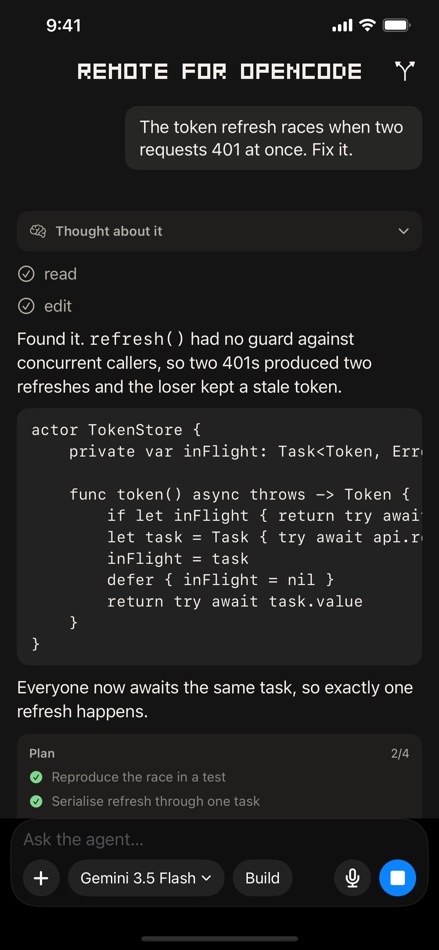
Remote for OpenCode connects your iPhone to the OpenCode coding agent running on your own Mac, so you can start work, watch it happen, and approve what it wants to do, from the sofa, the bus, or anywhere else.
ZERO NETWORK SETUP
No VPN, no port forwarding, no IP addresses to type. Your devices find each other through your own iCloud account and talk directly, end-to-end encrypted. There is no server in the middle because there is no server at all.
YOUR CODE STAYS YOURS
The agent runs on your Mac, against your repositories, using your model credentials, which never leave it. Nothing is collected, no analytics, no third-party SDKs.
APPROVE FROM ANYWHERE
When the agent wants to run a command, you see the exact command and decide. Risky actions look different from routine ones, so a destructive command never gets waved through out of habit. Face ID confirms it's you.
PLAN MODE
Switch the agent to Plan mode and it cannot edit anything at all, explore a codebase and get a plan back with a hard guarantee that nothing changed.
REVIEW BEFORE YOU SIGN OFF
See every accumulated change with per-file diffs, either against your last commit or against your default branch, the way a reviewer would.
ALSO
- Watch the agent think, live
- Dictate prompts, transcribed on-device
- Send screenshots and files as context
- Run your own slash commands
- Pick any model your OpenCode is configured with
OPEN SOURCE
The iPhone app, the Mac companion, and the protocol between them are public at github.com/tjameswilliams/remote-for-opencode under the PolyForm Noncommercial license. Every privacy claim on this page is something you can verify by reading the code instead of taking it on trust.
REQUIRES a Mac running the free Remote for OpenCode companion and OpenCode. Get the companion at https://remoteforopencode.com. Not affiliated with, endorsed by, or sponsored by the OpenCode project.
Другие платформы 0
| Remote for OpenCode AgentsApp Store1K СереброВы здесь | Бесплатно |
Сейчас только в этом магазине.
История цен 0
- Текущая цена: Бесплатно
- Минимум: Бесплатно
- Максимум: Бесплатно
Отслеживайте цены Добавьте в список, чтобы получать уведомления о скидках по электронной почте или через push
Списки 0
0
-
 Remote for OpenCode Agents
Очки 0
0
Рейтинги 0
-

- Ваша оценка

Комментарии 0 ¡
Будьте первым, кто оставит комментарий
Разработчик 7
- Tim Williams
- Подписчики: 0
- Платформы: iOS Приложения (5) iOS Игры (2)
- Скидки: 0
- Списки: 0 + 0
- Очки: 2 + 28 ¡
- Рейтинги: 0
- Комментарии: 0
- Видео: 1
- RSS: Подписаться
Что нового
- Версия: 1.6
- Последнее обновление:
- Works with OpenCode 2. Update the Mac companion to 1.8 and your phone keeps working whether your Mac runs OpenCode 2 or 1.x, with nothing to set up.
Also new in 1.6:
- A roomier message box that is easier to tap, with more space between your words and the controls below them.
- Projects show their ten most recent conversations, with Show More for older ones, so a busy project no longer scrolls forever.
История версий6
- Manage your MCP servers from your phone. Add, edit, or remove the servers in OpenCode's global config, and choose which ones a new conversation starts with. A server you add connects right away.
Also new in 1.5:
- New Chat: start a conversation that belongs to no project. It runs in a scratch folder on your Mac, so nothing the agent writes lands in your code.
- Ask the agent to do it: in a New Chat, the agent can add or remove an MCP server for you.
- Scheduled Tasks and MCP Servers now sit in the launcher list, so the top bar is no longer cramped.
Update the Mac companion to 1.7 for the new features. - Say yes once. When your agent asks permission, you can now allow it for this folder, the whole project, this command, or every command like it, for this conversation or saved to the project so it never asks again. Several asks waiting show as one card with a count instead of a stack to chase.
Also new in 1.4:
- Text files you attach (JSON, logs, code) reach the model as text, so they no longer fail the turn.
- Steadier connections: the Mac companion shares one event feed per OpenCode instance, so a phone reconnecting over a flaky network can no longer stall everything behind it.
- Mac companion 1.6 adds a sidebar that follows a new conversation as OpenCode names it, and a chip for large pasted text. - Scheduled tasks: ask your Mac to run a prompt on a schedule, a nightly test run or a Monday morning dependency check, and it runs while you are away. Approvals and results reach your phone exactly as they do for a live turn, and a task that missed its time while the Mac was asleep says so.
Also new in 1.3:
- The home screen groups every conversation under its project, with the freshest project already open.
- Long conversations open on their newest turn at once instead of scrolling in from the top.
- The context meter now reads the current step rather than the session total, and shows a ring at a glance.
- The Mac companion's new Model Sources keeps OpenCode's model list in step with your own OpenAI-compatible endpoints. - Choose your tools: a new menu in the composer turns each MCP server on or off per conversation, so a thread only carries the tools it needs and your context stays lean. Your choice rides with the session and follows you across devices.
Also new in 1.2:
- See how full the agent's context window is, live while a turn runs.
- The transcript renders markdown tables properly.
- Select and copy your own prompts straight out of the history. - Your agent's work is now live in the app, even when it starts somewhere else.
- Live sessions: a session you drive from OpenCode in a terminal on your Mac now streams into the app as it happens, with the prompt, the agent's progress, and the finished diff.
- Code previews: when the agent writes or edits a file, the code appears in the conversation as a syntax-highlighted block you can expand.
- Add any folder as a project: pin a folder on your Mac as a place to start sessions, straight from your phone, and remove it with a swipe.
- Fresher lists: sessions and projects now refresh automatically when you return to the app, alongside the existing pull-to-refresh. - 1.0
Дополнительная информация
- Дата выпуска:
- Категория:
Приложения для iOS›Инструменты разработчика - Операционные системы:
iPhone,iOS 17.0 и выше - Размер:
5 Mb - Поддерживаемые языки:
Английский - Возрастные ограничения:
4+ - App Store Рейтинг: ¡
0
 https://remoteforopencode.com
Оценка AppAgg
1 260
Примерная оценка AppAgg для
Remote for OpenCode Agents
Разработчик: Tim Williams
1 260 Серебро
Более высокая оценка обычно означает лучшие результаты по показателям AppAgg.
На основе: популярности · оценок пользователей · актуальности · скидок · данных магазинов · активности сообщества
Пересчитывается ежедневно на основе актуальных данных AppAgg.
Бейдж для сайта:  Скопировано!
Кратко
Remote for OpenCode Agents Короткий URL: Скопировано!- App Store
На AppAgg можно следить за приложением «Remote for OpenCode Agents» от Tim Williams. Платформа — iOS, категория — Инструменты разработчика. Оценка AppAgg: 1 260 (Серебро). Очки приложения — подтверждённые: 0; косвенные: 0. Публичных списков с приложением: 0. Пользователей, сохранивших его в приватные списки: 0. Пользователи AppAgg пока не оценили приложение. Подтверждённые очки отражают переходы авторизованных пользователей AppAgg в магазин; косвенные очки основаны на данных магазинов. AppAgg учитывает публичные списки с приложением или игрой и пользователей, сохранивших приложение или игру в приватные списки. Приложение впервые выпущено . Последнее обновление приложения: . Сейчас приложение доступно бесплатно. Приложение доступно на следующих языках: Английский. Посмотрите историю цен, добавьте приложение в список или подпишитесь на разработчика. Следите за будущими скидками и обновлениями приложения через RSS-канал. AppAgg не размещает и не распространяет это приложение. Все связанные с приложением товарные знаки, логотипы и снимки экрана принадлежат их владельцам.

