
ที่บันทึกไว้
เลือกชื่อที่จะแสดงในเมนูที่บันทึกไว้ของคุณ
เสร็จแล้ว
| ผู้พัฒนา: | Abdullah Anwar (5) | ||
| ราคา: | $4.99 | ||
| การประเมิน: | 1,120 เงิน | ||
| การจัดอันดับ: | 0 | ||
| ความเห็น: | 0 โพสต์ความคิดเห็น | ||
| รายการ: | 0 + 1 | ||
| แต้มแล: | 0 + 0 ¡ | ||
| +1 แต้มแล | |||
คำอธิบาย

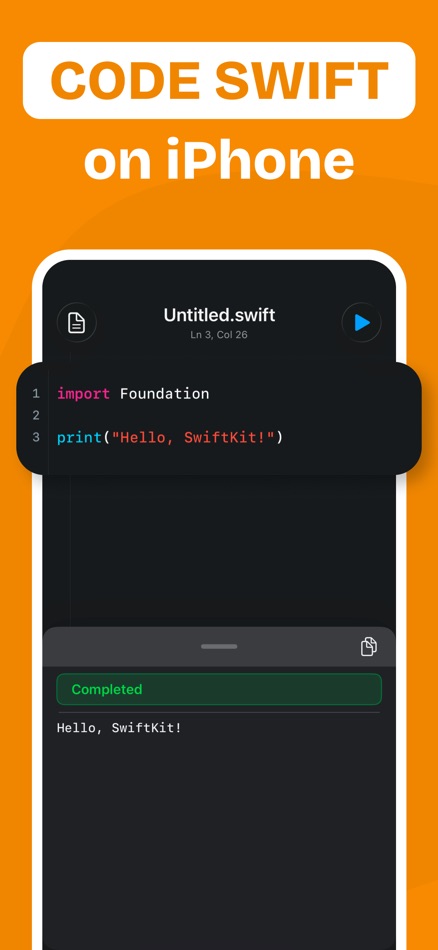
SCode gives you a lightweight Swift coding workspace built for quick practice, testing, learning, and experimentation. Write code in a focused editor, run real Swift, review output, and fix errors without needing a full desktop setup.
• Code Anywhere
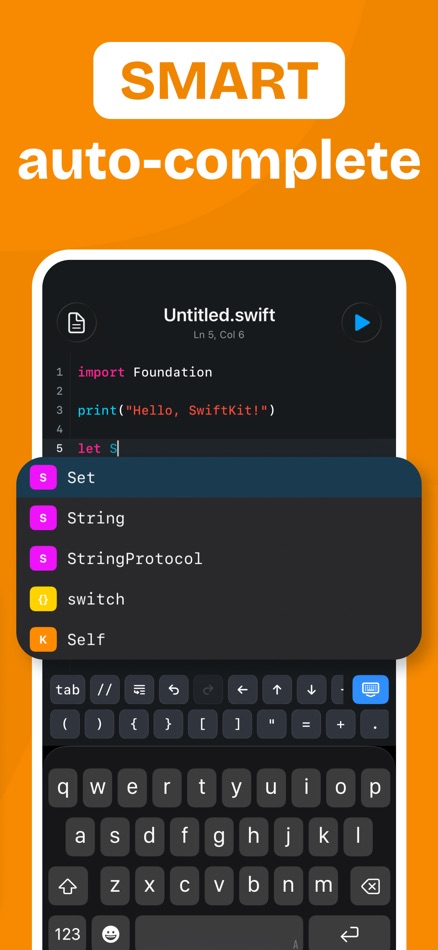
Write Swift in a clean mobile editor with syntax highlighting and autocomplete support.
• Run Real Swift
Compile and test Swift code directly from your device, so you can try ideas quickly wherever you are.
• Choose Your Compiler
Switch between supported Swift compiler versions and test how your code behaves across different Swift environments.
• Clear Output & Diagnostics
Review console output, compile errors, runtime errors, warnings, and diagnostics in a readable format.
• Import & Export Swift Files
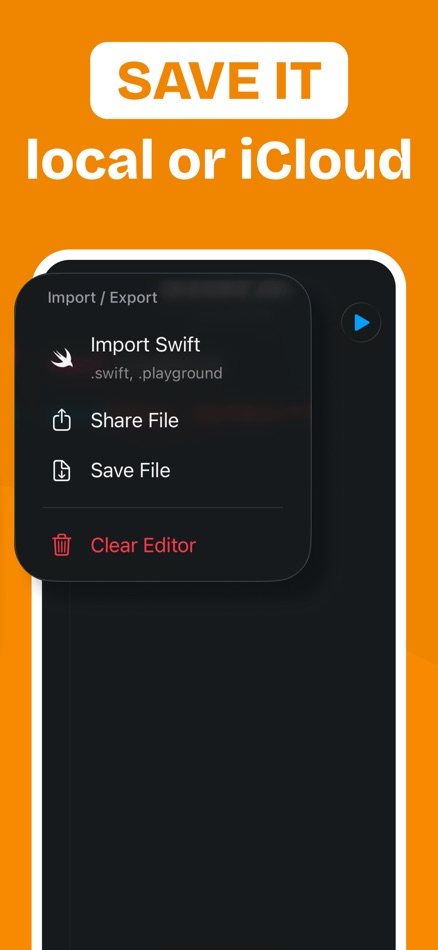
Open .swift files, edit your code, and save or share polished files when you are done.
• Custom Editor Settings
Adjust themes, font size, tabs, line wrapping, and editor behavior to match the way you like to code.
• Built for Practice and Learning
SCode is ideal for developers, students, interview practice, tutorials, quick experiments, and anyone learning Swift.
How SCode Works
1. Write your Swift code in the editor.
2. Choose your compiler version.
3. Run your code and review the result.
SCode helps you stay close to your ideas. Whether you are testing a small function, learning a new Swift concept, or practicing code on the go, you can write and run Swift with a simple, focused workspace.
Download SCode and start coding in Swift from anywhere.
DISCLAIMER: SCode is an independent app and is not affiliated with, endorsed by, or associated with Apple Inc.
Privacy Policy: https://925apps.com/privacy
Terms of Use: https://925apps.com/terms
โฆษณา
ภาพหน้าจอ


ประวัติราคา
- ราคาปัจจุบัน: $4.99
- ต่ำสุด: $4.99
- มากที่สุด: $4.99
ติดตามราคา เพิ่มลงในรายการเพื่อรับการแจ้งเตือนส่วนลดทางอีเมลหรือพุช
การประเมิน AppAgg
1,120
การประเมิน AppAgg โดยประมาณสำหรับ
SCode - Code Editor & Compiler
ผู้พัฒนา: Abdullah Anwar
1,120 เงิน
การประเมินที่สูงขึ้นมักหมายถึงสัญญาณบน AppAgg ที่แข็งแกร่งขึ้น
อิงจาก: ความนิยม · คะแนนจากผู้ใช้ · ความสดใหม่ · ดีล · ข้อมูลร้านค้า · กิจกรรมชุมชน
คำนวณใหม่ทุกวันจากข้อมูล AppAgg ล่าสุด.
URL แบบสั้น: คัดลอกแล้ว!
มีอะไรใหม่
- เวอร์ชัน: 1.0
- อัปเดตล่าสุด:
ข้อมูลเพิ่มเติม
- วันที่วางจำหน่าย:
- หมวดหมู่:
แอปสำหรับ iOS›เครื่องมือ - ระบบปฏิบัติการ:
iPad,iPhone,iOS 17.0 และสูงกว่า - ขนาด:
19 Mb - ภาษาที่สนับสนุน:
English - การจัดประเภทเนื้อหา:
4+ - App Store คะแนนโดย:
0 - เว็บไซท์:
 https://925apps.com/
ผู้พัฒนา
- Abdullah Anwar
- ผู้ติดตาม: 0
- แพลตฟอร์ม: iOS แอป (4) iOS เกม (1)
- ลดราคา: 0
- รายการ: 0 + 1
- แต้มแล: 0 + 2 ¡
- การจัดอันดับ: 0
- ความเห็น: 0
- วิดีโอ: 0
- RSS: ติดตาม
รายการ (0)
0
- SCode - Code Editor & Compiler
แต้มแล (0)
0
การจัดอันดับ (0)
0
ความเห็น (0)
เป็นคนแรกที่แสดงความเห็น
สรุป
SCode - Code Editor & Compiler URL แบบสั้น: คัดลอกแล้ว!- แชร์
- App Store
“SCode - Code Editor & Compiler” เป็นแอปหมวด เครื่องมือ สำหรับ iOS แอปนี้พัฒนาโดย “Abdullah Anwar” เปิดตัวครั้งแรกเมื่อ และอัปเดตล่าสุดเมื่อ ปัจจุบันแอปราคา $4.99 ราคาต่ำสุดที่บันทึกไว้ของแอปคือ $4.99 และราคาสูงสุดคือ $4.99 แอปนี้ยังไม่ได้รับคะแนนบน AppAgg แอปนี้รองรับภาษาต่อไปนี้: English AppAgg ติดตามประวัติราคา คะแนน และรีวิวจากผู้ใช้ของแอป “SCode - Code Editor & Compiler” AppAgg ไม่ได้โฮสต์หรือแจกจ่ายแอปนี้ เครื่องหมายการค้า โลโก้ และภาพหน้าจอทั้งหมดที่เกี่ยวข้องกับแอปเป็นของเจ้าของแต่ละราย ติดตามส่วนลดและอัปเดตในอนาคตของแอปผ่าน ฟีด RSS
คล้ายกัน
-
- Code Editor - Compiler & IDE
- iOS แอป: เครื่องมือ โดย: Rhythm Software
- ฟรี
- รายการ: 0 0 0
- แต้มแล: 1 + 43 4K · เงิน เวอร์ชัน: 1.1.7 Code editor is optimized text editor focused on coding. It contains necessary features including syntax highlight, code assist, auto-complete, compile and execute, etc. Features: - ...
-
- AI Code Editor & Compiler
- iOS แอป: เครื่องมือ โดย: MEHMET CANKER (TR)
- * ฟรี
- รายการ: 0 0 0
- แต้มแล: 0 + 0 950 · เงิน เวอร์ชัน: 82.2.0 In today s fast-paced digital era, coding on-the-go is essential for developers. AI Code Editor is your ultimate solution for mobile coding, offering a seamless and intuitive ...
-
- Code Editor
- iOS แอป: เครื่องมือ โดย: Rainbow Factory LTD - Sticky Notes
- ฟรี
- รายการ: 1 + 1 0 0
- แต้มแล: 2 + 96 4K · เงิน เวอร์ชัน: 26.0.2 Introducing the Visual Code Editor for iOS, the ultimate solution for coding on-the-go. This powerful app is designed to provide you with a seamless coding experience that is both ...
-
- Code Runner: Compiler
- iOS แอป: เครื่องมือ โดย: Omer Faruk BAGCI
- ฟรี
- รายการ: 1 0 0
- แต้มแล: 1 + 3 2K · เงิน เวอร์ชัน: 1.1.0 Code Runner turns your phone into a real compiler and code editor. Write code, tap Run, and get real output in seconds powered by a secure cloud sandbox, not a fake preview. Whether ...
-
- Code - Editor Git and Terminal
- iOS แอป: เครื่องมือ โดย: Morella Folesani
- ฟรี
- รายการ: 0 0 0
- แต้มแล: 0 + 33 2K · เงิน เวอร์ชัน: 1.0.1 Code, Work Anywhere! This app has an entire developer suite embedded in this app, and it's fully native! ## Code Editor - Various Themes - Colored Syntax - Autocompletion - Minimap - ...
-
- Textastic Code Editor
- iOS แอป: เครื่องมือ โดย: Alexander Blach
- ฟรี
- รายการ: 14 + 12 0 0
- แต้มแล: 20 + 2,509 14K · แพลทินัม เวอร์ชัน: 10.9.7 Textastic is a comprehensive and versatile text and code editor for iPad and iPhone. It supports syntax highlighting for more than 80 programming and markup languages. Connect to SFTP,
-
- Buffer Editor - Code Editor
- iOS แอป: เครื่องมือ โดย: Blakzero Oy
- ฟรี
- รายการ: 5 + 5 0 0
- แต้มแล: 8 + 158 6K · ทอง เวอร์ชัน: 21.4 Buffer Editor is a POWERFUL code and text editor that lets you easily develop software, view code or take notes on the go. Enjoy an editing experience that is both versatile and ...
-
- PythonIDE: Python Code Editor
- iOS แอป: เครื่องมือ โดย: 文禄 张
- * ฟรี
- รายการ: 0 + 1 0 0
- แต้มแล: 5 + 37 17K · แพลทินัม เวอร์ชัน: 1.7.2 PythonIDE turns iPhone and iPad into a local Python and Web development workspace. Run Python 3.14.6, build multi-file HTML/CSS/JavaScript projects, and turn code into notebooks, ...
-
- Text Editor : Code Editor
- iOS แอป: เครื่องมือ โดย: Devashy Rangpariya
- ฟรี
- รายการ: 0 + 2 0 0
- แต้มแล: 2 + 15 3K · เงิน เวอร์ชัน: 1.0.2 Text Editor is a fast, modern, and powerful code editor built for developers, students, and creators who want a professional coding experience on iPhone, iPad, Mac, and Vision Pro. ...
-
- Pad Code AI - Code Editor
- iOS แอป: เครื่องมือ โดย: Hung Tien Pham
- ฟรี
- รายการ: 0 + 2 0 0
- แต้มแล: 2 + 2 1K · เงิน เวอร์ชัน: 1.0.1 Pad Code AI is a powerful, local-first code editor and IDE designed specifically for iPad and iPhone. Built to deliver a desktop-class VS Code-style experience, it allows developers, ...
-
- Web IDE - AI Code Editor
- iOS แอป: เครื่องมือ โดย: Tahmiez Sandaim
- ฟรี
- รายการ: 0 + 1 0 0
- แต้มแล: 4 + 14 2K · เงิน เวอร์ชัน: 8.5.66 Web IDE turns your iPhone or iPad into a full-featured, portable code editor, powered by AI. Whether you're learning to code or shipping real projects, Web IDE gives you a ...
-
- Visual Code Editor - vCode
- iOS แอป: เครื่องมือ โดย: Devang Samirbhai Shah
- ฟรี
- รายการ: 0 + 1 0 0
- แต้มแล: 2 + 5 2K · เงิน เวอร์ชัน: 1.3 The power of a desktop code editor, in your pocket. vCode is a visual code editor and complete coding studio for iPhone and iPad write code, run it instantly, and see the output. Fully
-
- PHP Editor - compiler & run
- iOS แอป: เครื่องมือ โดย: Merbin Joe
- ฟรี
- รายการ: 0 0 0
- แต้มแล: 0 + 0 1K · เงิน เวอร์ชัน: 2.4 PHP Compiler Description: A PHP compiler is a crucial tool in the development workflow, designed to transform human-readable PHP source code into machine-executable code. It plays a ...
-
- MobileCode Code Editor
- iOS แอป: เครื่องมือ โดย: Mark Mendell
- ฟรี
- รายการ: 0 + 1 0 0
- แต้มแล: 0 + 5 1K · เงิน เวอร์ชัน: 1.5 MobileCode is a code editor that completely rethinks how coding should work. Why are we tapping around on lines way too long for our screen? Why are we punished severely for typos? Why

