
已保存
选择将在你的已保存菜单中显示的名称。
完成!
| 开发者: | Codedatda.casa (8) | ||
| 价格: | * 免费 | ||
| 评价: | 600 青铜 | ||
| 排名: | 0 | ||
| 评论: | 0 发表评论 | ||
| 列表: | 0 + 0 | ||
| 积分: | 0 + 0 ¡ | ||
| +1 积分 | |||
说明

Vibe coding, off the desk. Talk to your agent from the couch. Approve its actions from the kitchen. Watch it work from anywhere on your network.
NOT JUST VS CODE — NOW IN BETA
SofaCode started as a VS Code remote. Now it drives your agent in the VS Code editor you actually use: Cursor, VS Code Insiders, VSCodium, Devin (formerly Windsurf) and Antigravity (Google's IDE) — all in beta, right alongside stock VS Code. Same deck, same voice, same real approvals, whichever one you open. (Copilot Chat features apply only where Copilot Chat itself runs: VS Code and Insiders.)
HOW IT WORKS
A small companion daemon runs on your computer next to VS Code — free for Mac, Windows and Linux at https://sofacode.app. The app connects to it directly over your own Wi-Fi, VPN, or mesh network. Nothing routes through a cloud: no relay servers, no accounts, and your code, voice, and sessions never leave your network.
WHAT YOU CAN DO
• Push-to-talk dictation straight into your coding agent
• Live deck that shows working / needs-you / error states at a glance
• Approve or deny permission prompts remotely — real approvals, not keystroke hacks
• Full chat with code boxes, task checklists, and session transcripts
• Drive all three assistants alike — skills, model picker, usage, tasks, permissions and more work the same for Claude Code, GitHub Copilot Chat and OpenAI Codex
• Browse sessions across machines, switch windows, open projects
• File browser, terminal, saved prompts, themes (including LCARS), TTS read-aloud
• Works across editors — VS Code, plus Cursor, Insiders, VSCodium, Devin and Antigravity in beta
• Multiple machines and multiple devices at once
WHAT YOU NEED
A computer running VS Code with Claude Code, Codex or GitHub Copilot Chat — your own assistant subscription — plus the free SofaCode daemon. Copilot Chat can also run local models from LM Studio or Ollama. Setup takes a few minutes with QR pairing. SofaCode is an independent product and is not affiliated with OpenAI, Anthropic, GitHub, or Microsoft.
PRICING
One subscription, one week free, then $5/month or $50/year. Cancel anytime in Settings.
Terms of Use (EULA): https://www.apple.com/legal/internet-services/itunes/dev/stdeula/
Privacy Policy: https://sofacode.codedatda.casa/privacy.html
Your coding agent. In your comfy place.
by Codedatda.casa
广告
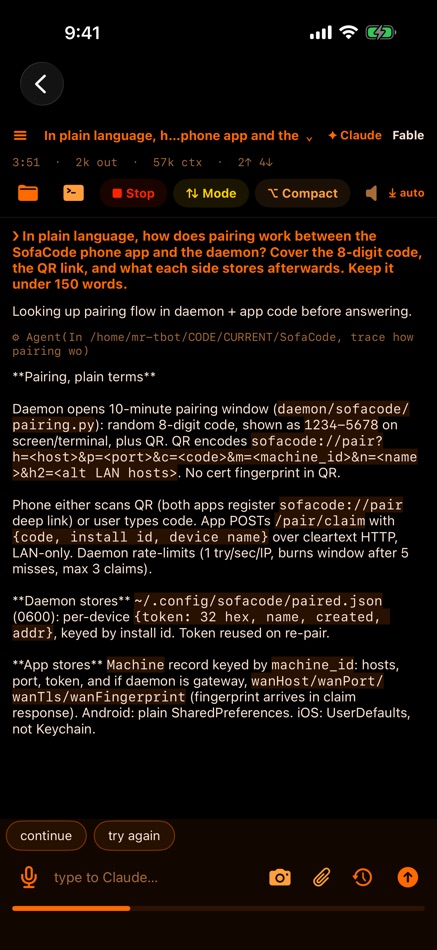
屏幕截图



价格历史
-
* 提供应用内购商品 - 目前价格: 免费
- 最小值: 免费
- 最大值: 免费
AppAgg 评分
600
AppAgg 预估评价:
SofaCode - VS Code Vibe Coding
开发者: Codedatda.casa
600 青铜
评价越高,通常表示在 AppAgg 上的信号越强。
基于: 热度 · 用户评分 · 新鲜度 · 优惠 · 商店数据 · 社区活跃度
根据最新 AppAgg 数据每日重新计算。
短网址: 已复制!
新版变化
- 版本: 2.40.0
- 最后更新:
- GitHub Copilot Chat and OpenAI Codex now do everything Claude Code does. Skills and slash commands are listed for each assistant. Codex gets a model list with a default for new sessions, usage and quota with the plan name, honest subagent counts, and its own permission card. The session bar counts each assistant separately, and the memory-file editor names the file each one reads. Needs the desktop app at 2.39.0 for the new lists and numbers.
其他信息
 https://sofacode.app
开发者
- Codedatda.casa
- 关注者: 0
- 平台: Android 应用 (6) iOS 应用 (2)
- 折扣: 0
- 列表: 0 + 0
- 积分: 0 + 0 ¡
- 排名: 0
- 评论: 0
- 视频: 0
- RSS: 订阅
列表 (0)
0
- SofaCode - VS Code Vibe Coding
积分 (0)
0
排名 (0)
0
评论 (0)
成为第一个发表评论的人
摘要
SofaCode - VS Code Vibe Coding 短网址: 已复制!- App Store
在 AppAgg 上,你可以关注由 Codedatda.casa 开发的“SofaCode - VS Code Vibe Coding”应用。适用平台:iOS;分类:软件开发工具。 AppAgg 评价:600(青铜)。 AppAgg 为该应用记录的积分:已确认 0,间接 0。 收录此应用的公开列表:0 个。将其保存到私人列表的用户:0 人。 AppAgg 用户尚未对该应用评分。 已确认积分记录已登录 AppAgg 用户前往商店的操作,间接积分则基于商店数据。 两个计数分别表示公开列表数量,以及将应用或游戏保存到私人列表的用户人数。 该应用首次发布于。 该应用最近更新于。 该应用目前可免费获取。 该应用支持以下语言:Chinese, English。 查看价格历史、将应用加入列表,或关注开发者。 通过RSS 提要关注该应用今后的优惠和更新。 AppAgg 不托管或分发该应用。 与该应用相关的所有商标、徽标和屏幕截图均归其各自所有者所有。

