
Bookmarks
Choose a title for this bookmark.
Bookmark saved
| Developer: | GitSwift LLC (3) | ||
| Price: | * Free | ||
| Score: | 14,600 Platinum | ||
| Rankings: | 0 | ||
| Comments: | 0 Add a comment | ||
| Lists: | 0 0 | ||
| Points: | 2 | ||
| +1 Point | |||
Screenshots 8

Advertisement
Summary
SwiftServer - SSH Client (iOS): free, with in-app purchases. AppAgg Score: 14,600 (Platinum). Developer: GitSwift LLC. Category: Developer Tools. App Points: 2. Public lists containing the app: 0. Users who have saved it in private lists: 0. AppAgg users have not rated the app yet. Points show how many signed-in AppAgg users went to the store. AppAgg counts public lists containing an app or game and users who have saved it in private lists. The app was first released on . The app was last updated on . Current app rating on App Store: 4.4. Number of votes: 31. The app is available in these languages: English, Arabic, Chinese, French, German, Italian, Japanese, Russian, Spanish, Ukrainian. Explore the price history, add the app to a list, or follow its developer. Follow future deals and updates for the app via its RSS feed. AppAgg does not host or distribute the app. All trademarks, logos, and screenshots related to the app belong to their respective owners.
Your own feed on the home page
Pick your platforms for the New & Updated feed, and the home page will show only the apps and games you need.
Description

Nothing is installed on the server. SwiftServer connects over the SSH access you already have. No agent, no daemon, no account.
MONITORING
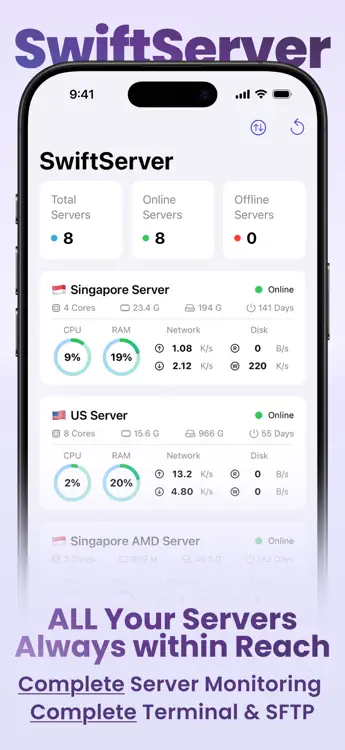
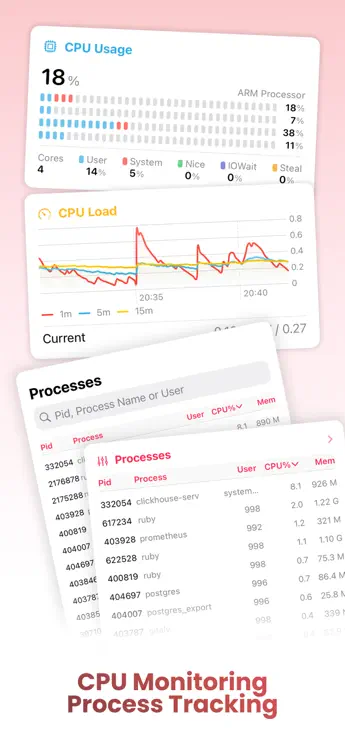
- CPU per core, load averages, and temperature
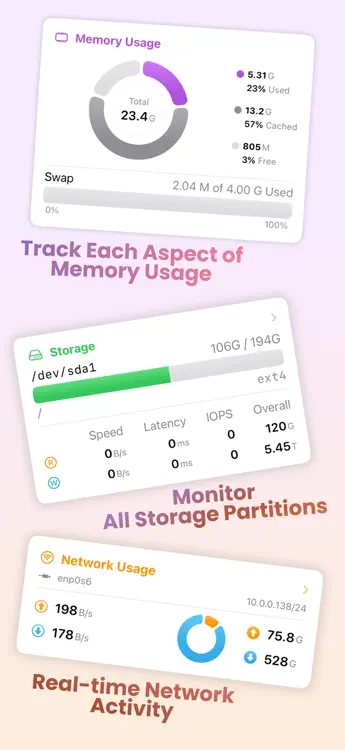
- Memory as used, cached, free, and swap
- Live process table, sortable and searchable
- Network speed and totals, with vnStat history by hour, day, month, and year
- Storage per volume with disk I/O speed, latency, and IOPS
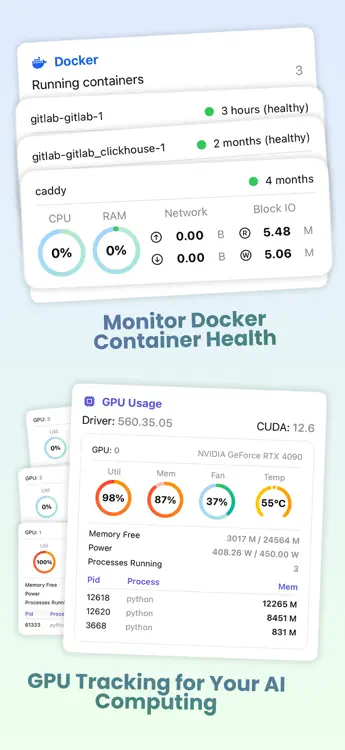
- NVIDIA GPU: utilization, memory, fan, temperature, power, and compute processes
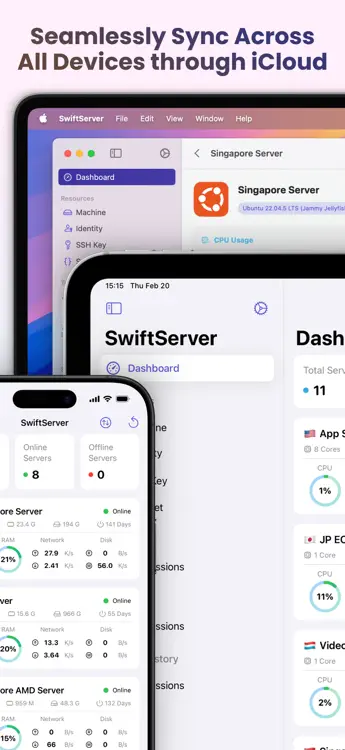
- Public IP and location per server. Global View maps every server with live latency.
- Linux, macOS, and Windows on one dashboard
- Widgets, Live Activities, and the Dynamic Island
TERMINAL
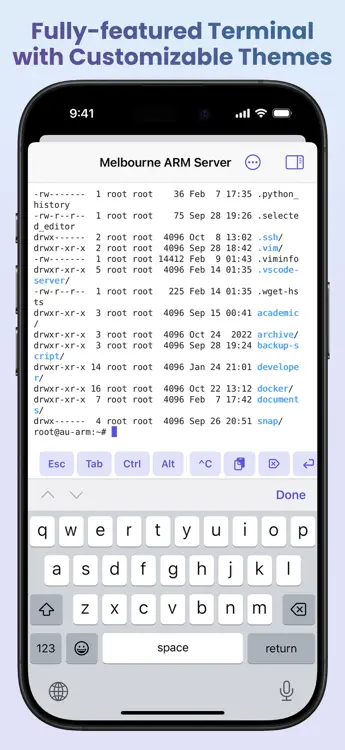
- SSH and Mosh sessions. Mosh keeps the shell alive through network changes and sleep.
- Keyboard bar with Esc, Tab, Ctrl, Alt, arrows, and ^C on iPhone and iPad. Hardware keyboards work too.
- Snippets: save a command once, run it in any session, or across many machines with a result per machine
- 518 color themes with separate light and dark picks, nine bundled monospace fonts, and custom font import
- Mac: Local Shell opens a terminal on your own Mac in the same window
DOCKER
- Speaks the Docker Engine API over the SSH connection. No Docker port is exposed.
- Overview: engine status, counts, reclaimable space, and live CPU and memory across containers
- Containers: logs, processes, inspect. Create, start, stop, restart, pause, kill, remove.
- Compose projects: up, down, start, stop, restart, pull, and logs
- Images: pull with progress, remove, prune. Volumes and networks: inspect, remove, prune. Live event stream.
SFTP
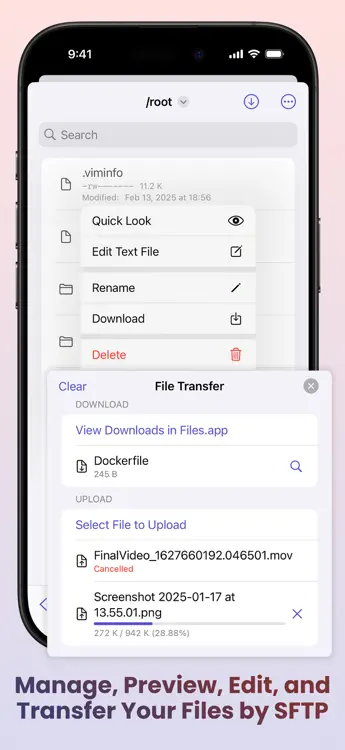
- Browse, upload, download, rename, delete, and create files and folders
- Copy files from one server to another without routing them through your device
- Quick Look preview and a text editor with save
NETWORKING
- Port forwarding: local, remote, and dynamic SOCKS rules with auto start and a built-in browser on iPhone and iPad
- Jump hosts: reach machines behind a bastion through one hop or a chain, each with its own credentials and host key check
- Connection proxies: SOCKS5 and HTTP CONNECT profiles, per machine or per forwarding rule
KEYS AND SECURITY
- Password, SSH key, and keyboard-interactive login, including two-factor prompts
- Generate Ed25519, ECDSA, or RSA keys on the device, or import existing keys
- Host key fingerprint on first contact. A changed host key stops the connection.
- Secrets stay in the device Keychain, behind Face ID, Touch ID, or passcode if you choose
- Built on Traversio, our open-source SSH engine written in Swift
ICLOUD SYNC AND PRIVACY
- Machines, identities, keys, snippets, forwarding rules, proxy profiles, and trusted host keys sync through your own iCloud. Passwords and private keys go only through iCloud Keychain, end-to-end encrypted.
- No accounts and no SwiftServer servers. What you save stays on your devices and in your iCloud.
- The only outbound request is the IP lookup, sent from your server to ipinfo.io. The result is stored on your device only.
FREE AND PREMIUM
The core of SwiftServer is free: saved machines and keys, live server status, the full terminal with Mosh and snippets, SFTP, port forwarding, Docker browsing, widgets, and Global View.
Premium adds unlimited monitored servers, iCloud sync, unlimited forwarding sessions, jump hosts, proxies, Docker management, terminal themes and fonts, SFTP preview and editing, and city, organization, and map pin for IP location. Premium is a monthly or yearly subscription, each with a free trial, or a one-time lifetime purchase. One purchase covers iPhone, iPad, and Mac.
Support: support@gitswift.com
Terms of Use: https://swiftserver.app/terms
Privacy Policy: https://swiftserver.app/privacy
From the developer
Are you the developer?
Your news at the top of the page, sent to followers by e-mail
Other platforms 0
| SwiftServer - SSH ClientApp Store14K PlatinumiPhoneiPadmacOSIn-App Purchases $1.99 – $34.99 | Free |
Only in this store right now.
Price History 0
- Current price: Free
- Minimum: Free
- Maximum: Free
Track prices Add to a list to get discount alerts by email or push
Lists 0
-
 SwiftServer - SSH Client
Points 2
-

- +1 Point
-
- 2,000 Sam
- +1
-
- 242 Lance Eliakim Sotto
- +1



Rankings 0
-
- Your rating
Comments 0 ¡
Be the first to comment
Developer 3
- GitSwift LLC
- Followers: 0
- Platforms: iOS Apps (2) iOS Games (1)
- Deals: 0
- Lists: 0 0
- Points: 2
- Rankings: 0
- Comments: 0
- Videos: 0
- RSS: Subscribe
What's new
- Version: 2.2.3
- Last Updated:
- - Fixed a Docker connection error
Version history15
- - Full support for iPhone Duo
- Added a terminal button to machine details for one-tap connections
- Swipe to duplicate or close sessions on iOS, and keep sessions running after closing the main window on macOS
- Fixed the terminal keyboard layout and several display issues in Docker, the dashboard, widgets, and Settings - - Improved the terminal keyboard on iPhone and iPad
- Added colorized Docker logs with level filtering, search, and follow
- Fixed a number of bugs - - Added a menu bar panel on Mac that keeps monitoring your machines after the last window closes
- Added a shell into running Docker containers, opened as a regular terminal session
- Added live Compose logs and editing of compose files in the SFTP editor
- Added a session-wide switch to pause machine monitoring
- Added machine restart from the status detail page
- Added opening a companion SFTP or terminal session at the current directory
- Added Save Image when sharing the Global View snapshot on iOS
- Fixed a machine disappearing from the dashboard after enabling a jump host before choosing a hop
- Fixed terminal keyboard focus after a sidebar selection on macOS 27 and iPadOS 27
- Updated for iOS 27, iPadOS 27, and macOS 27 - - Added support for creating Docker containers
- Added explanations of Docker connection modes
- Fixed OpenWrt monitoring errors
- Fixed an issue where the macOS sidebar did not retain its collapsed state
- Fixed duplicate text when switching input sources in the terminal - - Fixed terminal errors
- - Performance and stability fixes
- - Stability improvements
- - Added support for Windows server monitoring
- Added Mosh terminal connections
- Completely revamped the Docker panel with a new real-time resource overview and enhanced monitoring and management for containers and other resources
- Improved the global server view with support for exporting map snapshots
- Added an option to turn off port forwarding suggestions in the terminal
- Added support for opening terminals in separate windows on macOS
- Added IPv6 and dual-stack support to IP location information
- Improved dashboard loading, real-time monitoring, and navigation performance, with fixes for connection, syncing, and stability issues - - Fixed duplicated spaces when typing in the terminal
- Fixed widgets not showing the server region - - Fixed an issue where the app could become unresponsive.
- Improved SSH connection stability during network changes.
- Added optional Terminal Debug Logs to help diagnose terminal issues.
- Added faster entry points from widgets and macOS Dock recent connections.
- Improved SFTP folder tapping on iOS, settings controls, and localization polish. - - Fixed an issue that could prevent SwiftServer from opening data after an update
- - Fixed a crash that could occur while fetching server status
- Improved SSH connection stability and compatibility
- Refined Dashboard background styles
- Fixed Widget refresh issues - - Stability fixes
- SwiftServer 2.0.0 is here! This version brings more stable SSH connections and fixes a series of issues, providing a brand-new, fast, and secure SSH experience.
New Features:
- New SSH engine for more stable connections
- Jump Server support
- Redesigned Global View
- Widgets and Live Activities
- Server tag filtering
- Custom status page layout orchestration
- SFTP file transfer between servers
Fixes:
- Improved terminal experience
- iOS terminal supports text selection and copying
- Improved latency display and dashboard network unit settings
- Enhanced SFTP file transfer features
- Improved authentication prompts, disconnection handling, and session cleanup
Feedback: support@gitswift.com - - Terminal now supports custom fonts
- Fixed color issue in terminal sidebar under dark mode
Additional Information
 https://swiftserver.app
AppAgg Score
14,600
Estimated AppAgg Score for
SwiftServer - SSH Client
Developer: GitSwift LLC
14,600 Platinum
Higher scores usually reflect better results across AppAgg’s indicators.
Based on: popularity · ratings · freshness · deals · store data · community signals
Recalculated daily using fresh AppAgg data.
Website badge:  Copied!
You may also like
Recent discussionsMore →
 AppHOLD SPEAKER SIGNAL This app does not work on my iPhone it send a signal once and stops. I will make some more effort to...
 jeffrey wales30
 AppDearTimeToYou 17.Nov.2026 LIFETIME Plus FREE Download and open the app Tab the continues. Tab My Child at bottom r...
 CrashTestDanny7,414
 AppEdit Text on Photos: Glyphswap Hi everyone, I just released Glyphswap: a photo editor that changes the text in any photo (dates, si...
 yunusa obadoba56
 AppMillpond: Water Tracker Ad free, doesn't hide useful things behind a subscription. Treats users like adults rather than dyin...
 MyAugur50
 AppCrowdiume Very cool app! Allow to post some anonymous dilemmas
 Dor Levi30
 AppCalm I used this app for my daily meditation. And boy! Do I feel different. Just every day interactions w...
 ManifestQuest150
 AppScanChamp: Document Scanner Easy and fast PDF scanner app, I like that it's private, without upload anywhere
 Nikita59
 AppHundy: Push-Up Counter I love the app challenges; it should coming in the new release
 Sport Buddy50
 AppGlory Gym Timer Hello, Im trying to get a hold of the developer, so I can add my jiu-jitsu academy to the app
 James Johnson Jr20
 AppFurrVenture: Places & Events The map makes it easy to find places to take your dog, and details like leash rules and size restric...
 Vukan Vukotic55
Recently viewed
AppAgg users ¡More →
Weekly questsSign in to get 3 quests every week and earn XP for them.

