
| 개발자: | Anyi County Bingzhiyi Trading Co., Ltd. (13) | ||
| 가격: | $2.00 | ||
| 순위: | 0 | ||
| 리뷰: | 0 리뷰 작성 | ||
| 목록: | 0 + 1 | ||
| 포인트: | 0 + 0 ¡ | ||
| App Store | |||
기술

[Gallery]
The Gallery displays a thumbnail for each of your drawings. Tap a thumbnail to open it for viewing or editing. Tap the title below the thumbnail to enter a new title.
Tap the + button in the upper right corner of the screen to create a new drawing.
[Exporting]
Tap Select to enter selection mode.
In selection mode, tap on thumbnails to select them (or deselect them). When one or more drawings are selected, tap Email to email them.
Tap the Trash button to delete the selected drawings.
Tap Done to exit selection mode.
[Drawing]
Use the Edit menu to cut, copy, paste, delete, and alter the selection.
Use the Arrange menu to move objects backwards and forwards in the stack, group and ungroup objects, distribute objects, and align objects.
Use the Path menu to add anchors, remove anchors, outline strokes, join paths, combine paths, make masks, and place text on a path.
[Settings]
Use the Settings panel to turn the grid on and off, control the grid spacing, and indicate whether you want drawn objects to snap to the grid, snap to points in existing paths, or snap to the edges of existing paths. You can also turn rulers on and off, change the units of your drawing, and modify the dimensions of your drawing.
When Isolate Active Layer is enabled, you can only edit the active layer. The other layers in your drawing will be partially hidden. This makes it easy to edit the content of one layer without accidentally touching something in another layer.
When Outline Mode is enabled, you can only see the outlines of the objects in your drawing. This makes it easier to select objects that are obscured by other objects. It also significantly reduces rendering time for complex drawings.
[Zooming]
Use the standard iOS pinch gesture to zoom in and out. Once you’ve started a pinch gesture, you can lift one finger to move the canvas around without zooming.
If your drawing units are set to pixels, VectorPaint displays the drawing at actual pixel size when the zoom level is 100% (as indicated in the navigation bar).
If you’re using units that map to a physical measurement (inches, centimeters, etc.), VectorPaint displays the drawing at print size when the zoom level is 100%.
[Tools]
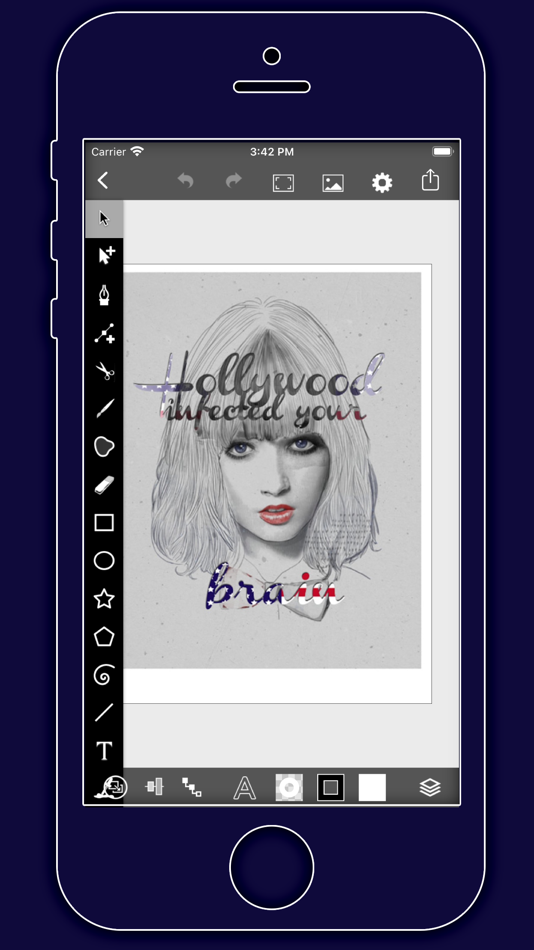
Tool PaletteVectorPaint provides a number of tools for creating and modifying your drawing.
The tool palette floats above the canvas. Drag it to move it around the screen. Flick it out of your way if necessary.
You can modify the behavior of many tools by holding down a second finger on the canvas after you start dragging. If you apply the second touch before you start dragging, you will zoom the canvas.
VectorPaint provides a number of tools for creating and modifying your drawing.
The tool palette floats above the canvas. Drag it to move it around the screen. Flick it out of your way if necessary.
[Layers]
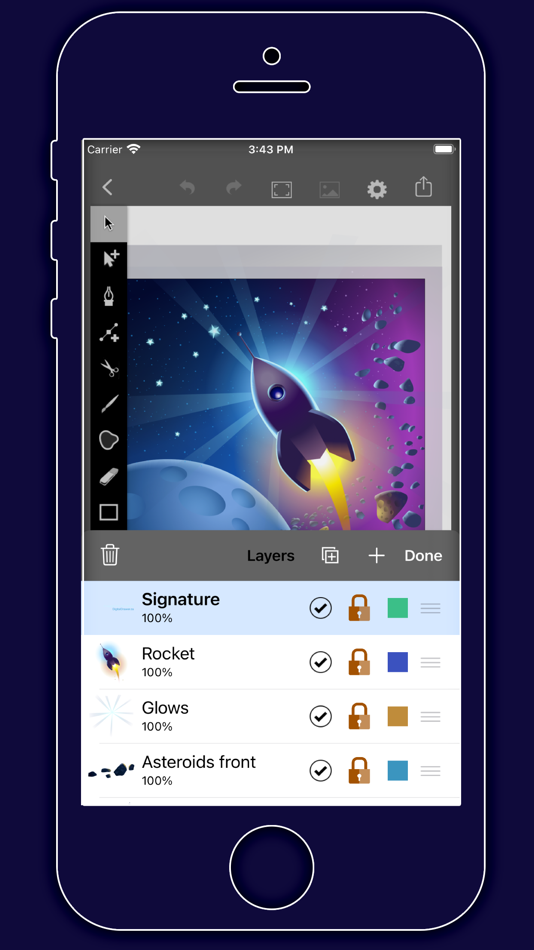
VectorPaint upports an unlimited number of layers. Layers are useful for organizing complex drawings. Each component of the drawing can be on its own layer, making it much easier to edit.
You can delete, duplicate, rearrange, rename, lock, and hide layers. You can also control the transparency of each layer.
Tap the Layers button in the toolbar to view the layers in your drawing.
[Masks]
A mask is a path, compound path, or text object that clips the contents of other drawing elements.
To create a mask, select the objects that you want to mask and the path or text object that you want to use as the mask (the masking object must be the topmost selected object). Choose Mask from the Path menu.
To unmask objects, select the masked object and choose Unmask from the Path menu.
A masking path can have a fill and stroke just like any normal path.
스크린샷



새로운 기능
- 버전: 1.0.5
- 업데이트:
- VectorPaint Version 1.0.5 Update - Full iOS 26 Adaptation, Enhanced Creative Experience
Dear VectorPaint User,
We are thrilled to announce the release of the new VectorPaint version 1.0.5! The key highlight of this version is the full adaptation to the latest iOS 26 system, ensuring a seamless and smooth vector drawing experience on your iPad. Whether you are a professional illustrator or a creative enthusiast, VectorPaint continues to provide efficient creative tools with its desktop-class features and Metal-accelerated rendering technology.
Core Update: Perfect iOS 26 Adaptation
System Compatibility Optimization: Fully adapted to iOS 26's latest APIs and performance frameworks, ensuring stable operation and seamless integration in the iOS 26 environment. Experience faster launch times and lower power consumption on your iPad Pro, iPad Air, or any other device supporting iOS 26.
Performance Boost: Leveraging iOS 26's graphics rendering optimizations, the Metal engine rendering speed is further increased by up to 10x, making drawing and editing complex vector graphics incredibly smooth. Maintain zero lag even when working with multi-layered, high-resolution illustrations.
Interface & Interaction Improvements: Adapted to iOS 26's new gestures and multitasking features, supporting smarter dragging and hiding of the floating tool panel, enhancing productivity in multi-window workflows.
Enhancements and Optimizations Based on Existing Features
VectorPaint remains focused on professional vector drawing as its core. In this version, we have further refined the core features to make your creative process more efficient and intuitive. Here are the highlights based on the application's existing powerful toolset:
Unlimited Layer Management: Continues to support an unlimited layer system. You can easily delete, copy, reorder, name, lock, hide layers, and precisely control transparency. New iOS 26-exclusive Isolate Active Layer mode allows for more focused editing in complex drawings, avoiding distractions.
Professional Drawing Tools: The floating tool panel can be freely dragged or quickly dismissed. Supports cutting, copying, pasting, deleting, and modifying selections. Path tools are further optimized, including adding/removing anchor points, stroking paths, joining/combining paths, creating masks, and placing text on a path. Outline Mode helps you view and edit vector outlines more clearly.
Object Arrangement & Editing: Enhanced object arrangement functions, supporting moving backward/forward, grouping/ungrouping, distributing, and aligning objects. iOS 26 gesture support makes these operations more precisely responsive.
Gallery & Export: The gallery view is cleaner, supporting quick creation of new drawings, selecting, emailing exports, or deleting existing works. Export formats are compatible with iOS 26's sharing ecosystem, ensuring your work is easily transferred to other apps or devices.
Custom Settings: Comprehensive optimization of grid controls (on/off, spacing, snap options), rulers, drawing units, and size settings. Supports 100% zoom view at actual pixel size or print size, combined with iOS 26's pinch gesture for infinite, lossless zooming.
Masks & Advanced Features: Masking functionality for paths, compound paths, or text objects is more powerful, allowing easy clipping of drawing elements and supporting quick toggling of mask/unmask, ideal for complex illustration design.
These updates are based on VectorPaint's core design philosophy – bringing a desktop-class vector drawing experience to iPad users. We have listened to user feedback to further improve the application's stability and user-friendliness, ensuring every creator can focus on inspiration rather than technical obstacles.
Update now and open a new era of vector creation with iOS 26!
가격
- 오늘: $2.00
- 최소: $0.99
- 최대: $3.99
가격 추적
개발자
- Anyi County Bingzhiyi Trading Co., Ltd.
- 플랫폼: iOS 앱 (13)
- 목록: 0 + 2
- 포인트: 12 + 17 ¡
- 순위: 0
- 리뷰: 0
- 할인: 1
- 동영상: 0
- RSS: 구독
포인트
0 ☹️
순위
0 ☹️
목록
0 ☹️
리뷰
첫 번째 리뷰를 남겨보세요 🌟
추가 정보
VectorPaint 단축 URL: 복사됨!- 🌟 공유하기
- App Store
당신은 또한 같은 수 있습니다
-
- Vector Drawing & Logo Design
- iOS 앱: 그래픽 및 디자인 게시자: Vector Ink LLC
- 무료
- 목록: 6 + 5 순위: 0 리뷰: 5 (1)
- 포인트: 7 + 270 (3.8) 버전: 2.6.1 Vector Drawing & Logo Design is a one-of-a-kind app putting full logo design power at your fingertips. Seamlessly and simply create custom graphics or logo designs while letting your ... ⥯
-
- Paint AI - Color Visualizer
- iOS 앱: 그래픽 및 디자인 게시자: REIMAGE AI INC.
- 무료
- 목록: 1 + 0 순위: 0 리뷰: 0
- 포인트: 1 + 933 (4.2) 버전: 1.3.2 Transform Your Space with Paint AI Discover the easiest and most innovative way to choose the perfect paint colors for your home with Paint AI, the cutting-edge app that brings your ... ⥯
-
- Paint App: AR Drawing Trace
- iOS 앱: 그래픽 및 디자인 게시자: QUYEN NGUYEN
- * 무료
- 목록: 0 + 0 순위: 0 리뷰: 0
- 포인트: 1 + 284 (4.7) 버전: 1.3.6 "AR Drawing: Sketch & Paint AR Drawing: Sketch & Paint is a creative application that lets you explore your artistic potential through augmented reality (AR) technology. Packed with ... ⥯
-
- Paint - Draw & Sketch
- iOS 앱: 그래픽 및 디자인 게시자: abedalkareem omreyh
- $0.49
- 목록: 0 + 0 순위: 0 리뷰: 0
- 포인트: 0 + 6 (4.3) 버전: 1.2 The smallest portable canvas on the Earth! A Revolutionary Drawing and Painting Experience on Your Apple Watch! Unleash your artistic side with Paint, the ultimate paint and drawing ... ⥯
-
- Paint Codex
- iOS 앱: 그래픽 및 디자인 게시자: Mitch Zavala
- * 무료
- 목록: 0 + 0 순위: 0 리뷰: 0
- 포인트: 0 + 4 (5.0) 버전: 1.7.5 Paint Codex, by Battle Servo Studios, is your all-in-one companion for miniature and model painters from weekend hobbyists to professional commission artists. Document every step of ... ⥯
-
- Paint Preview
- iOS 앱: 그래픽 및 디자인 게시자: Henrique Bersani
- * 무료
- 목록: 0 + 0 순위: 0 리뷰: 0
- 포인트: 0 + 9 (4.7) 버전: 1.1 Paint Preview Try Any Paint Color Before You Paint Test ANY paint color on your own walls in seconds. Simply snap or upload a room photo, choose a color or enter an exact HEX/RGB code ... ⥯
-
- Paint X - drawing app
- iOS 앱: 그래픽 및 디자인 게시자: 朝霞 彭
- 무료
- 목록: 0 + 0 순위: 0 리뷰: 0
- 포인트: 0 + 257 (4.5) 버전: 2.3 Paint X is an easy to get fun and rich hand drawn drawing software. In addition to drawing, it can also be used for coloring, sketching, and graffiti. A colorful brush, fun and ... ⥯
-
- Paint Diary
- iOS 앱: 그래픽 및 디자인 게시자: hintclick.com
- 무료
- 목록: 0 + 0 순위: 0 리뷰: 0
- 포인트: 0 + 0 버전: 1.3 Paint Diary provied a rich pallete ,different brush types,an eraserr and a lasso selection tool. Enjoy drowing diary! Best app for you. ⥯
-
- Vector & SVG Maker - Assembly
- iOS 앱: 그래픽 및 디자인 게시자: Pixite Inc.
- 무료
- 목록: 3 + 1 순위: 0 리뷰: 0
- 포인트: 3 + 10,512 (4.5) 버전: 2.4.7 Create logos, icons, illustrations, and more using powerful, easy to use features usually only found in professional desktop software. Assembly is the revolutionary vector design tool ... ⥯
-
- Paint Color Visualizer
- iOS 앱: 그래픽 및 디자인 게시자: Patzer LLC
- 무료
- 목록: 0 + 0 순위: 0 리뷰: 0
- 포인트: 0 + 292 (4.5) 버전: 2.11 Transform your space with Paint Color Visualizer! Discover the easiest way to test colors for your next painting project, using real colors from major paint brands like Sherwin ... ⥯
-
- Vector Sketch Limited
- iOS 앱: 그래픽 및 디자인 게시자: Dennis Clay
- $0.99
- 목록: 0 + 0 순위: 0 리뷰: 0
- 포인트: 0 + 1 (5.0) 버전: 1.1 No ads No subscription just a small one time purchase. A vector drawing application for the iPad or iPhone that provides a very simple, user friendly interface to draw vector lines, ... ⥯
-
- Paint magic soccer pages
- iOS 앱: 그래픽 및 디자인 게시자: Classic fairy tales Interactive book for kids
- * 무료
- 목록: 0 + 0 순위: 0 리뷰: 0
- 포인트: 0 + 0 버전: 1.0 Download the app to paint football drawings for free! This app is an educational game to play and with which you will have a lot of fun. It has a simple design, perfect for tablet. ... ⥯
-
- Paint Pad - Doodle Drawing Pad
- iOS 앱: 그래픽 및 디자인 게시자: ISMITECH COMPANY LIMITED
- 무료
- 목록: 0 + 0 순위: 0 리뷰: 0
- 포인트: 0 + 186 (5.0) 버전: 2.5 We are pleased to announce the release of the Paint Pad! Paint Pad is a great game for everybody. You can color pages, draw your own images and lines to change pictures in the way you ... ⥯
-
- Vector SVG Design Craft Space
- iOS 앱: 그래픽 및 디자인 게시자: Ali Raza
- 무료
- 목록: 0 + 0 순위: 0 리뷰: 0
- 포인트: 1 + 34 (2.6) 버전: 1.7 Design Studio, Our Design Team working on New Excited Designs and update in application on daily basis. You can start from scratch or browse the Image Library for thousands of DIY ... ⥯