
| ผู้พัฒนา: | Maciej Blizinski (1) | ||
| ราคา: | ▼ * ฟรี | ||
| การจัดอันดับ: | 0 | ||
| ความเห็น: | 0 เขียนความเห็น | ||
| รายการ: | 0 + 1 | ||
| แต้มแล: | 5 + 0 ¡ | ||
| App Store | |||
คำอธิบาย

Choosing between two options is natural for our minds. We make direct trade-offs. The app identifies our top priorities with a minimal number of questions—you don’t need to rank everything, you only need to know what matters most right now.
The app optimizes which questions to ask. You make the choices.
Task Compass integrates with Apple Reminders. No data migration, no duplicate systems.
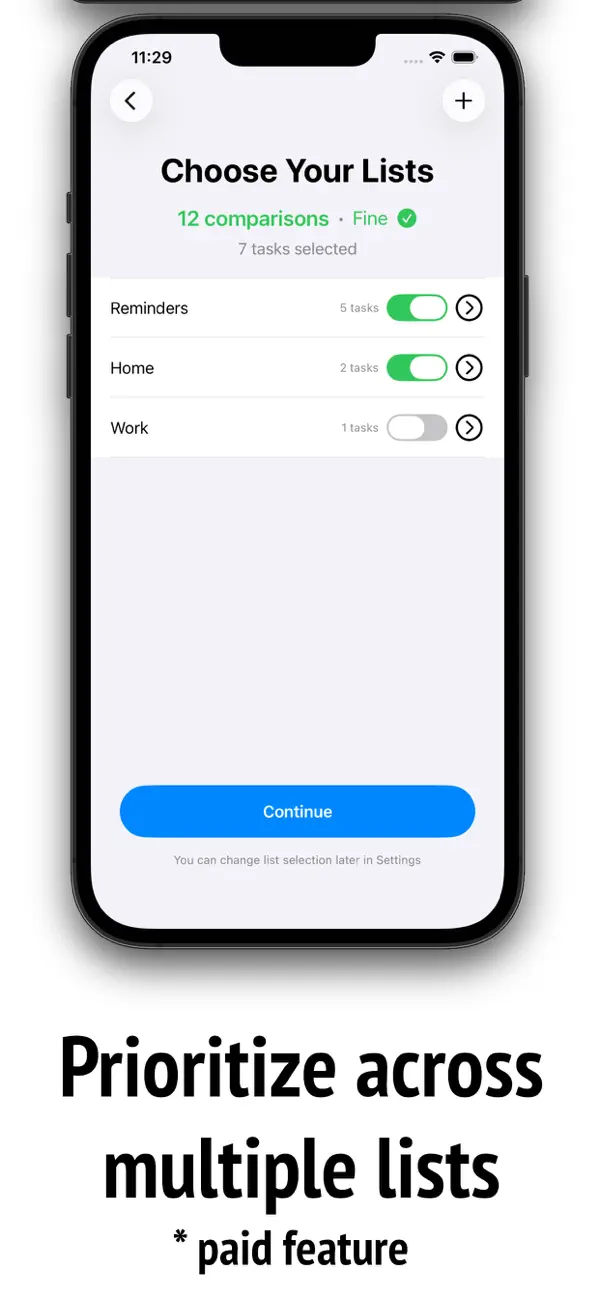
Use Reminder lists to organize by project or context—home, work, personal. Enable any subset of lists at any time (paid feature). The app handles this seamlessly.
Humans are surprisingly good at comparing importance across contexts. Enable multiple projects simultaneously and you’ll find out which project needs attention first. The comparisons work across contexts as naturally as within them.
You’ll benefit from Task Compass if you:
- Have too many important tasks and struggle to choose what to work on
- Want strategic clarity without manual categorization
This isn’t for you if you need elaborate project hierarchies, dependencies, or time tracking.
Free version:
- Prioritize your default Reminders list
- No limit on the number of tasks
- Top priority always on top
- Continuous mode
- Reminders scheduled for the future don't show up in prioritization
Subscription:
- Enable any subset of Reminder lists
- Daily cycle mode: Create a shortlist for the day, and see "All done for today!" when all tasks are complete
Terms of Use: Standard Apple Terms (https://www.apple.com/legal/internet-services/itunes/dev/stdeula/)
Ad
ภาพหน้าจอ


มีอะไรใหม่
- เวอร์ชัน: 1.0.2
- อัปเดต:
- - Moved most action buttons to toolbars for consistency.
- Daily Cycle mode shows status bar at the bottom, you can tap it and see reminders scheduled for today and tomorrow.
- Removed the Pomodoro timer as the default way of completing reminders. It's still available in the context menu (three dots). Instead, there's a cancellable button, with 2s delay.
- In the caught up mode (after the comparisons are done) more items are directly modifiable:
- tap the list name to assign the reminder to a different list
- tap the date to reschedule the reminder (or remove the scheduling)
- tap the priority number to reassess the importance of the reminder
- tap the notes area to edit
ราคา
-
* การซื้อภายในแอพ - วันนี้: ฟรี
$29.99-100% - ต่ำสุด: ▼ ฟรี
- มากที่สุด: $29.99
ติดตามราคา
Ad
ผู้พัฒนา
- Maciej Blizinski
- แพลตฟอร์ม: iOS แอป (1)
- รายการ: 0 + 1
- แต้มแล: 5 + 0 ¡
- การจัดอันดับ: 0
- ความเห็น: 0
- ลดราคา: 1
- วิดีโอ: 0
- RSS: ติดตาม
แต้มแล
-

- 3,943 Brain_vv
- +1
-
- 688 Rocky4812
- +1
-
- 11,014 Simon Chan
- +1
-
- 2,022 Lu Chin
- +1
-
- 2,780 Alan
- +1




การจัดอันดับ
0 ☹️
รายการ
0 ☹️
- Task Compass
ความเห็น
แสดงรีวิวเป็นคนแรกเลย 🌟
ข้อมูลเพิ่มเติม
- เวอร์ชัน: 1.0.2
- หมวดหมู่:
iOS แอป›ประสิทธิภาพการผลิต - ระบบปฏิบัติการ:
iPad,iPhone,macOS,iOS 18.6 และสูงกว่า - ขนาด:
9 Mb - ภาษาที่สนับสนุน:
English - การจัดประเภทเนื้อหา:
4+ - App Store คะแนนโดย:
0 - อัปเดต:
- วันที่วางจำหน่าย:
รายชื่อติดต่อ
- เว็บไซท์:
 https://task-compass.app/
Task Compass URL แบบสั้น: คัดลอกแล้ว!- 🌟 แชร์
- App Store
คุณอาจชอบ
-
- Task Kitchen: Timebox & To-Do
- iOS แอป: ประสิทธิภาพการผลิต โดย: Task Kitchen
- * ฟรี
- รายการ: 0 + 0 การจัดอันดับ: 0 ความเห็น: 0
- แต้มแล: 1 + 0 เวอร์ชัน: 1.6.0 In the fast-paced world we live in, managing time efficiently is key to achieving success. Task Kitchen makes it easy to timebox, turning your overwhelming to-do lists into an ... ⥯
-
- Compass Time
- iOS แอป: ประสิทธิภาพการผลิต โดย: Compass Group USA, Inc.
- ฟรี
- รายการ: 0 + 0 การจัดอันดับ: 0 ความเห็น: 0
- แต้มแล: 0 + 727 (4.4) เวอร์ชัน: 2.8.0 Compass Time app provides access to company job opportunities and company culture info. It's also a time and attendance application that allows users to clock in and out of work, view ... ⥯
-
- COMPASS PathWaves
- iOS แอป: ประสิทธิภาพการผลิต โดย: COMPass Pathways
- ฟรี
- รายการ: 0 + 0 การจัดอันดับ: 0 ความเห็น: 0
- แต้มแล: 0 + 0 เวอร์ชัน: 1.3.7 Compass PathWaves records audio of clinician-client conversations. The recorded audio can be analyzed for use in clinician training, client psychological safety monitoring, and ... ⥯
-
- Compass Credit Union
- iOS แอป: ประสิทธิภาพการผลิต โดย: Compass Credit Union
- ฟรี
- รายการ: 0 + 0 การจัดอันดับ: 0 ความเห็น: 0
- แต้มแล: 0 + 1 (5.0) เวอร์ชัน: 15.2.103 MyCompassCU is like carrying one of your branches in your pockets, you can check account balances and transaction history, pay bills, make transfers, and remotely deposit cheques. Your ⥯
-
- Compass Chat
- iOS แอป: ประสิทธิภาพการผลิต โดย: G Forty Two General Trading LLC
- ฟรี
- รายการ: 0 + 0 การจัดอันดับ: 0 ความเห็น: 0
- แต้มแล: 0 + 0 เวอร์ชัน: 3.1 Compass Chat Enterprise is an AI based assistant designed to enhance your journey toward greater productivity and efficiency. It delivers cutting-edge AI capabilities, including access ⥯
-
- Task Manager Progress
- iOS แอป: ประสิทธิภาพการผลิต โดย: Dylan Zaoui
- * ฟรี
- รายการ: 2 + 0 การจัดอันดับ: 5 (2) ความเห็น: 0
- แต้มแล: 0 + 0 เวอร์ชัน: 1.2.0 Task Manager Progress is a simple, elegant and powerful application for clearly organizing your tasks and projects. Designed for those who want to keep a structured overview of their ... ⥯
-
- Task Note 2 - Simple reminder
- iOS แอป: ประสิทธิภาพการผลิต โดย: Ankercast
- * ฟรี
- รายการ: 2 + 0 การจัดอันดับ: 0 ความเห็น: 0
- แต้มแล: 1 + 8 (4.4) เวอร์ชัน: 1.3.39 Task Note 2 - a simple reminder app. Task Note 2 is designed for ease use. You can use quickly and easily. You'll receive your reminders when they are scheduled to happen. You don't ... ⥯
-
- COMPASS by SH IML
- iOS แอป: ประสิทธิภาพการผลิต โดย: Daya Dimensi Indonesia
- ฟรี
- รายการ: 0 + 0 การจัดอันดับ: 0 ความเห็น: 0
- แต้มแล: 0 + 0 เวอร์ชัน: 1.0.4 Compass is your personal development journey assistant for coaching and mentoring process. Compass facilitates the dialogue between participants and their coaches or mentors by ... ⥯
-
- Task Shell AI
- iOS แอป: ประสิทธิภาพการผลิต โดย: Ivan Khaustov
- * ฟรี
- รายการ: 0 + 0 การจัดอันดับ: 0 ความเห็น: 0
- แต้มแล: 2 + 0 เวอร์ชัน: 1.0 Task Shell AI The Smart Task Manager Designed to Conquer Procrastination. Tired of putting things off? Task Shell AI leverages the power of Artificial Intelligence to help you tackle ... ⥯
-
- Compass by Rogers-O'Brien
- iOS แอป: ประสิทธิภาพการผลิต โดย: Rogers-O'Brien Construction
- ฟรี
- รายการ: 0 + 0 การจัดอันดับ: 0 ความเห็น: 0
- แต้มแล: 0 + 5 (5.0) เวอร์ชัน: 1.8 Compass is a construction oriented LLM chat application. ⥯
-
- Task List - Project Planner
- iOS แอป: ประสิทธิภาพการผลิต โดย: Matthew Olson
- ฟรี
- รายการ: 0 + 0 การจัดอันดับ: 0 ความเห็น: 0
- แต้มแล: 3 + 2 (3.0) เวอร์ชัน: 1.7.3 Task List is a simple and clean iOS application for managing tasks, creating To-Do lists, and organizing projects. ⥯
-
- Task-Shuffler
- iOS แอป: ประสิทธิภาพการผลิต โดย: Juanjo Valino
- ฟรี
- รายการ: 0 + 0 การจัดอันดับ: 0 ความเห็น: 0
- แต้มแล: 3 + 2 (4.5) เวอร์ชัน: 1.2 Task-Shuffler fills your spare time with tasks defined by you. The target is to avoid the procrastination by choosing for you what you have to do rather than struggling with decisions ... ⥯
-
- Task(ed)
- iOS แอป: ประสิทธิภาพการผลิต โดย: Geoffrey Silva
- * ฟรี
- รายการ: 0 + 0 การจัดอันดับ: 0 ความเห็น: 0
- แต้มแล: 1 + 0 เวอร์ชัน: 1.9.1 Task(ed) is a clean, flexible task manager built to help you stay on top of everyday tasks, projects, and shopping/checklists without overcomplicating your workflow. Capture tasks ... ⥯
-
- Task Banana
- iOS แอป: ประสิทธิภาพการผลิต โดย: Trackerteer
- ฟรี
- รายการ: 0 + 0 การจัดอันดับ: 0 ความเห็น: 0
- แต้มแล: 0 + 0 เวอร์ชัน: 1.5 Task Banana is a cloud-based task management solution that is super easy to use. Project managers can easily automate task tracking and visualize task status. These management ... ⥯