
| Udvikler: | Christian Fries (1) | ||
| Pris: | $1.99 | ||
| Rangeringer: | 0 | ||
| Anmeldelser: | 0 Skriv en anmeldelse | ||
| Lister: | 0 + 0 | ||
| Point: | 0 + 19 (4.6) ¡ | ||
| App Store | |||
Beskrivelse

[ Demo video available at: http://tinyurl.com/iphonetimer ]
During your performance, you can easily adjust the schedule by moving time across sections, with a swipe gesture (e.g., when feedback from the audience requires you to skip or intensify a section of your performance) or by pressing the pause button (e.g., when answering a question from the audience requires some extra time).
Features:
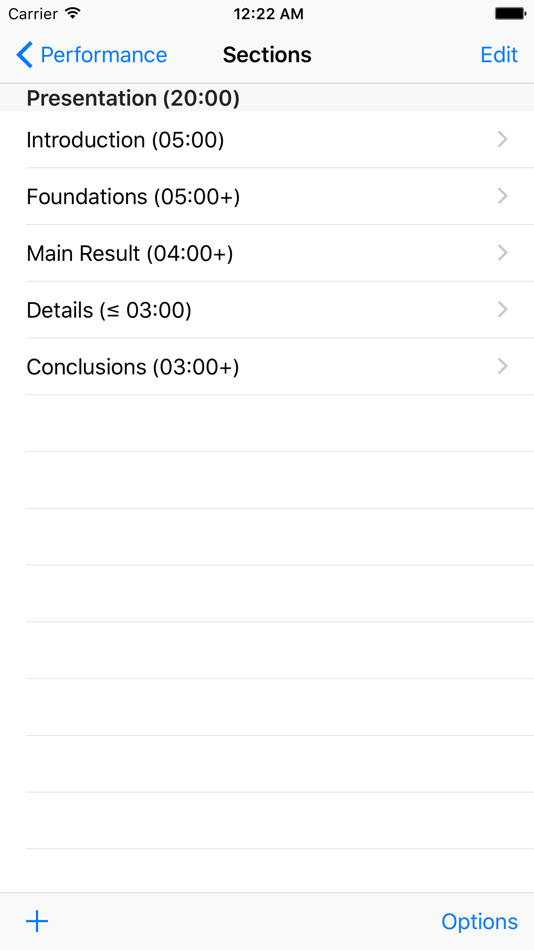
Structuring a Performance: Available time can be divided into sections.
Visualization of Time: The performance assistant view intuitively visualizes the remaining and elapsed time, both for the current section and the whole performance. Elapsed time is depicted in red, remaining time in green. An inner disc represents the used and remaining time for the current section. The section title is displayed in the center. An outer ring represents the used and remaining time for the whole performance. The segments of the ring represent the individual sections. Paused time (see below on the concept of pause) will is depicted in dark red. Extra time obtained by skipping parts of a section (see below on the concept of skipping) will be depicted in dark green.
Alarm Option: Optionally, you can set an alarm at the end of each section. If set a short tick sound will signal the end of a section. Note: The iPhone will vibrate if you have configured "vibrate" in its sound setup.
Managing Time during a Performance: Except for the stop-button you cannot interrupt, pause, extend or shorten a running performance. However, there are advanced possibilities to flexibly adjust the length of a section during a running performance, by moving time among sections.
For example, your performance could have a section containing additional results which you might want to shorten or skip in favour of extending another section.
There are three ways of altering the planned schedule during a running performance:
* Pausing: Holding time for the current section, by shortening a later one.
* Skipping: Skipping remaining time of the current section, by extending a later section.
* Resetting: Setting elapsed time to zero for the current section, by shortening a later section.
Leaving the Application: If you leave the performance assistant view or even the application, then the timer continues to count down. If you return to the performance assistant view, it will recover its previous state, including the elapsed time. If the performance assistant view is interrupted by pressing the home button or an incoming call, then a running performance is automatically switched to 'pause'.
Logging a Finished Performance: Upon finishing a performance, you are asked if you like to log that performance. If you log the performance, then data as the actual time run or skipped is stored for each section. This allows you to analyse your performance and hence adjust and improve your schedule. A log of a performance can be viewed at any later time. It can be exported via email.
Tips:
Rehearsal: If you are creating a new performance, you should use Performance Assistant in a rehearsal. Then analysing your time requirements by checking the log file.
Buffer Time: Consider adding a shrinkable section with optional topics or just a general discussion sections towards the end of your performance such that it can serve as a buffer. Note that you can pause a section only if such a buffer exits.
Ad
Skærmbilleder

Nyheder
- Version: 8.0
- Opdateret:
- New features: Version 8.0: Automatic restart / repeat of a timer. Automatic logging.
Pris
- I dag: $1.99
- Minimum: $1.99
- Maksimalt: $1.99
Overvåg priser
Ad
Udvikler
- Christian Fries
- Platforme: iOS Apps (1)
- Lister: 0 + 0
- Point: 0 + 19 ¡
- Rangeringer: 0
- Anmeldelser: 0
- Rabatter: 0
- Videoer: 0
- RSS: Abonner
Point
0 ☹️
Rangeringer
0 ☹️
Lister
0 ☹️
- Timer with Sections
Anmeldelser
Vær den første til at gennemgå 🌟
Yderligere oplysninger
- Version: 8.0
- Kategori:
iOS Apps›Produktivitet - Operativsystem:
iPad,iPhone,iOS 12.0 eller nyere - Størrelse:
2 Mb - Understøttet sprog:
English,German - Indholdsklassificering:
4+ - App Store Bedømmelse:
4.6(19) - Opdateret:
- Udgivelsesdato:
Kontaktpersoner
 http://www.christian-fries.de/iphone/timerTimer with Sections Kort webadresse: Kopieret!
- 🌟 Del
- App Store
Du vil måske også kunne lide
-
- Timer - Count Focus
- iOS Apps: Produktivitet Ved: CARA VN TRADE AND INVESTMENT JOINT STOCK COMPANY
- Gratis
- Lister: 0 + 0 Rangeringer: 0 Anmeldelser: 0
- Point: 1 + 0 Version: 1.0.4 Timer - Count Focus is a productivity app that transforms your work and study sessions into a more immersive and enjoyable experience. With its unique "Pomodoro" technique, the app ... ⥯
-
- Timer by UzVIP
- iOS Apps: Produktivitet Ved: UzVIP
- Gratis
- Lister: 0 + 0 Rangeringer: 0 Anmeldelser: 0
- Point: 0 + 0 Version: 1.0 Timer by UzVIP makes time tracking effortless with a beautifully clean interface designed for iPhone. PERFECT FOR: - Cooking and baking timers - Workout intervals and rest periods - ... ⥯
-
- Timer_i26
- iOS Apps: Produktivitet Ved: Carole, Claude Thibaut
- * Gratis
- Lister: 0 + 0 Rangeringer: 0 Anmeldelser: 0
- Point: 4 + 0 Version: 1.0.7 Stay focused. Take action. Reach your goals. Timer_i26 is designed to help you start tasks without procrastination, stay focused, and manage your time effortlessly. No harsh alarms ... ⥯
-
- Timer and Cat
- iOS Apps: Produktivitet Ved: Makoto Ohnami
- Gratis
- Lister: 0 + 0 Rangeringer: 0 Anmeldelser: 0
- Point: 0 + 0 Version: 1.0.7 This is a miraculous timer app where stoic cats cheer you on. An unlikely collaboration between cats, who don't understand the concept of time, and a timer app that guides time, is now ⥯
-
- Timer Machine
- iOS Apps: Produktivitet Ved: Montage App, Inc.
- Gratis
- Lister: 0 + 0 Rangeringer: 0 Anmeldelser: 0
- Point: 0 + 19 (3.9) Version: 3.1 Discover the ease of time management with Timer Machine, an app offering three personalized timers in a user-friendly and intuitive interface. Customize each timer to fit your unique ... ⥯
-
- Timer Just
- iOS Apps: Produktivitet Ved: Geeraard Mcmanus
- Gratis
- Lister: 0 + 0 Rangeringer: 0 Anmeldelser: 0
- Point: 0 + 1 (5.0) Version: 1.0.17 Timer Just is the fast, reliable multiple timer app that speaks your timer names out loud. Create and run as many timers as you need, name each one (e.g., cooking brownies ), and when ... ⥯
-
- Timer Stopwatch App
- iOS Apps: Produktivitet Ved: Code Origin Private Limited
- * Gratis
- Lister: 0 + 0 Rangeringer: 0 Anmeldelser: 0
- Point: 0 + 2 (5.0) Version: 2.0.3 Timer Stopwatch App - The perfect tool for all your timing needs! Whether you're timing a meeting, a workout, or a cooking session, this app has you covered. With a sleek and intuitive ⥯
-
- Timer Flow, Focus & Beat Timer
- iOS Apps: Produktivitet Ved: DING JIE TSAI
- * Gratis
- Lister: 0 + 0 Rangeringer: 0 Anmeldelser: 0
- Point: 0 + 0 Version: 1.5.8 Timer Flow is an all-in-one timer app designed to support your productivity, practice, and workouts. It combines a customizable focus timer, metronome, and now a brand new interval ... ⥯
-
- Timer - Stopwatch timer
- iOS Apps: Produktivitet Ved: 西连 郑
- * Gratis
- Lister: 0 + 0 Rangeringer: 0 Anmeldelser: 0
- Point: 0 + 28 (4.4) Version: 6.7 Timer, stopwatch timer · I love timer, is a simple and easy to use timer software. You can customize the timing content, which is very convenient. For example, skip rope for 1 minute, ... ⥯
-
- TIMER Operation
- iOS Apps: Produktivitet Ved: Gopi Gadhiya
- Gratis
- Lister: 0 + 0 Rangeringer: 0 Anmeldelser: 0
- Point: 0 + 0 Version: 1.4 Timer Operations is an advanced monitoring and management app designed for Smart Street Light control and Streetlight Automation with Central Control Monitoring System (CCMS). It ... ⥯
-
- Timer - Minimal Timer
- iOS Apps: Produktivitet Ved: 泽鑫 秦
- Gratis
- Lister: 0 + 0 Rangeringer: 0 Anmeldelser: 0
- Point: 2 + 374 (4.3) Version: 1.2.7 Meet Minimal Timer, your perfect companion for all your timing needs. This easy-to-use timer app helps you stay focused and manage your time well, whether you're working, studying, ... ⥯
-
- Timer App to Study, Focus, Win
- iOS Apps: Produktivitet Ved: Tidby LLC
- Gratis
- Lister: 0 + 0 Rangeringer: 0 Anmeldelser: 0
- Point: 0 + 2 (5.0) Version: 1.0 Kairo is a productivity timer app designed to help users maximize their focus and efficiently. |||| Kairo Features |||| Timer Name: Easily set your timer name with a single tap! - ... ⥯
-
- Timer × Metronome
- iOS Apps: Produktivitet Ved: Chihisa Yokoyama
- Gratis
- Lister: 0 + 0 Rangeringer: 0 Anmeldelser: 0
- Point: 0 + 0 Version: 1.0 "If only my timer had a metronome..." "What if my metronome had a timer?" If you've ever had these thoughts, Timer × Metronome is the app for you. We've fused two essential tools, a ... ⥯
-
- Timer - Timelo
- iOS Apps: Produktivitet Ved: Vignesh Viswanathan
- * Gratis
- Lister: 0 + 0 Rangeringer: 0 Anmeldelser: 0
- Point: 0 + 0 Version: 1.0.1 Timelo is a motion-driven timer app that lets you control time by simply rotating your iPhone. Inspired by physical timer devices, Timelo replaces buttons and sliders with natural ... ⥯