
| 개발자: | Walter Tengler (13) | ||
| 가격: | $3.99 | ||
| 순위: | 0 | ||
| 리뷰: | 0 리뷰 작성 | ||
| 목록: | 0 + 0 | ||
| 포인트: | 0 + 0 ¡ | ||
| Mac App Store | |||
기술

HOW IT WORKS
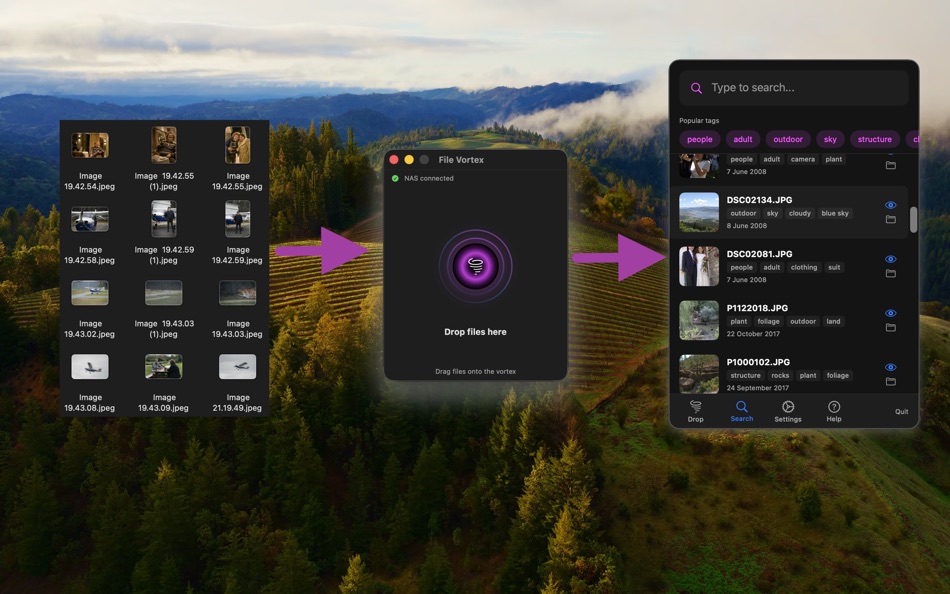
Set your storage folder (NAS, external drive, or any folder)
Drag files onto the floating vortex window
Files are automatically sorted into date-based folders, analyzed, and tagged
Find anything instantly using the built-in search
INTELLIGENT ORGANIZATION
Files are automatically sorted into clean folder structures by date. Choose from Year/Month, Year/Month/Day, or flat date-prefix formats. Facebook photos are automatically detected and routed to their own folder.
AI-POWERED TAGGING
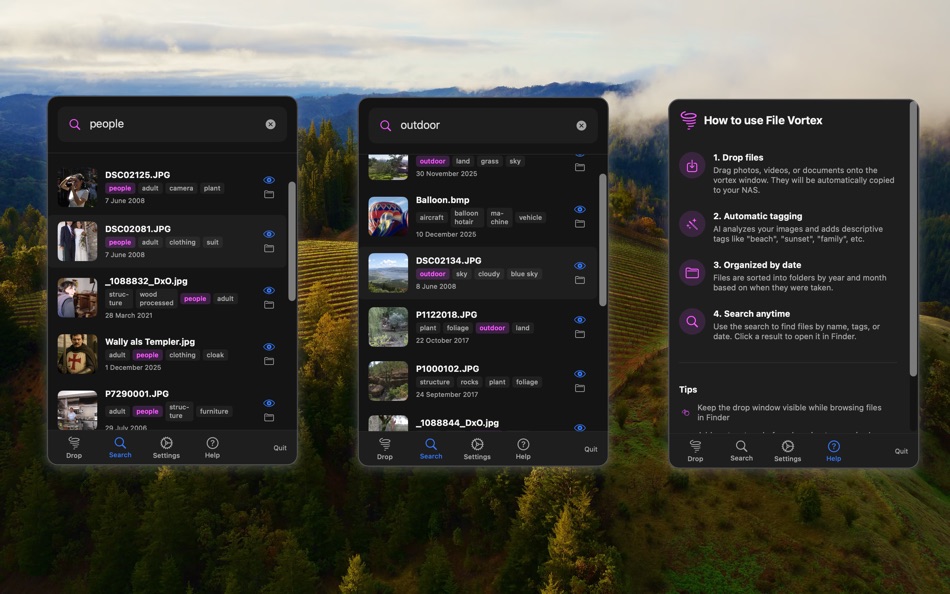
Every image is analyzed using on-device machine learning. File Vortex recognizes objects, scenes, faces, and text in your photos — generating descriptive tags automatically. Documents and PDFs are scanned for keywords and content. All tags are written directly to Finder metadata, so they work with Spotlight too.
FULL-TEXT SEARCH
Search across filenames, AI descriptions, extracted text, and tags — all from the menu bar. Click any result to reveal it in Finder or open it directly. Popular tags are shown for quick filtering.
DOCUMENT SUPPORT
Extracts text and keywords from PDFs (up to 50 pages), Word documents, and text files. Generates thumbnails for quick visual identification.
SUPPORTED FORMATS
Photos: JPEG, PNG, HEIC, GIF, TIFF, BMP, WebP, and RAW formats (CR2, CR3, NEF, ARW, DNG, and more)
Documents: PDF, DOC, DOCX, TXT, RTF, ODT, Pages
Videos: MP4, MOV, AVI, MKV, M4V, WMV
DESIGNED FOR YOUR WORKFLOW
Floating drop window stays on top of all apps
Menu bar access — no dock icon, no clutter
Real-time NAS connection monitoring
Duplicate file handling with automatic renaming
Open at login option
All processing happens on-device — your files stay private
Ad
스크린샷
가격
- 오늘: $3.99
- 최소: $3.99
- 최대: $3.99
가격 추적
개발자
Ad
포인트
0 ☹️
순위
0 ☹️
목록
0 ☹️
- File Vortex
리뷰
첫 번째 리뷰를 남겨보세요 🌟
추가 정보
 https://portwally.github.io/File%20Vortex/File Vortex 단축 URL: 복사됨!
- 🌟 공유하기
- Mac App Store
당신은 또한 같은 수 있습니다
-
- File Cabinet Pro
- macOS 앱: 유틸리티 게시자: App Tyrant Corp
- $29.99
- 목록: 0 + 1 순위: 0 리뷰: 0
- 포인트: 4 + 0 버전: 8.8 File Cabinet Pro is the file manager for the macOS menu bar. Quickly navigate to files without cluttering your desktop. Open, move, rename, compress, tag, trash, copy and paste files, ... ⥯
-
- File Rename Pro
- macOS 앱: 유틸리티 게시자: Gavin Matthews
- * $12.99
- 목록: 1 + 0 순위: 0 리뷰: 0
- 포인트: 1 + 0 버전: 2025.3 File Rename Pro lets you rename a number of files quickly and easily, saving you time and effort. Drag and drop one or more files or folders from Finder onto the app and you're ready ... ⥯
-
- File Content Finder
- macOS 앱: 유틸리티 게시자: GEO SYSTEMS DEV PTY LTD
- $12.99
- 목록: 0 + 0 순위: 0 리뷰: 0
- 포인트: 2 + 0 버전: 3.0 Highlights: - Searches files by their contents, not just names; - Supports all popular document types (PDF, MS Word, Excel, etc.); - Works in real time without indexing; - Advanced ... ⥯
-
- File Zip & Encryptor
- macOS 앱: 유틸리티 게시자: 成浩 吴
- $4.99
- 목록: 1 + 2 순위: 0 리뷰: 0
- 포인트: 4 + 0 버전: 1.0.6 If you need convenient encryption for your private files, try FileEncryption. FileEncryption provides you with the following convenient and useful features. - Normal mode: One-click ... ⥯
-
- File Encoder
- macOS 앱: 유틸리티 게시자: Jarik Okkerman
- 무료
- 목록: 0 + 0 순위: 0 리뷰: 0
- 포인트: 0 + 0 버전: 1.0 Experience seamless file conversion with File Encoder, the ultimate tool for transforming HEIC, PNG, JPEG, and PDF files. Whether you're a professional seeking precision or a casual ... ⥯
-
- File Manager For Dropbox
- macOS 앱: 유틸리티 게시자: Haroon Ahmad
- * 무료
- 목록: 0 + 0 순위: 0 리뷰: 0
- 포인트: 0 + 0 버전: 1.0 Take full control of your Dropbox storage with an easy-to-use file management app. This app lets you manage all files and folders in your Dropbox account from one convenient place. ... ⥯
-
- File Xterminator
- macOS 앱: 유틸리티 게시자: Alessandro Gimenes Ferri
- * 무료
- 목록: 0 + 1 순위: 0 리뷰: 0
- 포인트: 2 + 0 버전: 4.30 File Xterminator Industry-Standard File Deletion for Ultimate Data Security When it comes to protecting your privacy, File Xterminator ensures that your files are completely and ... ⥯
-
- File Manager - File Sortify
- macOS 앱: 유틸리티 게시자: 波 黄
- $9.99
- 목록: 0 + 0 순위: 0 리뷰: 0
- 포인트: 0 + 0 버전: 1.0.4 FILE SORTIFY - YOUR INTELLIGENT FILE ORGANIZER Tired of messy Downloads folders? File Sortify automatically organizes your files by type - instantly and effortlessly! KEY FEATURES ... ⥯
-
- File Archiver
- macOS 앱: 유틸리티 게시자: Khoa Tran Anh
- 무료
- 목록: 0 + 1 순위: 0 리뷰: 0
- 포인트: 1 + 0 버전: 1.0 File Archiver is an easy way to compress & extract files. Features: File Archiver can extract most of common archive formats such as zip, rar, tar, gz, xz, bz2, 7z... File Archiver can ⥯
-
- File Info Professional
- macOS 앱: 유틸리티 게시자: Rocky Sand Studio Ltd.
- $0.99
- 목록: 1 + 0 순위: 0 리뷰: 0
- 포인트: 0 + 0 버전: 1.3 File Info Professional shows you advanced information about your files. Quickly access the following information about any file: - Checksums: SHA1, SHA256, MD2, MD5 - HEX Dump: raw ... ⥯
-
- File Property Edit
- macOS 앱: 유틸리티 게시자: Lei Feng
- * 무료
- 목록: 0 + 0 순위: 0 리뷰: 0
- 포인트: 0 + 0 버전: 2.0 FILE PROPERTY EDIT - The Professional Metadata Editor for macOS **Transform Your File Metadata Workflow** File Property Edit is the ultimate tool for professionals who need precise ... ⥯
-
- File Manager AI
- macOS 앱: 유틸리티 게시자: Ahmed Mohamed Ali Ibrahim Almansoori
- * 무료
- 목록: 0 + 0 순위: 0 리뷰: 0
- 포인트: 0 + 0 버전: 1.0 File Manager AI is a beautifully designed macOS file organizer that helps you clean up space, find large files, and manage your storage effortlessly powered by intelligent on-device ... ⥯
-
- File Time
- macOS 앱: 유틸리티 게시자: 方成 印
- $2.99
- 목록: 0 + 0 순위: 0 리뷰: 0
- 포인트: 0 + 0 버전: 2.3 File Time: Effortlessly Change File and Folder Dates File Time is the perfect tool for modifying the creation and modification dates of your files and folders in just a few clicks. ... ⥯
-
- File Hash
- macOS 앱: 유틸리티 게시자: Dirk Einecke
- $0.99
- 목록: 0 + 0 순위: 0 리뷰: 0
- 포인트: 0 + 0 버전: 2.8 File Hash Verify File Integrity Made Easy Check the integrity of your files quickly and without using the Terminal. Generate Hash Values Whether MD5, SHA-1, SHA-256, or SHA-512 File ... ⥯