
| Developer: | NIHON SYSTEM DEVELOPER CORPORATION (182) | ||
| Price: | Free | ||
| Rankings: | 0 | ||
| Reviews: | 0 Write a Review | ||
| Lists: | 0 + 0 | ||
| Points: | 0 + 0 ¡ | ||
| App Store | |||
Description

This app uses your smartphone's camera to measure lap times for Mini 4WD cars, RC cars, Kyosho Mini-Z, and similar vehicles.
It offers detailed settings to ensure accurate measurements.
By entering the course length, speed can also be displayed.
**Main Features**
**- Font Size**: Adjust the font size for lap times and statistics. Choose the optimal size for visibility and layout.
**- Decimal Places**: Specify up to 9 decimal places for speed and time values. Choose between high precision or simplified display.
**- Screen Rotation**: Configure the display for easy viewing in both portrait and landscape orientations.
**- Sound Effects**: Enable sounds for lap detection and start events. Useful for notifications or silent operation depending on your needs.
**- Light**: Turns on the LED light during camera use to improve detection accuracy in dark environments.
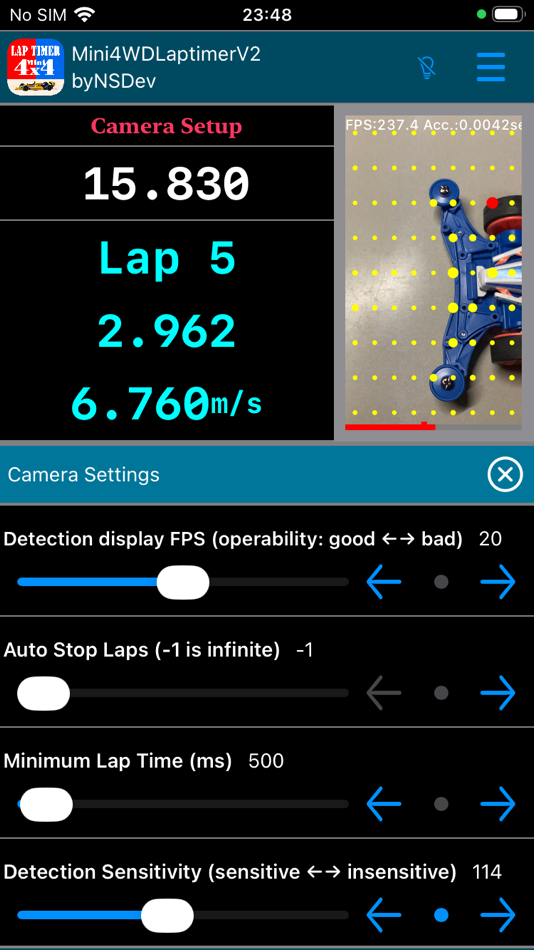
**- Detection, Measurement, and Camera Settings**: Fine-tune camera FPS, detection sensitivity, focus, and zoom. Customize detection conditions based on your environment and course.
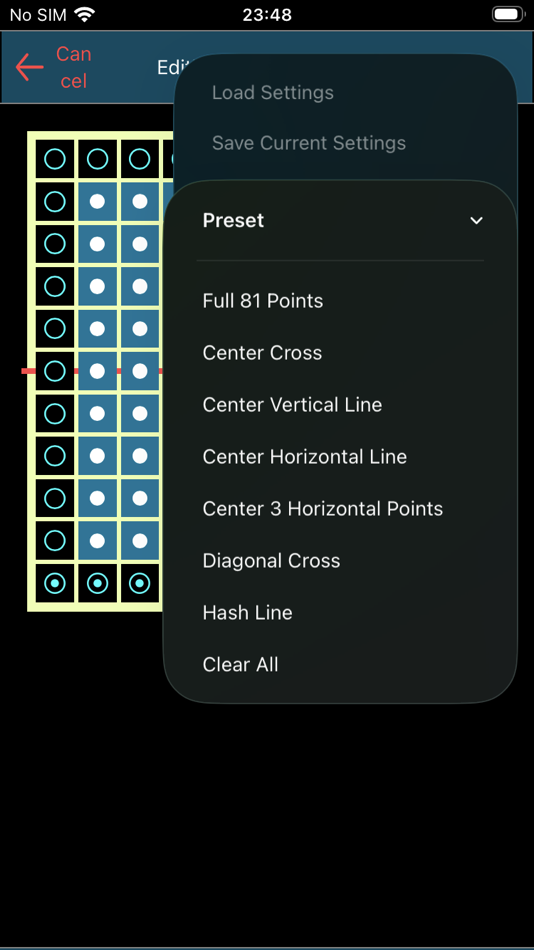
**- Detection Point Settings**: Specify which points on the screen trigger lap detection. Choose freely from 81 selectable detection points.
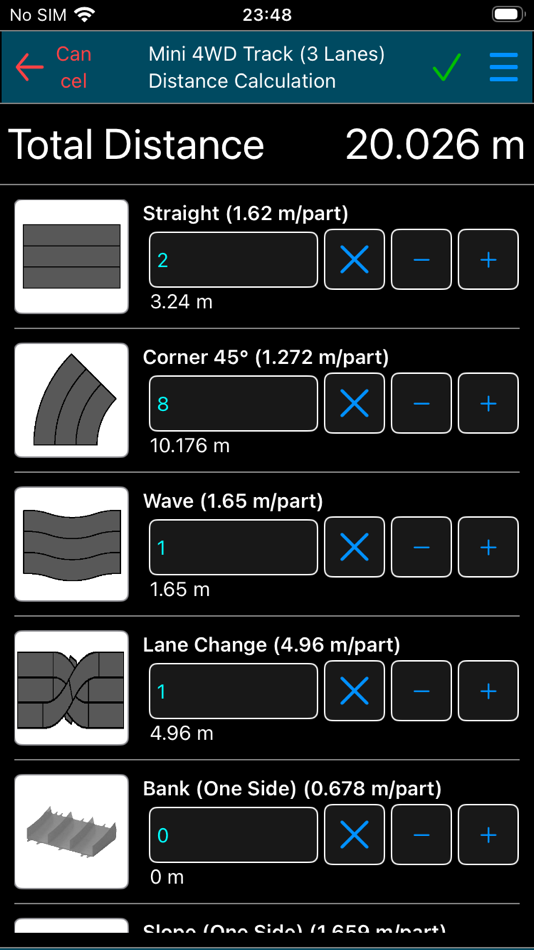
**- Course Length Settings**: Automatically calculate accurate lap distances based on course type (2-lane/3-lane) and selected parts. Used to compute lap speed.
**- Manual Measurement**: You can measure manually when the camera is unavailable or permission is not granted.
**How to Use**
1. Place your smartphone on the course (ensure it is stable and vibration-free).
2. Tap Start.
3. When the car passes, measurement begins.
4. Tap Stop after the desired number of laps.
5. Review lap and split times.
6. Share lap time data from the menu.
**Q&A**
**Q. Menu operations are slow to respond. **
A. When the camera is active, overall responsiveness may decrease. You can tap the camera image to stop the camera. Tap it again to restart the camera.
**Q. The Mini 4WD doesn't trigger detection when passing.**
A. If detection fails, try lowering the sensitivity value to improve responsiveness. The default is 100, but around 80 may work better. Detection may be difficult if the car and course colors are similar.
**Q. Speed is not displayed.**
A. Speed information will not appear unless the course length is set. Please enter the course length from the menu.
**Q. I set the course length, but where is the speed shown?**
A. Scroll the lap list to the left to reveal the speed on the right side.
**Q. Can I set a lap count for automatic stop?**
A. Yes. You can specify the auto-stop lap count from the settings menu. The default is infinite.
**Q. Does lap time accuracy vary by device?**
A. Yes. Accuracy depends on your device's camera frame rate.
**Q. Can I mute the sound?**
A. Yes. You can disable sound from the options menu.
**Caution**
Lap time accuracy depends on your smartphone's camera performance.
At 240 FPS, there may be an error of 0.0042 seconds.
Higher FPS may cause the device to heat up. Be cautious of thermal shutdown.
Continuous use of the light may also cause overheating.
Due to device protection, the light may stop functioning when hot.
Please wait until the device cools down.
**Disclaimer**
The developer shall not be held responsible for any damages or issues resulting from the use of this app. Please use it at your own discretion.
**Other**
[ミニ四駆] is a registered trademark of Tamiya, Inc.
[MINI-Z] is a registered trademark of KYOSHO CORPORATION.
[ラジコン] is a registered trademark of Masudaya Corporation.
This app is not affiliated with Tamiya Co., Ltd., Kyosho Co., Ltd., or Masudaya Corporation.
Screenshots




What's new
- Version: 1.0.0
- Updated:
Price History
- Today: Free
- Minimum: Free
- Maximum: Free
Track prices
Developer
- NIHON SYSTEM DEVELOPER CORPORATION
- Platforms: Android Apps (129) Android Games (10) iOS Apps (38) iOS Games (5)
- Lists: 0 + 2
- Points: 3 + 482 ¡
- Rankings: 0
- Reviews: 0
- Discounts: 0
- Videos: 67
- RSS: Subscribe
Points
0 ☹️
Rankings
0 ☹️
Lists
0 ☹️
Reviews
Be the first to review 🌟
Additional Information
Contacts
- Website:
 https://www.nsgd.co.jp/nsd/
«Mini4WDLaptimerV2 byNSDev» is a Utilities app for iOS, developed by «NIHON SYSTEM DEVELOPER CORPORATION». It was first released on and last updated on . This app is currently free. This app has not yet received any ratings or reviews on AppAgg. Available languages: English, Japanese. AppAgg continuously tracks the price history, ratings, and user feedback for «Mini4WDLaptimerV2 byNSDev». Subscribe to this app or follow its RSS feed to get notified about future discounts or updates.
Mini4WDLaptimerV2 byNSDev Short URL: Copied!- 🌟 Share
- App Store
You may also like
-
- SyotaiConverter byNSDev
- iOS Apps: Utilities By: NIHON SYSTEM DEVELOPER CORPORATION
- Free
- Lists: 0 + 0 Rankings: 0 Reviews: 0
- Points: 0 + 0 Version: 1.0.2 How to use Enter the Kanji characters. Sousyo is displayed. You can select Gyousyo,Reisyo or Mouhitsu Function Text size can be changed. You can select the placement in the left-right ... ⥯
-
- SyotaiConverter2 byNSDev
- iOS Apps: Utilities By: NIHON SYSTEM DEVELOPER CORPORATION
- Free
- Lists: 0 + 0 Rankings: 0 Reviews: 0
- Points: 0 + 1 (5.0) Version: 1.0.3 How to use Enter the Kanji characters. You can select Sousyo, Gyousyo,Reisyo or Mouhitsu Function Text size can be changed. Please post your request reviews. It corresponds as much as ... ⥯
-
- UnitConverter byNSDev
- iOS Apps: Utilities By: NIHON SYSTEM DEVELOPER CORPORATION
- Free
- Lists: 0 + 0 Rankings: 0 Reviews: 0
- Points: 0 + 0 Version: 1.0.6 Tool to convert each of 26 types of units. When you select a unit of value that you enter, you create a table to calculate all the other units. It also displays the conversion rate. ... ⥯
-
- RHCWC byNSDev
- iOS Apps: Utilities By: NIHON SYSTEM DEVELOPER CORPORATION
- Free
- Lists: 0 + 0 Rankings: 0 Reviews: 0
- Points: 0 + 0 Version: 1.0.2 You can calculate the weight of rubber tube and rubber hollow cylinder by entering length, outside diameter, inside diameter, specific gravity. You can calculate the sum by addition ... ⥯
-
- TimePointIntervalTimer byNSDev
- iOS Apps: Utilities By: NIHON SYSTEM DEVELOPER CORPORATION
- Free
- Lists: 0 + 0 Rankings: 0 Reviews: 0
- Points: 0 + 0 Version: 1.0.2 It is an interval timer that specifies end time and number of times. The time for each time is automatically calculated by dividing the time from the start to the end time by the ... ⥯
-
- MultiTimer4 byNSDev
- iOS Apps: Utilities By: NIHON SYSTEM DEVELOPER CORPORATION
- Free
- Lists: 0 + 0 Rankings: 0 Reviews: 0
- Points: 0 + 0 Version: 1.0.2 It is convenient 4 timers. Repeat until you stop. It also works in the background. When in the background, it will be displayed by notification only at the first time up. ⥯
-
- KitchenTimer4 byNSDev
- iOS Apps: Utilities By: NIHON SYSTEM DEVELOPER CORPORATION
- Free
- Lists: 0 + 0 Rankings: 0 Reviews: 0
- Points: 0 + 0 Version: 1.0.1 It is an application that only four kitchen timers are arranged. It is a very easy-to-use timer that can be used with intuition. ⥯
-
- DiscountCalculator byNSDev
- iOS Apps: Utilities By: NIHON SYSTEM DEVELOPER CORPORATION
- Free
- Lists: 0 + 0 Rankings: 0 Reviews: 0
- Points: 0 + 0 Version: 1.0.1 This app was created to easily calculate discount items when shopping. You can calculate immediately with fixed value buttons such as 5%, 10%, 20%, 30%, 40%, 50% 60%. Other than that, ... ⥯
-
- VisualTimer byNSDev
- iOS Apps: Utilities By: NIHON SYSTEM DEVELOPER CORPORATION
- Free
- Lists: 0 + 0 Rankings: 0 Reviews: 0
- Points: 0 + 0 Version: 1.0.0 Tap the time text to enter editing mode. Tap the time text again to enter execution mode. The following settings can be changed: * Tap the time bar to change the foreground and ... ⥯
-
- KMLViewer byNSDev
- iOS Apps: Utilities By: NIHON SYSTEM DEVELOPER CORPORATION
- Free
- Lists: 0 + 0 Rankings: 0 Reviews: 0
- Points: 0 + 0 Version: 0.1.2 **App Overview** Open KML and KMZ files and display them on a map. Supports points, lines, and polygons. **Main Features** Sequential Display**: Use the arrow keys at the bottom to ... ⥯
-
- SoundIntervalTimer byNSDev
- iOS Apps: Utilities By: NIHON SYSTEM DEVELOPER CORPORATION
- Free
- Lists: 0 + 0 Rankings: 0 Reviews: 0
- Points: 0 + 0 Version: 1.0.0 High-intensity interval training (HIIT) is the interval timer with a voice to recommend to. Preparation, exercise, each number of seconds to break (up to 9999 seconds), you can set the ⥯
-
- RemainderCalculator byNSDev
- iOS Apps: Utilities By: NIHON SYSTEM DEVELOPER CORPORATION
- Free
- Lists: 0 + 0 Rankings: 0 Reviews: 0
- Points: 0 + 0 Version: 1.0.0 *Overview A calculator that can calculate the answer and the remainder of division. The efficiency of dispensing work and picking work increases. *Function +There are three types of ... ⥯