
| Vývojář: | Dmitriy Kharutskiy (13) | ||
| Cena: | * Zdarma | ||
| Hodnocení: | 0 | ||
| Recenze: | 0 Napsat recenzi | ||
| Seznamy: | 1 + 0 | ||
| Body: | 0 + 78 (4.6) ¡ | ||
| App Store | |||
Popis

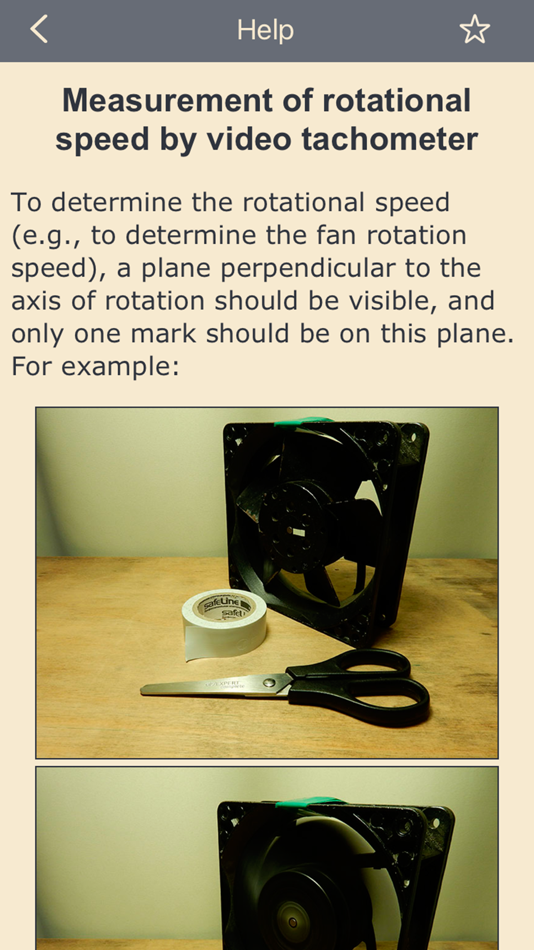
Since the frame rate of a video can be adjusted, this effect can be used to determine the rotational speed of a part.
The smartphone must support slow-motion video recording (filming at a high frame rate). This is the case for all smartphones starting with iPhone 5S. The range is as follows:
• 0.5—240 Hz (30—14400 RPM), for all phones from iPhone 6 onward
• 0.5—120 Hz (30—7200 RPM), for iPhone 5S
THE HERTZ (Hz) VALUE IS MORE ACCURATE THAN THE REVOLUTIONS PER MINUTE (RPM) VALUE, SINCE REVOLUTIONS PER MINUTE ARE CALCULATED FROM HERTZ AND ROUNDING IS DONE.
To get a clear image, good lighting is important. The clarity of the image is controlled by the exposure of the video (exposure time and light sensitivity (ISO)). If the exposure time is reduced, the image will increase in clarity, but brightness will lower. To increase the brightness, you need to raise the camera's light sensitivity (ISO), but then the amount of noise increases. You also need to manually adjust the focus of the camera.
The app can record video. The video format depends on the selected format in the app settings. If your iPhone supports 4K video format (3840x2160), then you can record 4K video at the frame rate supported by your iPhone. Text with important information is added to the frames of the recorded video: the selected frame rate, exposure duration, ISO, time stamp, time difference between the current and previous frames (Tcurr. − Tprev.), the sequence number of the frame in the recorded video. If you want any other information to be added, then let me know.
You can choose to add only part of this information, and you can choose a different text color. You also have the option of not adding any information. You can change the information that is added and the color of the text while recording a video. At high frame rates, frames that do not have time to be processed may be discarded. This does not affect subsequent frames and can be controlled using the time difference between the current frame and the previous frame (Tcurr. − Tprev.). Dropping frames affects the video frame rate displayed in the "Photos" app. But the time interval between frames that were taken one after another and were not discarded will correspond to the selected frame rate. Frames may be dropped even when shooting slow motion video using the "Camera" app. You can check this by looking at the frame rate for slow motion video in the "Photos" app.
Video containing the app's interface can be captured using the iOS "Screen Recording" function.
To take a photo with the result of the measurement written on it, press the "Pause" button and take a screenshot.
It is possible to choose a video format that has the best quality, but has a significantly lower maximum frame rate. The difference between the formats is clearly visible only when using the digital zoom. Also, when using a format with better quality, the Rolling Shutter effect is stronger. Therefore, the best quality format can be used at speeds less than about 1000 rpm.
You can turn on hints for easier observation of changes in rotation speed. Hints show how to change the frame rate (decrease or increase) depending on the direction of rotation of the mark. The hints are selected manually, but then you do not need to remember this information. The hints are relevant for frequencies close to the rotation frequency. If the direction of rotation of the impeller is known, hints can be selected in advance. The arrow showing the direction of rotation of the impeller must correspond to the "+" button.
The video tachometer measures the rotational speed in exactly the same way a stroboscopic tachometer would.
Snímky obrazovky




Cena
-
* Nákupy v aplikaci - Dnes: Zdarma
- Minimální: Zdarma
- Maximální: Zdarma
Sledovat ceny
Vývojář
- Dmitriy Kharutskiy
- Platformy: iOS Aplikace (13)
- Seznamy: 1 + 0
- Body: 6 + 334 ¡
- Hodnocení: 0
- Recenze: 0
- Slevy: 0
- Videa: 3
- RSS: Odebírat
Body
0 ☹️
Hodnocení
0 ☹️
Seznamy

Recenze
Buďte první, kdo bude hodnotit 🌟
Další informace
 https://usefulmobileapps.com/en/video-tachometer.php?s=as-vt-2Video tachometer Krátká adresa URL: Zkopírováno!
- 🌟 Sdílet
- App Store
Mohlo by se Vám také líbit
-
- Video tachometer for business
- iOS Aplikace: Utility Podle: Dmitriy Kharutskiy
- $2.99
- Seznamy: 0 + 0 Hodnocení: 0 Recenze: 0
- Body: 0 + 0 Verze: 2.1.4 IMPORTANT!!! Paid version of the "Video tachometer" app, without in-app purchases. For cases where the app is distributed using various services where in-app purchases are not ... ⥯
-
- Video Lite & PIP, Split Screen
- iOS Aplikace: Utility Podle: Video Lite LLC
- Zdarma
- Seznamy: 0 + 0 Hodnocení: 0 Recenze: 0
- Body: 0 + 50 (4.4) Verze: 1.3 TWO VIDEOS. ONE SCREEN. PICTURE-IN-PICTURE. React. Record. Create. Watch two videos at once. Record your facecam reactions live. Use PiP (Picture-in-Picture) to keep watching while ... ⥯
-
- Video Monitoring Platform
- iOS Aplikace: Utility Podle: Video Monitoring Platform Inc
- Zdarma
- Seznamy: 0 + 0 Hodnocení: 0 Recenze: 0
- Body: 0 + 1 (5.0) Verze: 1.0 Introducing Our Video Monitoring Platform: Your Eyes, Anywhere, Anytime In a world where safety and security are paramount, having the ability to monitor your surroundings remotely has ⥯
-
- Video Intelligent
- iOS Aplikace: Utility Podle: Video Intelligent Inc.
- Zdarma
- Seznamy: 0 + 0 Hodnocení: 0 Recenze: 0
- Body: 0 + 0 Verze: 4.8.14 The Video Intelligent mobile app will extend your VIP and BIRD usability onto your mobile devices, providing real-time remote video viewing and video playback, as we all as handling ... ⥯
-
- Video Speed Editor,Changer App
- iOS Aplikace: Utility Podle: Smda Dev Group
- * Zdarma
- Seznamy: 0 + 0 Hodnocení: 0 Recenze: 0
- Body: 0 + 13 (4.9) Verze: 1.6.4 Video Speed Changer change the speed of your videos with just a few taps! This innovative app gives you full control over the playback speed of your videos and music. Whether you want ... ⥯
-
- Video to Audio MP3 Converter
- iOS Aplikace: Utility Podle: NextPixel apps
- Zdarma
- Seznamy: 0 + 0 Hodnocení: 0 Recenze: 0
- Body: 0 + 34 (4.3) Verze: 1.13 Video to audio mp3 converter is all in one video to audio extract app. This app can help you to convert any video to audio. You can export mp3, wav and other supported audio files. You ⥯
-
- Video Files Converter MP3 GIF
- iOS Aplikace: Utility Podle: OFFIWIZ, S.L.
- Zdarma
- Seznamy: 0 + 0 Hodnocení: 0 Recenze: 0
- Body: 1 + 339 (3.8) Verze: 1.8.0 Video Converter It can convert MP3, AVI, MPG, GIF, FLV, WMV, MP4, and many more. Choose the extension, choose an output format and convert any video, perfect for creating image albums ... ⥯
-
- Video Trimmer and Video Merger
- iOS Aplikace: Utility Podle: Shadat Tonmoy
- * Zdarma
- Seznamy: 0 + 0 Hodnocení: 0 Recenze: 0
- Body: 0 + 0 Verze: 1.0.4 Video Trimmer and Video Merger app is a simple and convenient app for iOS to perform various video editing operation like Trim Video, Join Multiple Video into single Video, Merge ... ⥯
-
- Video Player Max
- iOS Aplikace: Utility Podle: KEENX LIMITED
- Zdarma
- Seznamy: 0 + 0 Hodnocení: 0 Recenze: 0
- Body: 0 + 1 (5.0) Verze: 1.0.6 Video Player Max is a high-quality media player. Video Player Max provides easy video playback. The full HD video player has MX player function, which is the most powerful media player ⥯
-
- Video Saver & Video Organizer
- iOS Aplikace: Utility Podle: Firat Bahar
- * Zdarma
- Seznamy: 0 + 0 Hodnocení: 0 Recenze: 0
- Body: 0 + 1 (1.0) Verze: 1.0 Video Saver & Organizer is the ultimate app for saving, organizing, and managing your favorite videos from anywhere on the internet. Whether you come across a tutorial, a movie ... ⥯
-
- Video Compression-Crop Videos
- iOS Aplikace: Utility Podle: 超 赵
- Zdarma
- Seznamy: 0 + 0 Hodnocení: 0 Recenze: 0
- Body: 0 + 0 Verze: 1.0.0 Video Compressor Master is a powerful video processing application designed for users who need to efficiently manage their video files. Whether you want to save storage space or ... ⥯
-
- Video looper - Loop videos
- iOS Aplikace: Utility Podle: Muhammed Efdal incesu
- Zdarma
- Seznamy: 0 + 0 Hodnocení: 0 Recenze: 0
- Body: 0 + 0 Verze: 1.0 Video Looper is an intuitive mobile application that allows users to create seamless video loops with ease. The app offers the following key features: Video Selection: Import videos ... ⥯
- Novinka
- Video to Audio Pro Converter
- iOS Aplikace: Utility Podle: ARRON WILLIAM CHILD
- * Zdarma
- Seznamy: 0 + 0 Hodnocení: 0 Recenze: 0
- Body: 0 + 0 Verze: 1.0 Video to Audio Pro Converter is the fast and easy way to turn any video into high-quality AAC audio. Whether you re saving music from a clip, extracting dialogue from a recording, or ... ⥯
- Novinka
- Video Converter: Media Convert
- iOS Aplikace: Utility Podle: Maribelle Hawks
- * Zdarma
- Seznamy: 0 + 0 Hodnocení: 0 Recenze: 0
- Body: 0 + 0 Verze: 1.0 Video Converter is a powerful and easy-to-use tool that lets you convert videos to a wide range of formats quickly and efficiently. Whether you need to change the format for playback, ... ⥯